Experience Pages
Info: Experience Pages are available in brXM 14.3.0 and later.
Experience Pages are standalone pages that combine content and page layout. They enable a page-driven approach in Bloomreach Content.
You can edit the layout of an Experience Page only in the Experience manager. Most other actions are available in both the Experience manager and the Content application.
In the Content application, you can perform the same actions on Experience Pages as on documents. The following sections describe the differences specific to Experience Pages:
- Create an Experience Page
- Edit an Experience Page
- Publish an Experience Page
- Other Actions on Experience Pages
Create an Experience Page
To create a new Experience Page, first navigate to the appropriate folder in the navigation area. Only the folder configured as the Experience Page root folder for a channel and its subfolders support creating Experience Pages.
Open the folder's menu and select the Add new... option. By default, this option is labeled Add new document....
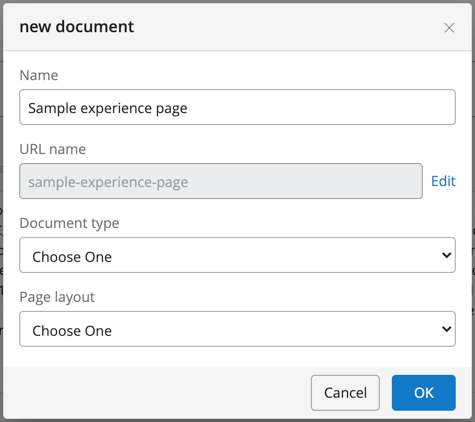
In the dialog, select both a Document type and a Page layout for the Experience Page.
Edit an Experience Page
You can update all fields of an Experience Page while in editing mode, similar to editing documents. These fields represent the embedded content, which is versioned together with the page layout.
Hint: In the Channel editor, you can edit both the embedded content and the layout of the Experience Page.
Publish an Experience Page
Authors can request publication or schedule publication and take offline actions for Experience Pages, as with documents.
Limitation in 14.3.0: Editors cannot accept or reject publication requests for Experience Pages in the Channel editor. You must perform these actions in the Content application.
Other Actions on Experience Pages
You can move, rename, or delete Experience Pages that are offline, following the same process as for documents.
Limitation in 14.3.0: Moving, renaming, or deleting Experience Pages is not supported in the Channel editor. Use the Content application to perform these actions.