Authorization Model Concepts
Info: For details about authentication and authorization in the website delivery tier, see Delivery Tier Authentication Configuration and Delivery Tier Authorization Configuration.
Overview
Security Authorization Management, also known as Information Access Management (IAM), determines which users are permitted to perform specific actions in defined areas of the system.
In Bloomreach Content, authorization is managed using a structured model that answers the question: Who can do What and Where?
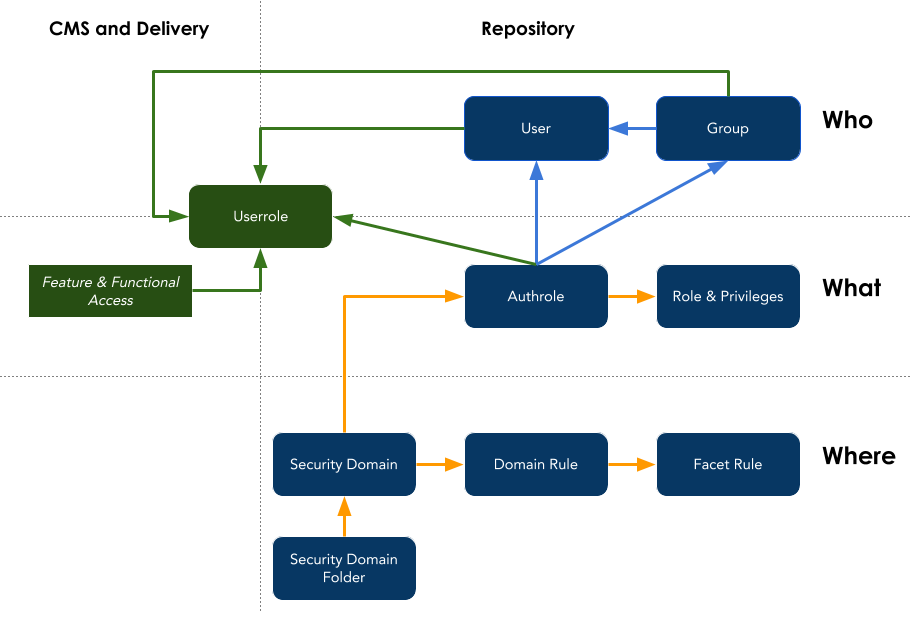
Diagram: This diagram illustrates the Bloomreach Content authorization model. The model is divided vertically into CMS and Delivery (left) and Repository (right), and horizontally into Who, What, and Where. "Who" includes User and Group, connected to Authrole, and Userrole, which links CMS/Delivery to the repository. "What" shows Authrole pointing to Role & Privileges, and Feature & Functional Access linked to Userrole. "Where" includes Security Domain Folder, Security Domain, Domain Rule, and Facet Rule, with Security Domain also connecting to Authrole. Authorization combines identity, privileges, and domain rules.
The concepts of Userrole and Feature & Functional Access were introduced in brXM v14.
This page provides a high-level overview of each element in the authorization model. For technical implementation details, refer to the linked documentation for each concept.
Who
The Who component identifies the user or group of users subject to authorization.
Bloomreach Content supports three mechanisms to define and reference users:
- Directly as a User
- As a member of a Group
- By assignment of a Userrole, either directly or through Group membership
Users
Users represent individual accounts. Users can be human users or system users used for internal processes or integrations. System users cannot log in interactively.
Each user record includes required fields such as username, first name, last name, email, password, and a flag indicating whether the user is a system user. The 'active' flag controls whether the user can log in.
Users can be managed within the CMS or synchronized from external sources such as LDAP. Bloomreach Content provides a few built-in users, but most user accounts are environment-specific and managed as category system data in the repository.
Groups
Groups organize users by organizational or functional criteria. Groups can be assigned roles within security domains and/or specific userroles. Users inherit all userroles and roles granted to their groups.
Userroles
Userroles represent functional privileges (also called Functional Roles) that can be assigned to users directly or via group membership. Userroles are global and apply for the duration of a user's session.
Some userroles grant global privileges, such as logging into the CMS (xm.cms.user) or accessing the Channels application (xm.channel.user). Others are effective only within certain security domains, such as channel administration (xm.channel.admin), which requires both xm.cms.user and xm.channel.user userroles.
Userroles can include or imply other userroles, allowing for recursive privilege inheritance. For example, xm.content.admin implies xm.content.editor, so granting xm.content.admin also grants the privileges of xm.content.editor.
Userroles serve as a bridge between the Who and What aspects of authorization, and between functional access for CMS/Delivery and context-specific privileges for repository security domains. The diagram places Userrole at the intersection of these dimensions.
Starting with brXM v14, the product and its default security domains primarily use Userroles to define Who is authorized. Default users and groups are no longer required for this purpose.
What
The What component defines the privileges or actions a user is permitted to perform. Privileges can be granted globally as userrole privileges, or within a specific security domain through a role assignment.
Feature & Functional Access
brXM v14 introduced the ability to control access to features and functionality directly through assigned userroles. This approach is used when repository content context (the Where aspect) is not relevant.
Examples include:
- Determining if a user can log in to the CMS (
xm.cms.user) - Checking if a user can manage security (
xm.security.user-admin) - Allowing a Delivery Tier Authenticated user with a custom userrole (e.g.,
intranet.staff) to access restricted intranet sections
You can check if a logged-in user has a specific userrole programmatically using the HippoSession.isUserInRole(<userRoleName>) API, or in the delivery tier using the standard Java Servlet / JAAS HttpServletRequest.isUserInRole(<userRoleName>) method. Declarative configuration is also supported. For details, see the Userroles and Delivery Tier Authorization documentation.
Roles, Privileges, and Authrole
Roles define sets of repository privileges (the What) that can be granted to users, groups, or users with a specific userrole (the Who) within a security domain (the Where). This assignment is configured through an Authrole.
An authrole is always associated with a specific security domain, linking Who, What, and Where for repository content authorization.
There are two types of repository role privileges:
- Standard JCR privileges as specified in JSR 283 section 16.2.3, such as
jcr:read,jcr:write, andjcr:all - Custom privileges provided by Bloomreach Content, such as
hippo:editor,hippo:channel-viewer, andhippo:rest
Roles can include or imply other roles, allowing for recursive privilege inheritance.
Each security domain must have at least one authrole node, typically named after the role it grants. Authroles specify the recipients of the repository role as a set of users, groups, or a single userrole. Multiple authroles can be configured per security domain to grant different roles to different users or userroles.
An authrole can reference only one userrole. In cases where the same repository role must be granted to multiple userroles, configure multiple authroles, each named after the userrole it references.
Where
Security Domains
A Security Domain defines a set of repository nodes (such as documents) for which specific access privileges can be configured using authroles.
Security domains are defined using facet-based queries. This approach enables the repository to efficiently determine node access during queries and faceted views without evaluating access rules for each node individually. This design supports fast query execution, even for large repositories, because result sets do not require post-query filtering.
Since brXM v14, standard facet rules primarily use the hierarchical jcr:path or jcr:uuid facets, further optimizing access rule evaluation and query performance.
A security domain consists of one or more domain rules, each containing one or more facet rules. A repository node belongs to a security domain if it matches at least one domain rule, and it matches a domain rule if it satisfies all facet rules within that rule.
At login, the repository parses all roles for the security domains assigned to the user. This enables efficient rule evaluation in the access manager. To apply changes to a user's domain security configuration, the user must log out and log in again.
Domain Rules
A Domain Rule is a container for one or more facet rules.
Facet Rules
A Facet Rule defines the criteria for determining whether a repository node belongs to a security domain. For technical details on available facet rule types and configuration, see the Domains documentation.
Security Domain Folders
All security domains are defined under a Security Domain Folder parent node.
brXM v14 adds support for federated security domain folders, in addition to the standard folder at /hippo:configuration/hippo:domains.
Federated security domain folders can be used within specific repository paths, providing a hierarchical and relative scope for security domains in those sections. This approach simplifies and standardizes the definition of common security domains across different repository paths, such as for multiple HST site configurations. It also allows for separate management of security domains for optional features, such as relevance or projects.
As of brXM v14, standard security domains for these features have moved to dedicated federated security domain folders. For implementation details, see the Domains documentation.