Customize Universal Pixel Integration Addon
Warning: The Universal Pixel Integration was designed for Bloomreach Discovery. It is no longer in active use and has been removed from brXM 16.2 and later.
Add a Universal Pixel Editor Field to an Existing Document Type
For content-driven pages (not landing pages), you can specify Universal Pixel data on a per-document basis. To enable this, add the Universal Pixel Variables mixin to the relevant document types.
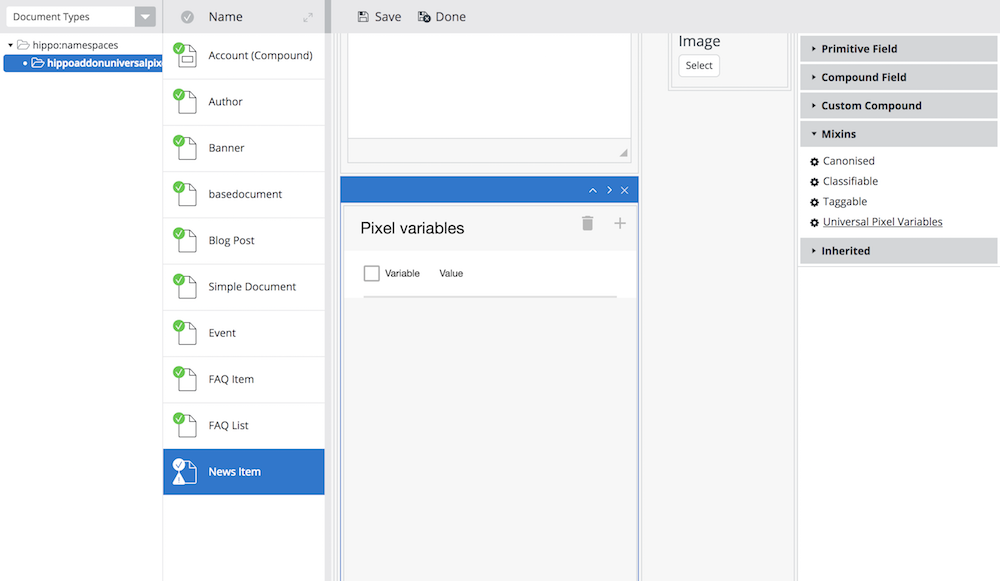
After you commit and publish the changes with the Universal Pixel Variables mixin, editors can set Universal Pixel variables for each document.
Pixel Scriptlet Location and Head Contributions
Universal Pixel data is contributed to the page using JavaScript scriptlets, as shown below:
<script type="text/javascript"> var br_data = { "page_type":"search", "page_labels":"bloomreach,documentation", "cmscategories":"news", "acct_id":"****", "domain_key":"", "type":"pageview" }; </script> <script type="text/javascript"> (function() { var brtrk = document.createElement('script'); brtrk.type = 'text/javascript'; brtrk.async = true; brtrk.src = '//cdns.brsrvr.com/v1/br-trk-****.js'; var s = document.getElementsByTagName('script')[0]; s.parentNode.insertBefore(brtrk, s); })(); </script>
These scriptlets include:
- The Universal Pixel Data JavaScript object definition:
var br_data = { ... } - Dynamic loading of the Universal Pixel Tracker Library
The Universal Pixel Integration addon uses the HST Head Contributions feature to add both scripts with the scripts category.
Typically, the base layout template (for example, repository-data/webfiles/src/main/resources/site/freemarker/myproject/base-layout.ftl) includes the <@hst.headContributions /> tag for the scripts category. This ensures the scriptlets are included at the bottom of each page:
<!doctype html> <#include "../include/imports.ftl"> <html lang="en"> <head> <#-- SNIP --> <@hst.headContributions categoryExcludes="htmlBodyEnd, scripts" xhtml=true/> </head> <body> <#-- SNIP --> <@hst.headContributions categoryIncludes="htmlBodyEnd, scripts" xhtml=true/> </body> </html>
Configure Head Contribution Category Values
By default, both scriptlets use the scripts category. To assign different category values to each scriptlet, add the following properties to /WEB-INF/hst-config.properties in your webapp application:
# Head contribution category name for the Universal Pixel Data JavaScript variable scriptlet
universalpixel.trackingDataHeadContributionCategory = pixel-data-scriptlet
# Head contribution category name for the Universal Pixel Tracker library inclusion scriptlet
universalpixel.trackingJslibHeadContributionCategory = pixel-jslib-scriptlet
In this example, the scriptlet that defines the pixel data object uses the pixel-data-scriptlet category, and the scriptlet that loads the tracking library uses the pixel-jslib-scriptlet category.
If you change the Head Contribution category values, update the layout template accordingly:
<!doctype html> <#include "../include/imports.ftl"> <html lang="en"> <head> <#-- SNIP --> <@hst.headContributions categoryExcludes="htmlBodyEnd, scripts, pixel-data-scriptlet, pixel-jslib-scriptlet" xhtml=true/> </head> <body> <#-- SNIP --> <@hst.headContributions categoryIncludes="htmlBodyEnd, scripts" xhtml=true/> <#-- Add separate head contributions for Universal Pixel scriptlets below. --> <@hst.headContributions categoryIncludes="pixel-data-scriptlet" xhtml=true/> <#-- You can also include custom JavaScript scriptlets here by using Head Contributions with a specific category. --> <@hst.headContributions categoryIncludes="pixel-jslib-scriptlet" xhtml=true/> </body> </html>
You can insert additional custom JavaScript scriptlets between the two Universal Pixel Integration scriptlets for further customization, such as modifying Universal Pixel variables based on domain-specific requirements.