Configure Universal Pixel Integration Addon
Warning: Universal Pixel Integration was previously used to integrate with Bloomreach Discovery. This integration is no longer in use and has been removed from brXM 16.2 and later.
The Universal Pixel Integration addon uses the ChannelInfo Mixin feature to enable webmasters and editors to configure Universal Pixel integration settings in Experience manager. Projects can also define custom Universal Pixel variables by providing custom JSON schema resources. When custom JSON schema resources are configured, the variables defined in those schemas appear in the editor UI, allowing webmasters and editors to assign values.
Configure Universal Pixel Channel Info Mixin for Channels
After you configure the Universal Pixel ChannelInfo Mixin for a channel, webmasters can set channel-level default Universal Pixel data values in the Channel properties UI.
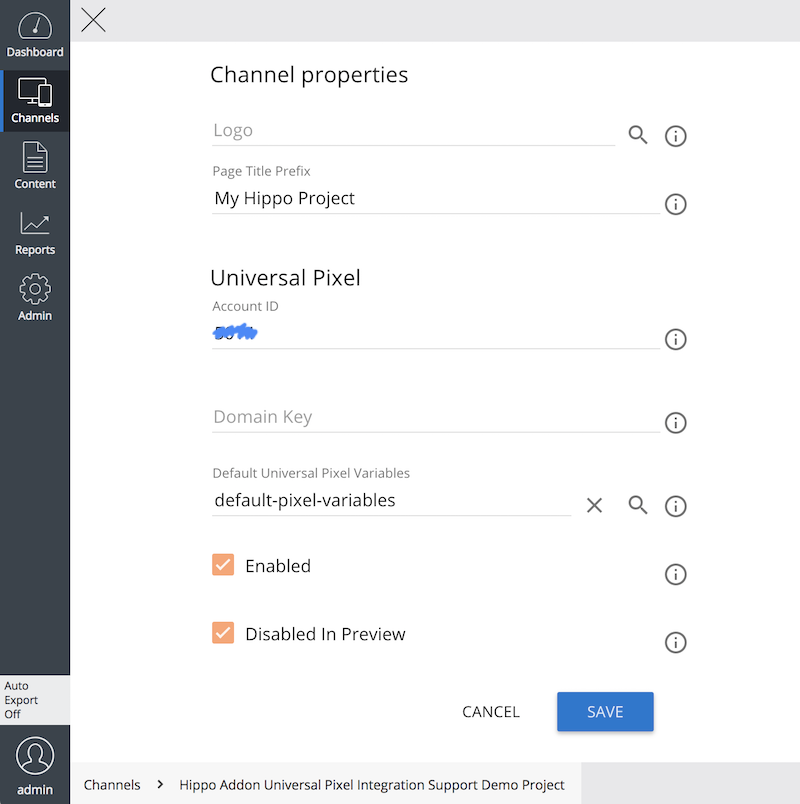
The following parameters are available:
| Parameter | Type | Description | Required? | Default value |
|---|---|---|---|---|
| Account ID | String | The account identifier provided by Bloomreach. | Yes | |
| Domain Key | String | The Bloomreach-provided ID for the domain receiving the request. Use this to identify a specific site language version when a single account ID serves multiple language versions. Bloomreach uses this value to ensure that only data relevant to the specified language is used for features. | No | |
| Default Universal Pixel Variables | Document Link | Reference to a Universal Pixel Variables document. Webmasters can set channel-wide default Universal Pixel data values here, which are merged in if a landing page or content-driven page does not override specific values. | No | |
| Enabled | Boolean | Enables Universal Pixel Scriptlets on live pages. | No | True |
| Disabled In Preview | Boolean | Disables Universal Pixel Scriptlets on preview pages. | No | True |
To enable the Universal Pixel ChannelInfo Mixin for a channel, add the value com.onehippo.cms7.addon.unipixel.site.channel.UniversalPixelChannelInfo to the hst:channelinfomixins property of the channel info configuration node:
definitions: config: /hst:hst/hst:configurations/hippoaddonuniversalpixelintegrationdemo/hst:workspace/hst:channel: .meta:residual-child-node-category: content jcr:primaryType: hst:channel hst:name: Hippo Addon Universal Pixel Integration Support Demo Project hst:type: website hst:channelinfoclass: com.onehippo.cms7.demo.pixel.demo.channel.WebsiteInfo hst:channelinfomixins: [com.onehippo.cms7.addon.unipixel.site.channel.UniversalPixelChannelInfo] # ...
This configuration displays the Universal Pixel Channel Properties panel in Experience manager as shown above.
If you manage multiple channels across different environments, you can automate adding com.onehippo.cms7.addon.unipixel.site.channel.UniversalPixelChannelInfo to the hst:channelinfomixins property for each channel using a Groovy Updater script. The following example script assumes you run it against a JCR query such as /jcr:root/hst:hst/hst:configurations//hst:workspace/hst:channel to target all existing channel nodes.
// configure_universal_pixel_channel_info_mixins.groovy package org.hippoecm.frontend.plugins.cms.admin.updater import javax.jcr.Node import javax.jcr.RepositoryException import javax.jcr.Session import org.apache.commons.lang.ArrayUtils; import org.hippoecm.repository.util.JcrUtils; import org.onehippo.repository.update.BaseNodeUpdateVisitor /** * Example Groovy Updater Script to configure Universal Pixel ChannelInfo Mixin types to each channel configuration node. * * This updater should be configured with a JCR query such as * /jcr:root/hst:hst/hst:configurations//hst:workspace/hst:channel, * which finds and iterates over each channel configuration node. */ class ExampleConfigureUniversalPixelChannelInfoMixinsUpdaterVisitor extends BaseNodeUpdateVisitor { String upixelMixinChannelInfo = "com.onehippo.cms7.addon.unipixel.site.channel.UniversalPixelChannelInfo" boolean doUpdate(Node node) { log.debug "Visiting channel config node at ${node.path}" if (node.hasProperty("hst:channelinfoclass")) { String[] oldValues = JcrUtils.getMultipleStringProperty(node, "hst:channelinfomixins", ArrayUtils.EMPTY_STRING_ARRAY) if (!ArrayUtils.contains(oldValues, upixelMixinChannelInfo)) { node.setProperty("hst:channelinfomixins", ArrayUtils.add(oldValues, upixelMixinChannelInfo)) return true } } return false } boolean undoUpdate(Node node) { throw new UnsupportedOperationException('Updater does not implement undoUpdate method') } }
Configure Custom Pixel Schema
By default, the Universal Pixel editor UI displays only the predefined Bloomreach Universal Pixel variables, such as "Page type" and "Page labels".
To add custom Universal Pixel variables for your site, provide JSON Schema resources through the Universal Pixel addon configuration at /hippo:configuration/hippo:modules/universal-pixel/hippo:moduleconfig:
definitions: config: /hippo:configuration/hippo:modules/universal-pixel/hippo:moduleconfig: custom.vars.source: jcr:/hippo:configuration/hippo:modules/universal-pixel/hippo:moduleconfig/custom.pixel.schema custom.pixel.schema: type: string resource: custom-pixel-schema.json
The custom.vars.source property accepts a comma-separated list of resource locations for multiple custom JSON schema resources. Each resource can be either a classpath: resource or a jcr: string property resource.
For example, if you set custom.vars.source to classpath:/org/example/MySchema.json, jcr:/a/b/c/prop1, the Universal Pixel Integration addon loads and merges both resources: one from the classpath (such as cms/WEB-INF/classes/org/example/MySchema.json) and one from the JCR property /a/b/c/@prop1 of type string, along with the default Universal Pixel variables.
In the example above, the configuration uses a jcr: string property resource at /hippo:configuration/hippo:modules/universal-pixel/hippo:moduleconfig/custom.pixel.schema (located in the same node). A custom JSON schema resource might look like this:
{ "title": "MyCommercePixelSchema", "type": "object", "properties": { "mycommercetags": { "title": "My commerce tags", "description": "My commerce tags", "type": "array", "format": "csv", "items": { "type": "string" } }, "mycommercescore": { "title": "My commerce score", "description": "My commerce score", "type": "integer", "minimum": 1, "maximum": 10 } }, "required": [ ] }
The Universal Pixel Integration addon scans each custom JSON schema resource and registers additional custom Universal Pixel variables based on the properties section. In this example, it registers "mycommercetags" and "mycommercescore" as custom variables, which then appear in the editor UI for webmasters and editors to configure.