Create a Custom Perspective
Overview
This page describes how to create a custom application—referred to as a "perspective"—in Bloomreach Content and add it to the navigation UI.
About Perspectives
A perspective is a distinct application within Bloomreach Content, accessible through the navigation UI. Examples include the Content perspective for editing documents and assets, and the Setup > System perspective for managing users, groups, and roles. Each perspective provides access to a specific area of functionality. For a list of default perspectives, see the end user manual.
Info:
If your custom perspective loads an external application via URL, you must add the application's domain to the Content Security Policy.
Create a Custom Perspective
A custom perspective can display any content, interact with the repository, or load external resources such as iframes. At minimum, you must provide repository configuration and a Wicket plugin class with its corresponding HTML file. Optionally, you can add a CSS file for custom styling. Custom perspectives appear in the navigation's Extensions menu.
Example: Hello World Perspective
This example creates a perspective that displays "Hello world!" on an empty screen, using the package com.example.
1. Create the Java Class
Add the following file at cms/src/main/java/com/example/MyCustomPerspective.java:
package com.example; import javax.jcr.Session; import org.apache.wicket.markup.head.CssHeaderItem; import org.apache.wicket.markup.head.IHeaderResponse; import org.apache.wicket.request.resource.CssResourceReference; import org.apache.wicket.request.resource.ResourceReference; import org.hippoecm.frontend.plugin.IPluginContext; import org.hippoecm.frontend.plugin.config.IPluginConfig; import org.hippoecm.frontend.plugins.standards.perspective.Perspective; import org.hippoecm.frontend.session.UserSession; public class MyCustomPerspective extends Perspective { private static final ResourceReference PERSPECTIVE_CSS = new CssResourceReference(MyCustomPerspective.class, "MyCustomPerspective.css"); public MyCustomPerspective(IPluginContext context, IPluginConfig config) { super(context, config); setOutputMarkupId(true); Session session = UserSession.get().getJcrSession(); } @Override public void renderHead(final IHeaderResponse response) { response.render(CssHeaderItem.forReference(PERSPECTIVE_CSS)); } }
2. Create the Wicket Markup File
Add the following file at cms/src/main/resources/com/example/MyCustomPerspective.html:
<html xmlns:wicket="http://wicket.apache.org/"> <wicket:panel> <div id="my-custom-perspective"> Hello world! </div> </wicket:panel> </html>
3. Add the CSS File
Add the CSS file referenced in the Java class at cms/src/main/resources/com/example/MyCustomPerspective.css:
#my-custom-perspective {
  font-size: 16px;
  font-weight: bold;
}
4. Build and Restart
Rebuild your project and restart the application.
5. Configure the Perspective in the Repository
Use the Console to add a new frontend:plugin node under /hippo:configuration/hippo:frontend/cms/cms-static. Configure the following properties:
-
Add the
frontend:navigationitemmixin. -
Set the required property
frontend:appPath. This value appears as the last segment in the URL when the perspective is active. For example, iffrontend:appPathismyappand the CMS is deployed athttps://cms.example.com, the perspective URL ishttps://cms.example.com/myapp. -
Set the
hipposys:userroleproperty. Assign a product-provided role (such asxm.cms.user) or a custom role from your project.
Example configuration:
/hippo:configuration/hippo:frontend/cms/cms-static/myCustomPerspective: jcr:primaryType: frontend:plugin jcr:mixinTypes: ['frontend:navigationitem'] frontend:appPath: my-custom-perspective hipposys:userrole: xm.cms.user plugin.class: com.example.MyCustomPerspective wicket.id: service.tab
Info:
Perspective Order
The order of perspectives in theExtensionsmenu matches the order of their configuration nodes under/hippo:configuration/hippo:frontend/cms/cms-static.
6. Add Translations
Add translation key-value pairs under /hippo:configuration/hippo:translations/hippo:navigation/navigationitem for each required language. The displayName key is mandatory. If it is missing, the navigation UI will not display the custom perspective.
Example translation configuration:
/hippo:configuration/hippo:translations/hippo:navigation/navigationitem: jcr:primaryType: hipposys:resourcebundles /displayName: jcr:primaryType: hipposys:resourcebundles /en: jcr:primaryType: hipposys:resourcebundle my-custom-perspective: My Custom Perspective
7. Verify
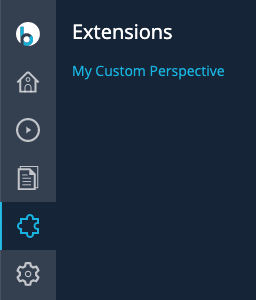
Log in to Bloomreach Content. The custom perspective should appear in the Extensions menu.
Lazy-Loaded Perspective
By default, all plugins for a perspective are instantiated when a user logs in to the CMS. This can slow down the initial page load, especially if the perspective registers or uses multiple plugins.
To improve performance, you can configure a perspective to load lazily. A lazy-loaded perspective defers plugin instantiation until the user selects the perspective in the UI for the first time. This approach is recommended if your perspective performs resource-intensive operations.
To enable lazy loading, add a cluster.name property to the perspective's configuration node. This property specifies the name of a plugin cluster node under /hippo:configuration/hippo:frontend/cms. The cluster is loaded only when the perspective is first activated.
Scope of lazy loading
The cluster.name property only defers instantiation of the plugins inside the referenced plugin cluster. It does not defer:
-
The perspective's own tab/shell. Every perspective node configured under
cms-staticis instantiated as soon as a user logs in, regardless of whethercluster.nameis set. -
Iframe loading, for iframe-based custom perspectives. If your perspective embeds an external application via an iframe, that iframe is created and its URL is requested at CMS login — independent of
cluster.name. Expect the iframe URL to be requested immediately after login, even before an editor selects the perspective for the first time.
Example: Lazy-Loaded Reports Perspective
Configuration for a lazy-loaded perspective:
/hippo:configuration/hippo:frontend/cms/cms-static/reportsPerspective: jcr:primaryType: frontend:plugin jcr:mixinTypes: ['frontend:navigationitem'] cluster.name: hippo-reports frontend:appPath: content-reports hipposys:userrole: xm.report.user plugin.class: org.onehippo.cms7.reports.ReportsPerspective wicket.extension: [] wicket.id: service.tab
The cluster.name property points to the plugin cluster node:
/hippo:configuration/hippo:frontend/cms/hippo-reports
This cluster is loaded only when the Reports perspective is activated for the first time.
Note:
If plugins in your perspective's cluster expose services required by other parts of the CMS, those services will not be available until the perspective is loaded. To make such services available by default, move them to /hippo:configuration/hippo:frontend/cms/cms-services.