Limit the Number of Values in a Multiple Value Field
Overview
Bloomreach Content allows you to define document fields with the multiple type. By default, there is no restriction on how many values an author can add to these fields in a single document. In some scenarios, you may need to enforce an upper limit. For example, you might want to allow a maximum of five related articles for a news item document.
Configure a Maximum Value Limit
You can set an upper limit for a multiple value field using the Console.
To configure the limit:
- Open the Console and navigate to the following path:
/hippo:namespaces/<project-name>/<document-type>/editor:templates/_default_/<field-name> - Add a property with the following details:
- Name:
maxitems - Type: Long
- Value: The maximum number of values allowed for the field
- Name:
The maxitems property sets the maximum number of values an author can add to the field in a document. This configuration applies to both property-based fields (such as fields of type String) and child node-based fields (such as compound fields like Link).
Example
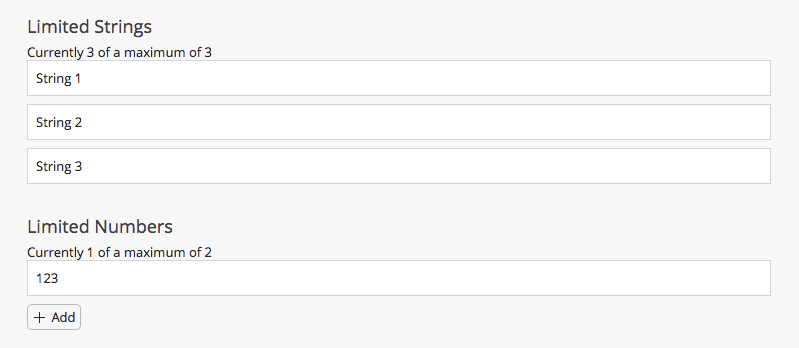
The following screenshot shows how the CMS Document Editor displays a multiple value field with an upper limit of 2 or 3. The interface indicates the limit, and the Add button is hidden once the maximum is reached.