In-Product Feedback
Info: Applies to Bloomreach Content 17.2 and later.
Overview
Starting with Bloomreach Content 17.2, the CMS navigation bar includes a "Give feedback" button. This feature allows editors and administrators to submit structured feedback directly to the Bloomreach product team from within the CMS.
The in-product feedback feature is enabled by default. After upgrading to version 17.2, no additional configuration is required for standard usage. You can disable the feature or configure it to send feedback to a custom endpoint if needed. Both options are described in this document.
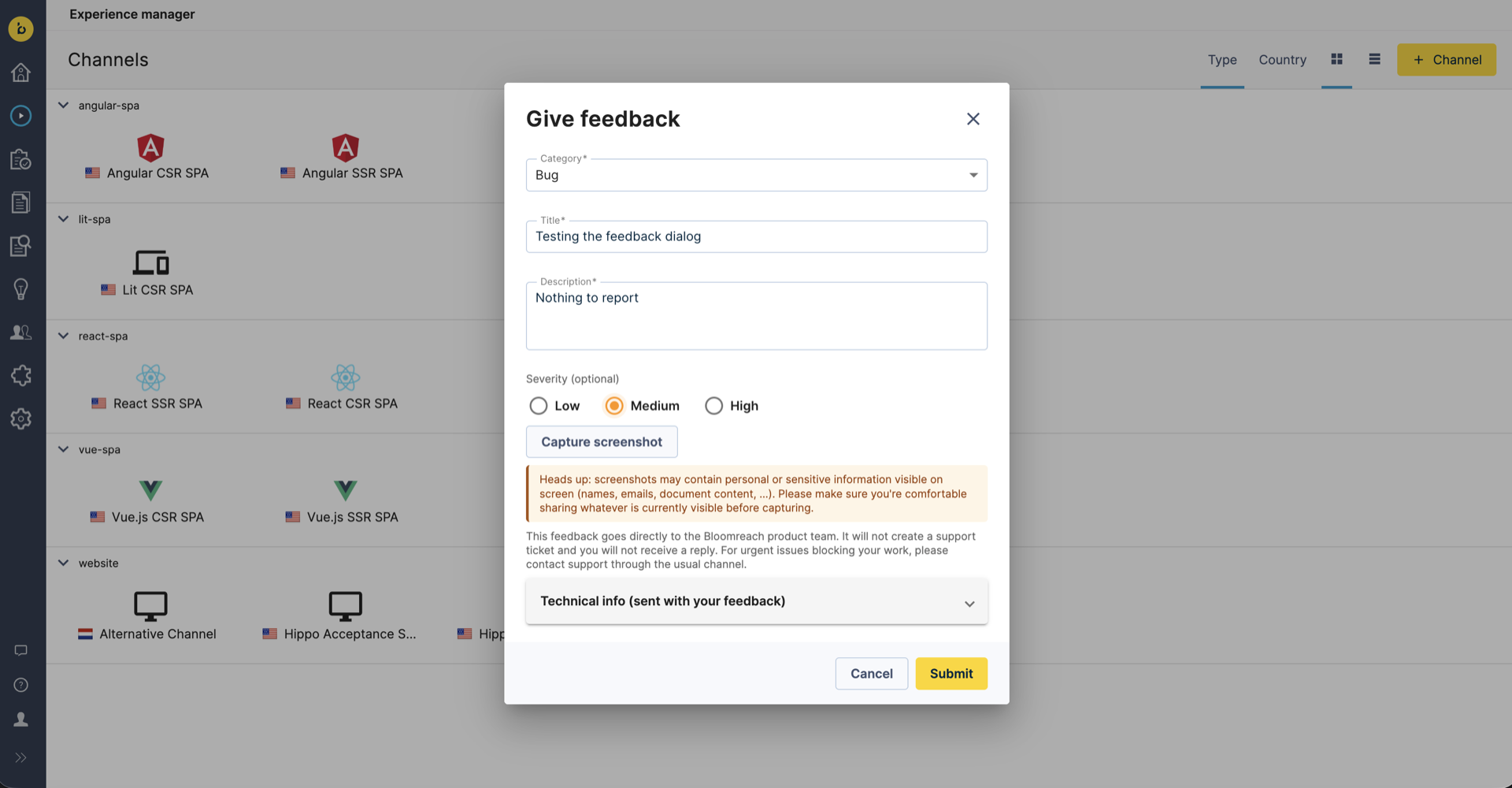
When a user selects the feedback button, a dialog appears. The user can select a category, enter a title and description, optionally set a severity, and optionally capture a screenshot. When submitted, the widget sends a structured JSON payload to the configured endpoint (by default, a Bloomreach-managed service).
Privacy and Data Collection
The feedback widget is designed for transparency and user control.
No Passive Data Collection
The widget does not collect personally identifiable information (PII) automatically. No data is transmitted until the user explicitly selects Submit in the feedback dialog. The widget does not track or send any data in the background.
User Visibility of Submitted Data
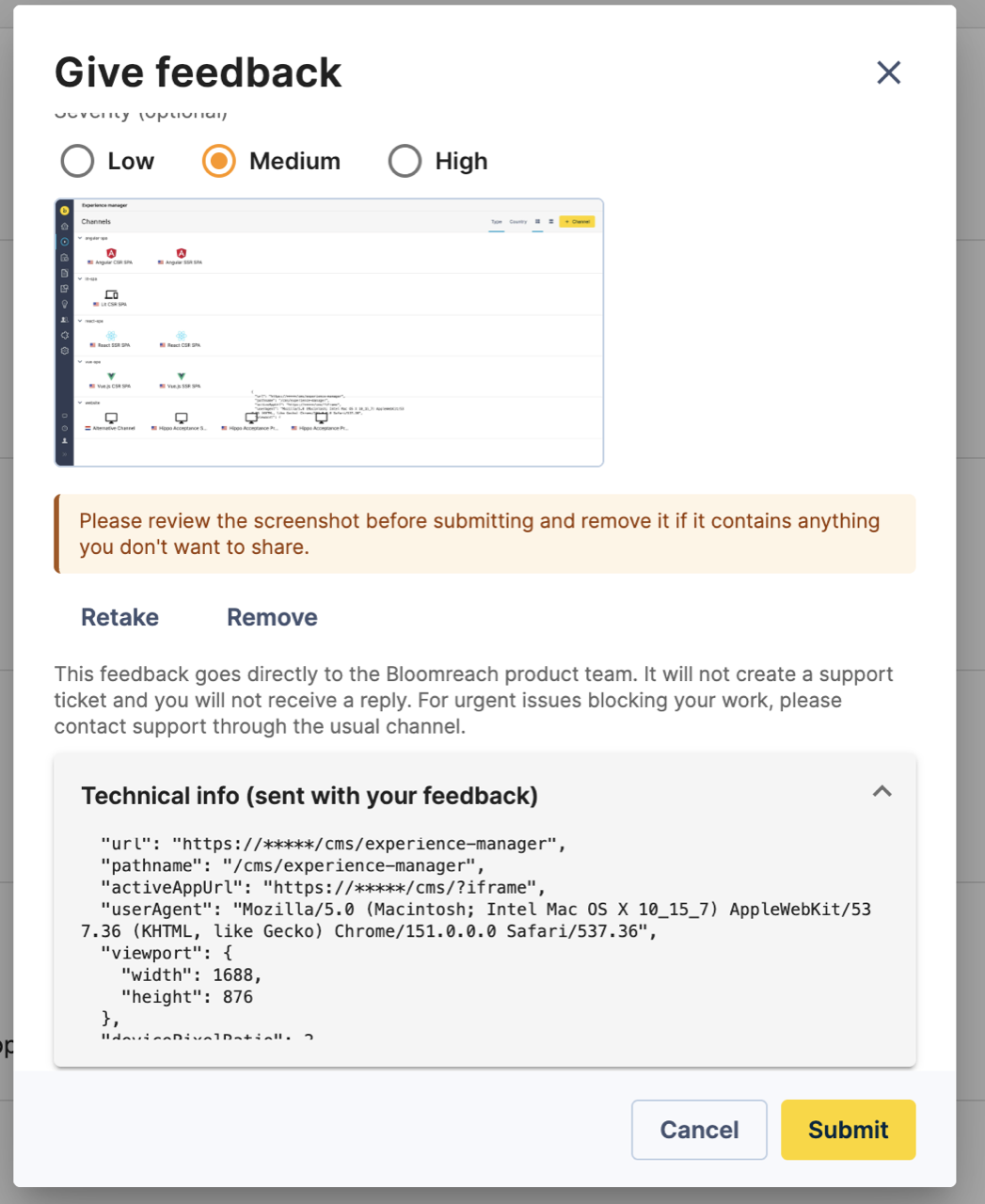
Before submission, the dialog displays all data that will be sent. A collapsible Technical info section shows the complete context JSON. All fields included in the payload are visible for user review.
The context object, always included with a submission, contains only non-personal technical metadata:
| Field | Description |
|---|---|
| url | Full current URL. |
| pathname | Path portion of the URL. |
| activeAppUrl | URL of the active iframe app, or null. |
| userAgent | Browser user-agent string. |
| viewport | Object with width and height. |
| devicePixelRatio | Display pixel ratio. |
| language | Browser UI language. |
| timezone | Browser IANA timezone. |
| timestamp | ISO-8601 timestamp of submission. |
Screenshots Are Opt-In
Screenshots are only captured if the user chooses to do so within the dialog. The widget never captures screenshots automatically.
When a user selects the screenshot option, the dialog displays a warning:
Heads up: screenshots may contain personal or sensitive information visible on screen (names, emails, document content, …). Please make sure you’re comfortable sharing whatever is currently visible before capturing.
After capturing, the dialog prompts the user to review the screenshot before submitting. The screenshot is only included in the payload if the user does not remove it before submission.
User Disclaimer
The dialog displays the following disclaimer:
This feedback goes directly to the Bloomreach product team. It will not create a support ticket and you will not receive a reply. For urgent issues blocking your work, please contact support through the usual channel.
Default Configuration
The feedback widget is enabled and functional by default.
| Setting | Default |
|---|---|
| Enabled | feedbackEnabled: true |
| Endpoint | https://brxm-feedback.bloomreach.works/feedback (Bloomreach-managed) |
| Outbound header | X-Api-Key: brxm-feedback-{version} |
- The feature is enabled by default (
feedbackEnabled: true). - Feedback is sent to the Bloomreach-managed endpoint (
https://brxm-feedback.bloomreach.works/feedback) unless you configure a custom endpoint. - The default outbound header is
X-Api-Key: brxm-feedback-{version}. The{version}placeholder is replaced at runtime with the actual Bloomreach Content version (for example,brxm-feedback-17.2.0).
No configuration is required for this default behavior.
Disabling the Feature
You can disable the feedback button through the JCR CMS console.
The configuration node is:
/hippo:configuration/hippo:frontend/navapp/navapp-services/navAppSettingsService
Steps to Disable
- Open the CMS console at
<cms-url>/cms/console. - Navigate to the node above.
- Add a String property named
feedbackEnabledwith the valuefalse. - Save and reload the CMS.
To Re-Enable
Set feedbackEnabled to true, or remove the property. The default value is true, so deleting the property restores the enabled state.
Note: The change takes effect on the next CMS page load. The setting is read from the plugin configuration on each navapp settings request, so reloading the CMS is sufficient. A server restart is not required.
Configuring a Custom Feedback Endpoint
You can configure the widget to send feedback to a custom endpoint and set custom outbound HTTP headers.
Both properties are set on the same node as feedbackEnabled:
/hippo:configuration/hippo:frontend/navapp/navapp-services/navAppSettingsService
JCR Property: feedbackEndpointUrl
- Type: String
- Effect: All feedback POST requests are sent to this URL instead of the Bloomreach endpoint.
- Payload: The JSON structure is unchanged regardless of the endpoint.
JCR Property: feedbackHeaders
- Type: Multi-value String
- Format: Each entry is a raw HTTP header in
Name: Valueformat (for example,Authorization: Bearer mytoken). - When set: The configured headers replace the default
X-Api-Keyheader. Only the headers you configure are sent. - When absent or empty: The default
X-Api-Key: brxm-feedback-{version}header is used.
Steps: Configure a Custom Endpoint with Custom Auth Headers
- Open the CMS console at
<cms-url>/cms/console. - Navigate to
/hippo:configuration/hippo:frontend/navapp/navapp-services/navAppSettingsService. - Ensure the feature is enabled: set
feedbackEnabledtotrue, or leave the property absent (default istrue). - Add a String property
feedbackEndpointUrlwith your endpoint URL (for example,https://feedback.example.com/intake). - Add a Multi-value String property
feedbackHeaders. Add one entry per header, for example:Authorization: Bearer mytoken- (add additional headers as needed, one per entry)
- Save and reload the CMS.
- Submit feedback and confirm that the request reaches your endpoint with the configured headers.
Note: If you configure a custom endpoint, your server must accept CORS preflight requests from the CMS origin and handle a request body with Content-Type: application/json. The browser sends a CORS preflight (OPTIONS) request before the feedback POST. If your server does not allow the CMS origin, the browser blocks the feedback request.
Feedback Payload Reference
The widget sends a JSON body to the configured endpoint with Content-Type: application/json. The payload structure is:
{ "category": "bug | feature_request | usability | documentation", "title": "string (max 80 chars)", "description": "string (max 1000 chars)", "severity": "low | medium | high (optional, omitted if not selected)", "screenshotBase64": "data:image/jpeg;base64,... (optional, only when screenshot captured and not removed)", "context": { "url": "string", "pathname": "string", "activeAppUrl": "string | null", "userAgent": "string", "viewport": { "width": number, "height": number }, "devicePixelRatio": number, "language": "string", "timezone": "string", "timestamp": "ISO-8601 string" } }
Field Presence
| Field | Presence | Notes |
|---|---|---|
| category | Always | One of bug, feature_request, usability, documentation. Required in the dialog. |
| title | Always | Max 80 characters. Required in the dialog. |
| description | Always | Max 1000 characters. Required in the dialog. |
| severity | Optional | One of low, medium, high. Omitted if not selected. |
| screenshotBase64 | Optional | Data URI (data:image/jpeg;base64,...). Present only if a screenshot was captured and not removed. |
| context | Always | Non-personal technical metadata. |
| context.url | Always | Full current URL. |
| context.pathname | Always | Path portion of the URL. |
| context.activeAppUrl | Always | URL of the active iframe app, or null. |
| context.userAgent | Always | Browser user-agent string. |
| context.viewport | Always | Object with numeric width and height. |
| context.devicePixelRatio | Always | Numeric display pixel ratio. |
| context.language | Always | Browser UI language. |
| context.timezone | Always | Browser IANA timezone. |
| context.timestamp | Always | ISO-8601 timestamp of submission. |
Configuration Reference Table
All feedback-related properties are configured on the navAppSettingsService node:
/hippo:configuration/hippo:frontend/navapp/navapp-services/navAppSettingsService
| Property | Type | Default | Description |
|---|---|---|---|
| feedbackEnabled | Boolean/String | true | Show or hide the feedback button. |
| feedbackEndpointUrl | String | https://brxm-feedback.bloomreach.works/feedback | The URL that receives feedback POST requests. |
| feedbackHeaders | Multi-value String | X-Api-Key: brxm-feedback-{version} | HTTP headers sent with each feedback POST. When set, replaces the default X-Api-Key header. |
Note: Changes to these properties take effect on the next CMS page load; a server restart is not required. The
{version}placeholder in the default header is replaced at runtime with your actual Bloomreach Content version (for example,brxm-feedback-17.2.0).