Configure the Search Page
Previous Step
The navigation menu and its linked pages are now functional and match the web design.
Review the Web Design
Open the web design in your browser. In the Search textbox at the top right, enter any text and press Enter. The browser displays the search results page design.
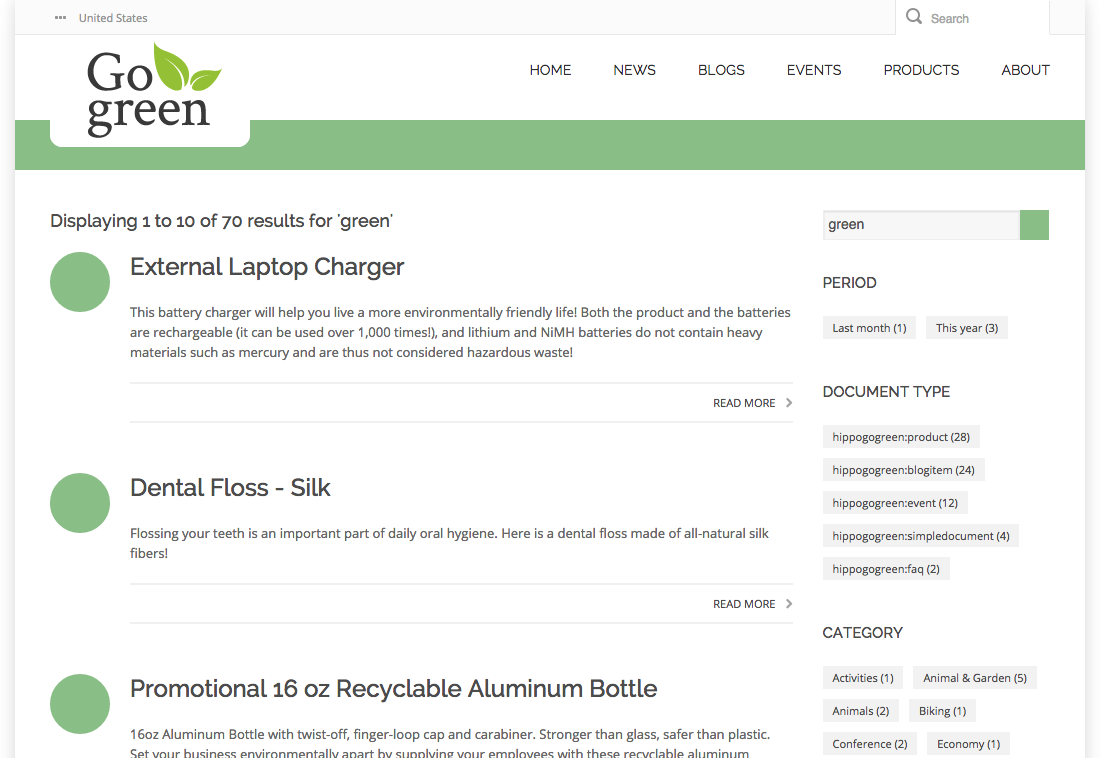
The main content area uses a two-column layout:
- Left column: search results
- Right column: search filter
For this sprint, focus only on the search results in the left column. The search filter and two-column layout are out of scope.
Review the Out-of-the-Box Search Results Page
The "Search" feature was included when you set up your project. This feature provides a working search results page, which is active but not yet connected to the search box in the header. You can access the search results page directly by entering its URL with a query parameter.
Open the following URL in your browser: http://localhost:8080/site/search?query=news.
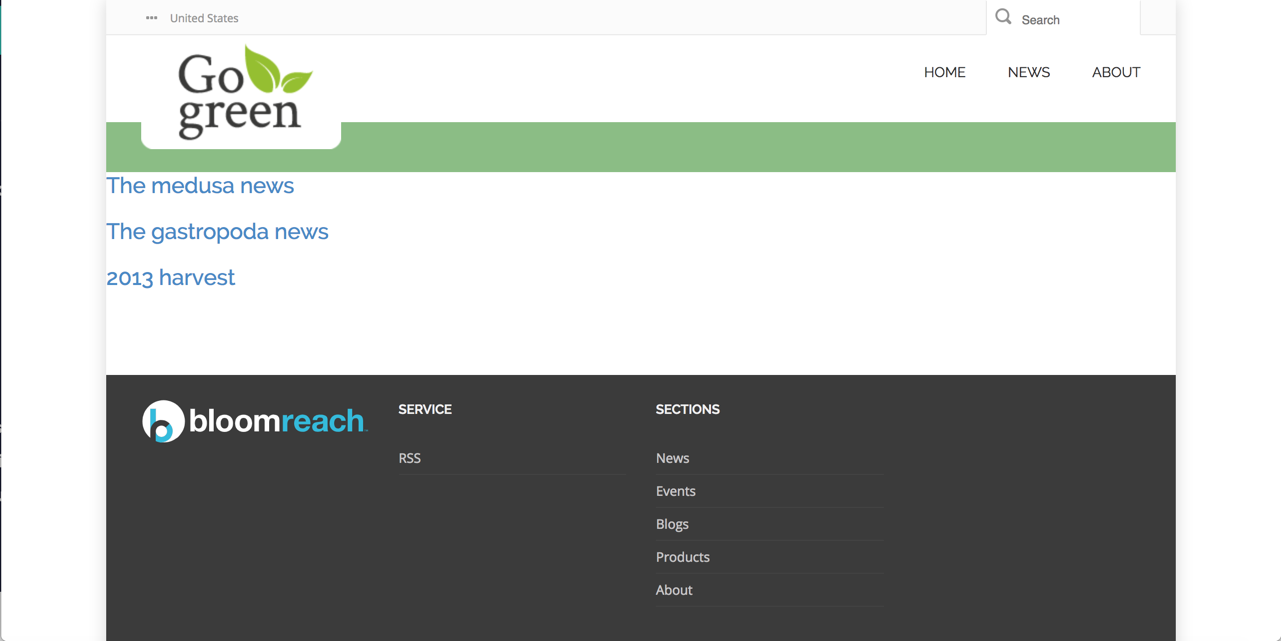
The main content area displays search results, but the page lacks styling.
Connect the Search Box to the Results Page
To allow visitors to submit search queries, connect the search box in the page header to the search results page.
- Open
repository-data/webfiles/src/main/resources/site/freemarker/gogreen/base-layout.ftlin your project. - Find the
<div class="searchbox">element and the<form>inside it. The form'sactionattribute is currently set to the static URL"search.html", copied from the web design. - Replace the
actionattribute value with<@hst.link siteMapItemRefId="search" />:
<div class="searchbox"> <form action="<@hst.link siteMapItemRefId="search" />" method="get"> <input type="text" class="searchbox-inputtext" id="searchbox-inputtext" name="query" placeholder="Search" /> <label class="searchbox-icon" for="searchbox-inputtext"></label> <input type="submit" class="searchbox-submit" value="Search" /> </form> </div>
The <@hst.link> tag dynamically resolves the correct URL for the search results page.
After this change, entering a query in the search box and clicking "Search" loads the search results page for that query. The page is still unstyled.
Apply Web Design to the Search Results Template
To match the web design, update the Freemarker template for the search results page.
- Open
search.htmlfrom the web design. Locate the<div class="body-wrapper">element, which contains the markup for search results. - Open
repository-data/webfiles/src/main/resources/site/freemarker/gogreen/search-main.ftlin your project. This is the Freemarker template for the search results page.
The template includes pagination logic, as shown below:
<#if cparam.showPagination??> <#include "../include/pagination.ftl"> </#if>
Copy the relevant HTML markup for search results from search.html and integrate it into search-main.ftl. The pagination template is already styled according to the web design.
Template hints:
- The search query is available as the
queryobject. - Search results are available as
pageable.items. - The
pageableobject providestotal,startOffset, andendOffsetattributes for result counts.
A typical implementation looks like this:
<#include "../include/imports.ftl"> <div class="body-wrapper"> <div class="container"> <div class="row"> <div class="col-md-9 col-sm-9"> <#if pageable??> <#if pageable.total == 0> <h4>No results for '${query?html}'</h4> <#else> <h4>Displaying ${pageable.startOffset +1 } to ${pageable.endOffset} of ${pageable.total} results for '${query?html}'</h4> <div id="search-results"> <#list pageable.items as item> <@hst.link var="link" hippobean=item /> <div class="blog-post"> <div class="blog-post-type"> <i class="icon-shop"> </i> </div> <div class="blog-span"> <h2> <a href="${link}">${item.title?html}</a> </h2> <div class="blog-post-body"> <p>${item.introduction?html}</p> </div> <div class="blog-post-details"> <div class="blog-post-details-item blog-post-details-item-right"> <a href="${link}"> Read more<i class="fa fa-chevron-right"></i> </a> </div> </div> </div> </div> </#list> </div> <#if cparam.showPagination> <#include "../include/pagination.ftl"> </#if> </#if> <#else> <h3>Please fill in a search term.</h3> </#if> <div class="col-md-3 col-sm-3"> </div> </div> </div> </div>
To verify the result:
- Open http://localhost:8080/site/ in your browser.
- Enter a search term (for example,
news) in the search box and press Enter.
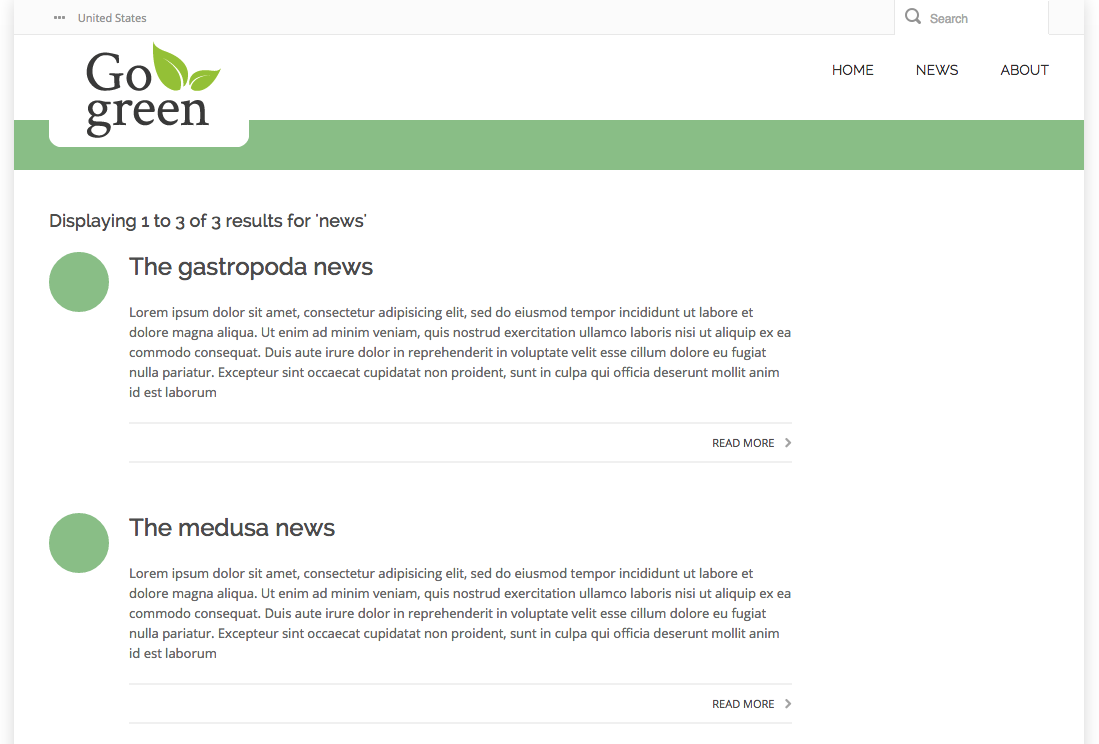
The search results page now matches the web design.
Next Step
Full Source Code
base-layout.ftl
<!doctype html> <#include "../include/imports.ftl"> <html class="no-js" lang="en"> <head> <title>Bloomreach Go Green - Home</title> <meta charset="utf-8"> <meta name="viewport" content="width=device-width, initial-scale=1.0"> <link rel="stylesheet" href="<@hst.webfile path="/css/bootstrap.css"/>"> <link rel="stylesheet" href="<@hst.webfile path="/css/font-awesome.css"/>"> <link href='<@hst.webfile path="/css/style.css"/>' rel='stylesheet' type='text/css'> <link href='<@hst.webfile path="/css/responsive.css"/>' rel='stylesheet' type='text/css'> <!-- Fonts --> <link href="<@hst.webfile path="/fonts/open-sans.css"/>" rel='stylesheet' type='text/css'> <link href="<@hst.webfile path="/fonts/raleway.css"/>" rel='stylesheet' type='text/css'> <link rel="stylesheet" media="screen" type="text/css" href="<@hst.webfile path="/css/hippo-green.css"/>" /> <link rel="icon" href="<@hst.webfile path="/images/favicon.ico"/>" type="image/x-icon" /> <link rel="shortcut icon" href="<@hst.webfile path="/images/favicon.ico"/>" type="image/x-icon" /> <link rel="apple-touch-icon" href="<@hst.webfile path="/images/apple-touch-icon.png"/>" /> <link rel="alternate" type="application/rss+xml" title="Bloomreach Go Green RSS" href="rss" /> <@hst.headContributions categoryIncludes="htmlHead" xhtml=true/> </head> <body class="bgpattern-neutral"> <div id="wrapper" class="boxed"> <div class="top_wrapper"> <div class="top-bar"> <div class="container"> <div class="row"> <!-- lang navigation --> <div class="col-sm-7 langnav"> <nav> <ul class="" id="language"> <li class="active"><i class="fa fa-ellipsis-h"></i> <span>United States</span> <ul> <li><a href="fr.html">France</a></li> </ul></li> </ul> </nav> </div> <div class="col-sm-5" id="top-search"> <div class="searchbox"> <form action="<@hst.link siteMapItemRefId="search" />" method="get"> <input type="text" class="searchbox-inputtext" id="searchbox-inputtext" name="query" placeholder="Search" /> <label class="searchbox-icon" for="searchbox-inputtext"></label> <input type="submit" class="searchbox-submit" value="Search" /> </form> </div> </div> </div> </div> </div> <!-- Header --> <header id="header"> <div class="container"> <div class="row header"> <!-- Logo --> <div class="col-xs-2 logo"> <a href="index.html"><img src="<@hst.webfile path="/images/gogreenlogo2.png"/>" alt="" height="107" /></a> </div> <!-- //Logo// --> <!-- Main navigation --> <!-- Navigation File --> <div class="col-md-12"> <!-- Mobile Button Menu --> <div class="mobile-menu-button"> <i class="fa fa-list-ul"></i> </div> <!-- //Mobile Button Menu// --> <@hst.include ref="menu"/> <!-- Mobile Nav. Container --> <ul class="mobile-nav"> <li class="responsive-searchbox"> <!-- Responsive Nave --> <form action="index.html#" method="get"> <input type="text" class="searchbox-inputtext" id="searchbox-inputtext-mobile" name="s" /> <button class="icon-search"></button> </form> <!-- //Responsive Nave// --> </li> </ul> <!-- //Mobile Nav. Container// --> </div> <!-- //Main navigation// --> </div> </div> </header> <!-- //Header// --> </div> <!-- body / main --> <div class="content-wrapper"> <div class="top-title-wrapper"> <div class="container"> <div class="row"> <div class="col-md-12 col-sm-12"> <div class="page-info"> </div> </div> </div> </div> </div> <@hst.include ref="main"/> </div> <!-- footer --> <@hst.include ref="footer"/> </div> <script src="<@hst.webfile path="/js/jquery-3.5.1.min.js"/>" type="text/javascript"></script> <script src="<@hst.webfile path="/js/bootstrap.min.js"/>" type="text/javascript"></script> <script src="<@hst.webfile path="/js/kanzi-menu.js"/>" type="text/javascript"></script> <@hst.headContributions categoryIncludes="htmlBodyEnd" xhtml=true/> </body> </html>
search-main.ftl
<#include "../include/imports.ftl"> <div class="body-wrapper"> <div class="container"> <div class="row"> <div class="col-md-9 col-sm-9"> <#if pageable??> <#if pageable.total == 0> <h4>No results for '${query?html}'</h4> <#else> <h4>Displaying ${pageable.startOffset +1 } to ${pageable.endOffset} of ${pageable.total} results for '${query?html}'</h4> <div id="search-results"> <#list pageable.items as item> <@hst.link var="link" hippobean=item /> <div class="blog-post"> <div class="blog-post-type"> <i class="icon-shop"> </i> </div> <div class="blog-span"> <h2> <a href="${link}">${item.title?html}</a> </h2> <div class="blog-post-body"> <p>${item.introduction?html}</p> </div> <div class="blog-post-details"> <div class="blog-post-details-item blog-post-details-item-right"> <a href="${link}"> Read more<i class="fa fa-chevron-right"></i> </a> </div> </div> </div> </div> </#list> </div> <#if cparam.showPagination> <#include "../include/pagination.ftl"> </#if> </#if> <#else> <h3>Please fill in a search term.</h3> </#if> <div class="col-md-3 col-sm-3"> </div> </div> </div> </div>