Make Changes to Channels and Content in a Project
Info: This feature in Bloomreach Content requires a standard or premium license. Contact Bloomreach for details.
This page explains how to update channels and content within a project in Bloomreach Content.
Prerequisites
- Create a project before making any changes.
- Add channels to the project if you plan to modify channel settings.
- Add documents to the project if you plan to update content.
Change Channel Configuration in a Project
-
Open the
Projectsapplication. -
Select your project.
-
In the
Channelstab, click the channel you want to edit.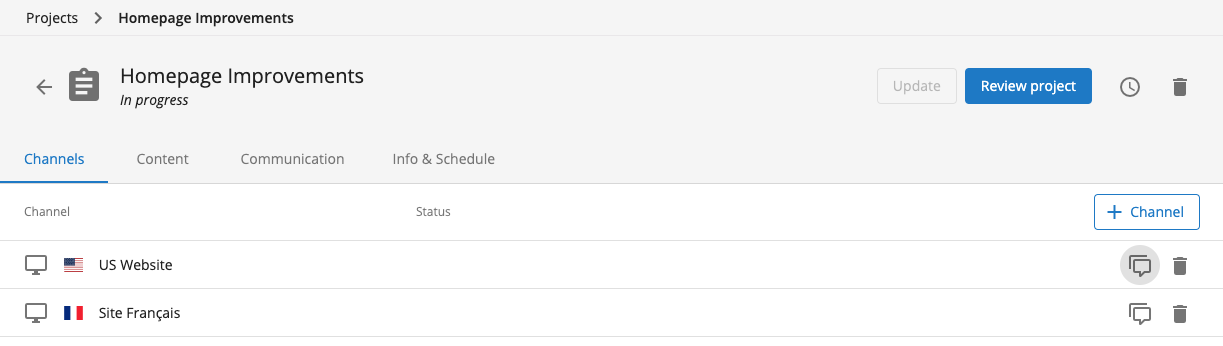
This action opens the
Experience managerfor the selected channel in the context of your project.
Alternatively, you can open the
Experience managerdirectly, navigate to the relevant channel, and use the project context dropdown at the top to select your project. -
Make your channel changes. All modifications are now associated with the selected project.
-
When finished, submit your changes using the menu at the top-left of the
Experience manager.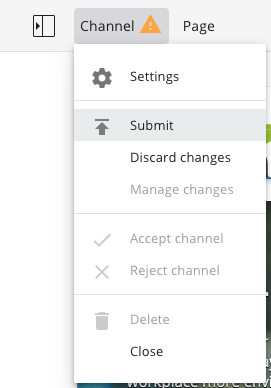
Change Content in a Project
You can edit content within the context of a project using either the Experience manager or the Content application.
- To edit content visually, use the Experience manager.
- To edit content in the repository, use the Content application.
Add Documents to a Project
When editing in the Content application, ensure the document is added to your project:
-
Open the document in the editor.
-
Use the project menu to select "Add to project".

-
In the dialog, choose the correct project.
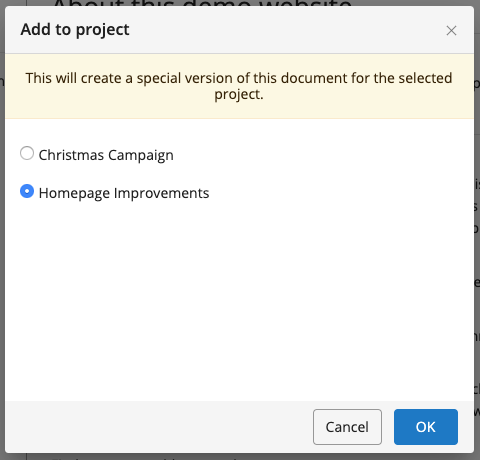
If the document already has unpublished changes, those changes will be included in the project.
Edit Documents Already in a Project
To update a document already part of the project, confirm that the project version is selected:

Make your changes and save.
Next Steps
After completing your channel and content updates, request a review of the project.