Administering the Feed
Overview
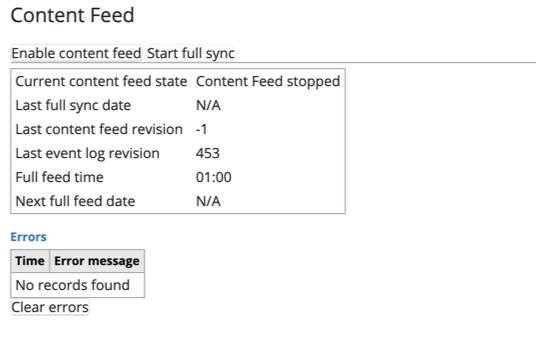
The content feed add-on includes an administrative interface for monitoring and managing the content feed. You can use this interface to:
- View the current feed status
- Enable or disable the feed
- Trigger an immediate full synchronization of content with the content search index
To access the content feed administration UI, navigate to Setup > System > Content Feed.
When using a blue-green deployment strategy, ensure that the content feed service is enabled only in the active production environment. Always disable the service in the standby environment.
Delta and Full Feeds
Delta Feed
Delta feed executions are scheduled using a cron expression, as described in the Configure Content Feed section. During each delta feed execution:
- The system collects all new, updated, and removed documents since the last successful feed run.
- These documents are serialized into a JSON file.
- The JSON file is transferred to the DataConnect SFTP environment.
- An API call notifies DataConnect of the file transfer and its location.
- Another API call triggers indexing of the documents in DataConnect.
- If all steps complete successfully, the system updates the last processed content revision property.
Full Feed
A full feed runs once per day. You can configure the execution time using the fullFeedTime property. At the scheduled time:
- The system collects all documents, regardless of changes.
- All documents are sent to DataConnect.
- After successful processing, the system updates the next and last full feed date properties.
Error Handling
The feed process includes four steps, each monitored for errors:
- Collect and serialize documents
- Deliver the feed file to DataConnect
- Notify DataConnect via API that the file was transferred
- Trigger document indexing in DataConnect via API
If any step fails, the feed process stops and the content feed task is disabled.
- If delivery of the feed file (step 2) fails, the system retries delivery based on the value of the
maxFullFeedRetryCountproperty. - If either the notification (step 3) or indexing (step 4) API calls fail, the system records the failing job ID in the following property:
/hippo:configuration/hippo:modules/content-feed/control/lastFailedJobId