brXM V16.8 Release Notes
Overview
brXM version 16.8 introduces new features, technical stack upgrades, and product improvements. This document summarizes the key updates in this release. For a complete list of release notes, see the Release Notes Overview.
All features described here are part of Bloomreach Content unless otherwise specified.
Significant Updates and New Features
Search Agent: Semantic Content Discovery
The Search Agent addresses the challenge of finding relevant content in large repositories. Traditional keyword search is limited to known terms, making it difficult for editors to discover related or duplicate content.
The Search Agent uses AI to interpret content meaning, enabling editors to find related documents through natural language queries. This capability supports content discovery, consistency checks, and content governance across the editorial workflow.
The Search Agent leverages a vector store for similarity search and provides two main functions:
- Find similar documents: Surfaces semantically related documents based on the one currently open in the editor.
- Repository-wide natural language search (Incubating): Editors can use free-form questions to search repository content. This feature is in early access, may change, and does not guarantee complete or fully accurate results. Bloomreach will continue to develop and expand this capability.
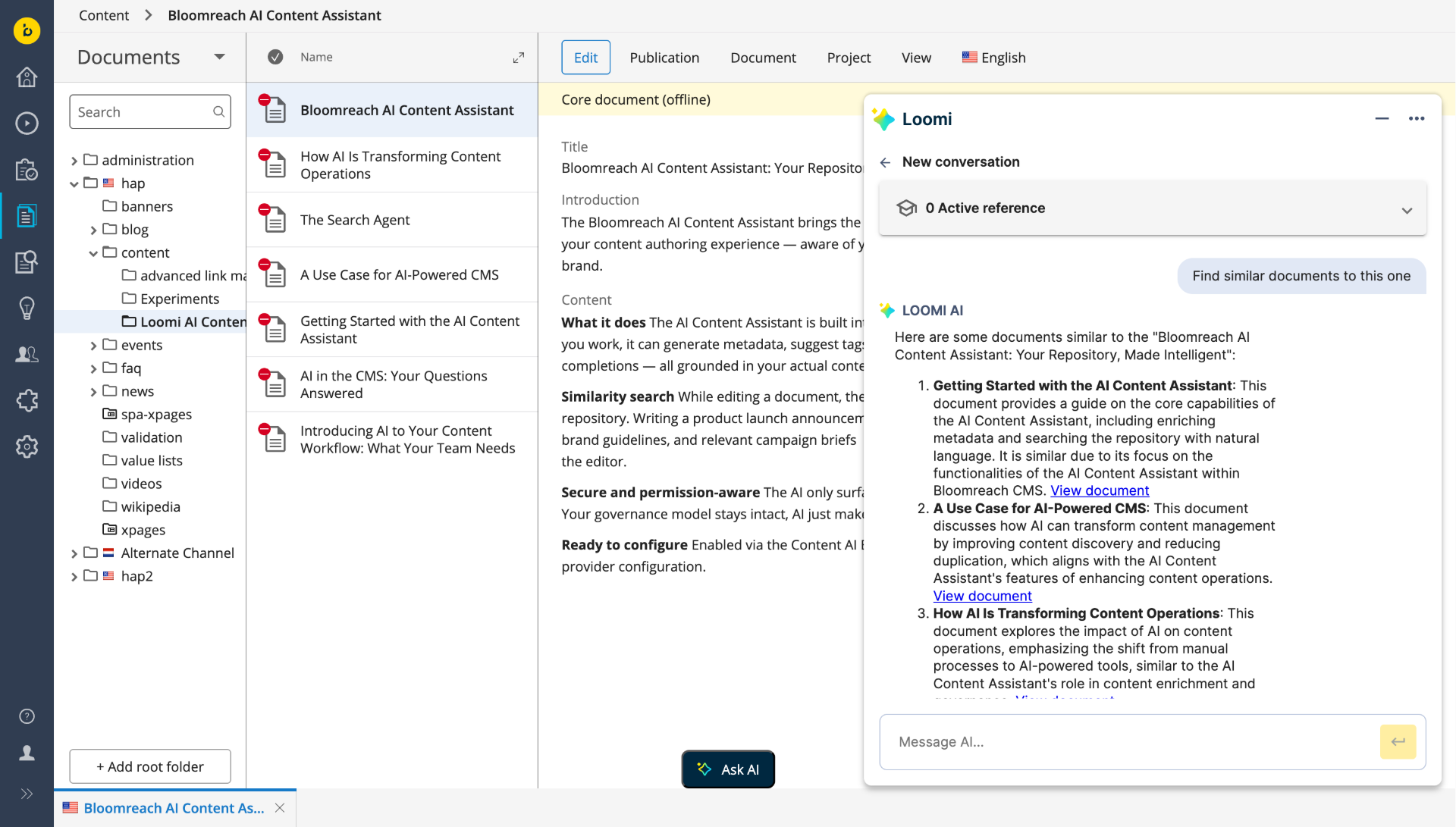
Finding Similar Documents
The Search Agent returns up to five clickable links ranked by semantic relevance. Editors can use queries like "Find similar documents to this" or refine results with keywords, such as "Find similar documents that also contain the terms 'welcome' and 'assistant'."
- Identifies related content, even if terminology or repository location differs.
- Helps editors locate documents affected by changes in products, policies, or terms.
- Supports editorial planning by providing an overview of existing content on a theme.
Search Agent results are non-deterministic and intended as a starting point for exploration. Do not use these results for processes that require complete or fully verified lists.
For more details, see the AI Content Assistant user guide.
Developer Notes
The Search Agent is built on a Retrieval-Augmented Generation (RAG) embeddings pipeline. This foundation will support future features such as the Document Agent (planned for Q2 2026) and content governance automation (planned for H2 2026).
Ingestion
- The vector store updates automatically when documents are changed or published. You can also manage ingestion with updater scripts.
- Initial repository indexing must be performed manually.
Supported ingestion modes:
- live: Indexes only published content.
- preview: Indexes unpublished content on save.
You can filter ingestion by document type and folder path. Search results are filtered based on the requesting user's JCR permissions.
Supported vector store options:
- Redis: Supported and tested. Requires a customer-managed instance.
- Self-managed (Incubating): Implement a custom vector store using the VectorStoreFactory SPI.
- Bloomreach Cloud managed vector store: Planned for Q2 2026. Contact your Account Manager for details.
For configuration, supported embedding models, and setup instructions, see the AI Content Assistant initialization and configuration guide.
AI Extensibility: Custom Vector Stores and AI Tools
Version 16.8 introduces two extension points for AI infrastructure integration:
-
Custom vector store (Incubating)
Use theVectorStoreFactorySPI to connect your own vector store to the Search Agent. This is suitable for teams with existing vector infrastructure or specific data residency requirements. The SPI is incubating and may change between releases. -
Custom AI tools
Register custom AI-callable actions in the chat assistant using theClientToolPackageSPI. Use cases include triggering internal workflows, integrating with external systems, or adding domain-specific capabilities. Custom tools can access user and document context at runtime and, when Search Agent is enabled, can perform semantic searches as part of their logic.
Example use cases:
- Integrate with a translation management system to trigger translation requests from the chat assistant.
- Build a compliance checker that searches the vector store for documents referencing specific terms or policies and returns a structured report.
- Connect to an analytics platform so editors can request page performance data directly from the assistant.
Both extension points are Spring @Component beans. Register your implementation to enable it. For interface definitions, implementation guidance, and examples, see the AI Module Extensibility Guide.
AI Content Assistant: Demo and Feedback
If AI Content Assistant is not enabled in your project, you can evaluate it in the demo environment and provide feedback.
- Try it: Bloomreach Content Demo
- Share feedback: Complete the AI Adoption and Vision Survey to help shape future AI features.
Revision Restoration Control
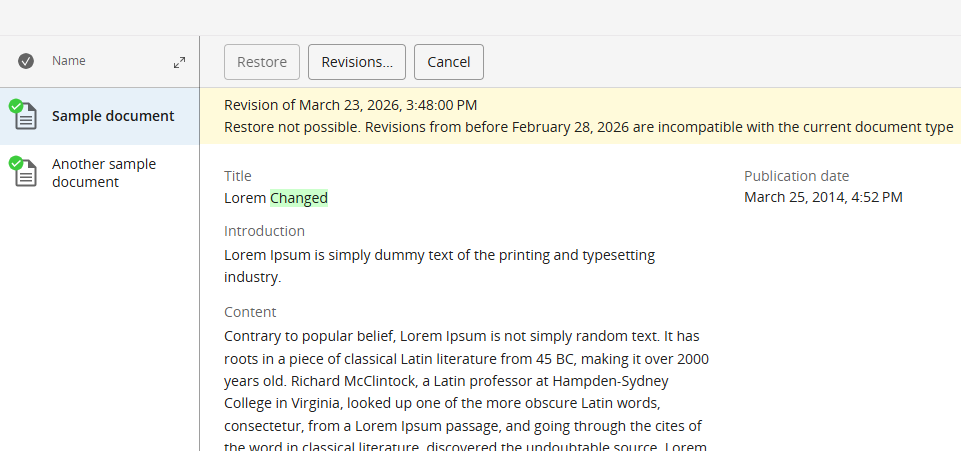
To prevent data corruption from restoring outdated document revisions after breaking content model changes, administrators can now set a date threshold. Editors cannot restore revisions older than this date, but can still view and compare all historical versions.
Configure this restriction via a JCR property or system variable. For details, see Configure a Revision Compatibility Date on Document Types.
Repository Node Type Definition (CND) Changes
This release includes the following node type definition changes:
- Added
hipposysedit:revisionscompatiblefrom (date)to thehipposysedit:nodetypedefinition. - Added
hippostdpubwf:publicationReason (String)andhippostdpubwf:depublicationReason (String)to thehippostdpubwf:documentmixin. - Added
hst:multiple (boolean)to thehst:dynamicparameterdefinition.
Important:
Upgrading to 16.8.0 introduces CND changes that prevent simple rollback by redeploying the previous distribution on the upgraded repository. To downgrade, restore from a full repository backup taken before the upgrade.
Ongoing Enhancements and Fixes
End User Improvements
Experience Manager
- Component reordering via drag-and-drop now updates immediately.
- The Component Details panel consistently expands in preview mode.
- Editors can now discard unsaved changes without navigating away.
- A save notification appears after reordering menu items.
- Channel and Component properties now support multi-select lists.
- Dynamic parameter configuration supports multiple values per parameter.
- HST components configured via annotations can now define multi-value parameters.
Homepage 2.0
- Pending Requests widget links now open the correct document in the editor.
- The 'Change Password' link is hidden when the feature is not configured.
Content Editor
- Document tabs remain open when switching between Content and Experience Manager perspectives.
- Resource bundles with `${`` patterns can be deleted without error.
- Documents with invalid or missing taxonomy values no longer cause NullPointerExceptions.
- Depublish Dialog selections remain visible when switching filters.
- The Site References tab now displays document names inline for easier reference tracking.
AI Content Assistant
- The 'Ask AI' button is disabled when a modal dialog is open.
- Conversation history displays visited CMS documents per session.
- Editors can remove references from active conversations, excluding them from further AI interactions.
Developer-Focused Updates
AI Content Assistant
- The
completions-pathproperty can now be set explicitly for OpenAI-compatible endpoints. - LiteLLM has a dedicated connector under the
spring.ai.litellm.*namespace. Migration is optional but recommended. - The
brxm.ai.pdf.max-sizeproperty limits the maximum size for AI-processed PDFs. - When no AI provider is configured, startup log entries are now at INFO level.
OpenUI
- OpenUI field extension values are now returned by the API regardless of rendering context.
Content Model & Configuration
- The Add button label for optional and multiple-value fields is now configurable via
cluster.options.addButtonLabel.
Platform & Stability
- JCR nodes accessed via relative paths now resolve reliably under concurrent load.
- Translation operations generate fewer log entries at appropriate severity levels.
- This release includes multiple third-party library upgrades. See the 16.8.0 Detailed Release Notes.
- Security updates address multiple vulnerabilities. Upgrade to 16.8.0 is recommended.
Bloomreach SPA SDK Updates
SPA SDK 27.1.0 – Angular 21 and Nuxt 4 Support
SPA SDK 27.1.0 adds support for Angular 21 and Nuxt 4, enabling development with the latest front-end frameworks. See the SPA SDK 27.1.0 release notes for details.
Bloomreach Cloud Updates
Enhanced Indexing Process
Bloomreach Cloud introduces a new Lucene index creation process to improve system stability:
- Regularly creates a fresh Lucene index for deployments, reducing the risk of index corruption and system unavailability.
- Reduces manual intervention and support escalations related to index issues.
Professional Services Plugin Newsletter
Folder Context Menus v7.2.0
- Move and copy permissions are now separate:
folderctxmenus:copyandfolderctxmenus:move. The previousfolderctxmenus:editorprivilege remains for backward compatibility. - Bulk operations display a live progress panel with item count, percentage complete, estimated time, and current path. Users can cancel operations in progress.
See the Folder Context Menus release notes for details.
Camel Event Bus v5.3.0
Now supports brXM 16.7.0. See the Camel Event Bus release notes.
B.R.U.T. v5.2.0
Parent POM updated to brXM 16.7.0. See the B.R.U.T. release notes.
Inference Engine v6.0.1
Upgraded for compatibility with brXM v16.6.4. See the Inference Engine release notes.
Translations Add-on v8.0.0
- Added support for translating nested compound types, including compounds that support reordering and adding items.
- Translations can now overwrite the target document directly.
See the Translations Add-on release notes.
Text Find & Replace v4.0.1
Maintenance release for compatibility with brXM 16.7.0 and above. See the Text Find & Replace release notes.
Upgrade Assistance from Bloomreach Experts
The Bloomreach Professional Services team offers upgrade support for Bloomreach Content projects. Services include:
- Upgrade Assessment: A three-day evaluation of your current systems and infrastructure, resulting in a detailed report with an executive summary, overview of major changes, recommended upgrade procedure, and a comprehensive list of findings.
- The assessment fee is fully refundable if you proceed with Professional Services for the upgrade.
Contact your account manager to request upgrade assistance.
Notices
Important Notes for AI Module
Breaking Change – OpenAI Completions Path Property Renamed
In v16.8.0, the configuration property for the OpenAI provider's completions path has changed. Update your JCR configuration before upgrading.
| Before | After |
| spring.ai.openai.chat.options.completions-path | spring.ai.openai.chat.completions-path |
JVM Default Time Zone on Bloomreach Cloud
When running brXM v16.x on Bloomreach Cloud, the JVM default time zone is UTC. Any date/time processing that relies on the JVM default time zone will use UTC.
Changing the Time Zone Behavior
- CMS UI time zone: Configure the login page time zone dropdown to allow users to select their time zone at login, defaulting to the browser time zone. You can also configure a single time zone for all users. See: Configure the CMS login page (time zone selection dropdown)
- JVM default time zone: Set the time zone as a JVM system property by uploading a properties file (e.g.,
user.timezone=Europe/Amsterdam) and configuring it during deployment.
Minor Release
Version 16.8 is a minor release and is backward compatible with the previous minor version. Upgrading from v16.7 to v16.8 requires minimal effort. See upgrade instructions for enterprise customers (login required) and the overview of minor version upgrade instructions.
Supported Technologies
For full system requirements and a comprehensive compatibility table, see the system requirements documentation.
End-of-Life, Support, and Maintained Code
Terminology
- Supported product version: Customers receive helpdesk support as described in their service level agreement (SLA). If a bug is found in a supported but non-maintained version, fixes are only applied to maintained versions. Customers must upgrade to receive the fix.
- Maintained product version: The product code receives security and bug fixes, and system requirements for third-party libraries are kept current. Bloomreach supports only certified system requirement providers.
For more details, refer to the full documentation.