brXM V16.3 Release Notes
Highlights for v16.3
brXM version 16.3 introduces new features, technical stack upgrades, and product improvements. This document summarizes the key updates in this release. For a complete overview of release notes, see Release Notes Overview.
All features described here are part of Bloomreach Content unless otherwise specified.
Significant Updates
Bulk Workflows with Advanced Link Management
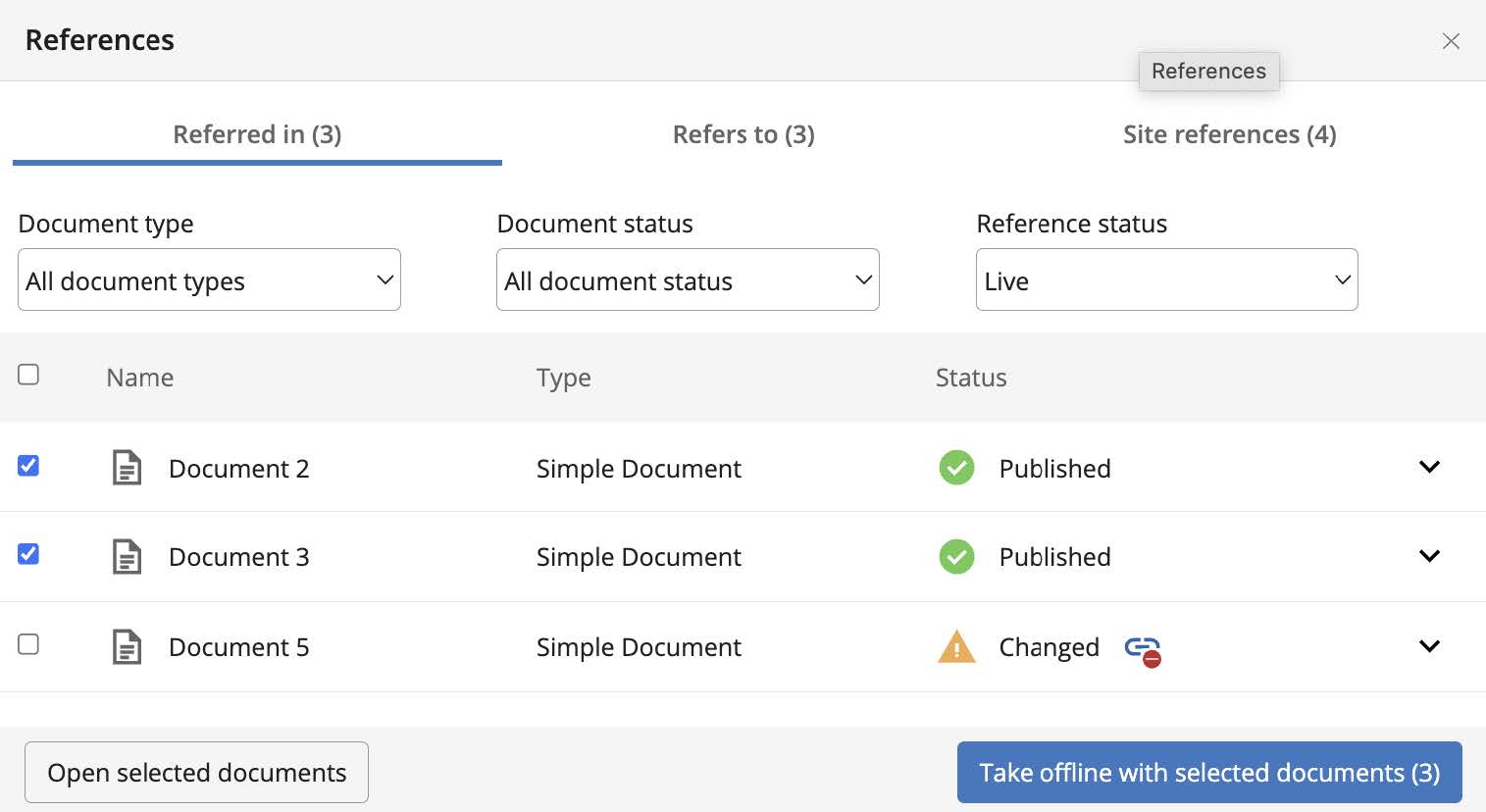
Phase 2 of advanced link management is now available. This feature improves visibility and management of references to documents, images, and assets across components, pages, and projects. Editors and authors can now track references more efficiently. As of v16.3, the feature supports concurrent publication for direct references, enabling more robust workflow management for referenced content.
Feature Capabilities
- Track and manage usage of specific documents, images, or assets across the platform. (Available since v16.2)
- Identify the impact of changes to a document or asset on related pages or components. (Available since v16.2)
- Support concurrent publication workflows for direct references, reducing manual effort and minimizing errors. (Available since v16.3)
Key Benefits
- Improved visibility for referenced documents and assets in components, documents, and pages.
- Streamlined concurrent publication workflows for referenced documents.
- Increased efficiency and accuracy in content management processes.
- Reduced time spent on manual reference management.
For details, see References in Content documentation.
Improved Content Request Management
Advanced Search and pending request handling have been enhanced to improve content management efficiency:
- Pending Requests Panel Enhancements:
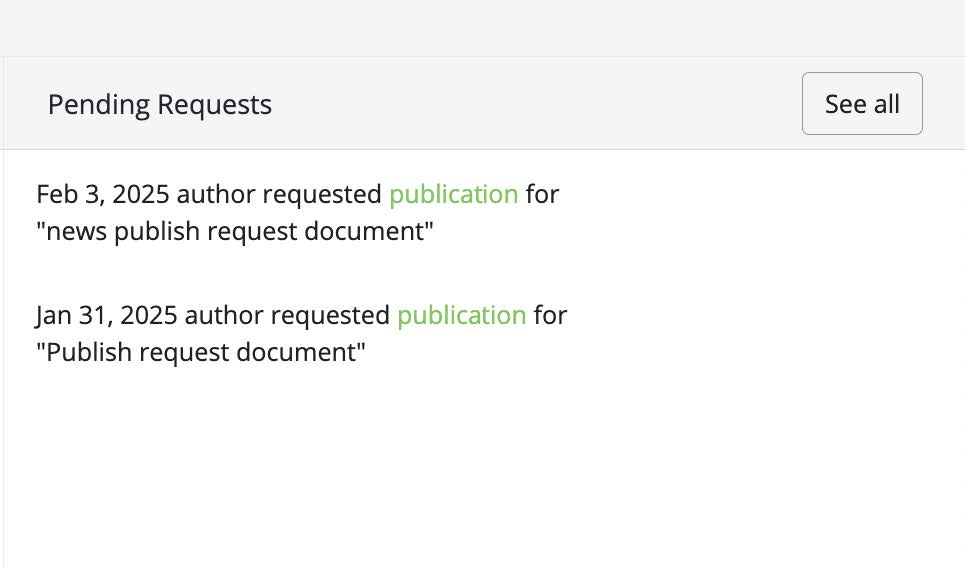
- Added a "See all" button to redirect users to the Advanced Search page, displaying all documents with pending requests.
- The Document Search page now automatically fetches documents with pending requests, allowing users to publish or take offline relevant documents directly from the search interface.
-
Document Search Page Enhancements:
- Added a column indicating whether a document has a pending request ("Yes" or "No").
- Introduced a status filter for pending requests, enabling users to filter documents by pending request status.
-
Bulk Request Processing:
- Users can now accept or reject multiple pending requests in bulk directly from the Search Page.
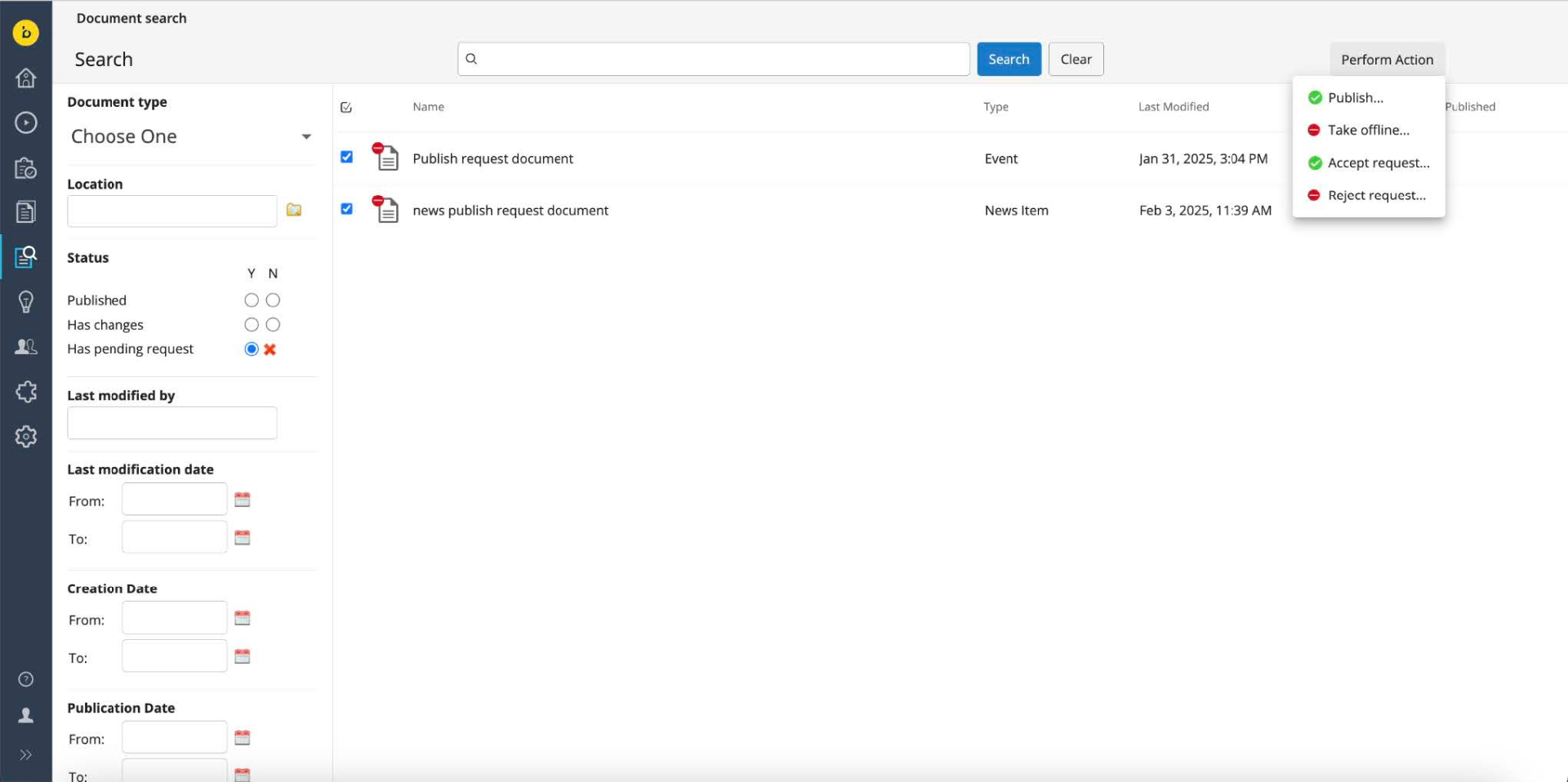
These updates reduce manual effort and improve the efficiency of managing pending requests.
For more information, see Advanced Search documentation.
Automated Translation Link Adaptation
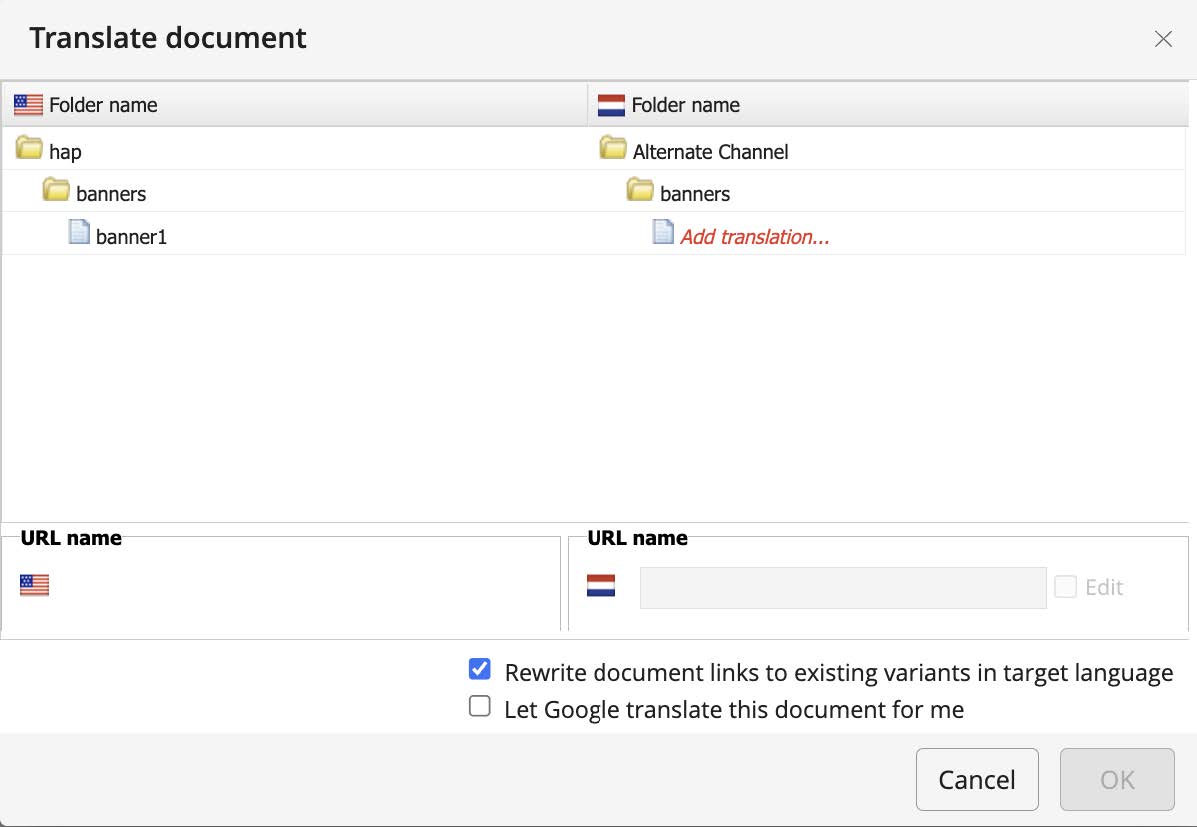
When copying a document for translation, links are now automatically updated to the target locale if a translated version of the link exists. This eliminates manual link updates and ensures that translated documents contain correct, locale-specific links, reducing the risk of broken or incorrect references.
WebP Image Format Support
brXM 16.3 supports storing and serving WebP images. WebP provides improved image compression and can enhance website performance.
- WebP is now a default allowed extension.
- Scaling and cropping for WebP imagesets are not supported out-of-the-box due to the lack of a stable, native-free Java library for WebP manipulation.
- To enable scaling and cropping, add a Java library such as
webp-imageioor implement a custom gallery processor by overridingScalingGalleryProcessor#handleMissingProcessor.
For implementation details, see Image and Asset Upload Validation documentation.
Ongoing Enhancements and Fixes
End User Improvements
- Resolved an issue where switching between Channel Manager and Content Perspective via NavApp caused the CMS to become unresponsive.
- The language translation dropdown now verifies user rights for the target folder before allowing translation creation.
- Fixed a bug where the Visual Editor sometimes failed to display editable fields for documents, especially with optional compound fields. All fields are now correctly displayed and editable.
- Resolved an issue where custom link processors and index sitemap items in configuration led to non-selectable menu items, even when selected.
Developer Updates
- Upgraded
org.apache.commons:commons-imagingfrom version 1.0-alpha2 to 1.0.0-alpha5 for improved stability, security, and compatibility. - Replication can now be disabled at application startup, preventing accidental data replication to incorrect environments during database restoration.
- Fixed an issue where data added via
setModel()for linked documents (beans) was lost in Resource API v1.0 when the bean was picked in Channel Manager. - The CMS now logs a warning instead of an error stack trace if the Relevance Engagement plugin is not configured, reducing unnecessary error output during startup.
Bloomreach SPA SDK Updates
SPA SDK version 24.0.1 (release notes) includes:
- Resolution of critical security vulnerabilities, including the "Vulnerable hardcoded 'cookie' package version" (Issue #43).
- Fixed an exception that occurred when creating a page-specific component variant, which previously prevented the dialog from loading.
Bloomreach Cloud Updates
Sysdig Integration for Enhanced Observability
Bloomreach Cloud now exposes metrics to third-party monitoring tools via a Sysdig API integration. This allows you to pull Sysdig metrics into your monitoring environment for unified monitoring and visualization. The integration uses the Sysdig Prometheus API and supports any monitoring tool compatible with Prometheus data sources.
Key Benefits:
- Consolidate Bloomreach Cloud metrics into existing monitoring dashboards.
- Gain detailed insight into performance trends and resource utilization.
- Streamline troubleshooting and performance optimization.
- Integrate with any Prometheus-compatible monitoring tool.
Getting Started:
To use this feature, contact Bloomreach Support at https://support.bloomreach.com/. The Bloomreach Cloud team will provide a Sysdig API token and configuration instructions.
Upgrade Assistance
The Bloomreach Professional Services team offers upgrade support for Bloomreach Content projects. Services include:
- Upgrade Assessment: A three-day evaluation of your current systems and infrastructure, resulting in a detailed report with an executive summary, overview of major changes, recommended upgrade procedure, and a comprehensive list of findings.
- The assessment fee is fully refundable if you proceed with Professional Services for the upgrade.
To request upgrade assistance, contact your account manager.
Notices
Usage Statistics Module Update
Bloomreach is replacing the vendor for the usage statistics module. You may see errors in your browser's network tab as a result. The new integration is available in versions v16.3, 15.7.2, and 14.7.24. To avoid errors, upgrade to one of these versions or disable statistics collection. For more information, see Usage Statistics documentation.
JVM Default Time Zone on Bloomreach Cloud
When running brXM v16.x on Bloomreach Cloud, the JVM default time zone is UTC. Any date/time processing that relies on the JVM default time zone will use UTC unless explicitly configured.
Changing Time Zone Behavior
- CMS UI Time Zone:
Configure the login page timezone dropdown to allow users to select their timezone at login (defaulting to the browser timezone), or set a single timezone for all users.
See: Configure the CMS login page (time zone selection dropdown) - JVM Default Time Zone:
Set the timezone explicitly as a JVM system property. Upload a properties file (e.g.,user.timezone=Europe/Amsterdam) and configure it as a Java System Properties file during deployment.
Minor Release Details
Version 16.3 is a minor release and is backward compatible with the previous minor version. Upgrading from the previous minor version requires minimal effort. For upgrade instructions, see Upgrade 16.2 to 16.3 (enterprise login required). For an overview of all minor version upgrades in this major release, see Upgrade Introduction.
Supported Technologies
For full system requirements and a detailed table of maintained third-party compatibility, see System Requirements.
End-of-life, Support, and Maintained Code
Terminology
-
Supported Product Version:
Supported versions receive helpdesk support as defined in your SLA. If a bug is found in a supported but non-maintained version, fixes are only applied to maintained versions. To receive a fix, you must upgrade to a maintained version. -
Maintained Product Version:
Maintained versions receive code updates, security fixes, and bug fixes. System requirements for third-party libraries and components are kept updated. Bloomreach does not provide support for third-party providers (e.g., databases, Java), only for certified system requirement providers. -
End-of-life Product Version:
Versions that are not maintained or supported are considered end-of-life. These may be available from archives but can be removed without notice.
Current Release Support Status
The table below lists support status and planned end dates for each version. Versions not listed are not active or supported and are considered end-of-life.
| Version | Planned end date of Standard Support | Planned end date of Premium Plus Support | Original major version release date |
|---|---|---|---|
| 12.6 | No Support | No support | July 2017 |
| 13.4 | No Support | No support | January 2019 |
| 14.7 | December 2024 | December 2025 | December 2019 |
| 15.7 | December 2025 | December 2026 | April 2022 |
| 16.3 | December 2026 | December 2027 | June 2024 |
The versions highlighted in orange are actively maintained and receive bug fixes and product improvements.
Security Notes
This release includes updates to third-party dependencies with published vulnerabilities. Keep your systems up to date with the latest product releases.
Availability
brXM 16.3 is available as of April 14, 2025. The open source release will be available approximately two years later, in line with the Bloomreach release policy.