brXM V16.7 Release Notes
Overview
brXM version 16.7 introduces new features, technical stack upgrades, and improvements. This release note summarizes the key changes and enhancements included in this version. For a complete list of release notes, see the Release Notes Overview.
All features described here are part of Bloomreach Content unless otherwise specified.
Significant Updates and New Features
Role-Based Access for AI Content Assistant
You can now control access to the AI Content Assistant feature using role-based access management. This update allows you to:
- Restrict AI Content Assistant usage to specific users or groups by assigning a dedicated user role. Users without this role will not see the AI Content Assistant button in their interface.
- Roll out the feature incrementally by enabling it for a pilot group before expanding access.
This update supports organizations that want to test or govern AI usage, or provide phased training for new capabilities.
For configuration details, see Initialize and configure the AI Content Assistant.
PDF Support in AI Content Assistant
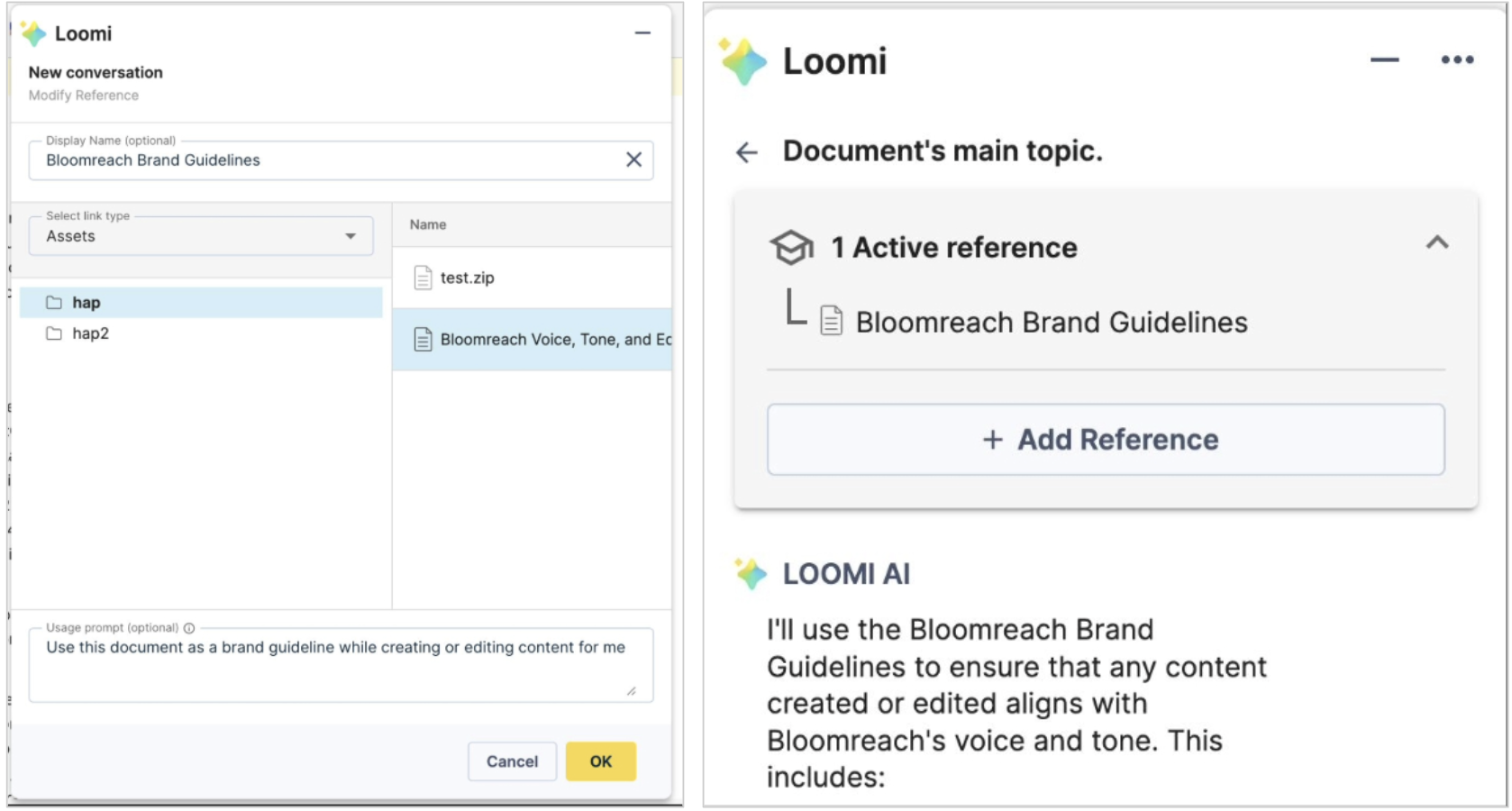
The AI Content Assistant now accepts PDF documents as both primary context and reference materials in conversations. This enhancement enables you to:
- Use any PDF asset from your CMS as context for AI-powered content generation.
- Reference PDF versions of brand, legal, or accessibility guidelines in AI conversations.
- Ensure content generated by the AI complies with your documented standards.
This feature helps maintain content consistency by allowing the AI to access your organization’s guidelines in their original PDF format.
AI Content Assistant Demo and Feedback
If the AI Content Assistant is not enabled in your project, you can try it in the demo environment:
- Explore the feature at Bloomreach Content Demo.
- Provide feedback and share your requirements through the AI Adoption and Vision Survey.
Your input will help guide future AI development.
Angular Upgrade for Channel Manager, Projects, and Navigation Applications
The Angular framework used in Channel Manager, Project Management, and Navigation Application has been upgraded from Angular v12 to v21. This upgrade provides:
- Long-term framework support and alignment with the latest Angular ecosystem.
- Improved performance and stability through updated rendering and runtime optimizations.
- Access to modern Angular features and tooling for more efficient development.
- Enhanced security by removing deprecated dependencies and adopting security improvements.
This upgrade is transparent to end users and does not introduce functional changes. Developers and integrators benefit from a more maintainable and extensible codebase.
Enhanced SVG Security
SVG file upload security has been improved with a configurable SVG validator. This validator:
- Allows you to tailor validation rules to your organization’s security requirements.
- Blocks potentially harmful SVG files from being uploaded.
- Applies validation automatically during the upload process.
For more information, see Media Validation Service and Image and asset upload validation.
Refactored CMS File Uploads
The deprecated Blueimp File Upload frontend library has been replaced with FilePond, removing the dependency on jQuery 1 and addressing related security concerns.
The following internal Wicket classes have been removed or refactored:
org.hippoecm.frontend.plugins.jquery.upload.multiple.FileUploadBarorg.hippoecm.frontend.plugins.jquery.upload.multiple.FileUploadTemplateorg.hippoecm.frontend.plugins.jquery.upload.multiple.FileDownloadTemplateorg.hippoecm.frontend.plugins.jquery.upload.single.FileUploadBar
If your implementation customizes or extends these classes, review and update your code when upgrading to 16.7.0.
Repository Node Type Definition (CND) Change
This release adds the property hst:localnetworkaccessenabled (boolean) to the hst:channel node type definition.
Important:
A simple rollback is not supported after this CND change. You cannot revert to a previous version by redeploying the earlier distribution or swapping binaries/containers on an upgraded repository. To downgrade, restore from a full repository backup taken before the upgrade.
Ongoing Enhancements and Fixes
For End Users
- Fixed an issue where the '+ Add' button in compound fields malfunctioned when multiple documents were open.
- Resolved a problem where text fields in the CMS did not receive keyboard focus on click.
- Fixed the document picker retaining previous selections after an error.
- Improved compression for cropped PNG images, resulting in smaller file sizes.
- The notification banner in documents now displays only the latest request status and includes the creation date and time.
- Added an upload progress indicator and disabled the 'Done' button until uploads complete for large documents.
- Enabled configuration of multiple validation rules on a single content block.
- Improved performance of the Advanced Link Management modal.
- Fixed a session crash issue when two editors used the same perspective simultaneously.
- Resolved an issue where the Bulk Workflow Wizard dialog would not close after bulk operations.
- Fixed navigation after copying an XPage to ensure editors can immediately edit the new copy.
- Prevented unintentional image modification during upload.
- Fixed the "Schedule to take offline" function when used with the "Refers to" option.
- Resolved preview failures in the Channel Manager for document names with special or non-ASCII characters.
- Fixed document picker issues when custom field names contained periods.
- Resolved menu tree collapse after adding a new item to second-level nested menus.
- Fixed the Publish request dialog for users without Experience Manager access.
- Enabled file downloads from embedded iFrames by adding the required sandbox attribute.
- Fixed the References dialog box not closing after clicking on documents.
- Resolved caching issues in the Document Translation Picker Plugin v7.0.0.
- Improved dashboard performance by limiting recent activities retrieved.
- Fixed the "Show References" action to display references from the Channel Manager.
- Resolved saving issues for advanced menu item settings.
For Developers
- Addressed Chrome 142+ CORS restrictions that prevented SPA preview in the Experience Manager iframe. The fix adds the
allow="local-network-access"attribute to the iframe tag. See troubleshooting documentation. - Added warning-level logging for failed image uploads.
- Fixed a caching issue causing the Home 2.0 page to show outdated Bloomreach Content version numbers.
- Introduced the
compressionLosslessparameter for image set variants to control lossless format compression quality. See Create a Custom Image Set and Essentials' Gallery Manager. - Added support for Spring AI's
spring.ai.openai.chat.completions-pathproperty in the AI module, enabling custom API endpoint paths for OpenAI-compatible services. See the OpenAI API Reference. - Deprecated APIs that rely on Jackrabbit RMI connections. These will be removed in Bloomreach Content version 17. See the Notices section for details.
Bloomreach SPA SDK Updates
React Server Components Support (v27.0.0)
The SPA SDK now supports React Server Components (RSC) with the @bloomreach/react-sdk/server package. Key features:
- New server-side components:
BrPageServerandBrComponentServerfor RSC rendering. - Backwards compatibility: Existing client components remain unchanged.
- Flexible rendering: Render components in both server and client contexts without maintaining separate versions.
For details, see the SPA SDK 27.0.0 release notes.
Bloomreach Cloud Updates
Enhanced Indexing Process
A new index creation process is being rolled out for Bloomreach Cloud (BRC):
- The process creates a fresh Lucene index for deployments, reducing the risk of index corruption and system unavailability.
- This enhancement improves system reliability and reduces manual intervention and support escalations related to index issues.
Professional Services Plugin Newsletter
Generic Resource Entity Builder (GREB) API v3.0.1
The GREB API has been updated to version 3.0.1, providing full compatibility with brXM v16.x and support for the Jakarta namespace.
Translations Addon v7.3.0 – Environment Variable Support
The Translations Addon now supports environment variables for connector configuration, allowing secure management of API keys and credentials outside the JCR repository. An issue with SFTP connection termination has also been resolved.
Content HAL API v6.1.0 – Security Enhancement
Input validation and sanitization have been added to HAL API input handling, mitigating security vulnerabilities. Upgrading to this version is strongly recommended.
Upgrade Assistance from Bloomreach Experts
The Bloomreach Professional Services team offers upgrade support for Bloomreach Content projects, including an Upgrade Assessment service. This assessment provides:
- Executive summary
- Overview of major changes
- Recommended upgrade procedure
- Comprehensive findings report
The evaluation fee is fully refundable if you proceed with Professional Services for the upgrade. Contact your account manager for more information.
Notices
Deprecated APIs
The following APIs that rely on Jackrabbit RMI connections are deprecated and will be removed in Bloomreach Content version 17:
org.hippoecm.repository.RemoteHippoRepository
org.hippoecm.repository.decorating.client.ClientHierarchyResolver
org.hippoecm.repository.decorating.client.ClientQuery
org.hippoecm.repository.decorating.client.ClientRepository
org.hippoecm.repository.decorating.client.ClientServicesAdapterFactory
org.hippoecm.repository.decorating.client.ClientServicingNode
org.hippoecm.repository.decorating.client.ClientServicingSession
org.hippoecm.repository.decorating.client.ClientServicingWorkspace
org.hippoecm.repository.decorating.client.ClientServicingXASession
org.hippoecm.repository.decorating.client.ClientWorkflowDescriptor
org.hippoecm.repository.decorating.client.ClientWorkflowManager
org.hippoecm.repository.decorating.client.LocalServicingAdapterFactory
org.hippoecm.repository.decorating.remote.RemoteHierarchyResolver
org.hippoecm.repository.decorating.remote.RemoteQuery
org.hippoecm.repository.decorating.remote.RemoteRepository
org.hippoecm.repository.decorating.remote.RemoteServicingNode
org.hippoecm.repository.decorating.remote.RemoteServicingSession
org.hippoecm.repository.decorating.remote.RemoteServicingWorkspace
org.hippoecm.repository.decorating.remote.RemoteServicingXASession
org.hippoecm.repository.decorating.remote.RemoteWorkflowDescriptor
org.hippoecm.repository.decorating.remote.RemoteWorkflowManager
org.hippoecm.repository.decorating.server.RemoteServicingAdapterFactory
org.hippoecm.repository.decorating.server.ServerHierarchyResolver
org.hippoecm.repository.decorating.server.ServerQuery
org.hippoecm.repository.decorating.server.ServerQueryManager
org.hippoecm.repository.decorating.server.ServerRepository
org.hippoecm.repository.decorating.server.ServerServicingAdapterFactory
org.hippoecm.repository.decorating.server.ServerServicingNode
org.hippoecm.repository.decorating.server.ServerServicingSession
org.hippoecm.repository.decorating.server.ServerServicingWorkspace
org.hippoecm.repository.decorating.server.ServerServicingXASession
org.hippoecm.repository.decorating.server.ServerWorkflowDescriptor
org.hippoecm.repository.decorating.server.ServerWorkflowManager
org.hippoecm.hst.core.jcr.pool.BasicPoolingRepositoryFactory
org.hippoecm.hst.core.jcr.pool.MultiplePoolingRepositoryFactory
JVM Default Time Zone on Bloomreach Cloud
When running brXM v16.x on Bloomreach Cloud, the JVM default time zone is UTC. Any date/time processing that relies on the JVM default time zone will use UTC unless explicitly configured.
Changing the Time Zone Behavior
- CMS UI time zone:
Configure the login page timezone dropdown to allow users to select their timezone, defaulting to the browser timezone. You can also configure a single timezone for all users.
See: Configure the CMS login page (time zone selection dropdown) - JVM default time zone:
Set the timezone explicitly as a JVM system property. Upload a properties file containing, for example,user.timezone=Europe/Amsterdamand configure it as a Java System Properties file during deployment.
Minor Release Information
Version 16.7 is a minor release and is backward compatible with the previous minor release. Upgrading from the previous minor version requires minimal effort. For upgrade instructions, see Upgrade from v16.6 to v16.7 (login required) and the overview of minor version upgrade instructions.
Supported Technologies
For full system requirements and a comprehensive compatibility table, see the system requirements documentation.
End-of-Life, Support, and Maintained Code
Terminology
-
Supported product version:
Supported versions receive helpdesk support as described in your service level agreement (SLA). If a bug is found in a supported but non-maintained version, fixes are only applied to maintained versions. You must upgrade to a maintained version to receive the fix. -
Maintained product version:
Maintained versions receive code updates, security fixes, and bug fixes. System requirements for third-party libraries are kept up to date. Bloomreach does not provide support for third-party system requirement providers (e.g., databases, Java), but only for certified providers listed in the documentation. -
Non-maintained product:
Non-maintained versions do not receive updates and may contain unresolved bugs or security vulnerabilities.
[Content truncated]