Configure a Compatibility Date on a Document Type
Info: Available in brXM 16.8.0 and later.
Overview
You can configure a compatibility date on a document type to prevent editors from restoring document revisions that are incompatible with the current content model.
When to Use
Set a compatibility date when your project introduces backward-incompatible changes to a document type. This prevents restoring older revisions that could break the updated implementation.
Prerequisites
- Access to the Console.
- Permission to modify document type definitions.
- Knowledge of your project's namespace and document type names.
Implementation Steps
-
In the Console, navigate to the
nodetypenode for the relevant document type:/hippo:namespaces/[namespace]/[document_type]/hipposysedit:nodetype/hipposysedit:nodetypeReplace
[namespace]and[document_type]with your project's values. For example:/hippo:namespaces/myproject/contentdocument/hipposysedit:nodetype/hipposysedit:nodetype -
Add a
Dateproperty namedhipposysedit:revisionscompatiblefromwith the desired compatibility date. For example:/hippo:namespaces/myproject/contentdocument/hipposysedit:nodetype/hipposysedit:nodetype: hipposysedit:revisionscompatiblefrom: 2026-03-31T00:00:00.000Z -
Save your changes to the repository.
In local development, this change is typically auto-exported to a YAML file for inclusion in your project's release package.
Verification
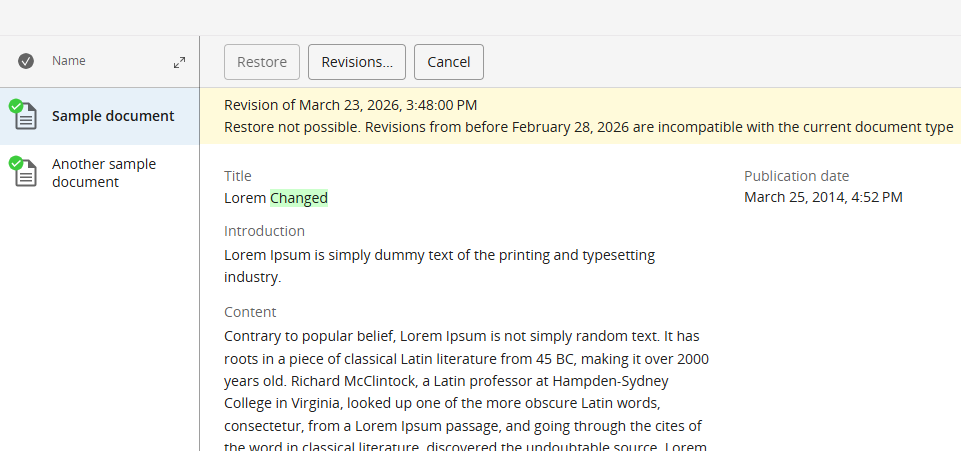
When an editor views the revision history for a document, any revision dated before the configured compatibility date will have the Restore button disabled. An informational message explains why the restore action is unavailable.