brXM V16.4 Release Notes
Highlights for v16.4
brXM version 16.4 introduces new features, technical stack upgrades, and product improvements. This document summarizes the key changes in this release. For a complete overview of release notes, see the release notes overview.
All features described here are part of Bloomreach Content unless otherwise specified.
Significant Updates
AI Content Assistant (BETA), Powered by AI Content Assistant
The new AI Content Assistant is available as a beta feature in brXM 16.4. This assistant, powered by AI Content Assistant, integrates AI capabilities into the CMS to support content creation and management tasks.
With the AI Content Assistant BETA, you can:
- Automatically generate metadata tags.
- Receive SEO optimization suggestions.
- Check and correct spelling and grammar.
- Generate content summaries or expand content.
- Create and translate multilingual content.
- Access AI-powered assistance through the chat assistant.
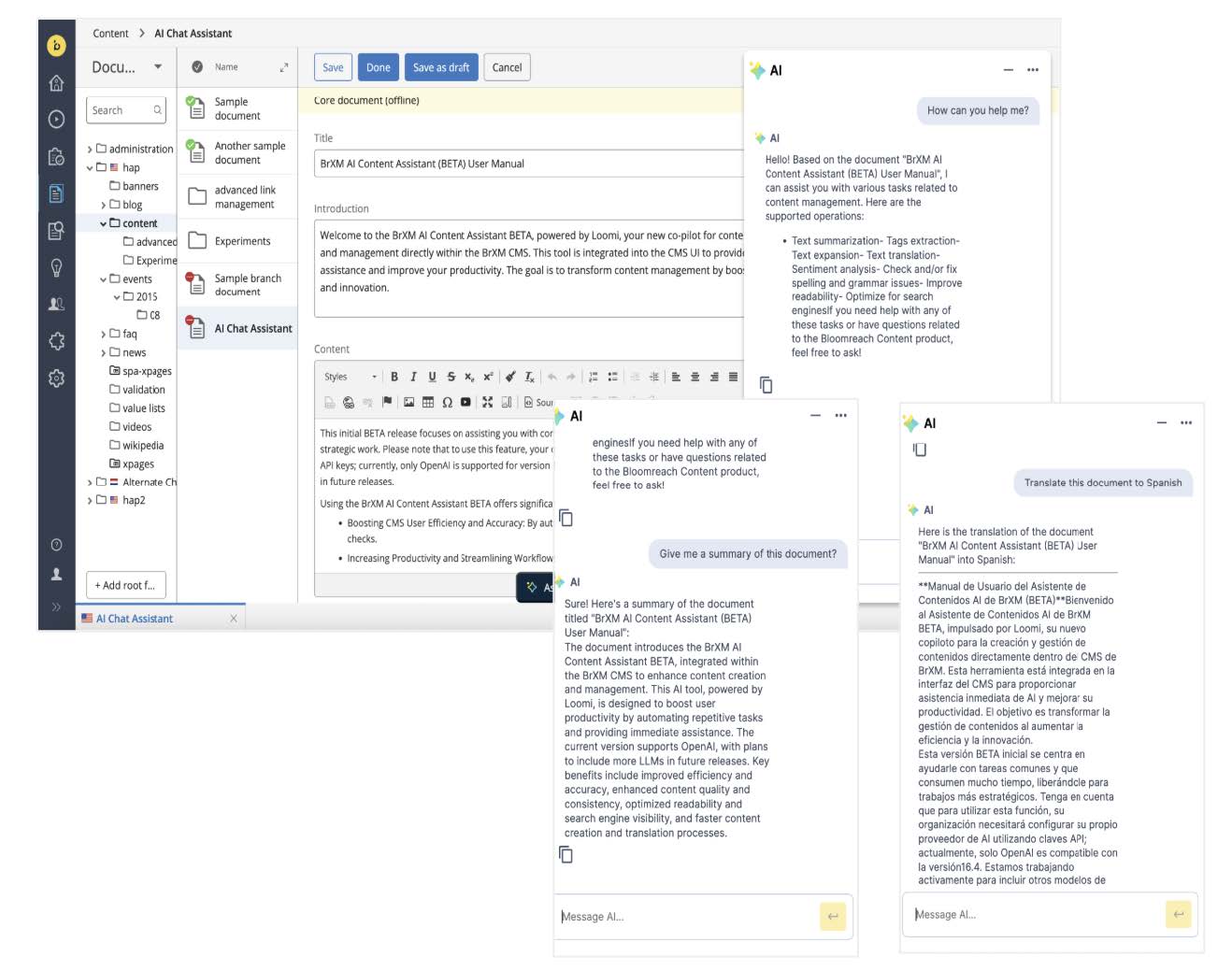
This beta release is the first step toward AI-driven content management in Bloomreach Content. Future releases will introduce additional features, such as broader contextual awareness and automated actions.
Important: To use this feature, configure your own AI provider using API keys. Version 16.4 supports only OpenAI. Support for additional large language models (LLMs) is planned for future releases.
For implementation details, refer to the User Manual and Developer Guide.
Ongoing Enhancements and Fixes
For End Users
- Added
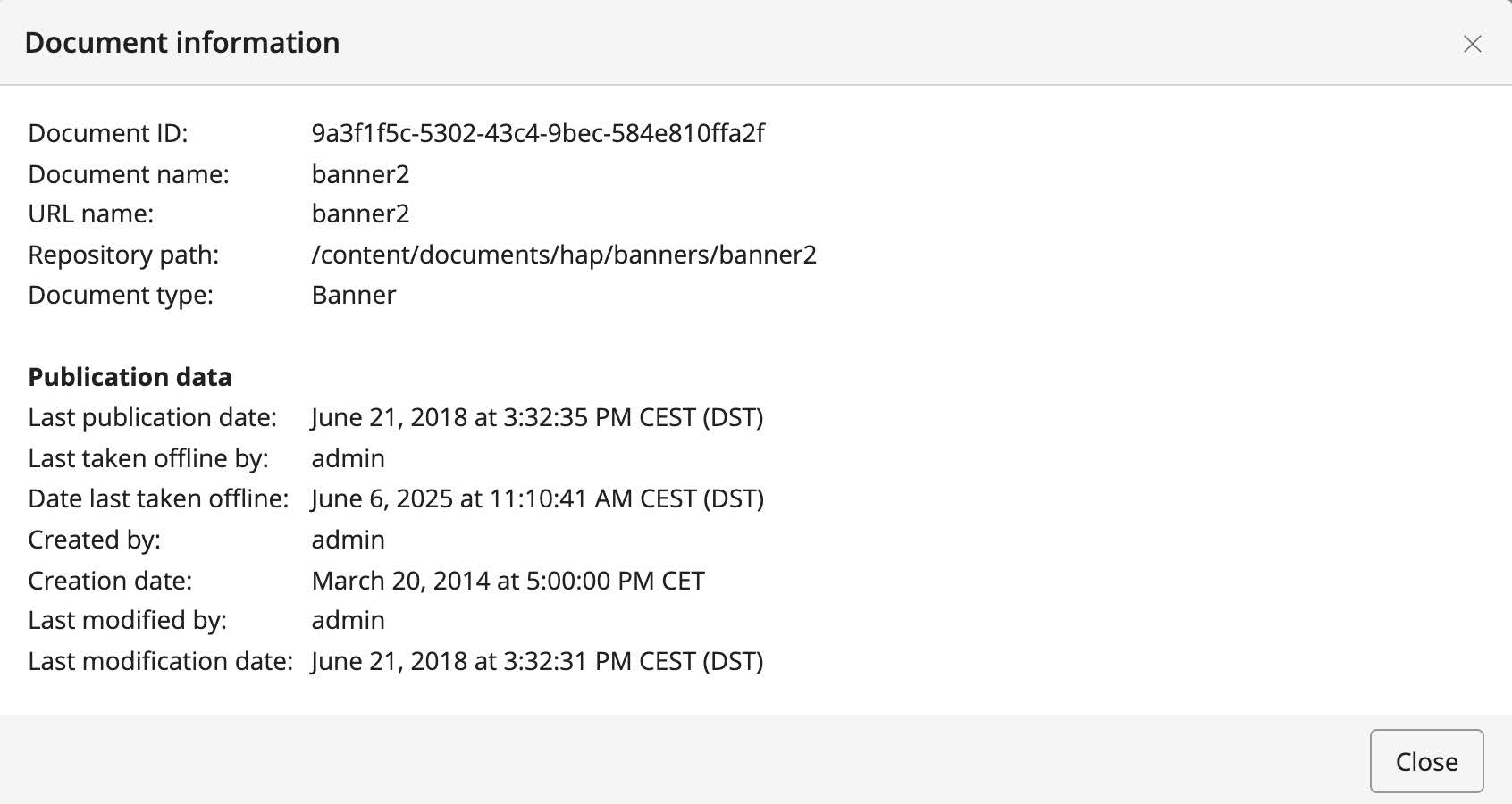
depublicationDateanddepublishedByproperties to the published document variant. These are now visible in the document information dialog.
- Corrected the display of the max items text in the Experience Manager text field.
- Fixed an issue where creating Experience pages resulted in standard documents when multiple layouts were configured.
- Updated the Advanced Search panel to allow document selection for custom workflows, even for users without
hippo:editorprivileges. TheSearchViewPluginnow includes a configuration option to align permission checks with custom workflows. - Resolved an issue where Experience Manager content did not load if a page was locked by another user. Previously, this caused a 403 error and prevented the content tab from loading or being canceled.
- Fixed content loading issues in Experience Manager when pages were not locked.
- Corrected the "switch to the content editor" link in Experience Manager when German is set as the UI language.
- Fixed the delete document dialog for non-admin users, which previously required a page refresh after deletion.
- Updated the Site References tab to display linked menu items for components.
- Fixed an issue where the location field was empty in Site References when a menu item referred to a sitemap item by
refId. The correct sitemap item location now displays. - Resolved an issue where the application became unresponsive after switching views from Experience Manager and canceling component changes.
- Fixed the offline status icon for linked documents in Experience Manager component properties.
- Addressed an issue where the delete document dialog for non-admin users could not be dismissed after successful deletion, often resulting in a NullPointerException.
For Developers
- Removed orphaned text from
hst-core.tld. - Fixed a regression caused by a JSON library change that affected eForm message serialization. The UI now displays the correct messages.
Bloomreach SPA SDK Updates
The latest Bloomreach SPA SDK release, v24.1.0, adds support for React 19. Documentation, React examples, and Next.js examples have been updated to use React 19 and Next.js 15. For details, see the SPA SDK release notes.
Bloomreach Cloud Updates
Sysdig Integration for Enhanced Observability
Bloomreach Cloud now supports integration with Sysdig, enabling you to expose Bloomreach Cloud metrics to third-party monitoring tools. This integration uses the Sysdig Prometheus API, allowing you to pull metrics into your monitoring environment for unified visualization and analysis. Bloomreach uses Sysdig internally to monitor all Cloud stacks.
Key benefits:
- Consolidate Bloomreach Cloud metrics with your existing dashboards.
- Gain visibility into performance trends and resource utilization.
- Streamline troubleshooting and optimization with unified metrics.
- Integrate with any monitoring tool that supports Prometheus data sources.
Getting started:
To use this integration, configure your monitoring tool with the Sysdig API token provided by the Bloomreach Cloud team. Contact Bloomreach Support to request access and configuration instructions.
Professional Services Plugin Updates
Several Bloomreach Forge plugins maintained by the Professional Services team have new versions:
- Bloomreach Camel Event Bus Support Plugin (v5.1.0): Integrates Bloomreach Content with Apache Camel for event-driven architectures. See release notes for details.
- Content Export / Import Plugin (v6.1.0): Enhances content migration and synchronization. See release notes.
- JCR Pojo Bind Plugin (v3.1.0): Simplifies mapping Java POJOs to Bloomreach Content's JCR content. See release notes.
- Gallery Magick Image Processing Plugin (v4.1.0): Updates ImageMagick integration for advanced image processing. See release notes.
Upgrade Assistance from Bloomreach Experts
The Bloomreach Professional Services team offers upgrade support for Bloomreach Content projects. Services include:
- Full project upgrade execution to the latest Bloomreach Content version.
- Upgrade Assessment: A 3-day evaluation that provides a detailed report, including:
- Executive summary
- Overview of major changes
- Recommended upgrade procedure
- Comprehensive list of findings
The evaluation fee is fully refundable if you proceed with Professional Services for the upgrade. Contact your account manager for more information.
Notices
JVM Default Time Zone on Bloomreach Cloud
When running brXM v16.x on Bloomreach Cloud, the JVM default time zone is UTC. Any date/time processing that relies on the JVM default time zone will use UTC unless explicitly configured.
Changing the time zone behavior:
- CMS UI time zone:
Configure the login page timezone dropdown to allow users to select their timezone at login, defaulting to the browser timezone. You can also set a single timezone for all users.
See: Configure the CMS login page (time zone selection dropdown) - JVM default time zone:
Set the timezone explicitly as a JVM system property. Upload a properties file (e.g.,user.timezone=Europe/Amsterdam) and configure it as a Java System Properties file during deployment.
Minor Release
Version 16.4 is a minor release and remains backward compatible with the previous minor release. Upgrading from the previous minor version requires minimal effort. For upgrade instructions, see the upgrade guide (login required). An overview of all minor version upgrade instructions is available here.
Supported Technologies
System requirements and maintained third-party compatibility details are available in the system requirements documentation.
End-of-Life, Support, and Maintained Code
Nomenclature
Definitions for support and maintenance terms used in this documentation:
Supported Product Version
A supported product version is eligible for helpdesk support according to your service level agreement (SLA) with Bloomreach. Multiple service levels are available.
If a bug is found in a supported but non-maintained version, fixes are applied only to maintained versions. To receive a fix, you must upgrade to a maintained version.
Maintained Product Version
A maintained product version receives code updates, security patches, and bug fixes. System requirements for third-party libraries and components are kept current. Bloomreach supports only the use of certified system requirement providers, not the providers themselves.
Non-maintained versions do not receive updates and may contain unresolved bugs or security vulnerabilities.
End-of-Life Product Version
End-of-life versions are neither maintained nor supported. These versions may be available in archives but can be removed without notice.
Current Release Support Status
This release introduces changes to maintenance and support status. The table below lists support timelines for each product version. Versions not listed are considered end-of-life.
| Version | Planned end date of Standard Support | Planned end date of Premium Plus Support | Original major version release date |
|---|---|---|---|
| 12.6 | No Support | No support | July 2017 |
| 13.4 | No Support | No support | January 2019 |
| 14.7 | December 2024 | December 2025 | December 2019 |
| 15.7 | December 2025 | December 2026 | April 2022 |
| 16.4 | December 2026 | December 2027 | June 2024 |
Supported versions may differ based on contractual agreements. Versions highlighted in orange are actively maintained and receive bug fixes and improvements.
Security Notes
This release updates third-party dependencies with published vulnerabilities. Keep your systems current with announced product releases.
Availability
brXM v16.4 is available as of January 29, 2025. The open source release will be available approximately two years later, following Bloomreach's release policy.
Links
[1] User Manual: AI Content Assistant
[2] Developer Guide: AI Content Assistant
[3] SPA SDK Release Notes
[4] Camel Event Bus Support Plugin
[5] Content Export / Import Plugin Release Notes
[6] JCR Pojo Bind Plugin Release Notes
[7] Gallery Magick Plugin Release Notes
[8] Upgrade Guide: 16.3 to 16.4
[9] Minor Version Upgrade Overview
[10] System Requirements