brXM V16.6 Release Notes
Warning: Version 16.6.0 is deprecated. Upgrade to the latest available patch release in the 16.6 series (for example, 16.6.5 or higher).
Highlights for v16.6
brXM version 16.6 introduces new features, technical stack upgrades, and product improvements. This document summarizes the key changes in this release. For a complete overview of release notes, see the release notes overview.
All features described here are part of Bloomreach Content unless stated otherwise.
Significant Updates
Expanded Context and History for AI Content Assistant
This release extends the AI Content Assistant with additional capabilities to support advanced content workflows.
Expanded Contextual Awareness (References):
The AI chat assistant can now reference multiple documents from the CMS repository, not just the currently open document. This enables the assistant to use a wider range of internal content for tasks such as generating new content with specific guidelines or creating personalization variants. Document access respects the current user's permissions.
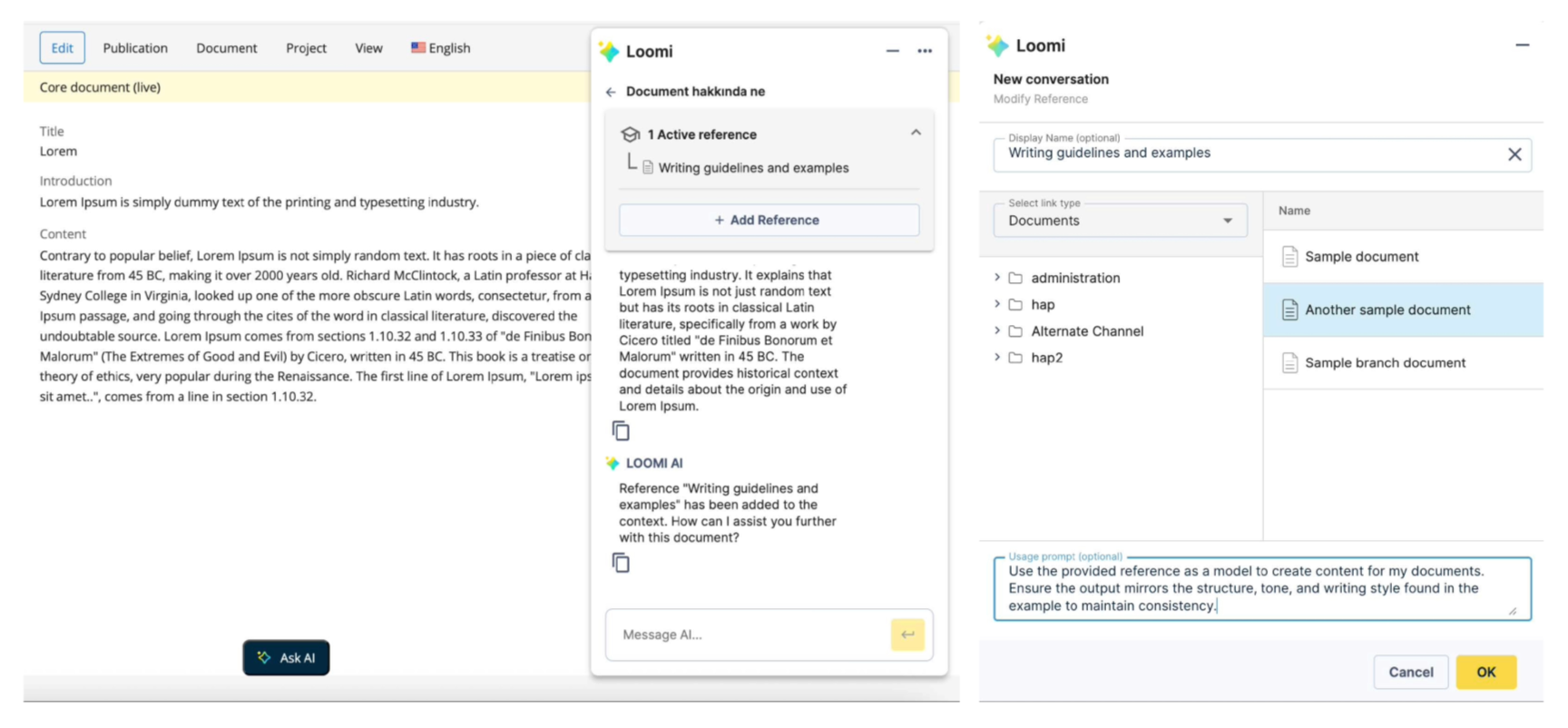
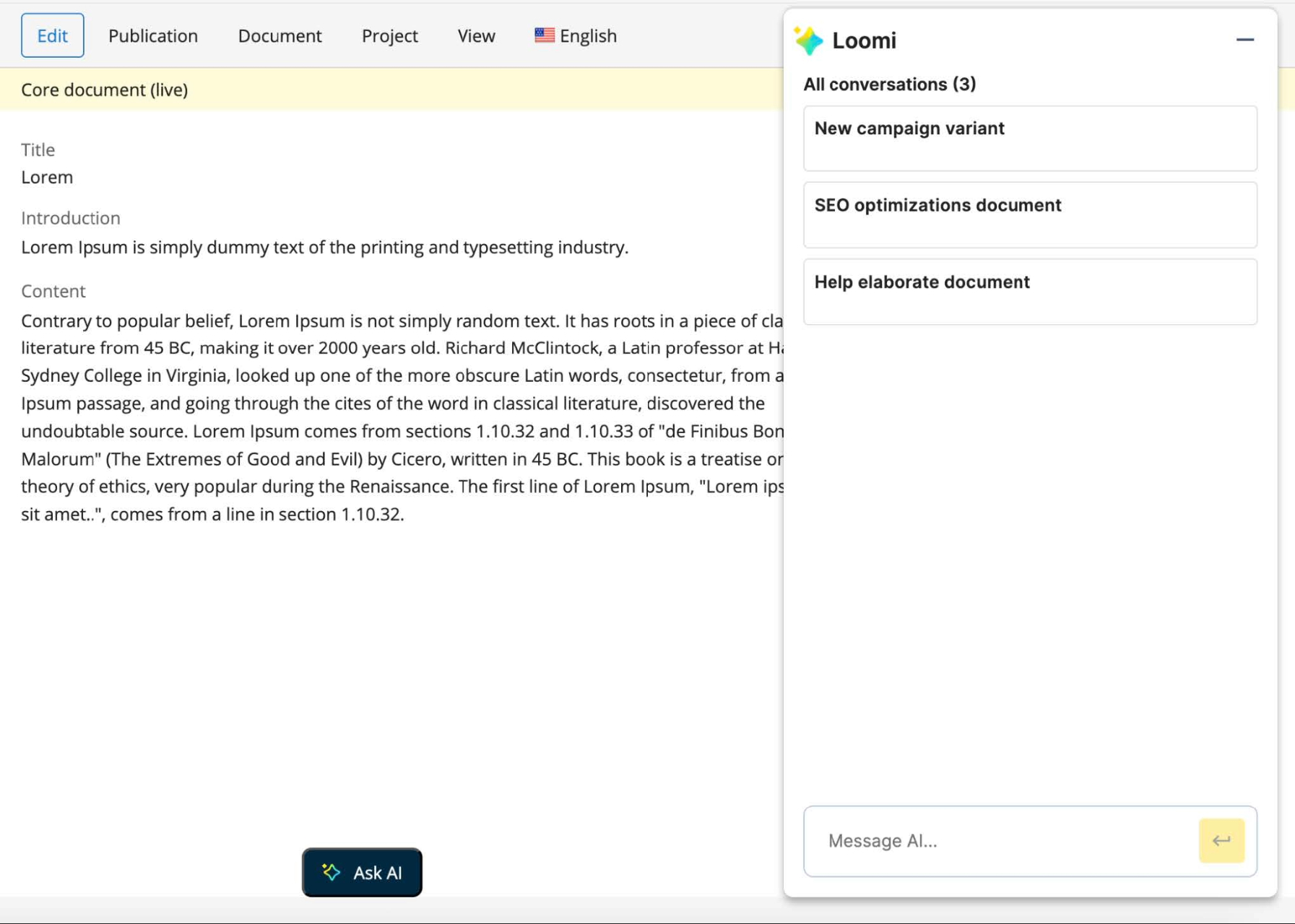
Persistent Chat History:
The assistant now maintains conversation history for the duration of your session on the same server. You can continue previous discussions and retain context across multiple tasks. New conversations are automatically titled using AI-generated descriptive names. Administrators can configure a maximum message limit per conversation in the AI Content Assistant settings to manage usage and maintain a focused context window.
For details, see the AI Content Assistant user guide.
Audit Logging
All AI interactions are now logged to support auditing and compliance requirements.
LiteLLM Support
The AI Content Assistant now supports LiteLLM, allowing integration with a broader range of large language models. You can connect your LiteLLM account to use these models within the assistant.
For implementation details, see the AI Content Assistant developer guide.
Homepage 2.0
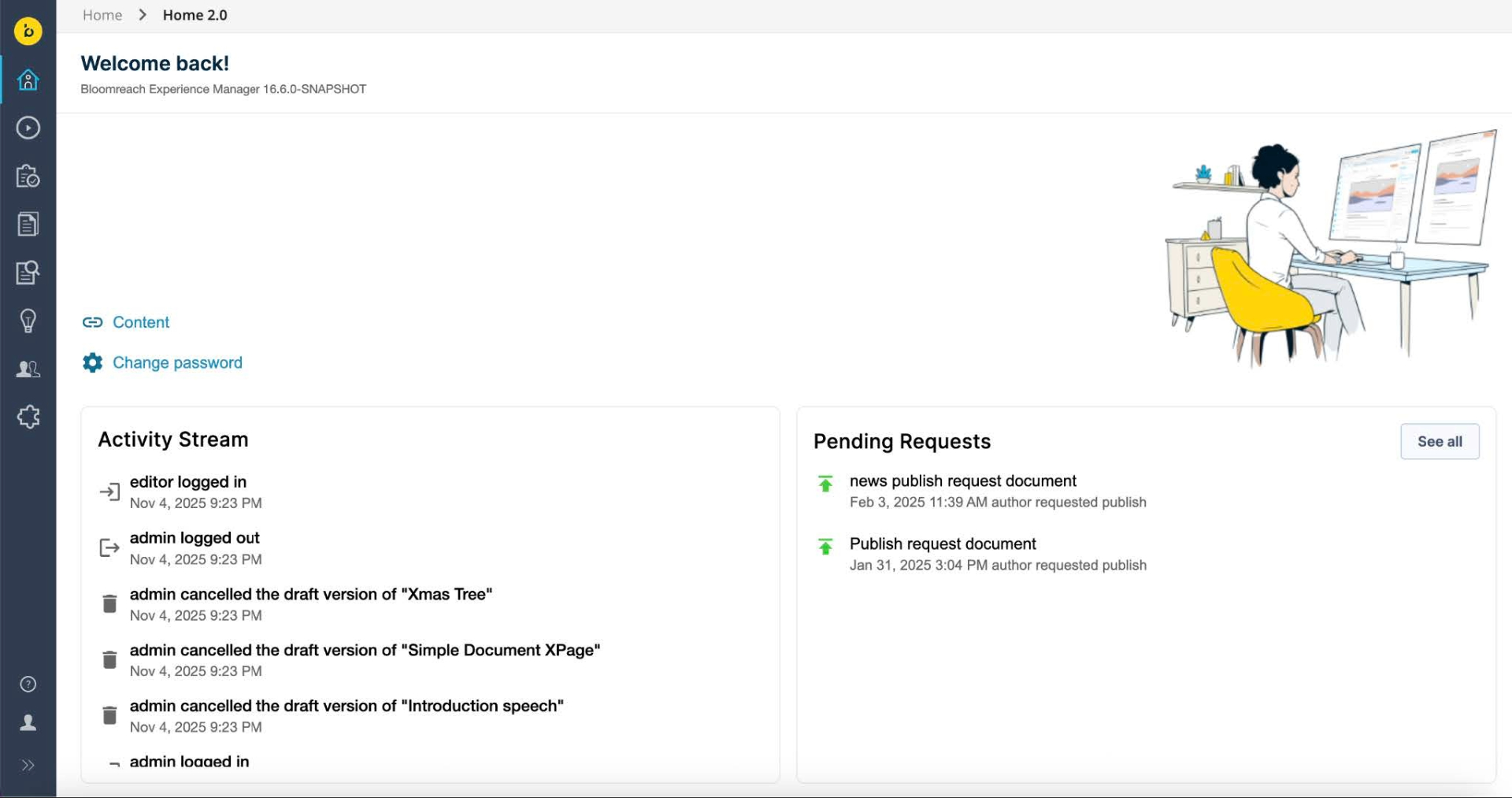
Homepage 2.0 introduces a redesigned CMS homepage built with the Angular framework. This release is part of the ongoing initiative to modernize the Bloomreach Content UI and replace legacy Wicket-based applications.
Modern Architecture and Performance
Homepage 2.0 uses Angular to deliver a more secure, maintainable, and responsive user interface. Key components such as the Activity List and Pending Requests now use REST APIs instead of Wicket plugins.
Concurrent Operation and Configuration
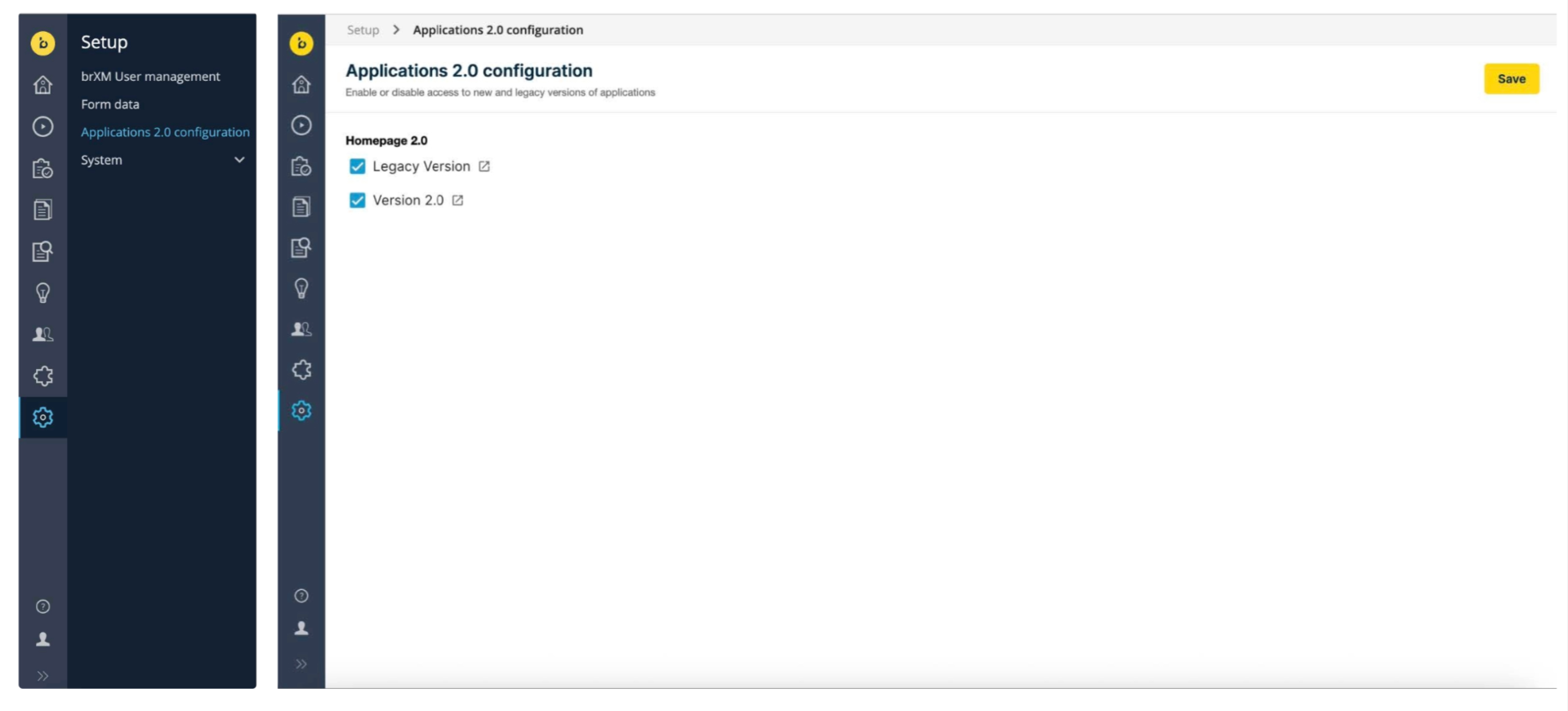
Homepage 2.0 can run alongside the legacy homepage. Administrators can enable or disable the legacy Wicket UI and the new Angular UI for individual applications, including Homepage 2.0, using the Apps 2.0 Configuration GUI (available under the Setup menu). This approach supports customers with customizations in the Wicket UI and allows for a controlled transition.
For more information, see Modernizing Wicket Applications.
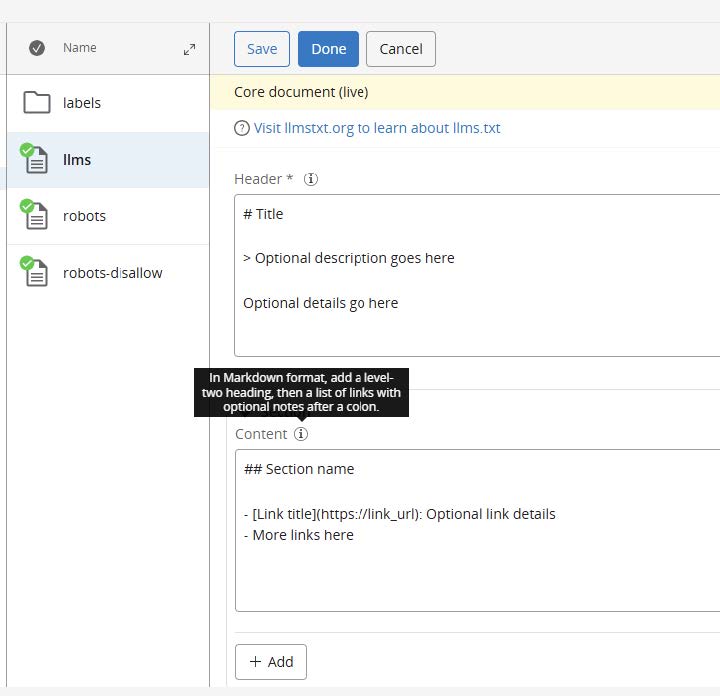
LLms.txt Plugin
The LLms.txt plugin introduces a dedicated document type for managing llms.txt files in the CMS. Large language models (LLMs) often require plain text representations of website content, but extracting this from complex HTML is challenging.
The plugin enables webmasters to manage llms.txt files, which provide LLMs with content in a human- and machine-readable format. The plugin includes beans, a standard component for retrieving llms.txt data from the repository, and a sample Freemarker template for rendering the file.
For format details, see llmstxt.org. For implementation, see the Llms.txt Plugin documentation.
Ongoing Enhancements and Fixes
End User Improvements
- Resolved an issue where some validation messages were truncated or overlapped in the Experience View.
- Fixed a problem where the '+ Add' button did not reliably add extra fields in single- and multi-value compound fields.
- Corrected a display issue where a taxonomy field was incorrectly marked as required in the Experience Manager.
Developer Improvements
- Added a
makeCollapsibleproperty under thecluster.optionsnode to allow configuration of compound field collapse functionality, improving editor readability. - Fixed an issue where setting
hst:localeon a mount was not properly registered whenhstLinkUrlPrefixwas used, causingmount.getLocale()to return the parent locale. - Removed an unnecessary call to retrieve Xpage versions when editing a component in the Experience Manager, improving performance.
- Added WARN log messages for missing taxonomy keys in documents.
- Fixed an issue where custom component JavaScript did not execute in the Experience Manager after upgrading, due to differences between jQuery and pure JavaScript DOM manipulation.
Professional Services Plugin Newsletter
The Translation Addon (version 7.2.0) includes the following updates:
- GlobalLink Connector Update: The deprecated GlobalLink connector now uses the GlobalLink REST API.
- Select All / Select None Button: Added to the translation dialog for both document and advanced search translation requests, simplifying target language selection.
- Preselect Translation Targets Setting: This setting now works correctly when opening the dialog from Advanced Search, matching the behavior when opened from a document.
Upgrade Assistance from Bloomreach Experts
Bloomreach Professional Services offers upgrade support for Bloomreach Content projects, including an Upgrade Assessment service. The assessment provides a detailed evaluation of your current systems and infrastructure, outlining the investment required for upgrading.
The assessment report includes:
- Executive summary
- Overview of major changes
- Recommended upgrade procedure
- Comprehensive list of findings
The evaluation fee is fully refundable if you proceed with Professional Services for the upgrade. Contact your account manager for more information.
Notices
This release introduces the following node type definition (CND) change:
- Added property
hst:localnetworkaccessenabled(boolean)
Important: Simple rollback is not supported
Due to the above CND change, you cannot roll back to a previous version by redeploying the earlier distribution on an upgraded repository or by swapping binaries or containers.
To downgrade, restore from a full repository backup taken before the upgrade.
Incubating Features Policy
Bloomreach now releases some new features as "Incubating Features" to accelerate delivery of capabilities related to rapidly evolving technologies.
Key Points:
- Definition: Incubating features are new APIs, extension points, or functionalities released for early adoption and feedback.
- Production-Ready: These features are tested and can be used in production.
- Rapid Delivery: Incubating features may change or be removed in minor or patch releases. Upgrade guidelines will be provided.
- Impact: Backward-incompatible changes to incubating features do not affect the out-of-the-box CMS experience. Only custom integrations using these features may require updates.
- Identification: Incubating features are clearly marked in code, documentation, and release notes.
For details, see the Incubating Features documentation.
In v16.6.0:
- Group ID changed from
com.bloomreach.brx.aitocom.bloomreach.xm.ai. - The term 'incubating' was added to two artifacts.
<dependency> <groupId>com.bloomreach.xm.ai</groupId> <artifactId>content-ai-service-impl-incubating</artifactId> </dependency> <dependency> <groupId>com.bloomreach.xm.ai</groupId> <artifactId>content-ai-service-rest-incubating</artifactId> </dependency>
The following artifacts only require the group ID change:
<dependency> <groupId>com.bloomreach.xm.ai</groupId> <artifactId>content-ai-service-client-bootstrap</artifactId> </dependency> <dependency> <groupId>com.bloomreach.xm.ai</groupId> <artifactId>content-ai-service-client-assistant-angular</artifactId> </dependency>
JVM Default Time Zone on Bloomreach Cloud
When running brXM v16.x on Bloomreach Cloud, the JVM default time zone is UTC. Any date/time processing that relies on the JVM default time zone (instead of an explicitly configured one) will use UTC.
Changing the Time Zone Behavior
- CMS UI time zone:
Configure the login page time zone dropdown to allow users to select their time zone at login (defaults to browser time zone). You can also configure a single time zone for all users.
See: Configure the CMS login page (time zone selection dropdown) - JVM default time zone:
Set the time zone explicitly as a JVM system property. Upload a properties file (for example,user.timezone=Europe/Amsterdam) and configure it as a Java System Properties file during deployment.
Minor Release
Version 16.6 is a minor release and is backward compatible with the previous minor release. Upgrading from the previous minor version requires minimal effort. See the upgrade instructions for 16.5 to 16.6 (enterprise login required). For an overview of all minor version upgrade instructions, see Upgrade Introduction.
Supported Technologies
See the system requirements for a complete list of supported technologies and maintained third-party compatibility.
End-of-life, Support, and Maintained Code
Terminology
-
Supported product version:
Supported versions receive helpdesk support as described in your service level agreement (SLA). If a bug is found in a supported but not-maintained version, fixes are only applied to maintained versions. To receive a fix, you must upgrade to a maintained version. -
Maintained product version:
Maintained versions receive code updates, security fixes, and bug fixes. System requirements for third-party libraries are kept current. Bloomreach does not provide support for third-party system requirement providers (such as databases or Java), only for certified providers listed in the system requirements.Non-maintained versions do not receive code updates and may contain unresolved bugs or security vulnerabilities.
-
End-of-life product version:
End-of-life versions are neither maintained nor supported. They may be available in archives but can be removed without notice.
Current Release Support Status
The table below shows the support status and planned end-of-support dates for each version. Versions not listed are not active or supported and are considered end-of-life.
| Version | Planned end date of Standard Support | Planned end date of Premium Plus Support | Original major version release date |
|---|---|---|---|
| 12.6 | No Support | No support | July 2017 |
| 13.4 | No Support | No support | January 2019 |
| 14.7 | December 2024 | December 2025 | December 2019 |
| 15.7 | December 2025 | December 2026 | April 2022 |
| 16.6 | December 2026 | December 2027 | June 2024 |
The versions highlighted in orange are actively maintained and receive bug fixes and product improvements.
Security Notes
This release updates third-party dependencies with published vulnerabilities. Keep your systems current with the latest product releases.
Availability
brXM version 16.6 is available as of November 12, 2025. The open source release will be available approximately two years later, following the standard release policy.
Links
[1] AI Content Assistant user guide
[2] AI Content Assistant developer guide
[3] Modernizing Wicket Applications
[4] Llms.txt Plugin documentation
[5] Translations Addon
[6] Incubating Features documentation
[7] Upgrade instructions: 16.5 to 16.6
[8] Upgrade Introduction
[9] System requirements