brXM V16.2 Release Notes
Highlights for v16.2
brXM version 16.2 introduces new features, technical stack upgrades, and product improvements. This document summarizes the key updates included in this release. For a complete overview of all release notes, see the release notes overview.
All features and changes described here are part of Bloomreach Content unless otherwise specified.
Advanced Link Management
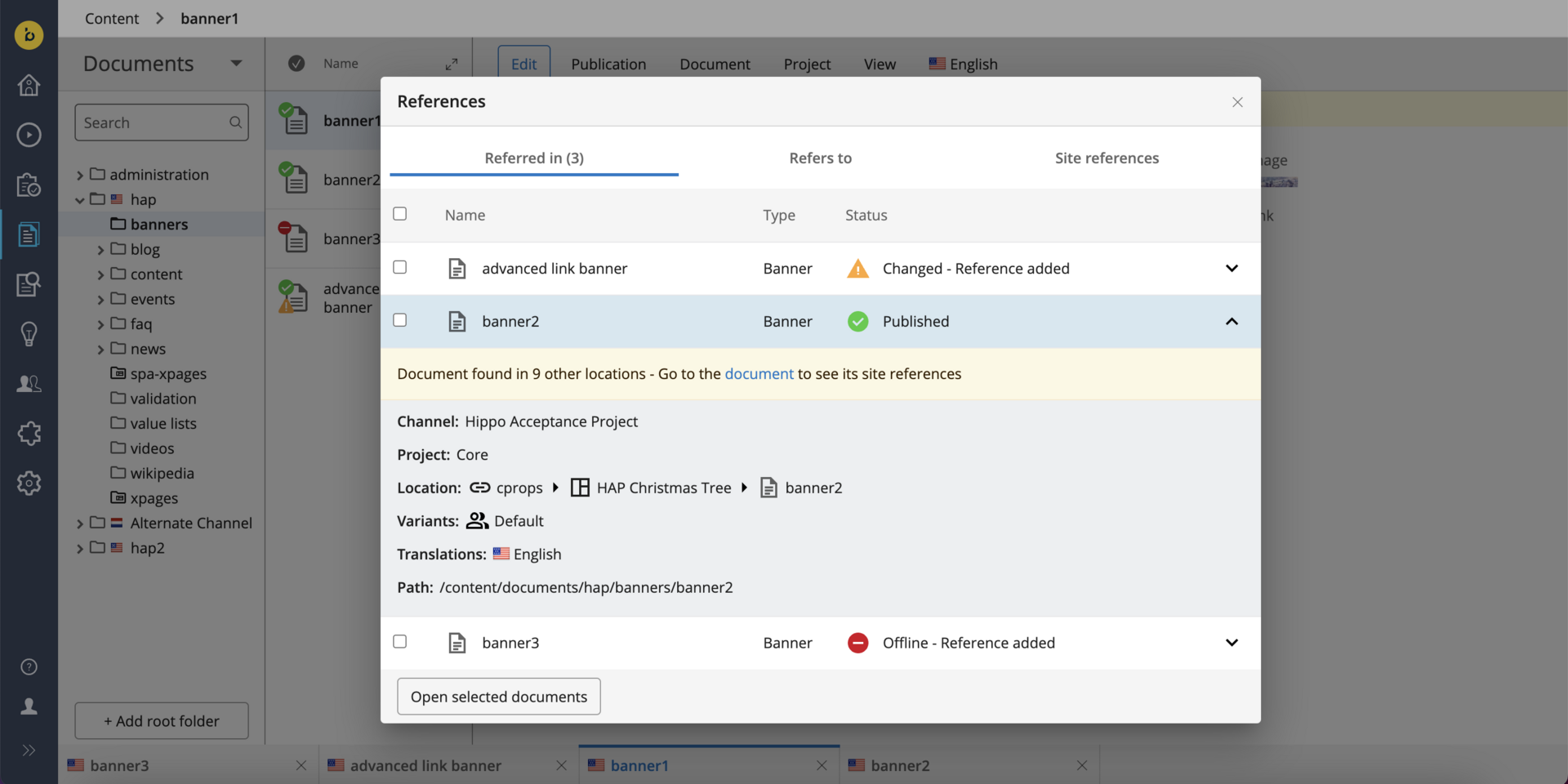
The advanced link management feature in Bloomreach Content improves visibility and management of references to documents, images, and assets across components, pages, and projects. This feature helps editors and authors track references and understand the impact of changes. Future versions will add more workflow management capabilities for references.
Feature Overview
Advanced link management enables you to:
- Track where specific documents, images, or assets are used throughout the platform.
- Identify how changes to a document or asset affect related pages or components.
- [Planned for v16.3] Support concurrent publication workflows for direct references, reducing manual intervention and errors.
Key Benefits
- Improved visibility for referenced documents and assets, making tracking and management easier.
- Streamlined concurrent publication workflows for referenced content, reducing manual steps and minimizing errors.
- Increased efficiency and accuracy in content management for editors and authors.
For detailed information, see the References in Content documentation.
Performance Improvements
This release includes several performance enhancements to optimize system efficiency.
Folder Expansion Optimization
Previously, expanding multiple folders quickly in the content perspective could cause delays. The FolderTreeNode implementation has been optimized to reduce unnecessary loading and database calls. Folder expansion is now more responsive.
Translation Query Optimization
In earlier versions, each CMS user queried translations for folders or documents individually, causing congestion in Lucene when user counts were high. The new DocumentTranslationsService, backed by a single system session, caches and invalidates results as needed. This reduces system load and improves performance.
Ongoing Enhancements and Fixes
For End Users
- Fixed an issue where switching between the Channel Manager (Experience Manager) and Content Perspective via NavApp could cause the CMS to stop responding.
- Updated the UI to rename 'Published date' to 'Last published date' and ensure visibility even when a document is unpublished.
- Fixed a bug that prevented adding new content blocks, optional compounds, and multi-value properties from the Visual Editor.
- Resolved an issue where experiments on a component were locked by a single user, blocking experiment-related actions for others.
For Developers
- Enhanced the DerivedDataFunction to access the
jcr:pathattribute, enabling more efficient filtering by publication type. - Updated log configuration files in the v16 archetype to use
jakarta.ws.rs.coreinstead ofjavax.ws.rs.core. - Fixed an issue where adding an Upload PreProcessor in version 16.1.0 prevented asset or image uploads.
- Resolved a problem where documents with large text fields could not be saved due to a "Request header is too large" error.
- Addressed unnecessary creation of multiple replication journal entries.
Bloomreach SPA SDK Updates
The latest Bloomreach SPA SDK release, v24.0.0, adds support for Angular 18. For details, see the SPA SDK release notes.
Upgrade Assistance
The Bloomreach Professional Services team offers expertise in upgrading Bloomreach Content projects. The team can assist with upgrading your project to the latest Bloomreach Content versions.
An Upgrade Assessment service is available. In three days, the team evaluates your systems and infrastructure to estimate upgrade requirements. The assessment report includes:
- Executive summary
- Overview of major changes
- Recommended upgrade procedure
- Comprehensive list of findings
The evaluation fee is fully refundable if you proceed with Professional Services for the upgrade.
To request upgrade assistance, contact your account manager.
Notices
Usage Statistics Module Update
The outdated usage statistics module has been removed in v16.2, v15.7.1, and v14.7.23. You may see related errors in the browser network tab if you use an earlier version. To resolve these errors, upgrade to one of the mentioned versions or disable statistics collection. For more information, see the usage statistics documentation.
Standard Support for brXM v14
Standard support for brXM v14 ends in December 2024. To maintain support and access new features, upgrade to brXM v15 or v16. Premium Support for v14 continues until December 2025.
Options:
- Plan your upgrade before the end of the year. For assistance, contact your Account Manager.
- Upgrade to Premium Support by contacting your Account Manager.
Jira Issue Tracking Access Update
Bloomreach has moved to a private cloud-based Jira instance. Customers no longer have direct access for issue reporting or tracking. Previously, issues.onehippo.com offered limited visibility, but security and enterprise-specific issues were always restricted.
For product questions, issue reports, or feature requests, contact support.bloomreach.com. The support team will manage your inquiry and provide status updates as needed.
JVM Default Time Zone on Bloomreach Cloud
When running brXM v16.x on Bloomreach Cloud, the JVM default time zone is UTC. Any date/time processing that relies on the JVM default time zone will use UTC unless explicitly configured.
Configuring Time Zone Behavior
- CMS UI Time Zone:
Configure the login page time zone dropdown to allow users to select their time zone at login, defaulting to the browser time zone. You can also configure a single time zone for all users.
See: Configure the CMS login page (time zone selection dropdown) - JVM Default Time Zone:
Set the time zone explicitly as a JVM system property. Upload a properties file with, for example,user.timezone=Europe/Amsterdamand configure it as a Java System Properties file during deployment.
Minor Release
Version 16.2 is a minor release and is backward compatible with the previous minor release. Upgrading from the previous minor version requires minimal effort. For upgrade instructions, see the upgrade guide for 16.1 to 16.2 (enterprise login required). For an overview of all minor version upgrade instructions, see the upgrade introduction.
Supported Technologies
System requirements and a detailed table of maintained third-party compatibility are available in the system requirements documentation.
End-of-Life, Support, and Maintained Code
Nomenclature
Definitions for product lifecycle terms used in this documentation:
Supported Product Version
A supported product version is eligible for helpdesk support as described in your service level agreement (SLA) with Bloomreach. Multiple service levels are available.
If a bug is found in a supported but non-maintained version, fixes are only applied to maintained versions. To receive a fix, you must upgrade to a maintained version.
Maintained Product Version
A maintained version receives code updates, security patches, and bug fixes. System requirements for third-party libraries and components are kept up to date. Bloomreach supports only the use of certified system requirement providers, not the providers themselves.
A non-maintained version does not receive updates and may contain unresolved bugs or security vulnerabilities.
End-of-Life Product Version
End-of-life versions are neither maintained nor supported. They may be available from archives but can be removed without notice.
Current Release Support Status
This release changes maintenance and support modes. The table below shows the support status and planned end dates for each product version. Versions not listed are not active, not supported, and considered end-of-life.
| Version | Planned end date of Standard Support | Planned end date of Premium Plus Support | Original major version release date |
|---|---|---|---|
| 12.6 | No Support | No Support | July 2017 |
| 13.4 | No Support | No Support | January 2019 |
| 14.7 | December 2024 | December 2025 | December 2019 |
| 15.7 | December 2025 | December 2026 | April 2022 |
| 16.2 | December 2026 | December 2027 | June 2024 |
Supported versions may vary depending on contractual agreements. Versions highlighted in orange are actively maintained and receive bug fixes and product improvements.
Security Notes
This release updates third-party dependencies with published vulnerabilities. Keep your systems current with announced product releases.
Availability
brXM version 16.2 is available as of January 29, 2025. The open source release will be available approximately two years later, following the release policy.
Links
[1] References in Content documentation
[2] SPA SDK release notes
[3] Usage statistics documentation
[4] Upgrade guide for 16.1 to 16.2
[5] Upgrade introduction
[6] System requirements documentation