Deploy the Authoring and Delivery Web Applications Separately
Important: This deployment approach is not supported for headless implementations.
Overview
This guide explains how to deploy the authoring (cms) and delivery (site) web applications in separate containers.
When to Use
Deploy the authoring and delivery applications separately when you need to:
- Increase availability by running multiple delivery servers.
- Isolate authoring and delivery environments.
- Scale delivery independently from authoring.
By default, Bloomreach Experience Manager deploys both applications on the same server. In the standard setup, the delivery application accesses the repository hosted by the authoring application. However, in some scenarios, separating these applications across different servers is preferred.
To enable this separation, package the platform as a standalone web application and deploy it alongside the delivery application. The platform web application allows the delivery application to access the shared storage repository.
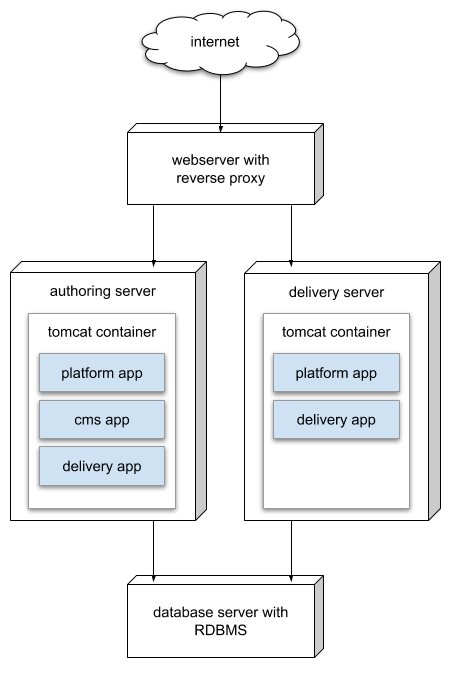
Diagram: This architecture routes internet traffic through a webserver with a reverse proxy, which forwards requests to two backend servers: one for authoring and one for delivery. The authoring server's Tomcat container runs the platform app, cms app, and delivery app. The delivery server's Tomcat container runs the platform app and delivery app. Both servers connect to a shared RDBMS database. This setup separates the authoring and delivery web applications while using a common database.
Note: For instructions on creating separate distributions for authoring and delivery, see Create Separate Distributions for the Authoring and Delivery Web Applications.
Prerequisites
- The platform web application must use a supported database and be configured for clustering. Refer to Configure Bloomreach Experience Manager for your Database Server for configuration examples.
- Start the authoring cluster before starting the delivery cluster.
Implementation Steps
-
Build Separate Distributions
Create two distributions: one for authoring and one for delivery. Each distribution is packaged as a
tar.gzfile and contains the required web applications for its server. See Create Separate Distributions for the Authoring and Delivery Web Applications for details. -
Deploy Web Applications
- On the authoring server, deploy the
cmsandsiteWAR files. - On the delivery server, deploy the
siteandplatformWAR files. - Follow the deployment procedure described in Deploy a Project Distribution.
- On the authoring server, deploy the
-
Configure Repository Location
Set the location of your
repository.xmlon both servers using therepo.configsystem property. For details, see Configure the Application Server (Apache Tomcat on Linux). -
Disable Bootstrapping on Delivery Servers
Always start the container running the delivery application (
site.war) with bootstrapping disabled:-Drepo.bootstrap=falseWarning: Enabling bootstrapping on the delivery server can result in removal of YAML definitions from the repository. If the delivery server classpath does not include all YAML artifacts, the bootstrap process deletes missing definitions and their nodes. When the authoring server starts, it will re-import these YAML definitions, leading to repeated removal and re-import cycles. Always disable bootstrapping on delivery nodes to avoid this issue.
-
Start Clusters in Order
Start the authoring cluster before starting the delivery cluster to ensure proper repository initialization.
Disabling Scheduled Jobs on Delivery Nodes
By default, all platform instances in a clustered repository perform scheduled tasks, such as scheduled publications, de-publications, and repository maintenance jobs. To prevent delivery nodes from executing these tasks, disable scheduling by adding the following directive to the delivery application container's startup script:
-Dhippo.scheduler.disabled=true
Recommendation: Disabling scheduled jobs on delivery nodes prevents interference with scheduled (de-)publications managed by CMS nodes.
Verification
- Confirm that both authoring and delivery applications connect to the shared database.
- Verify that the delivery application functions without direct access to the authoring application.
- Ensure that scheduled jobs do not run on delivery nodes if you have disabled them.