Essentials Architecture Overview
This page provides an overview of the Essentials setup application architecture in Bloomreach Content. It covers the main components involved in project setup and explains how they interact.
Main Components
The diagram below illustrates the primary components involved when you create a new Bloomreach Content project.
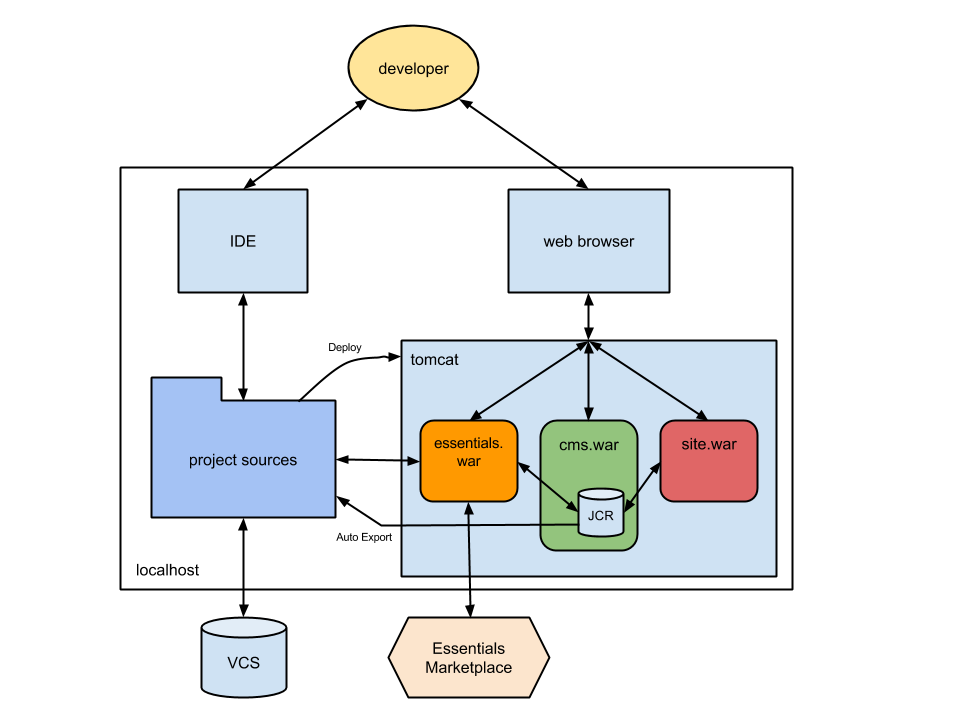
Diagram: The diagram shows the components used to create a Bloomreach Content project on localhost. A developer uses both an IDE and a web browser. The IDE connects to the project sources, which are deployed to a Tomcat container. The browser connects to Tomcat as well. Inside Tomcat, three web applications run: essentials.war, cms.war, and site.war. The cms.war contains a JCR repository. The diagram shows interactions between the web applications and the repository. Project sources exchange data with Tomcat, including an auto export flow from Tomcat back to the sources. The sources are also connected to a version control system (VCS). The essentials.war component is linked to an Essentials Marketplace outside the Tomcat container.
The Essentials setup web application (essentials.war) runs alongside the CMS (cms.war) and site (site.war) web applications in a Tomcat instance. The Essentials application provides a dashboard accessible through a web browser. As a developer, you use this dashboard to install dashboard plugins, modify project source code, and update the JCR repository to change CMS configuration. Configuration changes made in the JCR repository are persisted to the project sources using the Auto Export feature.
Essentials Setup Web Application
The following diagram provides a detailed view of the Essentials setup web application as deployed in a servlet container.
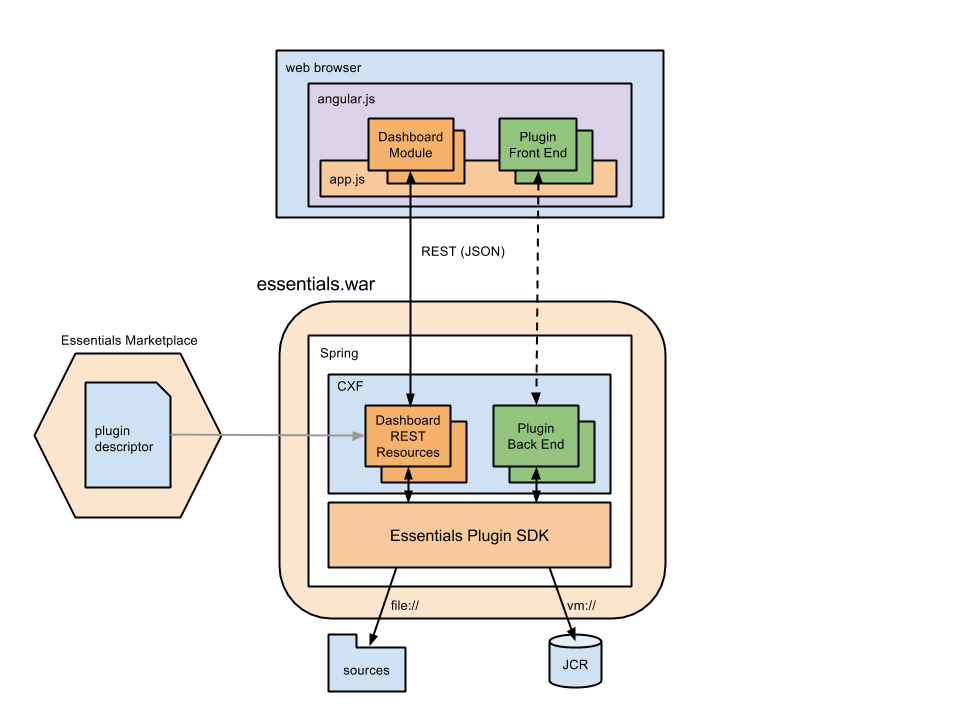
Diagram: The diagram shows the Essentials setup web application deployed in a servlet container, divided into a browser front end and a Spring-based back end. In the browser, Angular.js contains
app.jswith a Dashboard Module and a Plugin Front End. These modules communicate with server-side components. On the server, Spring contains a CXF layer with Dashboard REST Resources and a Plugin Back End, both connected to the Essentials Plugin SDK. A plugin descriptor feeds into the REST resources. The SDK interacts with the project sources via the file:// protocol and with the JCR repository via the vm:// protocol.
The front end uses Angular.js to build the dashboard user interface. Angular modules communicate with the back end using REST calls. Some modules are part of the core dashboard, while others are provided by dashboard plugins.
The back end is built on the Spring framework and uses CXF to process REST calls from the front end. The Essentials setup application includes a Plugin SDK that REST resources use to perform required operations. Through the SDK, resources can interact with the project’s source code using the file:// protocol and access the JCR repository using the vm:// protocol.
Dashboard Plugins
The Essentials setup web application relies on dashboard plugins to extend and customize Bloomreach Content projects. The application uses a Plugin Descriptor to register and use new dashboard plugins.