HST Container Integration with Other Web Application Frameworks
Overview
The delivery tier (also known as HST) supports container-level integration with external web application frameworks. Supported frameworks include Spring Web MVC, Struts2, Cocoon, Wicket, Tiles2, Sitemesh, and any filter or servlet-based handler module, such as simple servlets or JSPs.
Container-level integration allows you to use HST URL mappings (including virtual host mappings, mount mappings, and sitemap item mappings) and content mappings without relying on HST component aggregation. Your existing web applications maintain their own MVC structure and do not require migration of components into HST components. However, you can still use features such as HST URL/content mappings, session pooling, content beans and query API, and link rewriting.
This approach differs from HST component bridging solutions like the Spring HST Component Bridge. Component bridging executes within the DefaultSitePipeline and AggregationValve as part of a page aggregation. In contrast, container-level integration only handles URL/content mapping and delegates the request directly to the external web application framework. The external framework is fully responsible for rendering and handling actions.
For example, if you have an existing Spring Web MVC application with URL paths such as /news/, /news/2013/, /news/2013/08/, or /news/2015/08/launching_new_product.html, you can keep your current URL mappings in your Spring configuration. You can also configure these mappings in HST to enable content mapping. HST resolves the URL and content mapping first, then delegates the request to your Spring application with the resolved request context attributes.
By integrating at the container level, you can retain your existing controller, view, and aggregation logic, while simplifying content data access by using HST content mapping.
HST provides a consistent way to map URLs and content for external web applications and offers a straightforward API to access mapped content from these applications.
Architectural Overview
In a typical HST component-based application, the DefaultSitePipeline is invoked by the HstFilter and RequestProcessor, as shown in the "Typical HST Page/Component Aggregation" section of the diagram below.
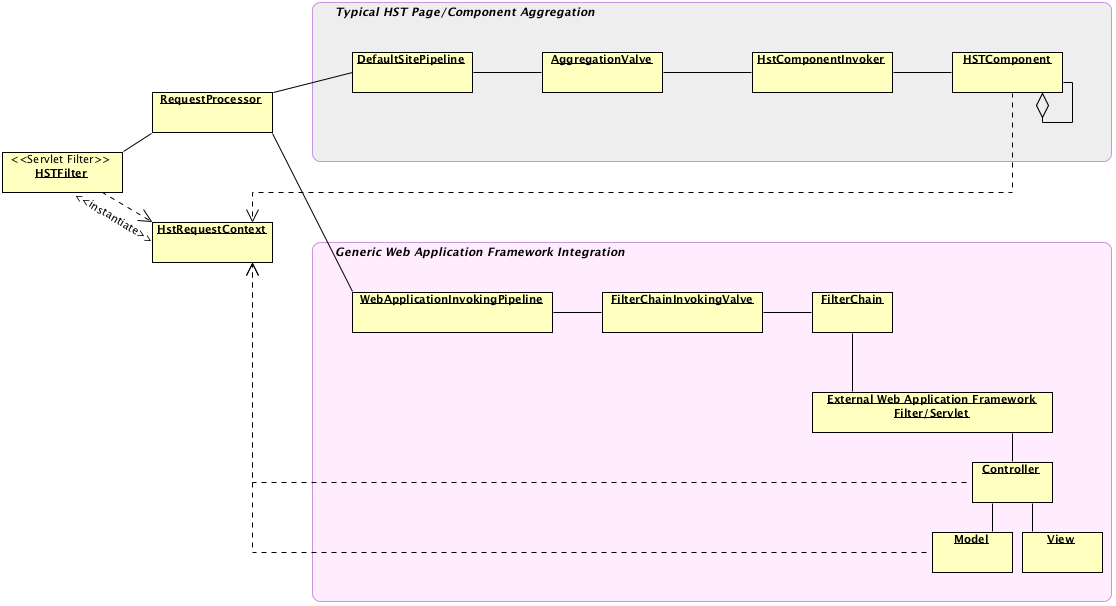
Diagram: The diagram compares two request-processing paths. The top section ("Typical HST Page/Component Aggregation") shows the flow from
HstFiltertoRequestProcessor, then toDefaultSitePipeline,AggregationValve,HstComponentInvoker, and an HST component. The lower section ("Generic Web Application Framework Integration") showsRequestProcessorinvokingWebApplicationInvokingPipeline, which usesFilterChainInvokingValveto pass control to a filter chain and then to an external web application framework. The external framework routes to its own controller, model, and view components. TheHstRequestContextis available in both flows.
For container-level integration, the WebApplicationInvokingPipeline is used instead of the DefaultSitePipeline.
WebApplicationInvokingPipeline performs the same steps as DefaultSitePipeline up to the point where AggregationValve would be called. Instead, it invokes FilterChainInvokingValve, which calls javax.servlet.FilterChain.doFilter(request, response). This passes control to the next filters or servlets in the external web application framework after HST processes URL and content mappings.
An HstRequestContext instance is created by HstFilter and populated with mapping information and API components. This context is accessible in both HST components and any part of the external MVC application, such as controllers or models. Components can use the HstRequestContext to access the resolved virtual host, mount, sitemap item, content beans, and APIs like HstContentBeansTool or HstQueryManager.
Mapping HST Sitemap Items or Mounts to External Web Applications
To map HST sitemap items or mounts to external web applications, follow these steps:
- Ensure your web application has URL mappings.
Your external web (MVC) application should already define URL pattern mappings in/WEB-INF/web.xmlor framework-specific configuration (such as Spring Web MVC handler mappings). - Configure equivalent URL patterns in HST site configurations.
Define the same URL patterns in HST sitemap item or mount configurations in the repository. You can also set relative content paths for each sitemap item. - Assign
WebApplicationInvokingPipelineto the sitemap item or mount.
SetWebApplicationInvokingPipelineas the named pipeline for the sitemap item or mount. HST will process the URL, resolve the sitemap item, and delegate to your web application using this pipeline.
For example, a Spring Web MVC application might be configured in web.xml as follows:
<!-- Example Spring Web MVC application configuration mapped to '/springapp/*' --> <servlet> <servlet-name>springapp</servlet-name> <servlet-class>org.springframework.web.servlet.DispatcherServlet</servlet-class> <load-on-startup>10</load-on-startup> </servlet> <servlet-mapping> <servlet-name>springapp</servlet-name> <url-pattern>/springapp/*</url-pattern> </servlet-mapping>
A corresponding Spring Web MVC controller might look like:
@Controller @RequestMapping("/news") public class NewsController { @RequestMapping(value={"", "/"}) public ModelAndView listHandler(HttpServletRequest request) { ModelAndView mav = new ModelAndView("news/list"); // ... return mav; } }
This is a standard Spring Web application setup.
Integrating the HST Container with an Existing Spring Web Application
If you want all requests for /springapp/ to continue being handled by your Spring Web application, while also leveraging HST URL/content mapping, JCR session pooling, host/channel information, and the HST Query API, follow these steps:
Add a Sitemap Matcher for /springapp/ Using WebApplicationInvokingPipeline
Assume your sitemap is structured as follows:
/hst:hst: /hst:configurations: /myproject: /hst:sitemap: /root: hst:relativecontentpath: homedocument /news: hst:relativecontentpath: news /_any_: hst:relativecontentpath: news/${1}
If no specific pipeline is configured, these sitemap items use the default HST DefaultSitePipeline, resulting in standard HST page/component aggregation. To route /springapp URLs using WebApplicationInvokingPipeline, add the following sitemap item:
/hst:hst: /hst:configurations: /myproject: /hst:sitemap: /root: hst:relativecontentpath: homedocument /news: hst:relativecontentpath: news /_any_: hst:relativecontentpath: news/${1} /springapp: hst:namedpipeline: WebApplicationInvokingPipeline /news: hst:relativecontentpath: news /_any_: hst:relativecontentpath: news/${1}
Note: The
newsand_any_sitemap items underspringappinherit thehst:namedpipelineproperty fromspringapp.
With this configuration, the URL /springapp/news maps to the springapp/news sitemap item, and URLs matching /springapp/news/** map to springapp/news/_any_.
For example, a request to http://localhost:8080/site/springapp/news/2013/09/launching_new_product.html is resolved by HST to the springapp/news/_any_ sitemap item. The corresponding HstRequestContext is updated, and the mapped content bean is made available through the hst:relativecontentpath configuration. For the example URL, the resolved relative content path is /news/2013/09/launching_new_product document.
Your web application code can access the HstRequestContext using RequestContextProvider.get() and retrieve the mapped content bean with HstRequestContext.getContentBean() in any layer (model, view, or controller).
Running the Spring Web MVC Framework Integration Example
The Hippo TestSuite project includes a working example of Spring Web MVC framework integration. After building and running the project locally, you can access http://localhost:8080/site/springapp/news. This maps URLs matching /springapp/** to the HST sitemap item (springapp/**), which delegates to the Spring Web MVC controller (NewsController).
You can check out the latest Hippo TestSuite tag from
https://github.com/bloomreach/brxm/tree/brxm-14.7.3/testsuite.
Build and run the project with:
mvn clean verify && mvn -P cargo.run
Accessing Mapped Content from External Web Applications
You can access the HstRequestContext from any location in your external web application code. This allows you to use any API provided by HstRequestContext, similar to an HST component-based application.
To access the mapped content bean for the resolved sitemap item:
HstRequestContext requestContext = RequestContextProvider.get(); HippoBean document = requestContext.getContentBean(); // Pass the document bean to the view, for example by adding it to the model.
To access the root content for the current site:
HstRequestContext requestContext = RequestContextProvider.get(); HippoBean siteRootContent = requestContext.getSiteContentBaseBean();
To use the HST Query API in your controller (for example, to query for News documents):
HstRequestContext requestContext = RequestContextProvider.get(); HstQuery query = requestContext.getQueryManager().createQuery(scope, NewsBean.class); HstQueryResult result = query.execute();
Your external web application can use HST features such as URL/content mappings, session pooling, content beans and query API, and link rewriting, in the same way as an HST component-based application.
Using HST Tag Libraries in External Web Applications
Most HST tag libraries work in external web applications, except for component-specific tags like <hst:namespace/>, <hst:renderURL/>, and <hst:actionURL/>. You can use tags such as <hst:link/> and <hst:html/> in JSP templates within your external application.
Example usage in a JSP view:
<%-- Generate a link to a sitemap item path --%> <hst:link var="newsLink" path="/springapp/news" /> <a href="${newsLink}" title="News">News</a> <%-- Render HTML content of the document using <hst:html/>. This tag automatically rewrites internal links based on sitemap configuration. --%> <div> <hst:html hippohtml="${requestScope.document.html}"/> </div> <%-- Generate a link to a binary asset resource. --%> <c:if test="${not empty requestScope.document.resource}"> <hst:link var="resource" hippobean="${requestScope.document.resource}" /> <a href="${resource}">${requestScope.document.resource.name}</a> </c:if> <%-- Generate a link to a binary image resource. --%> <c:if test="${not empty requestScope.document.image}"> <img src="<hst:link hippobean="${requestScope.document.image.original}"/>"/> </c:if>
You can use HST link rewriting features in your external application templates as you would in an HST component-based application.
Integration with Other Web Application Frameworks
Container-level integration is a generic solution. It prepares the request context, including URL/content mappings, content beans access API, and link rewriting components, before passing control to the external web application via the filter chain.
You can integrate any web application framework that is based on the JEE filter/servlet model. While only a Spring Web MVC integration example is provided in the Hippo TestSuite project, you can apply the same approach to frameworks such as Spring WebFlow, Tiles2, Struts2, Sitemesh, Wicket, and Cocoon.
If you implement integration with other frameworks, consider sharing your experience with the community.