Single Sign-On (SSO)
Overview
This page describes how Bloomreach Content supports single sign-on (SSO) integration in enterprise environments. It outlines the general architecture, core concepts, and key considerations for implementing SSO with XM. Specific integration guides are available separately.
When to Use SSO with Bloomreach Content
Integrate SSO when you need to connect XM with your organization's centralized authentication system. SSO enables users to authenticate once and access both the CMS and site applications without separate logins.
Note: You can implement SSO for either the CMS or the site application. Apply the relevant changes in the appropriate context.
SSO-Enabled Architecture
The following diagram illustrates a typical SSO-enabled deployment for Bloomreach Content:
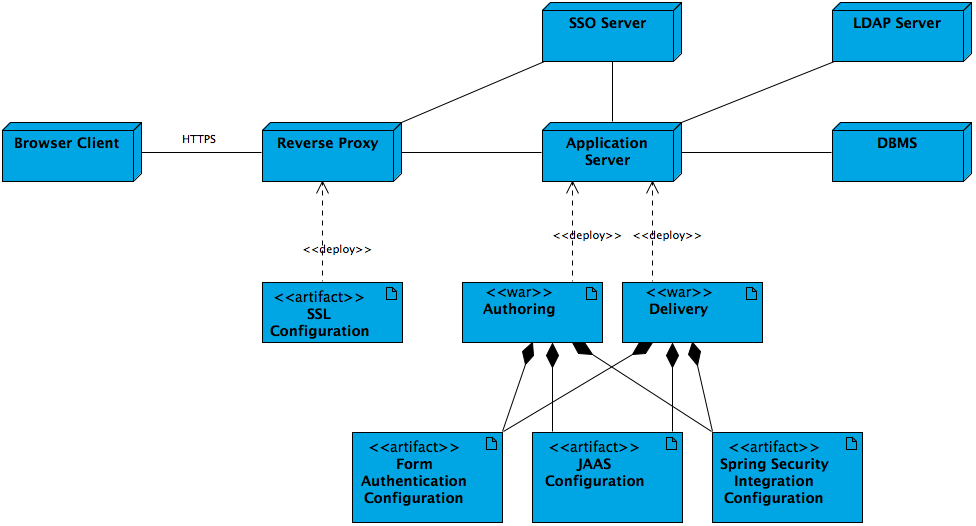
Diagram explanation:
A browser client connects over HTTPS to a reverse proxy (such as Apache HTTP Server). The reverse proxy communicates with the application server, which hosts the authoring and delivery applications. The application server integrates with an SSO server, an LDAP server, and a database management system (DBMS). Security configurations—such as form authentication, JAAS, and Spring Security—are shared between the authoring and delivery modules.
Key architecture details:
- Configure HTTPS for browser clients at the reverse proxy layer. See Configure Apache HTTP Server as a Reverse Proxy.
- The reverse proxy typically redirects authentication requests to the enterprise SSO server. After successful authentication, the SSO server returns a security token.
- Applications on the application server can validate security tokens with the SSO server if needed.
- Alternatively, the authoring and delivery applications can authenticate users against an LDAP server if configured.
- The applications can also use form authentication, JAAS, or Spring Security integration. Spring Security can integrate with enterprise SSO servers.
Authentication Mechanisms
Out-of-the-box (OOTB) authentication in XM manages users and authorization within the CMS. With SSO, user and rights management occur in external systems, often with users stored in an LDAP server and authentication handled centrally by the SSO server.
To enable SSO, configure both LDAP integration (see LDAP add-on documentation) and SSO integration as described in this document.
SSO Implementation Concepts
Consider the following components when implementing SSO:
- Provider: The integration process depends on the SSO provider (e.g., Okta, Microsoft Entra ID, Keycloak). Each provider has specific setup requirements.
- Keystore: Generate and provide a local key and certificate for encrypting SAML exchanges.
- Metadata: Providers typically expose a metadata URL containing details such as entityID, login URL, and provider key. Spring Security libraries often manage metadata retrieval.
- Security Configuration: Define relevant settings in Spring Security using either XML or DSL.
- SSO Login Filter: Register a filter as part of the security configuration to process authentication for secured resources.
- Custom Security Provider: The default security provider in the CMS authenticates users via repository authentication. Configure an additional provider to validate SSO-based authentication.
- web.xml / ContextLoadListener: For projects before version 15 or those excluding the integrated CMS Spring Boot, register a
ContextLoadListenerinweb.xmlto instantiate a Spring context. For version 15 and later with integrated Spring Boot, do not useContextLoadListener. Refer to the upgrade documentation for details. - Logout: Configure a logout URL that differs from the login URL to prevent redirect loops.
Key Considerations
- Libraries: Choose libraries based on the provider, protocol, and application. Use supported versions, avoid duplicates, and exclude unnecessary dependencies.
- Configuration and Parameters: Adapt configuration samples to your specific requirements. Update all relevant files and values for your implementation.
- XML/DSL Configuration: Both XML and DSL configuration methods are supported. XML is considered legacy; DSL is recommended for clarity and maintainability.
Requests to Exclude from SSO
Do not redirect the following paths to the enterprise SSO server:
/cms/ws/indexexport(Lucene index export)/cms/ping(CMS Ping Filter)
The following paths are usually not redirected to the SSO server; local CMS login is used:
/cms/repository(Repository Servlet)/cms/logging(Logging Servlet)
Related Integration Guides
- Spring Security/OAuth SSO Integration
- Shibboleth/SAML SSO Integration (legacy approach)