Configure Help Links
Info: This feature is available in brXM version 15.1.0 and later.
Overview
You can configure the Help links in Bloomreach Content to point to support and documentation resources.
Default Help Links
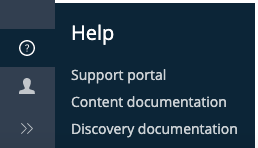
The main navigation in Bloomreach Content includes a Help section. By default, this section provides links to the Bloomreach Support Portal, Content documentation, and Discovery documentation. You can customize these links to meet your requirements using the CMS Console.
Configuration Location
Help links are configured at the following path in the JCR:
/hippo:configuration/hippo:frontend/navapp/navapp-services/navAppSettingsService/helpLinks
The default configuration is:
/hippo:configuration/hippo:frontend/navapp/navapp-services/navAppSettingsService/helpLinks: jcr:primaryType: frontend:pluginconfig /support: jcr:primaryType: frontend:pluginconfig link: https://support.bloomreach.com/ translationKey: helplinks-support visible: true /content: jcr:primaryType: frontend:pluginconfig link: https://documentation.bloomreach.com/library/end-user-manual/end-user-manual-introduction.html translationKey: helplinks-content visible: true /discovery: jcr:primaryType: frontend:pluginconfig link: https://documentation.bloomreach.com/search-and-merchandising translationKey: helplinks-discovery visible: true
You can update the existing links or add new ones by creating additional frontend:pluginconfig nodes with the same properties.
Label Translations
The translationKey property in each link configuration references a label defined in the resource bundles at:
/hippo:configuration/hippo:translations/hippo:cms/navapp
The default English translations are:
/hippo:configuration/hippo:translations/hippo:cms/navapp/en: jcr:primaryType: hipposys:resourcebundle helplinks-content: Content documentation helplinks-discovery: Discovery documentation helplinks-support: Support portal
If you add new help links, also add the corresponding label translations in the resource bundle.
Summary
- Edit or add help links by updating the configuration under
/navAppSettingsService/helpLinks. - Use the
translationKeyproperty to reference label translations. - Add new translation keys to the resource bundle when you introduce new links.