Delivery Tier Legacy Search API
Starting with brXM 11.1, use the Fluent Search API for improved usability and code readability. The Legacy Search API remains supported in current and future releases.
Introduction
Purpose
The Legacy Search API enables you to create and execute search queries in the delivery tier of Bloomreach Content.
Technical Overview
The delivery tier (HST) provides a Java API for search operations. When you execute an HST query, the HstQuery object is converted to a JCR XPath query and run against the Hippo Repository. The repository returns JCR Nodes as search results, which are then mapped to HippoBeans in the HstQueryResult object.
Examples
The following example demonstrates a Java HstComponent that performs a search. The diagram below outlines the interaction between the involved components.
For detailed usage instructions, refer to:
MySearchComponent Java Example
Java class MySearchComponent:
public class MySearchComponent extends BaseHstComponent { @Override public void doBeforeRender(final HstRequest request, final HstResponse response) throws HstComponentException { HstRequestContext context = request.getRequestContext(); SearchInfo info = getComponentParametersInfo(request); // the scope to search below, for example /content/documents/example HippoBean scope = context.getSiteContentBaseBean(); try { // create the query to search below 'scope', return beans that are // of type BaseDocument bean or a subclass/sub-jcr-types, the // third argument, 'true', indicates whether to include subtypes HstQuery hstQuery = context.getQueryManager().createQuery(scope, BaseDocument.class, true); // always set a limit! The limit is normally the pageSize, // for example 10 hstQuery.setLimit(pageSize); // the offset : Assume requested page is 3. Then the offset is 20 hstQuery.setOffset(pageSize * (currentPage - 1)); // we assume ordering on property "mynamespace:date" descending hstQuery.addOrderByDescending("mynamespace:date"); // parse a free text query to remove invalid chars. The argument // 'false' means no wildcards allowed String parsedQuery = SearchInputParsingUtils.parse(query, false); if (StringUtils.isNotEmpty(parsedQuery)) { // create a filter Filter f = hstQuery.createFilter(); // add a constraint: Only Documents that contain the terms // in parsedQuery will be a hit // Note that "." means: Search in the entire Document // including all descendant jcr nodes f.addContains(".", parsedQuery); // apply the filter hstQuery.setFilter(f); } // execute the query HstQueryResult result = hstQuery.execute(); // set the result, info and parsedQuery on the HstRequest : It is // then available in the JSP request.setAttribute("result", result); request.setAttribute("info", info); request.setAttribute("query", parsedQuery); } catch (QueryException e) { throw new HstComponentException( "Exception occured during creation or execution of HstQuery.", e); } } }
Note: For JSP and Freemarker templates that render search results, see Render a Search Query Result.
Component Overview
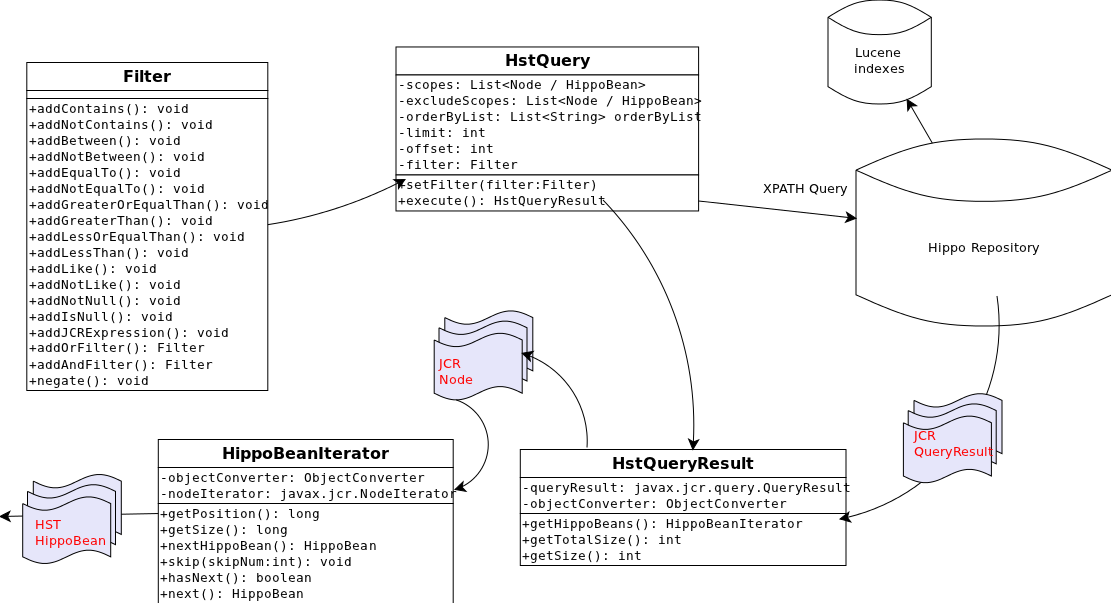
Diagram: The diagram illustrates the main components of the legacy search API: Filter, HstQuery, HstQueryResult, HippoBeanIterator, the Hippo Repository, and Lucene indexes. The Filter provides query constraint methods and attaches to HstQuery. HstQuery manages scopes, exclusions, ordering, limits, offsets, and filters, and executes the query to produce an HstQueryResult. HstQuery sends an XPath query to the Hippo Repository, which uses Lucene indexes and returns a JCR QueryResult. HstQueryResult wraps this result, exposing total size and HippoBeans through a HippoBeanIterator that converts JCR Nodes into HST HippoBean objects.