Multi Delivery Web Application Support
Info: Configure multiple delivery web applications within a single project only when separate development teams need to work independently on their own delivery web applications. In most cases, use multiple channels within a single delivery web application.
Version 13 introduces support for multiple delivery web applications in Bloomreach Content. This feature allows separate development teams to work independently on their delivery web applications, while a central team manages the CMS/platform web application. To support this, the default project structure has changed significantly from previous versions to ensure that each delivery web application's resources are packaged correctly.
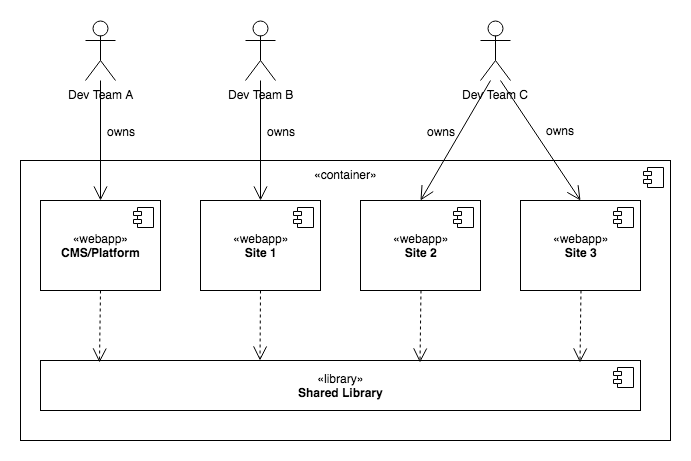
Diagram: The diagram shows a container with four web application components: CMS/Platform, Site 1, Site 2, and Site 3. Three development teams are shown above the container. Dev Team A owns CMS/Platform, Dev Team B owns Site 1, and Dev Team C owns Site 2 and Site 3. Each web application depends on a shared library, indicated by dashed arrows.
Single Webapp Mode vs. Multi Webapp Mode
To support projects upgrading to version 13, Single Webapp Mode is available. This mode provides some backward compatibility with the previous default project structure. New Bloomreach Content projects use the new structure, called Multi Webapp Mode.
All documentation, unless specifically related to upgrading, describes Multi Webapp Mode. Where relevant, documentation notes when a topic is sensitive to the webapp mode. If your project uses Single Webapp Mode, you must adapt the instructions accordingly. See the differences between Single and Multi Webapp Mode for details.
The upgrade documentation provides steps to upgrade to version 13 in Single Webapp Mode, with an optional step to restructure the project for Multi Webapp Mode. As a result, most upgrade documentation uses the Single Webapp Mode structure.
Multi Webapp Mode does not require more than one delivery web application. It refers to the project structure that supports adding additional delivery web applications if needed.
Managing Multiple Delivery Web Applications
To separate the development of delivery web applications, each web application is managed in its own version control system (VCS) repository by default. A single Bloomreach Content project can include multiple VCS repositories. Typically, the first repository contains the central CMS/platform web application and one delivery web application. Additional repositories can add more delivery web applications, with one web application per repository.
As of version 13, there are two Bloomreach Content project archetypes:
hippo-project-archetype: Generates a parent sub-project containing the CMS/platform web application and one delivery web application, using the Multi Webapp Mode structure.hippo-site-project-archetype: Generates a site sub-project containing only a delivery web application, intended for use with an external CMS/platform web application from the parent sub-project.
Both Maven projects include an Essentials web application for local development.
This layout is the default provided by the archetypes. You can also manage multiple delivery web applications in a single VCS repository, exclude delivery web applications from the parent sub-project, or keep all web applications together in one repository. Choose the repository setup that best fits your organization and development workflow.
Hint: For guidance on working with multiple delivery web applications, see Multi Delivery Webapp Development Workflow and follow the Add a Second Delivery Webapp tutorial. If you use Bloomreach Cloud, review Configure Multiple Delivery Webapps.