Server-Side Parallel Hst Component Preprocessing
Overview
Bloomreach Content supports parallel execution at the HstComponent level using the #prepareBeforeRender(HstRequest, HstResponse) method in the HstComponent interface. The HST container always calls prepareBeforeRender before doBeforeRender. This allows you to initiate asynchronous tasks during the preparation phase and retrieve their results during rendering, enabling parallel processing within your HstComponents.
Sequential Processing Limitations
Consider a scenario where multiple HstComponents (C1, C2, ..., Cn) on a page each need to fetch data from remote backends, such as microservices accessed via REST APIs. If each component performs its backend call in its doBeforeRender method, the HST container processes these calls sequentially. The total page response time becomes the sum of all component response times (R1 + R2 + ... + Rn), plus additional time for rendering and other processing.
In many cases, this sequential approach is sufficient. Data retrieval from local sources like the JCR is typically fast due to internal caching and indexing, and the servlet container can process multiple requests in parallel. However, when components depend on slower remote services, sequential execution can increase page response times.
To address this, XM provides a mechanism for parallel execution of backend calls at the component level.
Implementing Parallel Processing in HstComponents
Java offers several approaches for parallel programming. This section outlines a common pattern using Java's concurrency utilities:
- Use an Executor service (such as
java.util.concurrent.Executorororg.springframework.core.task.AsyncTaskExecutor) to manage concurrent task execution. - Define tasks as
RunnableorCallableobjects. UseCallablewhen you need to retrieve a result. The result can be accessed via aFutureobject. - Submit tasks to the Executor in the
prepareBeforeRendermethod. Store anyFutureobjects as attributes on theHstRequest. - In the
doBeforeRendermethod, retrieve theFuturefrom the request and callget()to obtain the result. Use the result to populate model attributes for your templates.
With this approach, the overall page response time is determined by the slowest backend call (max(R1, R2, ..., Rn)), rather than the sum of all response times, plus any additional rendering overhead.
The following diagram illustrates this process:
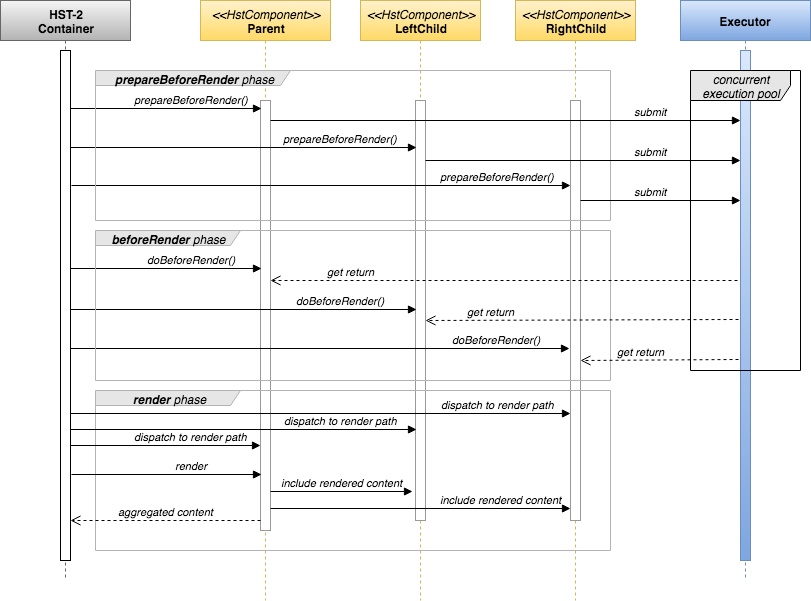
Diagram: The sequence diagram shows the HST-2 Container coordinating a parent component, left and right child components, and an Executor with a concurrent execution pool. The process is divided into three phases: prepareBeforeRender, beforeRender, and render. During prepareBeforeRender, components submit tasks to the executor in parallel. In beforeRender, components retrieve results and continue with doBeforeRender. In the render phase, each component renders its content, and the container aggregates the final output.
By using prepareBeforeRender, you can submit parallel tasks before the main rendering logic. The Executor service, typically backed by a thread pool, handles concurrent execution. Later, in doBeforeRender, you retrieve the results and populate the model for template rendering.
A typical implementation involves:
- Submitting
Futureinstances to the Executor inprepareBeforeRender. - Retrieving and processing the results in
doBeforeRenderby callingFuture#get().
Example: Parallel Processing in the TestSuite
A minimal example demonstrating prepareBeforeRender is available in the testsuite project.
To view the example:
- Build and run the testsuite project locally.
- Navigate to http://localhost:8080/site/.
- Select "prepareBeforeRender Example" from the left menu.
This example page includes a parent component (org.hippoecm.hst.demo.components.PrepareCallersParent) with four child components (org.hippoecm.hst.demo.components.PrepareCaller). Each PrepareCaller component creates an asynchronous job in its prepareBeforeRender method and submits it to the task executor. The result is retrieved in doBeforeRender. All four jobs execute in parallel, reducing the total page response time compared to sequential execution. The page displays execution timing to validate parallel processing.