Configure a Documentation Link for a Component
Info: This feature is available in brXM 15.5.0 and later.
Overview
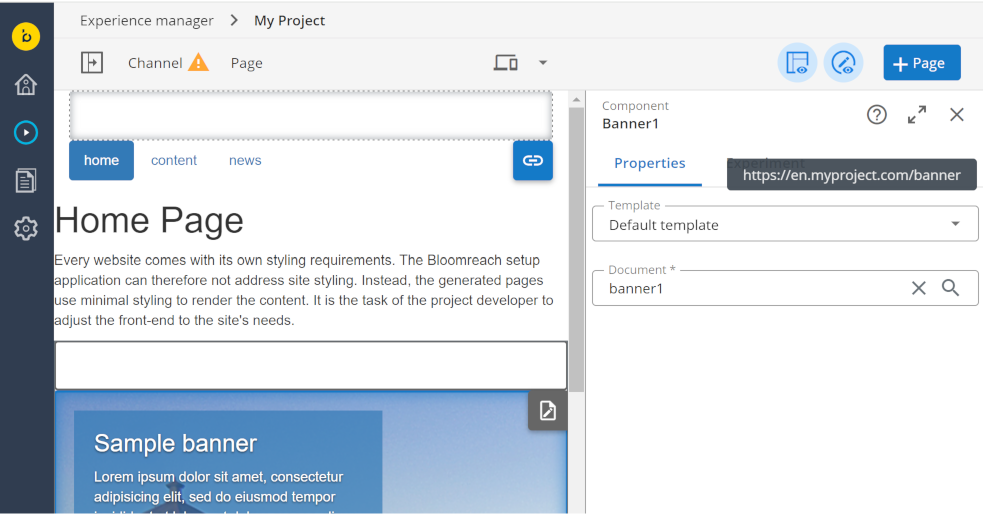
You can configure an external documentation link for a component. This link appears as a "?" icon in the Experience Manager application. When users click the icon, the external documentation opens in a new browser tab.
When to Use
Use this configuration to provide direct access to external documentation for a specific Delivery Tier (HST) Component. This is managed through Repository Resource Bundles in the Console.
Prerequisites
- Access to the Console
- Knowledge of the fully qualified class name for the component
- Appropriate permissions to modify repository resource bundles
Implementation Steps
-
In the Console, navigate to the following resource bundle path:
/hippo:configuration/hippo:translations/hippo:hst/components -
Under the
componentsnode, create a tree structure that matches the fully qualified class name of your component. For each language you want to support, add a language subnode. -
In each language subnode, add a
documentation.linkproperty with the URL to the relevant documentation.Example structure:
/org: jcr:primaryType: hipposys:resourcebundles /myproject: jcr:primaryType: hipposys:resourcebundles /components: jcr:primaryType: hipposys:resourcebundles /MyBannerComponent: jcr:primaryType: hipposys:resourcebundles /en: jcr:primaryType: hipposys:resourcebundle documentation.link: https://en.myproject.com/banner /fr: jcr:primaryType: hipposys:resourcebundle documentation.link: https://fr.myproject.com/banniere -
Save your changes to the repository.
- In a local development environment, use autoexport to export your changes to YAML for deployment to other environments.
Verification
- Open the Experience Manager application.
- Locate the component you configured.
- Confirm that the "?" icon appears in the component properties panel.
- Click the icon and verify that the external documentation opens in a new browser tab.