Bloomreach Content 17.4.1 Release Notes
Note: 17.4.0 has a known issue: the CMS console's node editor can fail to open some nodes, and the console can freeze. Upgrade to 17.4.1 instead of 17.4.0. 17.4.1 contains everything in 17.4.0 and the fix.
Highlights for 17.4.1
Version 17.4.1 of our content application introduces new features, technical stack upgrades, and product improvements. This page summarizes the key changes in this release. For a complete list of release notes, see the release notes overview.
All features and changes described here are part of the content application unless stated otherwise.
Significant Updates and New Features
One CMS agent Experience, in AI Perspective and in Your Document
The CMS agent in the document editor now shares the same interface and experience as AI Perspective: the same chat, conversation threads, result cards and change review. Your editors learn one way of working with the CMS agent and use it wherever they are, including while they edit a document.
-
The CMS agent edits your document. Ask it to rewrite a teaser, fix a translation or fill in an SEO description, and it shows the edit next to the original. Select Accept, and the CMS agent applies the edit to your document. Select Reject, and your document stays as it is.
-
Works in your projects. When the document you have open in the editor is part of a project, the CMS agent reads and edits it in that project, not in the main channel. Your edit is then reviewed and merged with the rest of the project's changes. See AI module projects support.
-
It knows which document you're working on. The document you have open is attached to the conversation, so you don't need to select it or paste its content. Your edits are saved first, so the CMS agent reads your latest version. Select Keep attached to keep it in the conversation when you open another document.
-
Customize how the CMS agent shows results. In Settings > UI plugins, choose which result blocks the CMS agent uses, such as document lists, document cards and proposed changes, and whether each one appears In chat or in the Canvas in AI Perspective. In the document editor, results always appear in the chat.
Developer notes: You can remove the content-ai-service-client-assistant-angular dependency from your project. See the Upgrade Guide.
For more information, see the CMS agent User Guide.
Attribute ingestion and filtering in AI module
Starting with 17.4, the CMS agent can constrain content search by document attributes, for example content type, language or folder path, in addition to keywords. Editors can ask natural-language questions such as "find news articles under products" and get results filtered and constrained by those attributes. Attribute filtering is under active development, and more metadata will become filterable in future releases. See Metadata and attribute filtering for AI search for more information.
Developer notes: After upgrading, rebuild your vector store index. See the Upgrade Guide.
Use Information from Your Other Systems in the CMS agent
Editors often need information from other systems while they write, such as product specifications, approved brand claims or the status of a ticket. Your developers can now connect those systems to the CMS agent, so editors can ask for that information in the same chat, in AI Perspective and in the document editor.
Developer notes: Connect external systems through MCP (Model Context Protocol) servers in the repository configuration. See Connect MCP Servers.
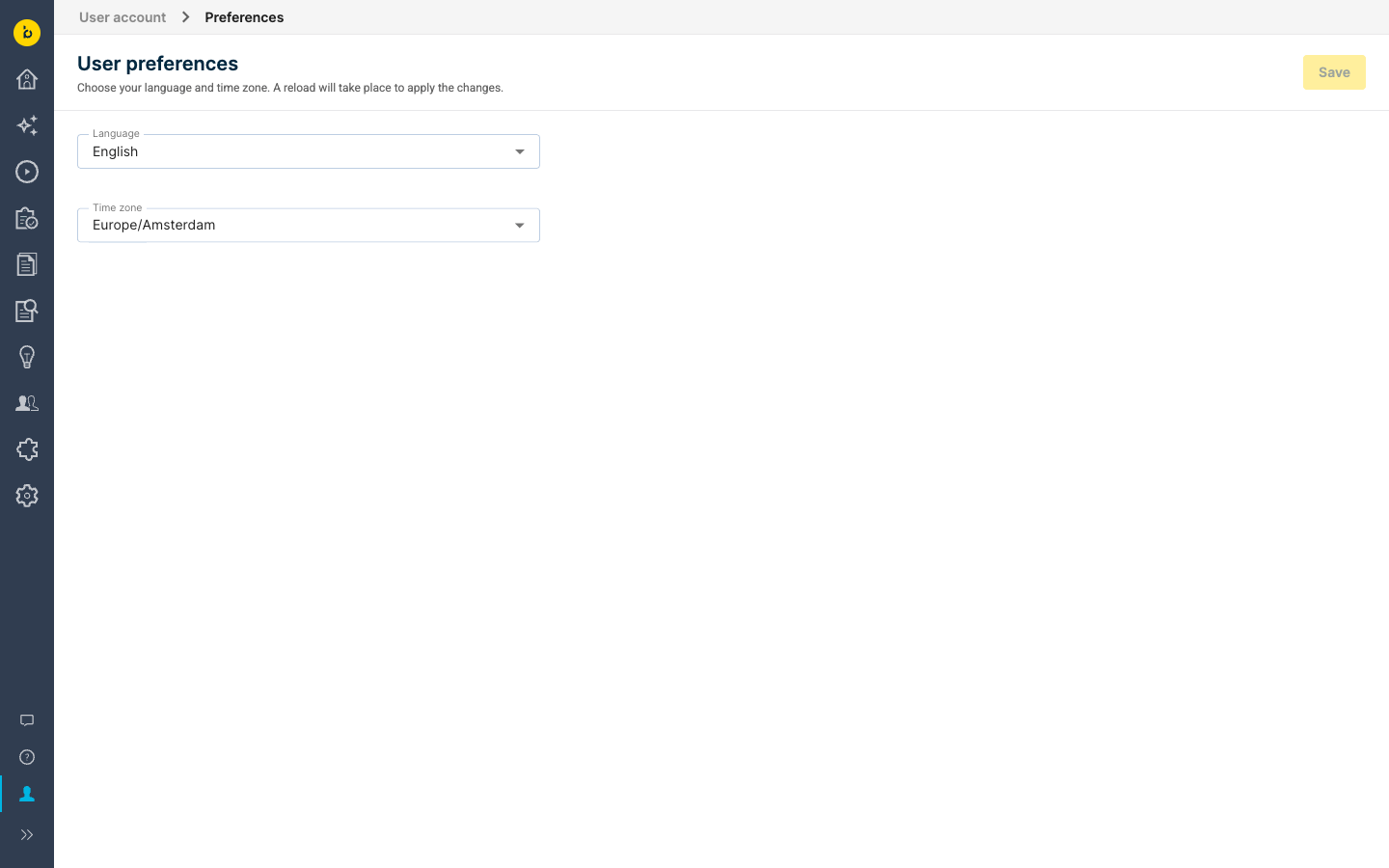
User Preferences: change language and time zone without logging out
The possibility has been added to change the user language and time zone, accessible via new menu item "User account > Preferences". The available languages and time zones are the same ones that appear on the login screen, but choosing those used to be impossible for users that log in via SSO.
Also, the browser's time zone is now picked up as default value, instead of the server's time zone.
Upgrade note: the location of the time zone configuration has moved, please adjust accordingly,
See page Configure the CMS Languages and Time Zones for further information.
Ongoing Enhancements and Fixes
For End Users
User Settings
- The home page dashboard shows when your password expires, so you can change it in time. This requires password expiration to be enabled, see Configure Password Strength Validation and Password Expiration.
Content Editor
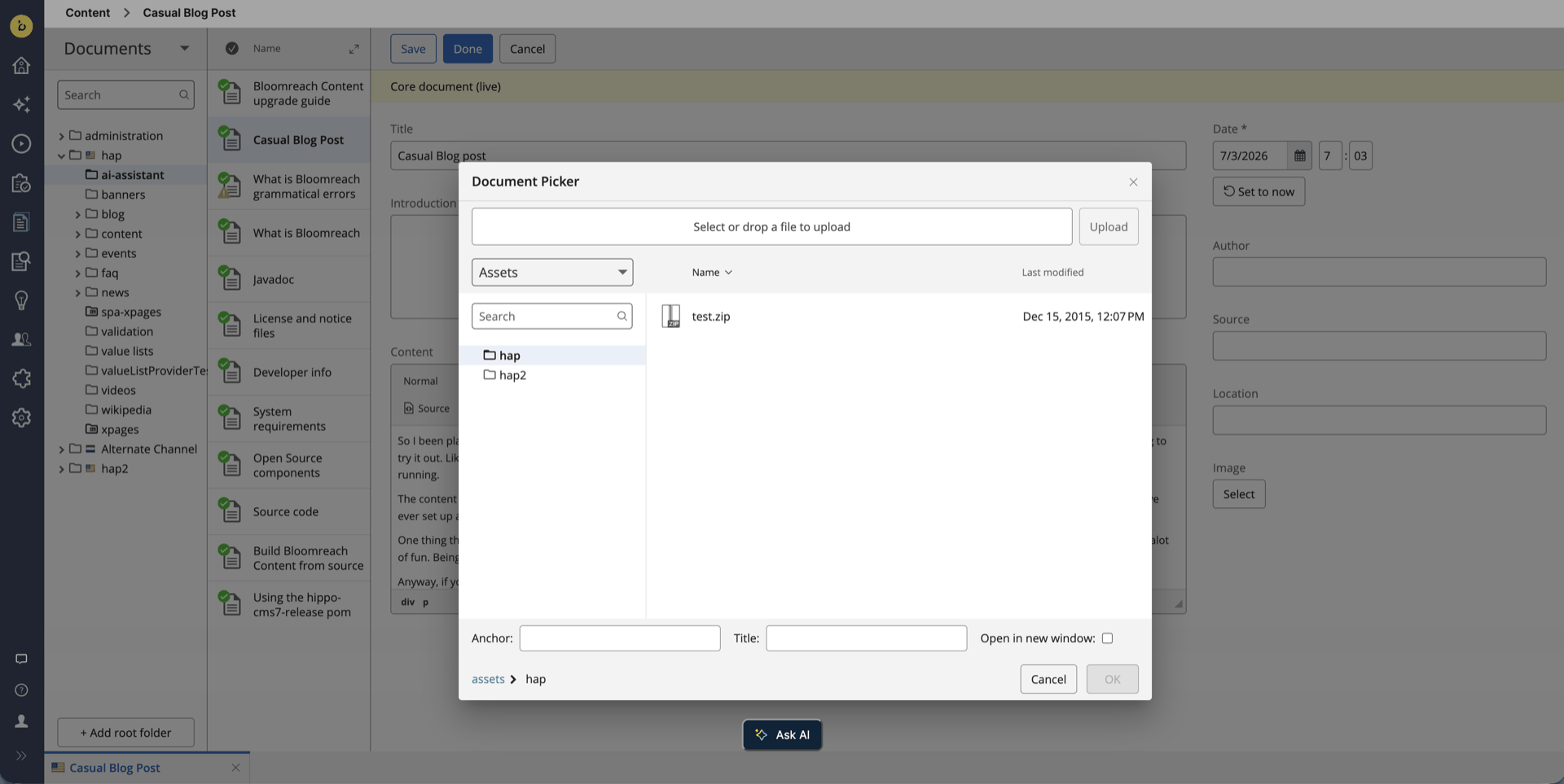
- Upload PDFs and other assets from the document picker and the rich-text link picker, as you already can in the image picker. It's on by default, and administrators can turn it off per field, see the Upgrade Guide.
-
If you enter a date the CMS can't read, in a date field or a component parameter, it now shows an error and doesn't save until you correct it. If you close the document first, you're asked whether to save or discard your changes.
-
When you add a value to a rich-text field with several values, or to a content blocks field, the page stays where you are. Previously, it could scroll to the middle of the field or of the new block.
-
JSON taxonomies show each category's display name, not its technical name, in the taxonomy editor, taxonomy fields and category picker.
-
The compare view now shows changes that only add or remove spaces in text fields.
-
In the publish and unpublish dialog, the select-all checkbox now reflects the rows you've selected.
-
Checkbox fields in component properties are spaced correctly again.
-
When you delete the document you have open, the browser address now changes to the document shown next.
Experience Manager
-
The channel overview sorts channels alphabetically again, follows the configured sort order and remembers the order you chose.
-
In the side panel, the rich-text link and image pickers use the field's own settings again, such as allowed document types, start folder and upload.
-
The browser console no longer shows a 404 error when the Relevance module isn't installed.
Projects
-
The merge conflict list shows every conflict on its own row again.
-
The Update and Resume update buttons in a project's detail view open the update view again.
For Developers
AI Platform
- The CMS agent's search and content tools now work with Ollama. Important: the configured Ollama model must support tool calling. Models without it, such as gemma3, fail with a "does not support tools" error, so check your model before upgrading. See Setup via Properties (Production).
APIs
-
An attribute
pubStateSummaryhas been added to the output of Document Resource of the Content REST API, to be able to better distinguish between document states, for example in a preview mount with a published document. The values arenew(offline),live, andchanged(live, with unpublished changes). -
Plain and context-aware JAX-RS services can use Jackson 3 for JSON without custom wiring, for example to return a JsonNode. Jackson 3 is opt-in, and Jackson 2 stays the default. Before you switch, check the differences in property order, date format and handling of unknown properties. See RESTful JAX-RS Component Support.
Content Security Policy and File Handling
-
The Groovy updater editor and the console's property editors now use CodeMirror 6. It works with a strict Content Security Policy and adds better highlighting, search, bracket matching and FreeMarker highlighting.
-
Files a browser could run scripts from, such as SVG and HTML, are served with a Content Security Policy header, and uploaded PDFs are checked for embedded scripts. Both are on by default. To change them, see the Upgrade Guide.
Replication
-
Replication recovers from failed saves and unreachable targets without a restart. Per-target paths and the maximum bundle size setting now also work in v17. See Replication Best Practices.
-
Replication target location, username and password can use ${...} placeholders, resolved from environment variables or system properties, so you don't have to store credentials in the repository. See Configuring Replication.
Content Platform
-
LDAP synchronization saves removed users in batches instead of in one large save, which reduces memory use during sync. A new read timeout stops a hanging LDAP server from blocking threads. See Enable LDAP Authentication and Synchronization.
-
Scheduled publication and unpublication events have the same arguments as before 16.7.1 again, so custom event listeners that rely on them work again.
-
The Relevance document types characteristic lists all document types again, also when a translation is missing a jcr:name.
-
When the CMS lists a document's references, documents linked from a field with several document links are now included, and publishing no longer logs an error for them.
-
Fewer log messages: CMS dialogs no longer log resource key warnings, and Enterprise Forms no longer logs errors when used with the Page Model API.
-
Spring Boot is upgraded to 4.1.2, Apache Wicket to 10.12.0 and Angular to 22.2, with the latest upstream fixes and security patches.
-
The checker tool 4.2.0 can create the
/lostnfoundnode for you, so it no longer has to be made by hand. Setcheck.lostnfound.autocreatetotrueto turn this on; it's off by default. See the checker tool release notes. [CMS-15971] -
The checker tool 4.3.0 deletes orphaned data store binaries in chunks instead of with one large delete, which helps on large data stores. See the checker tool release notes. [CMS-19348]
Security Fixes
- This release addresses known vulnerabilities. Upgrade to the latest patch version for the most recent security updates. Premium Support customers can use the Vulnerability Dashboard to assess applicability.
SPA SDK Updates
- SPA SDK 28.2.0: security improvements. The SDK's build tooling, example apps and documentation site now use updated dependencies with the latest security fixes, with examples for Angular 21.2, Next.js 15.5, Nuxt 4.6 and Vue 3.5. See the SPA SDK 28.2.0 release notes on GitHub.
Ecosystem & Add-on Updates from Professional Services Team
New plugin releases compatible with Bloomreach Content 17:
-
HST Spring Security Support 6.0.1: the plugin shows up in Essentials again, so it's quicker to install. See the HST Spring Security Support documentation.
-
Iframe Perspective 8.0.3: no more unnecessary error messages in the logs. See the Iframe Perspective documentation.
-
Gallery Bulk Upload 8.0.1: files with special characters in their names upload correctly. See the Bulk Upload Plugin release notes.
Minor Release
17.4.0 is a minor release and remains backward compatible with the previous minor version. Upgrading from 17.3 to 17.4 requires minimal effort; the main steps are rebuilding the AI vector store index and checking your Ollama model. See the upgrade instructions (login required) and the overview of minor version upgrade instructions for more information.
Notices
Repository Node Type (CND) Changes
This release introduces the following node type definition (CND) changes:
- Added property
hippoldap:readtimeoutms (string)to node typehippoldap:securityprovider
Important:
This CND change prevents simple rollback. Downgrading from 17.4.1 requires restoring from a full repository backup taken before the upgrade.
Deprecations
The following are deprecated in 17.4. For what replaces each one and what to change in your project, see the Upgrade Guide.
-
The content-ai-service-client-assistant-angular artifact and its -l10n artifact, which are now empty.
-
The language mode script references and the skin and mode hooks in CodeMirrorEditor.
-
DocumentRequestStore.isAdvancedSearchAvailable.
-
Configuring show.timezones and selectable.timezones on the login page.
Supported Technologies
For full system requirements and a detailed table of third-party compatibility, see the system requirements documentation.
End-of-Life, Support, and Maintained Code
Nomenclature
The following definitions clarify how Bloomreach uses the terms "end-of-life," "supported," and "maintained":
Supported Product Version
A supported product version is eligible for helpdesk support as described in your service level agreement (SLA). Multiple service levels are available.
If a bug is identified in a supported but not maintained version, fixes are only applied to maintained versions. To receive a fix, you must upgrade to a maintained version.
Maintained Product Version
Maintained versions receive code updates, security patches, and bug fixes. System requirements for third-party libraries and components are kept current. Bloomreach supports the use of certified system requirement providers but does not provide support for the providers themselves (e.g., databases, Java).
Non-maintained versions do not receive code updates and may contain unresolved bugs or security vulnerabilities.
End-of-Life Product Version
End-of-life versions are neither supported nor maintained. They may be available in archives but can be removed without notice.
Support Status Table
The table below lists the planned end-of-support dates for each product version. Versions not listed are not active, not supported, and considered end-of-life.
| Version | Planned end date of Standard Support | Planned end date of Premium Plus Support | Original major version release date |
|---|---|---|---|
| Latest 14.x | December 2024 | December 2025 | December 2019 |
| Latest 15.x | December 2025 | December 2026 | April 2022 |
| Latest 16.x | December 2026 | December 2027 | June 2024 |
| Latest 17.x | December 2027 | December 2028 | May 2026 |
Table: Planned end-of-support dates based on current SLA terms. Supported versions may vary depending on contractual agreements.
Versions highlighted in orange are actively maintained and receive bug fixes and product improvements.
Security Notes
This release updates third-party dependencies with published vulnerabilities. Keep your systems current by applying product releases as they become available.
Availability
Bloomreach Content 17.4.1 is available as of November 13, 2026. The open source release will follow approximately two years later, in accordance with the Bloomreach release policy.