Bloomreach Content V17.1 Release Notes
Highlights for v17.1
Bloomreach Content version 17.1 introduces new features, technical stack upgrades, and product improvements. This document provides an overview of the main changes in this release. For a complete list of release notes, see the release notes overview.
All updates described here are included in Bloomreach Content unless otherwise specified.
Significant Updates and New Features
Search Agent: Repository-Wide Content Discovery
The AI Content Assistant now supports repository-wide search. Editors can use natural language queries to search the entire content repository, returning the most relevant documents based on semantic meaning rather than exact keywords. This approach surfaces related content even if terminology differs or content resides elsewhere in the repository.
Use cases include:
- Checking if a topic is already covered before creating new content
- Identifying documents affected by product, policy, or regulation changes
- Bringing relevant material into the editing context
The Search Agent is available to all Bloomreach Content customers.
Developer notes:
You can control the number of results with the brxm.ai.tools.search.max-results property (default: 5, maximum: 20). For configuration details, see Initialize and configure the AI Content Assistant via Properties files.
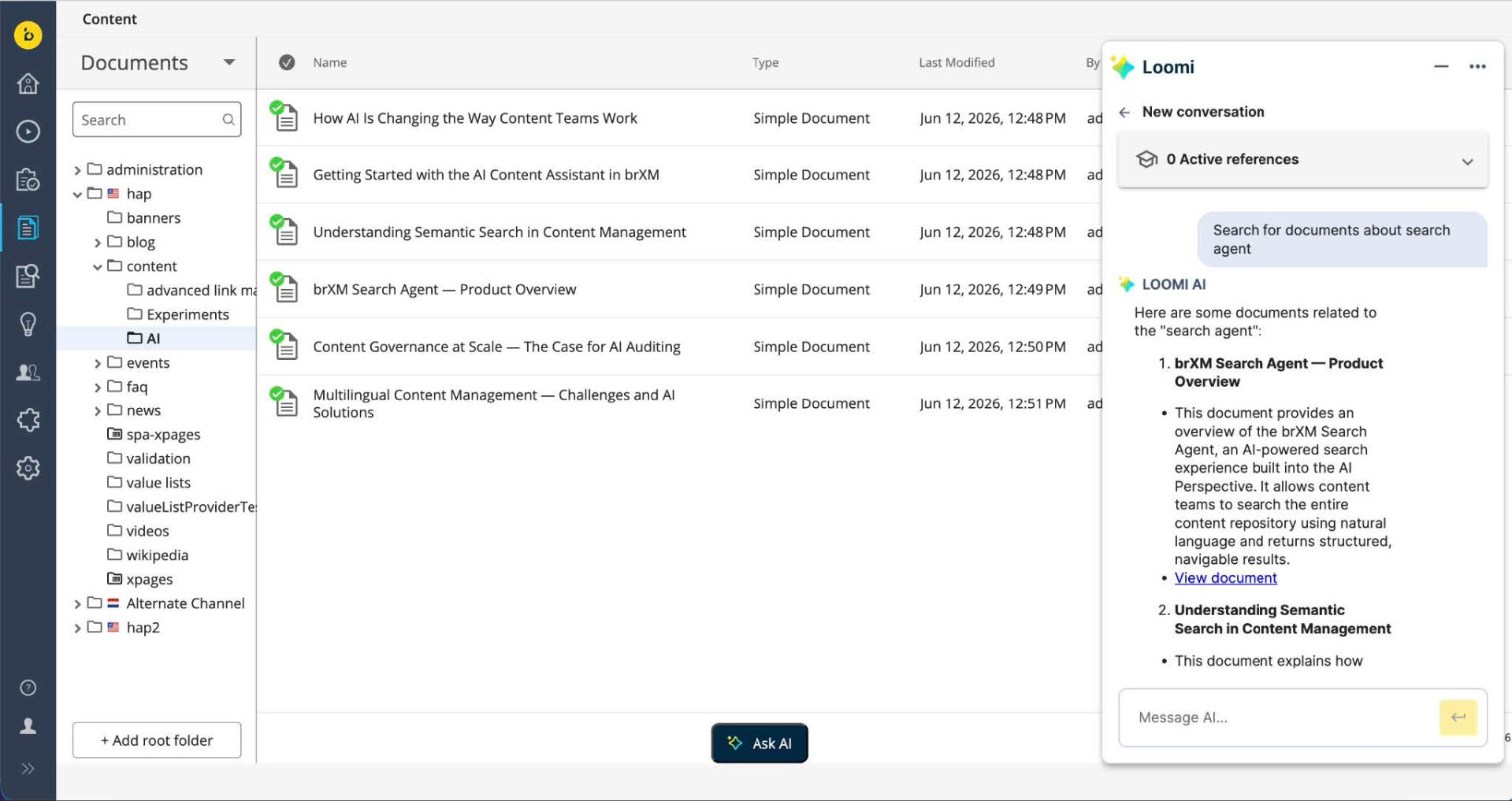
Vector Store: PostgreSQL (PgVector) Support and Search Agent on Bloomreach Cloud
The repository-wide Search Agent uses a vector store for semantic content matching. As of 17.1.0, Bloomreach Content supports PostgreSQL (PgVector) as a vector store in addition to Redis. This provides more deployment options and allows teams to use existing database infrastructure. PgVector support also enables the Search Agent on Bloomreach Cloud for the first time.
On Bloomreach Cloud, the Search Agent is available with a managed PostgreSQL (PgVector) vector store. Contact your Account Manager or Bloomreach Support to enable this feature.
Developer notes:
Select the vector store with the brxm.ai.vectorstore property (Redis or PgVector). Configure PgVector under the brxm.ai.vectorstore.pgvector.* namespace. For details, see the Vector Store and Ingestion guide.
Configure AI Features in Essentials
Developers can now configure more AI features directly in the Essentials application. This includes the LiteLLM connector, a custom completions path, and the vector store for the Search Agent. This streamlines AI setup, especially for development and testing environments. For instructions, see Initialize and configure via Essentials.
Ongoing Enhancements and Fixes
For End Users
Experience Manager
- Dropdown fields using a custom value list provider now render correctly in Experience Manager.
- Channel characteristics display correctly even if an entry is missing from the configuration.
- Channel locale icons are restored in the channels overview after upgrading to 17.0.0.
- Locked containers now display the username of the user holding the lock.
- Experience Page folders can now be selected in folder pickers, restoring expected selection behavior.
- When the relevance feature is disabled, the Experiments tab and trends/goals views remain hidden.
- Compound fields in the Visual Editor now support multiple validation messages per field.
Content Editor
- Refreshing a page now discards unsaved changes for Asset and Image fields, preventing invalid documents from being saved.
- Document search now displays the language of each result in multilingual repositories.
- Resource bundle revisions now display accurate historical data for the selected revision.
- Editors receive a warning about potential link and reference breakage when changing the URL name during a rename operation.
- Publication request notifications and reject/feedback dialogs now show the requester's display name, using full name, email, or user ID as available. This logic also applies to the homepage activity stream.
Home 2.0
- The "See all" link for Pending Requests now opens the full list as expected. The "See all" button is only available if the Advanced Search feature is enabled.
For Developers
Experience Manager
- Administrators can now configure channels to defer home page loading until a specific page is opened, improving load times for channels with many or deeply nested document references. For configuration details, see Defer Channel Preview Load.
AI Content Assistant
- AI usage for embeddings generation is now recorded for all model providers. Usage by the background ingestion process is attributed to a dedicated system identity.
Platform and Stability
- URL generation now applies consistent encoding and correctly handles special characters.
- A spurious WARN log on CMS application navigation (introduced in 17.0.0) has been removed.
- Administrators can now exclude system properties from being displayed, keeping internal fields hidden where not relevant.
- The multi-repository session pool now handles concurrent load without intermittent cleanup errors.
- The deprecated MimeTypeMapper utility has been removed. Use HippoServiceRegistry to obtain the MIME type mapping service.
- Apache Wicket has been upgraded to version 10.9.1.
This release also includes additional third-party library upgrades, security fixes, and internal improvements. For a complete list, see the 17.1.0 Detailed Release Notes.
Bloomreach SPA SDK Updates
SPA SDK 28.0.0: Reduced Size and Simplified Integration
SPA SDK 28.0.0 is a major release (available June 19, 2026) focused on reducing SDK size and simplifying front-end development. The core SDK is approximately 38% smaller, resulting in lighter applications that are easier to maintain. Integration with custom data-fetching setups is now more straightforward, with ready-to-use examples for both client-side and server-rendered applications.
This release is not backward compatible. It removes support for the legacy Page Model API v0.9 and several deprecated methods. Projects using older patterns should review the migration notes. For details, see the SPA SDK releases.
Bloomreach Cloud Updates
Search Agent on Bloomreach Cloud
The Search Agent is now available on Bloomreach Cloud using a managed PostgreSQL (PgVector) vector store. Cloud customers can enable repository-wide content search for their teams. For activation, contact Bloomreach Support or your Account Manager.
Ecosystem & Add-on Updates from the Professional Services Team
Bloomreach Forge Plugins Updated for Bloomreach Content 17 Compatibility
The following Bloomreach Forge community plugins are now compatible with Bloomreach Content 17 (Java 21 and Spring Boot 4):
- B.R.U.T.
- IFrame Perspective
- Review Workflow
- Folder Context Menus
- Breadcrumb
- xm-s3-manager
For the latest status and versions, see the Forge project list. Additional plugins are being updated progressively.
Upgrade Assistance from Bloomreach Content Experts
Bloomreach Professional Services offers upgrade support for Bloomreach Content projects. The team provides an Upgrade Assessment service, delivering a detailed evaluation within three days. The assessment includes:
- Executive summary
- Overview of major changes
- Recommended upgrade procedure
- Comprehensive list of findings
The evaluation fee is fully refundable if you proceed with Bloomreach Professional Services for the upgrade. To request assistance, contact your account manager.
Notices
MimeTypeMapper Removal
The deprecated MimeTypeMapper utility has been removed. Projects that reference it must use HippoServiceRegistry to obtain the MIME type mapping service.
Repository Node Type (CND) Changes
This release introduces the following node type definition (CND) changes:
- Added property
hst:deferpreviewload(boolean) to node typehst:channel - Added property
hippostdpubwf:rejectedBy(String) to node typehippostdpubwf:request
Important:
These CND changes prevent simple rollback. Downgrading from 17.1.0 requires restoring from a full repository backup taken before the upgrade.
Minor Release
Version 17.1 is a minor release and remains backward compatible with the previous minor version. Upgrading from 17.0 to 17.1 requires minimal effort. For instructions, see Upgrading from v17.0 to v17.1 (enterprise login required) and the overview of minor version upgrade instructions.
Supported Technologies
For full system requirements and a table of maintained third-party compatibility, see the system requirements documentation.
End-of-Life, Support, and Maintained Code
Terminology
- Supported product version: Customers receive helpdesk support as described in their SLA. Bug fixes for supported but not-maintained versions are only applied to maintained versions.
- Maintained product version: The product code receives updates, including security and bug fixes. System requirements are kept current, but support is limited to certified providers.
- End-of-life product version: Not maintained or supported. May be available in archives but can be removed without notice.
Current Release Support Status
The table below lists support timelines for active product versions. Versions not listed are end-of-life.
| Version | Planned end date of Standard Support | Planned end date of Premium Plus Support | Original major version release date |
|---|---|---|---|
| Latest 14.x | December 2024 | December 2025 | December 2019 |
| Latest 15.x | December 2025 | December 2026 | April 2022 |
| Latest 16.x | December 2026 | December 2027 | June 2024 |
| Latest 17.x | December 2027 | December 2028 | May 2026 |
Supported versions and end dates may vary based on contractual agreements. Versions highlighted in orange are actively maintained and receive bug fixes and improvements.
Security Notes
This release updates third-party dependencies to address published vulnerabilities. Keep your systems current with the latest product releases.
Availability
Bloomreach Content version 17.1 is available as of June 18, 2026. The open source release will be available approximately two years later, in line with the Bloomreach release policy.