Bloomreach Content 17.3 Release Notes
Highlights for v17.3
Bloomreach Content v17.3 introduces new features, technical stack upgrades, and product improvements. This page summarizes the key changes in this release. For a complete list of release notes, see the release notes overview.
All features and changes described here are part of Bloomreach Content unless stated otherwise.
Significant Updates and New Features
AI Perspective: Your New Workspace for Content at Scale
AI Perspective is a dedicated AI workspace in Bloomreach Content that uses CMS Agent to find and edit content across your repository. You describe what you're looking for, or what you'd like changed, in everyday language, and CMS Agent does it for you.
-
Navigator. Navigator is CMS Agent's search tool — describe what you're looking for in everyday language, and Navigator finds the documents for you across your repository.
-
Composer. Composer is CMS Agent's content editing tool — describe the change you want in everyday language, and Composer edits the documents for you, ready to review by you before it's saved.
-
One-click shortcuts. Ready-made shortcuts — Search content, Summarize, Translate — fill in a common prompt for you, so you're not retyping it every time. Edit these, add your own, or remove the ones you don't use, from AI Perspective's own Settings.
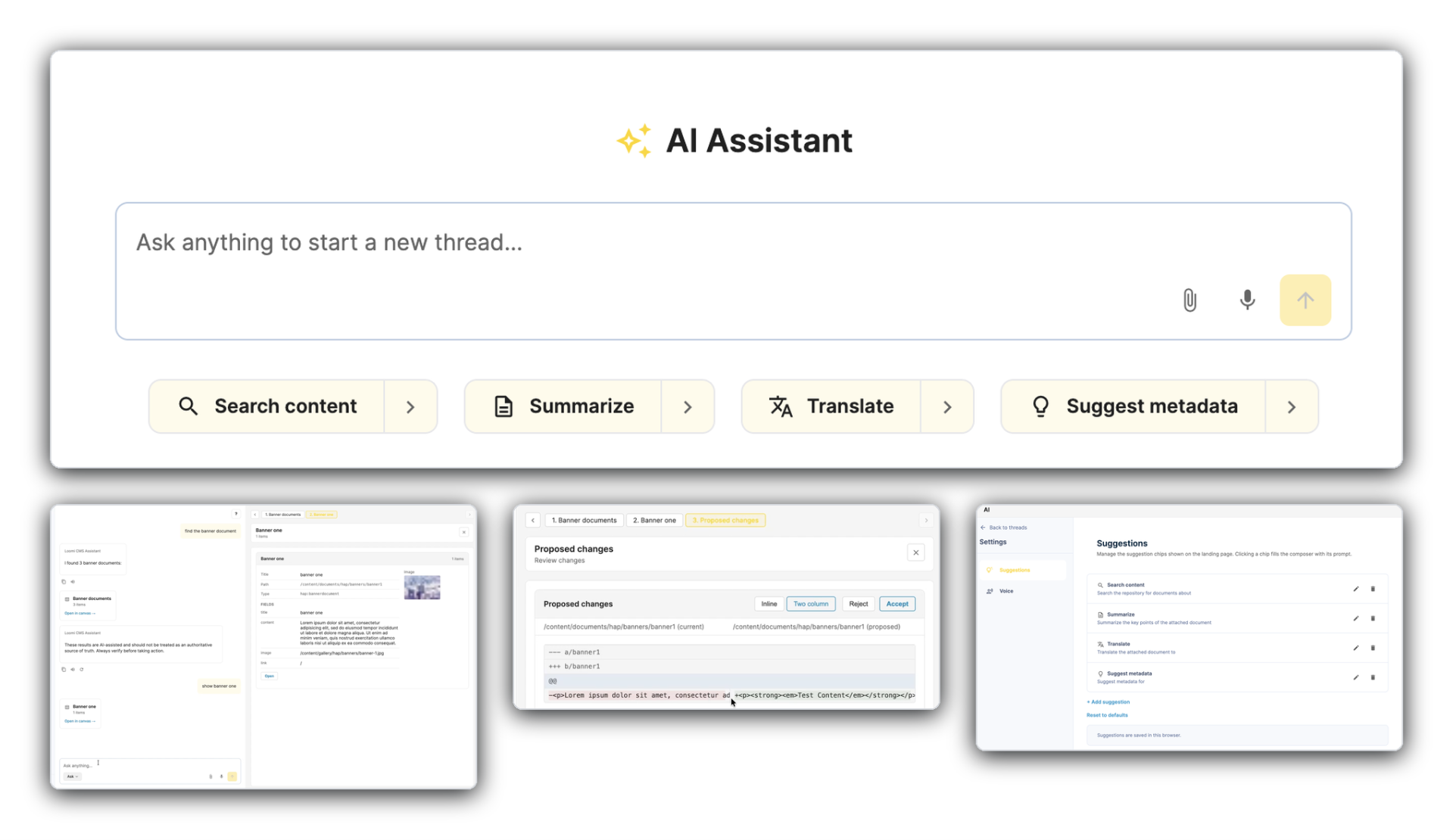
Developer notes: AI Perspective registers as a new CMS Perspective, gated by the existing xm.chatbot.user role, built on a structured event protocol (AGUI) that powers Navigator's search and live previews, and Composer's diff review. Composer's edits are saved through a modern content management API service layer introduced in this release - running in the requesting user's own JCR session. The one-click shortcuts are stored in the browser's local storage for now, not yet backed by a server-side/shared configuration.
For more information, see the AI Perspective documentation.
Content Delivery MCP: Your Live Content, Ready for Any AI Tool
With Content Delivery MCP support, your live, published content becomes a knowledge source that any MCP-compatible AI service can query directly — the same content, the same governance, now reachable by any AI tool that speaks MCP.
What that means in practice: any MCP-compatible AI surface your team already uses can look up your published content directly, on demand — whether that's your documentation, a fact someone needs from a piece of content to finish a review, or a question a visitor just asked.
-
One connection, any AI tool. Today, adding a new AI experience against your content means building and maintaining a bespoke integration for it. With MCP Server, it's one standard interface — Claude, an IDE assistant, a partner's AI product, or anything else that speaks MCP can query your content the same way.
-
AI-powered experiences on your own site. This can power features like an AI chat or answer feature that lets visitors ask a question in plain language and get a response grounded in your published content, or a "related content" widget where the AI decides what to recommend based on what a visitor is currently viewing.
-
A trusted datasource for external AI experiences. Any AI product requires access to your content — personalization, marketing automation, a customer-facing support agent, an internal copilot — gets a standard, governed way to reach it.
See it in action today: the new Bloomreach Content documentation site is itself built on this capability — connect Claude, your IDE assistant, or any MCP client directly to the documentation and query it from inside your own workflow.
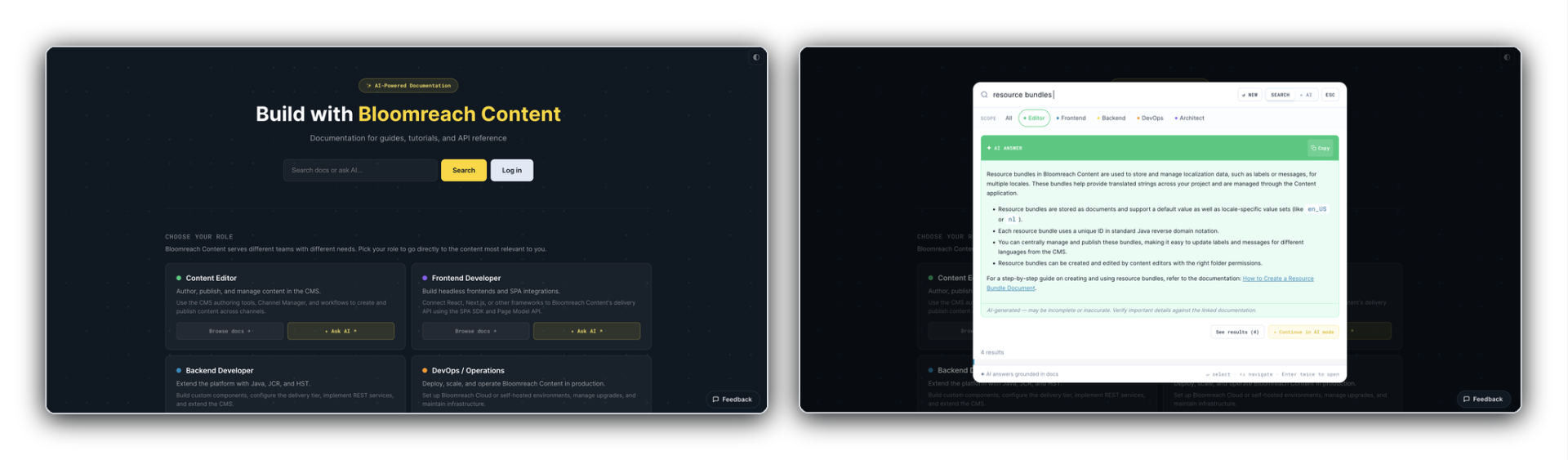
What's next: This is the first step in Bloomreach's broader Content MCP vision — standardizing how AI agents work with content, and unlocking automation that spans your entire Bloomreach ecosystem. This release covers live, published content, read-only. Letting external AI tools work with in-review (preview) content — for pre-launch review, campaign prep, and downstream marketing activation — and letting external AI workflows create or update content through MCP, in a governed way, are both on the roadmap for future releases.
Developer notes: Content Delivery MCP runs as a new HST pipeline, following the same pattern as Bloomreach Content's existing REST pipeline. No tools are provided out of the box — developers create their own by extending a base resource class and annotating methods, the same way they'd build a new REST endpoint today. This is an incubating capability, with published, read-only content as the initial focus.
For more information, see the Content Delivery MCP documentation.
Ongoing Enhancements and Fixes
For End Users
Experience Manager
-
The characteristic selector in the Experience Manager now shows every available characteristic — previously the list was cut off partway down due to a bug.
-
Experience page documents can no longer be published with a required field left empty — publishing now stops and asks for the missing value as expected.
-
You can now clear a previously-set date on a component parameter — it's removed cleanly, instead of showing a "Failed to edit component" error.
-
Content references for Experience page components now resolve correctly — previously, some page-editor layouts could cause a reference to be missed or attributed to the wrong document.
-
Adding a new page now opens the page location picker once per click, instead of it occasionally opening twice and freezing.
Content Editor
-
Multi-select fields using the palette presentation now correctly retain values whose key contains a comma.
-
The Gallery Picker now respects the configured base.path, opening directly in the intended folder instead of the repository root — no more navigating the full folder tree to find the right images.
-
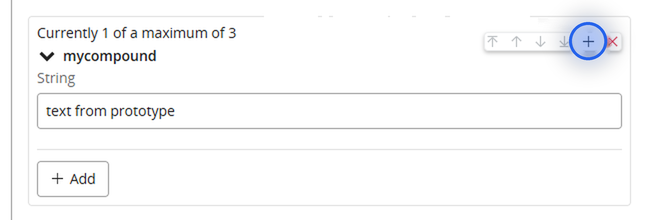
Editors can insert a new Content Block or compound field directly at the position they want — no more scrolling and manually reordering.
-
Link, document, and image pickers now show each result's document path in the search results — no more guessing which of several same-named documents in different folders is the right one.
-
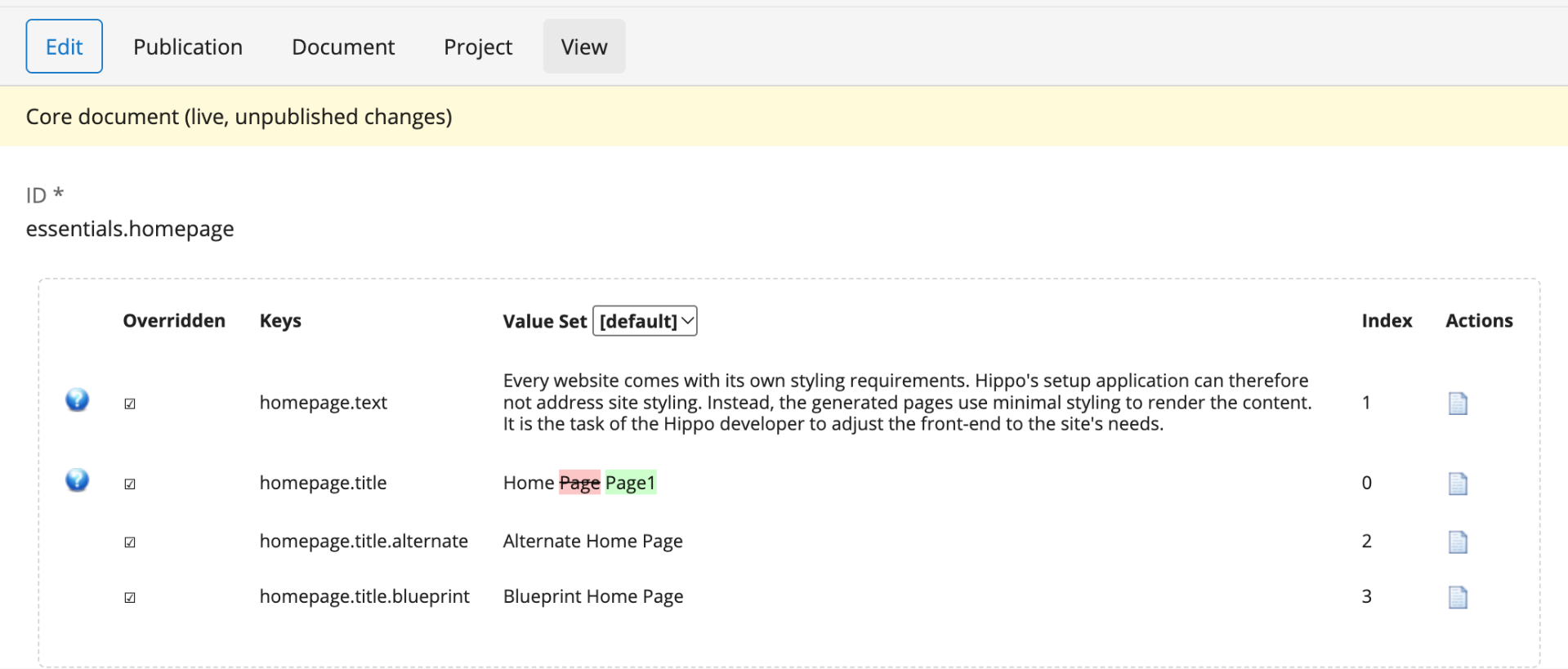
Resource bundles now have the same compare view as documents. Compare the draft with the published version, or any two revisions in the history — keys, values, and translations that were added, removed, or changed are highlighted, so you can review a change before publishing or restoring it. Restoring a revision now previews that revision's content instead of the current version.
-
Advanced search's "all" scope now includes images and custom image types — previously they were silently left out, so a search meant to cover everything could miss them.
-
Enterprise Forms: dragging a field in the form builder no longer gets stuck when the drag passes over a disabled field.
For Developers
Open UI Improvement
- The possibility has been added to configure an the Open UI Extension’s
iframewith anallowattribute, giving developers more flexibility on what can be done by the extension. See Configure a Document Field Extension and Configure a Page Tool.
Experience Manager
- Custom Relevance collector plugins can now declare their own Alter Ego and Segments editor — checkboxes, radio buttons, a free-text value list, or the built-in page-view picker — instead of falling back to an error-prone JSON text area. Previously, the only way to get a real editor for a custom collector was to reuse a built-in collector's ID, which supported at most one custom collector per built-in editor and is no longer necessary. See the Upgrade Guide if your project used that workaround.
Content Platform
-
A modern content management API service layer, the same foundation AI Perspective's content operations are built on, has been introduced. It's internal to the AI platform in this release, with no public REST layer yet.
-
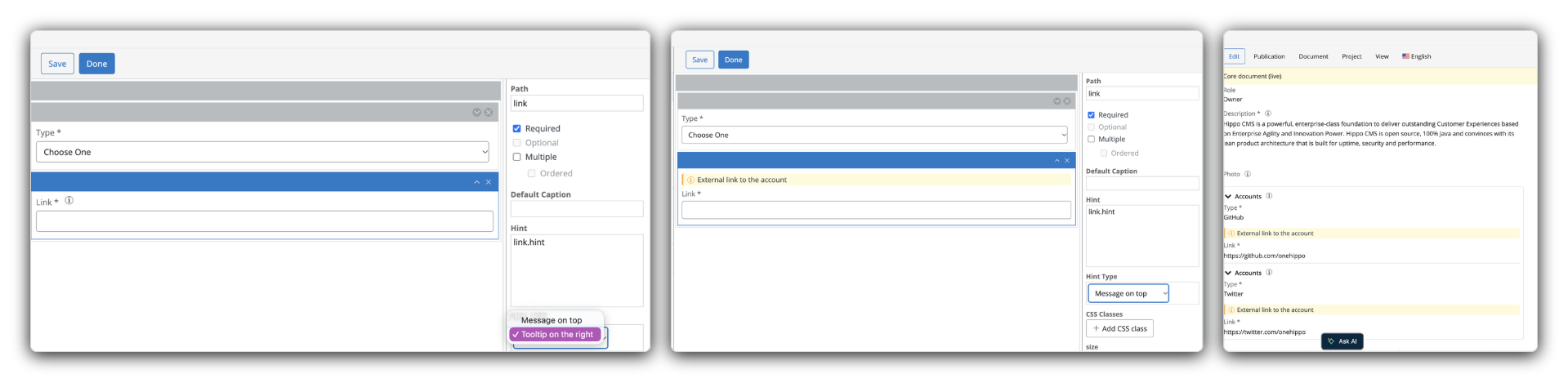
Document type fields can now show their hint as a "Message on top" of the field, in addition to the existing tooltip — configurable per field in the Document Type Editor.
- The translation-count warning no longer fires up to three times too early. It was counting every JCR variant per translation instead of distinct locales, inflating the count relative to the configured threshold.
AI Platform
-
AWS Bedrock joins OpenAI, Google GenAI, Ollama, and LiteLLM as a supported AI platform provider.
-
The AI platform now supports OpenAI's reasoning models (the gpt-5.x family) — previously these failed outright, since reasoning models reject the older max_tokens/temperature parameters the integration always sent. Configuration is available directly from the Essentials setup wizard, with no manual JCR edit required — including a new Reasoning Effort field, which must be set (for example, to none) for CMS Agent's tool calling to work on a reasoning model. The wizard's temperature field for the Google GenAI/Vertex and LiteLLM providers is also now correctly limited to the 0–1 range those providers actually support, instead of showing OpenAI's wider 0–2 range.
Platform & Stability
-
Web files served through the anti-cache mechanism can no longer be served stale after a rolling update — a cache hit could previously predate the content change that produced the requested anti-cache value, pinning outdated bytes behind what's meant to be an immutable, long-cached URL.
-
New database connection templates set default JDBC socket and connect timeouts for MySQL, PostgreSQL, SQL Server, and Oracle — so a transient database disturbance now fails fast and recovers, instead of a single stuck query freezing the entire application server. New projects and new Bloomreach Cloud environments get these defaults automatically; see the Upgrade Guide for how to apply the same protection to an existing project.
-
Spring Boot upgraded to 4.1.1, keeping the platform current with upstream fixes and security patches.
Performance Test Suite
The Bloomreach XM Performance Test Suite is more reliable and easier to run in 17.3:
-
Runs straight after download, including on Windows, and on clustered environments. (
-
Failed or empty runs are reported as failed instead of passing, so CI can rely on the verdict.
-
Load tests release their document locks, so runs no longer affect each other.
-
Multi-user runs also measure the create and publish journeys, and a new tab shows how the baseline scaled.
Security Fixes
- This release addresses known vulnerabilities. Upgrade to the latest patch version for the most recent security updates. Premium Support customers can use the Vulnerability Dashboard to assess applicability.
Bloomreach Cloud Updates
Reminder: Native OpenTelemetry Tracing on Bloomreach Cloud
Bloomreach Cloud customers running brXM 17.0 or later can export distributed traces from their CMS environment to any OTLP-compatible observability backend — such as Dynatrace, Grafana Cloud, or Honeycomb — extending the existing OpenTelemetry pipeline that already supports log data. This is a Bloomreach Cloud platform capability: it isn't tied to this specific release, and it's available to any Cloud customer already on a supported 17.x version.
Setup: To enable trace export, contact the Bloomreach Cloud team via a support ticket.
For configuration details, see OpenTelemetry Tracing on Bloomreach Cloud.
Ecosystem & Add-on Updates from Professional Services Team
New plugin releases compatible with brXM 17:
-
Translations Add-on 9.0.0 — targets brXM 17. Now runs on Java 21 following the platform upgrade, with memory improvements from moving physical threads to virtual threads, plus optimizations to the GPT connector. See the Translations Add-on release notes.
-
Content Export/Import 8.0.0 — targets brXM 17.x. Also upgraded to Java 21, with updated Forge dependencies (hippo-pojo-bind-jcr 5.0.0, gallery-magick 4.1.0, brut 6.1.0). Adds an optional EXIM-INF/manifest.txt file inside export ZIP packages, giving deterministic import ordering instead of relying on non-deterministic iteration order; existing packages without a manifest continue to work unchanged. See the Content Export/Import release notes.
Minor Release
v17.3 is a minor release and remains backward compatible with the previous minor version. Upgrading from v17.2 to v17.3 requires minimal effort. See the upgrade instructions (login required) and the overview of minor version upgrade instructions for more information.
Repository Node Type (CND) Changes
This release introduces the following node type definition (CND) changes:
- Added property
frontend:iframeAllow (string)to node typefrontend:uiExtension
Important:
These CND changes prevent simple rollback. Downgrading from 17.3.0 requires restoring from a full repository backup taken before the upgrade.
Notices
Deprecations
- ResourceBundlePlugin.MISSING_VALUE is deprecated. Use Resource.MISSING_VALUE instead.
Supported Technologies
For full system requirements and a detailed table of third-party compatibility, see the system requirements documentation.
End-of-Life, Support, and Maintained Code
Nomenclature
The following definitions clarify how Bloomreach uses the terms "end-of-life," "supported," and "maintained":
Supported Product Version
A supported product version is eligible for helpdesk support as described in your service level agreement (SLA). Multiple service levels are available.
If a bug is identified in a supported but not maintained version, fixes are only applied to maintained versions. To receive a fix, you must upgrade to a maintained version.
Maintained Product Version
Maintained versions receive code updates, security patches, and bug fixes. System requirements for third-party libraries and components are kept current. Bloomreach supports the use of certified system requirement providers but does not provide support for the providers themselves (e.g., databases, Java).
Non-maintained versions do not receive code updates and may contain unresolved bugs or security vulnerabilities.
End-of-Life Product Version
End-of-life versions are neither supported nor maintained. They may be available in archives but can be removed without notice.
Support Status Table
The table below lists the planned end-of-support dates for each product version. Versions not listed are not active, not supported, and considered end-of-life.
| Version | Planned end date of Standard Support | Planned end date of Premium Plus Support | Original major version release date |
|---|---|---|---|
| Latest 14.x | December 2024 | December 2025 | December 2019 |
| Latest 15.x | December 2025 | December 2026 | April 2022 |
| Latest 16.x | December 2026 | December 2027 | June 2024 |
| Latest 17.x | December 2027 | December 2028 | May 2026 |
Table: Planned end-of-support dates based on current SLA terms. Supported versions may vary depending on contractual agreements.
Versions highlighted in orange are actively maintained and receive bug fixes and product improvements.
Security Notes
This release updates third-party dependencies with published vulnerabilities. Keep your systems current by applying product releases as they become available.
Availability
Bloomreach Content v17.3 is available as of October 1, 2026. The open source release will follow approximately two years later, in accordance with the Bloomreach release policy.