Replication Overview
Info: The Replication module requires a standard or premium Bloomreach Content license. Contact Bloomreach for licensing details.
The Replication module is designed for advanced scenarios and is only appropriate for specific use cases. Consult Bloomreach Professional Services or your account manager to determine if the Replication module fits your requirements. The Replication and Synchronization add-ons are not compatible with the Relevance Module.
Bloomreach Content supports replication between separate repositories. Use replication when you need to isolate your external-facing content service from your intranet-based editing environment.
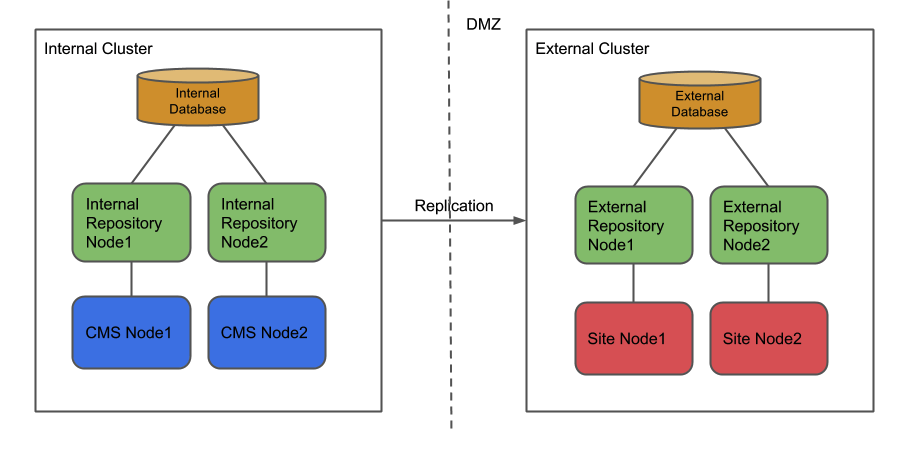
Diagram: The diagram illustrates two environments separated by a DMZ boundary. The Internal Cluster (left) contains an Internal Database connected to two Internal Repository nodes, each linked to a CMS node. The External Cluster (right) contains an External Database connected to two External Repository nodes, each linked to a Site node. Replication is represented by an arrow from the internal to the external cluster across the DMZ.
In this architecture, the public website uses a read-only repository located in the organization's DMZ. The CMS operates behind a firewall and uses a repository outside the public network.
Replication occurs automatically when editors publish changes in the CMS. The source repository cluster pushes changes to the target repository cluster. If the target is unavailable, the source pauses replication and resumes automatically, sending any backlog when the target becomes available.
To enable communication from the source to the target cluster, the target must be accessible through a load balancer. The source sends replication packages to the load balancer, which forwards them to an active repository node.
Not all repository changes are replicated. For example, changes to document types and CMS configuration are excluded. By default, preview documents and HST preview configurations are also not replicated, though this behavior can be customized.
By default, replication includes the following repository subtrees:
/content: Contains all documents, assets, images, and other plugin-related content. Only live, published documents are replicated to the target./hst:platform: HST platform configuration is replicated by default. HST site web application configuration can also be replicated. To enable this, add the root node name of the site configuration to theincludedpathsproperty at/hippo:configuration/hippo:modules/replication/hippo:moduleconfig/metadata. Site configuration is then replicated, except for site preview configuration, which is only relevant to the Channel Editor.
Info: To replicate your site web application HST configuration (for example,
/hst:myproject), add the relevant configuration subtree to the replication configuration.
The following modules and features are not replicated by default:
- Document types: Document types must be bootstrapped on both source and target environments.
- Projects: Project data is not replicated. Channel and content changes within a project are replicated only after merging the project into the core. Running a campaign does not replicate channel or content changes within the project.
- Web files: Web files must be bootstrapped on both source and target environments.
- Relevance Module settings: (brXM 15.1.0 and later) Relevance Module settings (personas, characteristics, etc.) under the
/targeting:targetingpath can be replicated by adding this node to theincludedpathsconfiguration property and specifying a relevance scope provider as shown below.
/hippo:configuration/hippo:modules/replication/hippo:moduleconfig/metadata/relevance: jcr:primaryType: hipposys:moduleconfig className: com.onehippo.cms7.replication.metadata.RelevanceReplicationScopeProvider
If you have a custom subsystem built on top of the repository, you can create a plugin for the replication engine to enable replication of your content.
For more information about replication, see: