Blueprint Usage Scenarios
A channel blueprint in Bloomreach Content provides a predefined configuration and optional content structure for creating new channels. Each blueprint defines a specific channel type, such as a mobile site, website, or newsletter page. You can create any number of blueprints to support different channel types as required by your project.
When a CMS user selects the + Channel button in Experience Manager, the Blueprint Chooser dialog appears. This dialog lists all available channel blueprints.
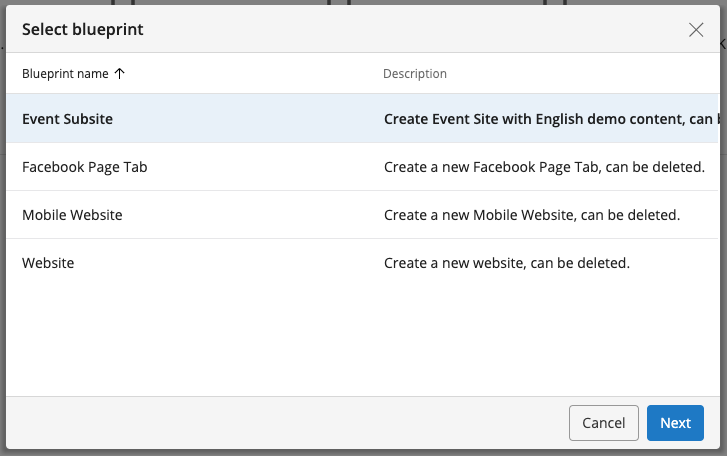
A blueprint defines the configuration for a channel type and enables you to generate multiple channels with consistent features. Channel types determine properties such as layout, available components, language, content structure, and sitemap. Grouping channels by type allows you to standardize features across related channels. For example, an organization managing international sites can use a regional site blueprint to create country-specific channels that share a common structure.
Technically, a blueprint is created by copying the configuration of an existing site to a designated location in the repository. For details about site configuration, refer to the documentation on blueprints. A blueprint can also include a content structure, which is stored with the blueprint in the repository. When a user creates a new channel, the blueprint's site configuration is copied to the HST site configuration area, and any included content is copied to a new content root under /content/documents. The system also creates a new host configuration and channel configuration for previewing the channel in Experience Manager. Developers are responsible for creating blueprints. The following example shows four blueprints, with the hst:configuration node expanded to display the copied configuration from an existing site.
/hst:hst: /hst:blueprints: /event-subsite: /facebook: /mobile: /website: /hst:configuration: /hst:pages: /hst:sitemap: /hst:workspace: /hst:channel: /hst:site:
Use Cases
Channel blueprints are useful when your project requires multiple channels of the same type and you need to create new channels dynamically. Channels can either share existing content or use dedicated content trees. Subsites that reuse content can have different layouts, menus, or styles, depending on the blueprint configuration.
Common blueprint use cases include:
-
Campaign sites
Campaign channels typically consist of a single page with a simple, well-defined content structure. The blueprint defines both the layout and the content structure, allowing you to generate new campaign sites as needed. -
Multilingual sites
For multilingual projects, each channel can use a separate content tree for a specific language while sharing the same site configuration. The blueprint standardizes the configuration, and the content varies by language. -
Email templates
Blueprints can be used to create channels for email templates, such as newsletters. These channels often display a single page sourced from a specific document. The blueprint provides the required configuration and an initial empty document for editors to populate. -
Facebook pages
Use a blueprint to create and manage Facebook pages, which are typically single-page channels displayed within the Facebook domain. Each page is accessible via its own URL. -
Mobile pages
If your project does not use responsive design and requires separate mobile and desktop sites, you can provide distinct blueprints for each. One blueprint creates standard websites, and another creates mobile sites. -
Other scenarios
Any situation where business requirements call for grouping channels into types can benefit from using a blueprint for each channel type. This approach streamlines channel creation and ensures consistency across similar channels.