URL Rewriter Rules for Reverse-Proxying External SPA (14.0-14.1)
Deprecated: Starting with brXM 14.2.1 and SPA SDK 14.2.1, you do not need to configure a reverse proxy using the URL Rewriter. Instead, enable cross-origin loading for a channel by setting a single configuration property. For details, see Configure HST for SPA SDK.
Overview
This page describes how to configure URL Rewriter rules to reverse-proxy an external Single Page Application (SPA) so that it is served from the same host as Bloomreach Content. This setup is required for SPA preview functionality in Bloomreach Content versions 14.0 and 14.1.
When to Use
Use these instructions if you are running brXM 14.0 or 14.1 and need to enable SPA preview in the Experience manager by serving an external SPA from the same host as Bloomreach Content. This approach is required for compatibility with Bloomreach Cloud environments.
Prerequisites
- brXM 14.0 or 14.1
- The SPA server runs externally to Bloomreach Content
- The URL Rewriter plugin is installed in your project
Install and Configure the URL Rewriter
Install the URL Rewriter plugin as described in the installation guide. Configure the module with the following parameters:
/hippo:configuration/hippo:modules/urlrewriter/hippo:moduleconfig: urlrewriter:ignorecontextpath: false urlrewriter:usequerystring: true urlrewriter:skippedprefixes: - /site/_cmsrest - /site/_cmssessioncontext - /site/_rp - /site/_hn: - /site/ping/
- Ensure that
urlrewriter:skippedprefixesincludes_cmssessioncontextbut does not include_cmsinternal. - If your project uses a context path, all prefixes must start with
/sitebecauseurlrewriter:ignorecontextpathis set tofalse.
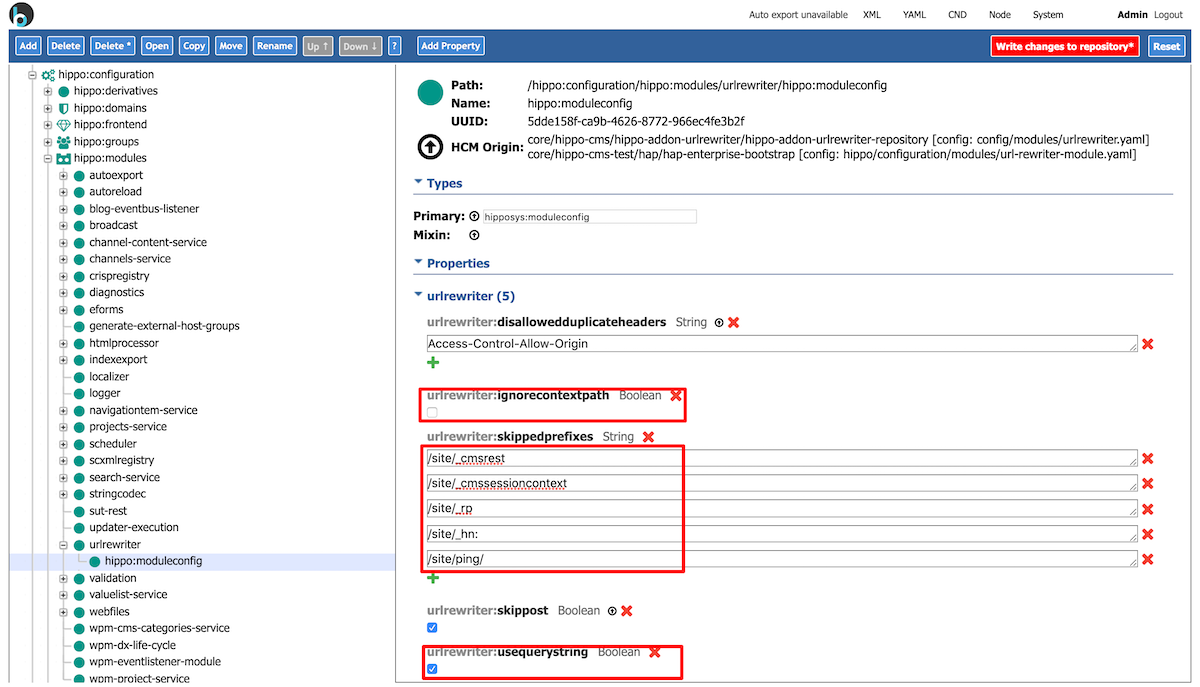
Image 1. UrlRewriter module configuration
Set Up Reverse Proxy Rules
You must define three URL Rewriter rules to reverse-proxy requests to your SPA server:
- Exclude requests for the Page Model API and binaries from proxying.
- Ensure the
bloomreach-preview=truequery parameter is present for preview requests. - Proxy all other SPA requests to the external SPA server.
These rules apply to both client-side and server-side rendered SPAs. They work in local and production environments, including Bloomreach Cloud and on-premises deployments.
Important: Use the _cmsinternal infix in your rules. Do not remove it as described in this guide.
Note: These rules do not handle static resources (such as JavaScript and CSS bundles). Serve static assets from an external server using absolute URLs. The demo SPA uses a PUBLIC_URL environment variable to generate absolute URLs for static resources.
Adjust the rules for your environment:
- Replace
http://localhost:3000with the address of your SPA server. - If you use a custom prefix for the Page Model API, update
resourceapiin Rule 1. - If your SPA channel is mounted at a non-empty path (e.g.,
http://www.example.com/channel-path), use the second set of rules and replacechannel-pathwith your actual channel path.
Rules for Empty Channel Path
If your SPA channel is mounted at the root (no channel path), use the following rules:
<rule> <!-- Rule 1: Exclude requests for Page Model API and binaries --> <from>^(?:/[^\/]+)?(?:/_cmsinternal)?/(?:binaries|images|resourceapi)([\?/].*)?$</from> <to last="true">-</to> </rule> <rule> <!-- Rule 2: Ensure bloomreach-preview query parameter for preview requests --> <from> ^((?:/[^\/]+)?/_cmsinternal(?:/[^\?]*)?)(?:\?((?!(.*&)?bloomreach-preview=.*).*))?$ </from> <to type="redirect" last="true">$1?$2&bloomreach-preview=true</to> </rule> <rule> <!-- Rule 3: Proxy requests to route to the SPA server --> <from>^(?:/[^\/]+)?(?:/_cmsinternal)?([\?/].*)?$</from> <to type="proxy" last="true">http://localhost:3000$0</to> </rule>
Rules for Non-Empty Channel Path
If your SPA channel is mounted at a non-root path, use these rules. Replace channel-path with your actual channel path.
<rule> <!-- Rule 1: Exclude requests for Page Model API --> <from>^(?:/[^\/]+)?(?:/_cmsinternal)?/channel-path/resourceapi([\?/].*)?$</from> <to last="true">-</to> </rule> <rule> <!-- Rule 2: Ensure bloomreach-preview query parameter for preview requests --> <from> ^((?:/[^\/]+)?/_cmsinternal/channel-path(?:/[^\?]*)?)(?:\?((?!(.*&)?bloomreach-preview=.*).*))?$ </from> <to type="redirect" last="true">$1?$2&bloomreach-preview=true</to> </rule> <rule> <!-- Rule 3: Proxy requests to route to the SSR SPA --> <from>^(?:/[^\/]+)?(?:/_cmsinternal)?(?:/channel-path)([\?/].*)?$</from> <to type="proxy" last="true">http://localhost:3000$0</to> </rule>
Verification
After configuring the URL Rewriter and rules:
- Access your SPA preview through the Experience manager.
- Confirm that preview requests are proxied to your SPA server and that the
bloomreach-preview=truequery parameter is present. - Verify that requests for the Page Model API and binaries are not proxied.