Experience Manager SPA API
Info: This feature requires a standard or premium Bloomreach Content license. Contact Bloomreach for details.
Info: This page explains the technical integration between Single Page Applications (SPAs) and the Experience manager application. If you use the recommended best practices and Bloomreach SPA SDKs, the integration described here is handled automatically by the SDK.
Introduction
Integrating your SPA with the Experience manager allows CMS users to manage SPA components dynamically. With this integration, users can add, move, remove, or configure SPA components using the familiar Experience manager interface. To enable this, components must be registered with HST and exposed to the SPA through the Delivery API. The SPA must recognize the concept of components and be aware of the available component set.
SPA integration with the Experience manager is optional. If you only use the Delivery API, CMS users cannot manage SPA components through the Experience manager interface.
The integration between the SPA and the Experience manager is bi-directional:
- When a CMS user updates the Delivery API data, the SPA must receive notifications.
- When a visitor changes the SPA state or route in preview mode, the Experience manager must be notified.
This ensures the SPA and Experience manager remain synchronized.
API
The integration API between the SPA and the Experience manager consists of three main parts:
JavaScript
PostMessage-based Remote Procedure Call (RPC)
All communication between the SPA and the Experience manager uses the postMessage API. This enables event-based messaging between the SPA and Bloomreach Content contexts, including cross-origin scenarios.
Because the API is event-driven, you cannot track the progress of individual messages. All two-way communication must be fully asynchronous. Each message should include a unique identifier, which Bloomreach Content will return in the response. The SPA uses this identifier to match responses to requests. Both the SPA and Bloomreach Content can initiate these message exchanges.
Security Considerations
Browsers do not restrict message origins for SPAs. Always verify the origin of incoming messages. In the SPA SDK, the event origin must match the origin specified by the [cmsBaseUrl](https://www.npmjs.com/package/@bloomreach/spa-sdk#configuration) configuration option. On the Bloomreach Content side, the origin must match the value of the org.hippoecm.hst.configuration.channel.PreviewURLChannelInfo_url property.
Set the targetOrigin parameter accordingly when sending messages. Both the SPA SDK and Bloomreach Content use [cmsBaseUrl](https://www.npmjs.com/package/@bloomreach/spa-sdk#configuration) and org.hippoecm.hst.configuration.channel.PreviewURLChannelInfo_url to restrict outgoing messages to trusted recipients.
Events
Some messages are events that do not require acknowledgement or a result. These messages do not include identifying data in the payload.
Example event message:
window.parent.postMessage( { type: 'brxm:event', event: 'something', payload: { some: 'data' } }, 'http://example.com', );
Event message properties:
type: Always set tobrxm:eventfor events.event: The event name.payload: Event parameters, serialized as a plain object.
Requests
Request messages require a response and represent remote procedure calls. Each request must include a unique identifier so the caller can match the response.
const pool = new Map(); function callSomething(...payload) { return new Promise((resolve, reject) => { const id = Math.random(); pool.set(id, [resolve, reject]); window.parent.postMessage( { id, payload, type: 'brxm:request', command: 'something', }, 'http://example.com', ); }); }
Request message properties:
type: Always set tobrxm:requestfor remote calls.command: The remote procedure name.id: The unique identifier for the call.payload: An array of parameters for the remote function.
Note: The code above is incomplete and does not handle identifier collisions. Do not use it as-is in production.
Responses
Response messages contain the result or error from a remote call. The message must include the identifier from the original request. Example response handling in the SPA:
const pool = new Map(); window.addEventListener('message', async (event) => { if (event.origin !== 'http://example.com') { return; } switch (event.data && event.data.type) { case 'brxm:request': return processRequest(event.data); case 'brxm:response': return processResponse(pool, event.data); } }); async function processRequest(request) { try { const result = await window[request.command](...request.payload); window.parent.postMessage( { result, id: request.id, state: 'fulfilled', type: 'brxm:response', }, 'http://example.com', ); } catch (error) { window.parent.postMessage( { result, id: request.id, state: 'rejected', type: 'brxm:response', }, 'http://example.com', ); } } function processResponse(pool, response) { if (!pool.has(response.id)) { return; } const [resolve, reject] = pool.get(response.id); pool.delete(response.id); if (response.state === 'rejected') { reject(response.result); return; } resolve(response.resolve); }
Response message properties:
type: Always set tobrxm:responsefor responses.state: Indicates the result state. Possible values:fulfilledorrejected.id: The identifier from the original request.payload: The result or error from the remote call.
Initial Rendering
The initial rendering sequence consists of three steps:
- The SPA notifies Bloomreach Content that the integration layer is ready.
- Bloomreach Content injects the required JavaScript asset.
- The SPA synchronizes overlays after rendering.
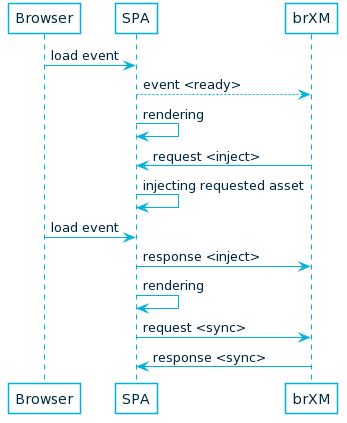
Diagram: The sequence diagram shows the browser loading the SPA, the SPA sending an "event
" to Bloomreach Content, rendering, issuing a "request ", and Bloomreach Content injecting the asset. The process repeats for subsequent loads, with message exchanges for synchronization.
Image 1. Initial rendering
Component Update
The component update sequence includes two steps:
- Bloomreach Content notifies the SPA about a component update.
- The SPA synchronizes overlays after rendering.
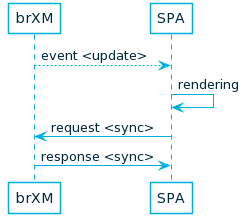
Diagram: The diagram shows Bloomreach Content sending an "event
" to the SPA, the SPA rendering, then sending a "request " to Bloomreach Content, and receiving a "response ".
Image 2. Component update
Reference
| Origin | Type | Name | Parameters | Description |
|---|---|---|---|---|
| SPA | Event | ready | none | Sent by the SPA when the integration layer is ready. |
| SPA | Procedure | inject | - string: Absolute URL of the JavaScript asset | Requests injection of a JavaScript asset. The injected asset initializes the Experience manager UI. |
| Bloomreach Content | Event | update | - id: string: Updated component ID- properties: object: Properties | Sent by Bloomreach Content when a component is updated via the Experience manager UI. The SPA should re-render the component using the provided properties. |
| Bloomreach Content | Procedure | sync | none* | Initiates synchronization of the Experience manager UI. Call after initial rendering and after each component re-render. Synchronizes the positions and sizes of Experience manager controls. |
* When no parameters are required, provide an empty array as payload ([]).
JavaScript Integration prior to brXM 14.2
Deprecated: As of brXM 14.2 and SPA SDK 14.2, this API is deprecated and will be removed in the next major release. Use the postMessage-based mechanism described above.
Previously, the SPA was required to define a global SPA object:
window.SPA = { init: (cms) => { // Store the cms object for callbacks }, renderComponent: (id, propertiesMap) => { // Re-render the component with the given ID and properties } };
The Experience manager detects the SPA object on page load. If present, it calls init to register a cms object for callbacks. The renderComponent function is called when a CMS user edits component properties. The SPA must use the provided properties to request an updated model for the component from the Delivery API and update its state and DOM.
The renderComponent function may return false to trigger the default rendering logic (replacing the component's DOM). Any other return value (typically true) instructs the Experience manager to take no further action.
The cms object exposes a sync function:
{ sync: () => { // Call when the set, order, or dimensions of components change } }
Call sync after initial rendering, when navigating to a new SPA route, or when component dimensions change without a DOM update (for example, after an image loads and changes layout).
The Experience manager monitors DOM changes and synchronizes overlays automatically. The SPA only needs to call sync when component dimensions change without a DOM mutation.
DOM
The DOM integration allows the SPA to indicate where components and containers are located in the DOM. In Experience manager preview mode, the page model includes metadata that the SPA must insert into the DOM as HTML comments. This enables the Experience manager to detect and interact with components and containers.
- Insert the start comment (
<component-model>._meta.beginNodeSpan[0].data) before the DOM element representing the component or container. - Insert the end comment (
<component-model>._meta.endNodeSpan[0].data) after the DOM element.
At the page level, insert all entries from <page-model>.page._meta.endNodeSpan[n].data as required.
Delivery API
To access the preview version of the Delivery API, the SPA must use JSON Web Token (JWT) authentication. If the SPA's initial HTML is served by HST using the SpaSitePipeline, JWT authentication is handled automatically.
By default, the Delivery API Preview is available at:
http://{cms-host}/site/resourceapi
The resourceapi path is configurable via the hst:pagemodelapi property.
The SPA must include a JWT in the Authorization header using the Bearer schema:
Authorization: Bearer xxxxx.yyyyy.zzzzz
The token is provided as the token query parameter in the SPA URL:
http://localhost:3000/?token=xxxxx.yyyyy.zzzzz
With a valid token, the SPA can access the Delivery API Preview, which:
- Returns a preview of the content.
- Includes
beginNodeSpanandendNodeSpanelements for component metadata.
For example, accessing:
http://localhost:8080/site/resourceapi/blog/2018/06/first-blog-post.html
returns a Delivery API Preview response for a single HstComponent similar to:
{ "id": "r6_r1_r2_r1", "name": "content", "componentClass": "org.onehippo.cms7.essentials.components.EssentialsContentComponent", "type": "CONTAINER_ITEM_COMPONENT", "label": "Blog Detail", "models": { "document": { "$ref": "/content/ua95a21d480194f1abe1181c532775102" } }, "_meta": { "params": { }, "beginNodeSpan": [ { "type": "comment", "data": "<!-- { \"HST-Label\":\"Blog Detail\", \"HST-LastModified\":\"1528271870520\", \"HST-XType\":\"hst.item\", \"uuid\":\"c5d11a29-307b-4ad4-b3a8-e0799f94789a\", \"HST-Type\":\"CONTAINER_ITEM_COMPONENT\", \"refNS\":\"r6_r1_r2_r1\", \"url\":\"/site/resourceapi/blog/2018/06/first-blog-post.html?_hn:type=component-rendering&_hn:ref=r6_r1_r2_r1\"} -->" } ], "endNodeSpan": [ { "type": "comment", "data": "<!-- { \"uuid\":\"c5d11a29-307b-4ad4-b3a8-e0799f94789a\", \"HST-End\":\"true\"} -->" } ] }, "_links": { "componentRendering": { "href": "/site/resourceapi/blog/2018/06/first-blog-post.html?_hn:type=component-rendering&_hn:ref=r6_r1_r2_r1" } } }
The SPA must insert the beginNodeSpan and endNodeSpan comments around the component's HTML.
Delivery API Integration prior to brXM 14.2
Deprecated: As of brXM 14.2 and SPA SDK 14.2, this approach is deprecated. Use JWT-based authentication instead.
Previously, to access the Delivery API Preview, the SPA had to be served from the same host as the CMS (for SSO). If the SPA's initial HTML is served by HST using the SpaSitePipeline, this requirement is met. By default, the Delivery API Preview was available at:
http://{cms-host}/site/_cmsinternal/resourceapi
The _cmsinternal path is configurable, as is resourceapi via the hst:pagemodelapi property. With SSO between the CMS and site webapps (for example, after logging in to the CMS and opening the SPA channel), the SPA could access the Delivery API Preview.