Repository Data Modules Structure
This page explains the conceptual structure of repository data modules in Bloomreach Content.
Three-Dimensional Structure
Bloomreach Content organizes repository data along three dimensions:
Determine the appropriate placement for each piece of repository data in your project using these dimensions.
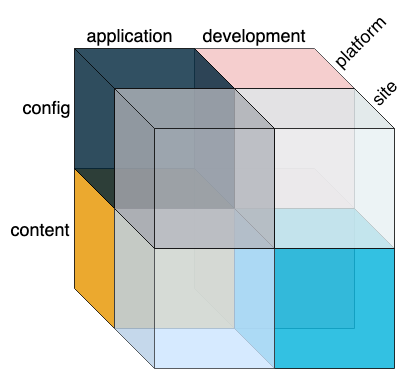
Diagram:
The diagram displays a three-dimensional cube divided along three axes: application versus development (top), config versus content (left), and platform versus site (right). Each segment represents a unique combination of these dimensions, illustrating how repository data is categorized by environment scope, data type, and project scope. The diagram is conceptual and does not represent a process flow.
Application vs. Development
The first dimension distinguishes between definitions intended for all environments and those used only in development environments.
- Definitions for all environments belong in the
repository-data/applicationandrepository-data/sitemodules. - Definitions for development environments belong in the
repository-data/developmentandrepository-data/site-developmentmodules.
The development repository data module typically depends on the application repository data module. You can use the application module independently, but the development module requires the application module.
Development Environment
A development environment is any environment used during project development. This can be a local setup (such as a developer's laptop) or a remote server used for continuous integration, testing, or demonstrations. The key characteristic is that the repository is regularly reset to a known state, often including test configuration and content. Content created in a development environment is usually disposable, except when used as seed content for production. In contrast, production content is valuable and must be preserved.
Application Repository Data
Application repository data includes any definitions that must be present in a production system after deployment. This typically covers essential system configuration and may also include seed content to provide CMS users with an initial set of documents.
Development Repository Data
Development repository data consists of configuration and content not intended for production systems. Common examples include:
- Test users (such as the archetype’s author and editor users) and their group memberships
- Demo or test content, such as fixtures for automated testing or content for manual testing and demonstrations
- Demo or test configuration, such as auto-export settings or facet navigation nodes used for testing
Deploying to Production or Acceptance Environments
When deploying to a production or production-like environment (such as Acceptance), exclude the development repository data module from the distribution.
If you validate an upgraded project against a production database copy locally (for example, using the Maven Cargo plugin), also exclude development repository data. Use the archetype's -Pwithout-development-data Maven profile to accomplish this.
Deploying to Development Environments
For a local development environment, include both the application and development repository data modules. The archetype includes the development module by default for local deployments.
For a remote development environment, also include both modules. By default, the development module is excluded from distributions, but you can use the -Pdist-with-development-data Maven profile to include it.
Config vs. Content
The second dimension separates configuration from content. Both the application and development modules can have hcm-config and hcm-content folders under /src/main/resources.
In brXM 12 and later, config and content are strictly defined and separated within each repository data module.
Config
Config refers to repository data created and maintained by project developers and driven from project sources. Configuration management further divides this data into namespace, webfilebundle, and config definitions.
The hcm-config folder contains all YAML sources that define configuration data, namespaces, and webfile bundles. Config data includes:
- Definitions for configuration nodes and properties
- Repository data categorization (e.g., identifying subtrees as content or system)
- Initial values for system data
External resources referenced by config or namespace definitions, such as updater scripts or JSON configuration files, also belong in hcm-config.
Note:
If a Maven module contributes webfiles, all directories under/src/main/resourcesare bootstrapped into the repository’s/webfiles. To avoid unintended bootstrapping, keep webfiles in a separate Maven module from application and development modules.
Content
Content refers to repository data created and maintained by CMS users. This includes documents, image sets, assets, editable HST configuration (such as data in hst:workspace), and data managed by plugins or add-ons (e.g., URL rewriter rules, Relevance characteristics, or form components).
Content is included in configuration management to allow bootstrapping of seed, test, and demo content. Typically:
- Test and demo content are placed in the development data module.
- Seed content is placed in the application data module.
- If seed content overlaps with test/demo content, consider creating an additional repository data module for data not intended for development environments.
The hcm-content folder must contain only YAML content sources, with one definition root per source. Definition root nodes in hcm-content must match the repository data categorization specified in config. If a content subtree is rooted at a node not declared as content, the CMS will throw an exception.
The configuration management mechanism tracks bootstrapped content to avoid re-importing it. After bootstrapping, ownership of seed content transfers from the developer to the CMS user.
On development environments, content does not exist initially, so strict separation between config and content is less critical. However, for consistency, apply the same categorization approach in both modules.
Custom Categorization
Properly categorizing repository data as config or content is essential for correct operation and upgrades. Bloomreach Content provides default categorization (via auto export configuration), but you can customize it in your application module’s config definitions. Always validate customizations before deploying to production to prevent accidental data loss or misclassification.
Platform vs. Site
The third dimension separates the platform web application from site web applications. In multi-site mode (default since v13.0), each site application bootstraps its own repository data, which must be included in the site's WAR file. This enables independent deployment and updates for each site.
Platform Data
Platform data includes all repository data definitions related to the CMS/platform web application, such as:
- CMS configuration
- Namespaces and content types
- Security domains
Site Data
Site data includes all repository data definitions for a specific site web application, such as:
- HST configuration
- Web files