Delivery API 0.9
Info: This page documents Delivery API version 0.9, which is the default API version in brXM 14.x.
Delivery API version 0.9 is not supported in brXM 15 and later.
Starting with brXM 14.3.0, Delivery API v1.0 is available and can be enabled optionally.
In brXM 15, Delivery API v1.0 is the only supported version.
Overview
The Delivery API (previously called the Page Model API) provides a JSON-based REST API for representing and aggregating page models. It is designed to:
- Offer a straightforward, built-in JSON API for model contribution and aggregation.
- Integrate directly with the WCMS delivery tier and channel management features.
The API exposes a dynamic page model that includes component representations, content, and domain-specific models. Developers can contribute model objects to the aggregated page representation from component implementations without writing boilerplate code.
The Delivery API endpoint is available by default for each channel. For example, if a channel is served at http://localhost:8080/site/, the Delivery API is accessible at http://localhost:8080/site/resourceapi/. The API provides JSON resources that represent all components, content items, menus, and domain-specific models in a generic structure. Single-page applications (SPAs) can consume this API to implement the delivery tier and integrate with channel management.
Developers can use standard HST APIs to contribute content items or domain-specific models to the aggregated page model. For more information, see Model Contribution API.
Delivery API 0.9
After you configure the Delivery API, it becomes available to SPAs at the child mount path (such as /resourceapi), as defined by the @hst:pagemodelapi property. The HST Container automatically adds a child mount with the name set to the @hst:pagemodelapi property value. This child mount invokes the PageModelPipeline, which is similar to the default website pipeline but does not render FreeMarker or JSP templates. Instead, it performs model collection, page model aggregation, and JSON serialization.
This approach allows SPAs to consume all aggregated models for a page. For example, if the SPA loads from http://localhost:8080/site/myapp/ or http://localhost:8080/site/myapp/news/, the API endpoint is available at http://localhost:8080/site/myapp/resourceapi/ or http://localhost:8080/site/myapp/resourceapi/news/. You can also generate links server-side using the org.hippoecm.hst.core.linking.HstLinkCreator API.
The Delivery API follows the HATEOAS principle. An SPA can enter the REST application using a standard HST-2 navigational URL. The API returns an aggregated page model containing all the data needed to construct the page. Example request and response:
GET /site/resourceapi/ HTTP/1.1
Host: localhost:8080
Accept: application/json
...
The JSON response structure:
HTTP/1.1 200 OK
Access-Control-Allow-Origin: http://localhost:3000
API-Version: 0.9
Content-Type: application/json;charset=UTF-8
Content-Length: ...
...
{
  "id": "r19",
  "_links": {
    "self": {
      "href": "http://localhost:8080/site/resourceapi"
    },
    "site": {
      "href": "http://localhost:8080/site/"
    }
  },
  "page": { ... },
  "content": { ... }
}
The HTTP body contains an Aggregated Page Model. This model includes an identifier, navigation links, a page representation with components and domain-specific models, and content models.
Aggregated Page Model
The Aggregated Page Model defines the root structure of Delivery API responses.
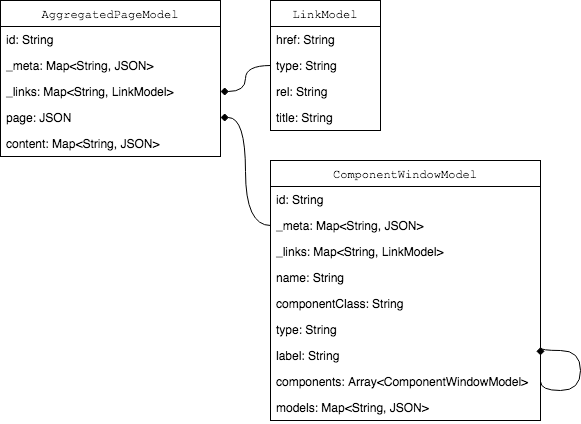
Diagram: The diagram shows the relationships between AggregatedPageModel, LinkModel, and ComponentWindowModel. AggregatedPageModel includes fields for id, _meta, _links, page, and content. LinkModel includes href, type, rel, and title. ComponentWindowModel includes id, _meta, _links, name, componentClass, type, label, components, and models. Relationships are indicated by field types, including recursive arrays for nested components.
The following sections describe each domain object.
AggregatedPageModel
This object is the root of all Delivery API responses.
| Field | Type | Required | Description |
|---|---|---|---|
| id | String | Yes | The namespace ID of the root page component. |
| _meta | Map<String,JSON> | No | Metadata as key-value pairs. |
| _links | Map<String,LinkModel> | No | Navigation links as key-value pairs. |
| page | JSON | Yes | The page representation, following the HST component configuration structure (ComponentWindowModel). |
| content | Map<String,JSON> | No | Content items as key-value pairs. Contains all HST Content Beans contributed by each HstComponent for documents, folders, gallery images, and assets. |
The page and content fields represent the dynamic composition of the page and the content item representations contributed by each component.
For details on model contribution, see Model Contribution API.
LinkModel
Represents a linkable resource in the API.
| Field | Type | Required | Description |
|---|---|---|---|
| href | String | Yes | The URI of the link. |
| type | String | No | The link type: internal, external, or resource. - internal: Link within the SPA; can be fetched via AJAX. - external: Fully qualified URL; should be handled as a standard navigation, not via AJAX. - resource: Typically used for binary resources such as images and assets. Note: As of version 14.1.0, external and resource links are fully qualified URLs. |
| rel | String | No | The relationship name between the linked resource and the page. |
| title | String | No | The title of the link. |
ComponentWindowModel (HST Component Configuration)
Represents either a page component (composite of HST Component Configurations) or a single descendant HstComponent.
| Field | Type | Required | Description |
|---|---|---|---|
| id | String | Yes | The namespace ID of the component. |
| _meta | Map<String,JSON> | No | Metadata as key-value pairs. |
| _links | Map<String,LinkModel> | No | Navigation links as key-value pairs. |
| name | String | Yes | HST Component configuration node name. See HstComponent Configuration. |
| componentClass | String | Yes | HST Component class name. See HstComponent Configuration. |
| type | String | Yes | HST Component class type: COMPONENT, CONTAINER_COMPONENT, or CONTAINER_ITEM_COMPONENT. See Channel Editor Containers for details. |
| label | String | No | HST Component catalog item label. See Channel Editor Catalog. |
| components | Array<ComponentWindowModel> | No | Array of child component representations, recursively structured. |
| models | Map<String,JSON> | No | Map of content, menu, or domain-specific models as key-value pairs. Models contributed by an HstComponent that are not included in the top-level content field appear here. |
The components and models fields represent the dynamic structure of component representations and their associated models.
For more information on contributing models, see Model Contribution API.
Content vs. Models
The API distinguishes between two types of model containers:
- The top-level
contentfield contains WCMS content data for documents, folders, gallery images, and assets. - The
modelsfield in each component contains other models, such as menus,HstURL,HstLink, or domain-specific models.
When an HstComponent contributes a WCMS content model, the actual data is included only in the top-level content field. The models field contains a JSON Pointer reference to the content data. Other models, such as menus, are embedded directly in the models field.
Example:
{ // ...SNIP... "page":{ // ...SNIP... "components":[ { "id":"r19_r1", "name":"main", "type":"COMPONENT", "models":{ "document":{ "$ref":"/content/u895fb1b6410d497298946b6a06d2b361" }, "menu":{ "name":"main", "siteMenuItems":[ // ...SNIP.., ] } } } ], // ...SNIP... }, "content":{ "u895fb1b6410d497298946b6a06d2b361":{ "id":"895fb1b6-410d-4972-9894-6b6a06d2b361", "name":"banner1", "displayName":"banner1", "content":{ "name":"hap:content", "displayName":"hap:content", "value":"\n \n\n <p>Banner description</p>\n\n \n " }, "title":"Sample banner", "image":{ "$ref":"/content/ub89d576f680a4bbf9c272dced9da3d6c" }, "address":false, "localeString":"en" }, // ...SNIP... } }
In this example, the "document" model is a WCMS content model and is referenced by a JSON Pointer in the models field, while the actual data is in the top-level content field. The "menu" model is embedded directly in the models field.
This approach provides several benefits:
- If a HST Content Bean is referenced by multiple
HstComponents on the same page, it is serialized only once in thecontentfield. Each component references it using a JSON Pointer. This reduces redundant serialization. - If a content bean references other content beans, those references are also replaced by JSON Pointers, and the referenced data appears as siblings in the
contentfield. This keeps the JSON structure clean. - Circular references between content beans do not cause serialization issues.
Best Practices for Accessing Model Objects
SPAs should handle both referenced and embedded models, as both are valid according to the JSON schema. In JavaScript, check for the presence of a $ref field. If present, resolve the reference using a JSON Pointer library; otherwise, use the model object directly.
Example JavaScript code:
import jsonpointer from 'jsonpointer'; //... // 'pageModel' is the root JSON object; 'models' is the 'models' field of a component. let documentWrapper = models.document; let document; if (documentWrapper['$ref']) { // Resolve the reference using the JSON Pointer library. let documentRef = documentWrapper['$ref']; document = jsonpointer.get(pageModel, documentRef); } else { // Use the embedded document directly. document = documentWrapper; } // Access fields of 'document' as needed... // ...
For more examples, see the Demo Project and its source code.
Hint: Always check whether a model is referenced by a JSON Pointer or embedded directly. This approach ensures your SPA remains compatible with future API changes, as additional model objects may be added to the top-level
contentfield in future versions for efficiency.
JSON Response Examples
The following is an example of a complete JSON response from an AggregatedPageModel object:
{ "id":"r19", "_links":{ "self":{ "href":"/resourceapi" }, "site":{ "href":"http://localhost:8080/site/myapp" } }, "page":{ "id":"r19", "name":"homepage", "componentClass":"org.hippoecm.hst.core.component.GenericHstComponent", "type":"COMPONENT", "components":[ { "id":"r19_r1", "name":"main", "componentClass":"org.hippoecm.hst.core.component.GenericHstComponent", "type":"COMPONENT", "components":[ { "id":"r19_r1_r1", "name":"container", "componentClass":"org.hippoecm.hst.pagecomposer.builtin.components.StandardContainerComponent", "type":"CONTAINER_COMPONENT", "label":"Homepage Main Container", "components":[ { "id":"r19_r1_r1_r1", "name":"banner", "componentClass":"org.onehippo.cms7.essentials.components.EssentialsDocumentComponent", "type":"CONTAINER_ITEM_COMPONENT", "label":"Banner", "models":{ "document":{ "$ref":"/content/u895fb1b6410d497298946b6a06d2b361" } }, "_meta":{ "paramsInfo":{ "document":"banners/banner1" }, "params":{ "com.example.cms7.targeting.TargetingParameterUtil.hide":"off", "document":"banners/banner1", "org.hippoecm.hst.core.component.template":"webfile:/freemarker/hstdefault/essentials-banner.ftl" } }, "_links":{ "componentRendering":{ "href":"/site/myapp/resourceapi?_hn:type=component-rendering&_hn:ref=r19_r1_r1_r1" } } }, { "id":"r19_r1_r1_r2", "name":"banner1", "componentClass":"org.onehippo.cms7.essentials.components.EssentialsDocumentComponent", "type":"CONTAINER_ITEM_COMPONENT", "label":"Banner", "models":{ "document":{ "$ref":"/content/u9a3f1f5c530243c49bec584e810ffa2f" } }, "_meta":{ "paramsInfo":{ "document":"banners/banner2" }, "params":{ "com.example.cms7.targeting.TargetingParameterUtil.hide":"off", "document":"banners/banner2", "org.hippoecm.hst.core.component.template":"webfile:/freemarker/hstdefault/essentials-banner.ftl" } }, "_links":{ "componentRendering":{ "href":"/site/myapp/resourceapi?_hn:type=component-rendering&_hn:ref=r19_r1_r1_r2" } } } ], "_meta":{ "params":{ } }, "_links":{ "componentRendering":{ "href":"/site/myapp/resourceapi?_hn:type=component-rendering&_hn:ref=r19_r1_r1" } } } ], "_meta":{ "params":{ } }, "_links":{ "componentRendering":{ "href":"/site/myapp/resourceapi?_hn:type=component-rendering&_hn:ref=r19_r1" } } }, { "id":"r19_r2", "name":"top-right", "componentClass":"org.hippoecm.hst.core.component.GenericHstComponent", "type":"COMPONENT", "_meta":{ "params":{ } }, "_links":{ "componentRendering":{ "href":"/site/myapp/resourceapi?_hn:type=component-rendering&_hn:ref=r19_r2" } } }, { "id":"r19_r3", "name":"menu", "componentClass":"com.example.cms.components.HapMenuComponent", "type":"COMPONENT", "models":{ "menu":{ "name":"main", "selectSiteMenuItem":{ "depth":0, "repositoryBased":false, "name":"home", "expanded":true, "selected":true, "parameters":{ "css class":"home" }, "childMenuItems":[ ], "_links":{ "site":{ "href":"/site/myapp", "type":"internal" } } }, "siteMenuItems":[ { "depth":0, "repositoryBased":false, "name":"home", "expanded":true, "selected":true, "parameters":{ "css class":"home" }, "childMenuItems":[ ], "_links":{ "site":{ "href":"/site/myapp", "type":"internal" } } }, { "depth":0, "repositoryBased":false, "name":"news", "expanded":false, "selected":false, "parameters":{ "css class":"" }, "childMenuItems":[ ], "_links":{ "site":{ "href":"/site/myapp/news", "type":"internal" } } } ] } }, "_meta":{ "paramsInfo":{ "siteMenu":"main" },