Model Contribution APIs
Overview
The Model Contribution APIs allow you to add content items or domain-specific models to the aggregated page model representation using standard HST APIs. Use HstRequest#setModel(String, Object) and HstRequestContext#setModel(String, Object) in your HstComponent implementations to contribute these models.
HST Model Contribution APIs
The following methods are available in HstRequest and HstRequestContext for contributing models to the Delivery API (formerly Page Model API):
/** * Returns the model object associated with the given {@code name}, * or <code>null</code> if no model object of the given {@code name} exists. * * @param name the name of the model object * @return the model object associated with the {@code name}, or * <tt>null</tt> if the model object does not exist. */ <T> T getModel(String name); /** * Returns an unmodifiable <code>Iterable</code> containing the * names of the model objects available to this. * This method returns an empty <code>Iterable</code> * if this has no model object available to it. * * @return an <code>Iterable</code> of strings containing the names * of model objects of this. */ Iterable<String> getModelNames(); /** * Returns an unmodifiable map of model objects contributed by {@link #setModel(String, Object)}. * <P> * Note that the returned map contains only the pairs of model name and value objects contributed by {@link #setModel(String, Object)}, * but it does not contain attributes set by <code>#setAttribute(String,Object)</code> API calls, whereas most * implementations of this interface (such as {@link HstRequest} and {@link HstRequestContext}) provides a * combined view for both <code>models</code> and other <code>attributes</code> through <code>#getAttribute(String)</code>, * <code>#getAttributeNames()</code> or <code>#getAttributeMap</code>. * </P> * @return an unmodifiable map of model objects contributed by {@link #setModel(String, Object)} */ Map<String, Object> getModelsMap(); /** * Stores a model object in this. * <p> * Model objects are contributed by a controller component to this, in general. * And, the contributed model objects may be accessed in view rendering or special model * aggregation / serialization request pipeline processing. * </p> * <p> * If the model object passed in is null, the effect is the same as * calling {@link #removeModel}. * * </p> * @param name the name of the model object * @param model the model object to be stored * @return the previous model object associated with <tt>name</tt>, or * <tt>null</tt> if there was no mapping for <tt>name</tt>. */ Object setModel(String name, Object model); /** * Removes a model object from this. * * @param name a <code>String</code> specifying * the name of the model object to remove */ void removeModel(String name);
To contribute objects such as content documents, folders, gallery images, assets, or domain-specific POJOs from your HstComponent, use the setModel(String name, Object model) method. The contributed model object will appear in the models field of the component representation. If the model object is a WCMS content document, folder, gallery image, or asset, the models field will contain a JSON Pointer reference as a JSON string (for example, { "$ref":"/content/ub89d576f680a4bbf9c272dced9da3d6c" }). The actual content data is serialized at the top level in the content field.
Tip: Replace any use of
HstRequest#setAttribute(name, object)in your components withHstRequest#setModel(name, object). This change is backward-compatible for template rendering becausesetModelalso sets the attribute. UsingsetModelensures that your model objects are automatically included in Delivery API responses.
Model Objects Must Be JSON-Serializable
When you contribute a domain-specific POJO object using HstRequest#setModel(String name, Object model), the object must be serializable to JSON for the Delivery API. If the object cannot be serialized, the Delivery API will fail to produce the JSON output.
The Delivery API uses the com.fasterxml.jackson.databind.ObjectMapper bean to serialize model objects to JSON. Ensure that your POJO can be serialized by ObjectMapper#writeValue(Writer out, Object model). If your POJO only contains basic types such as String, Number, Calendar, or compound classes with those types, Jackson will handle serialization automatically. If your object contains properties that are not JSON-serializable, you must exclude or convert those properties. The simplest approach is to use the @JsonIgnore annotation (see Jackson Annotations) to exclude such properties.
For example, consider a custom document bean ProductBean that extends HippoDocument and includes a property that cannot be serialized:
public class ProductBean extends HippoDocument { // SNIP /** * As an imaginary scenario, you have a getter method (as a result, working as a read property) * that retrieves CSV data stream from an external PIMS (Product Information Management System) for this product. * @return PIMS data stream in CSV for this product */ public InputStream getPimsDataInCSV() { // retrieve CSV data from PIMS and return it as an InputStream. } }
The pimsDataInCSV property cannot be serialized to JSON. To exclude it from serialization, annotate the getter method with @JsonIgnore:
public class ProductBean extends HippoDocument { // SNIP /** * As an imaginary scenario, you have a getter method (as a result, working as a read property) * that retrieves CSV data stream from an external PIMS (Product Information Management System) for this product. * @return PIMS data stream in CSV for this product */ @JsonIgnore public InputStream getPimsDataInCSV() { // retrieve CSV data from PIMS and return it as an InputStream. } }
This approach ensures that the Delivery API excludes the property when serializing your POJO.
For more information, see:
Tip: If you do not want to use Jackson annotations on your POJO model classes, and you do not need to serialize the objects in the Delivery API, use
HstRequest#setAttribute(name, object)instead. This is suitable if you only use the POJO in template rendering and do not require it in the Delivery API response.
Flattened JSON Serialization of Model Objects
Info: Available since brXM 13.4.0.
You can serialize model objects in a flattened structure by implementing the marker interface org.hippoecm.hst.content.PageModelEntity. Any component or document bean that implements this interface will be serialized in a flattened form. If a serialized object has a getter that returns an object implementing PageModelEntity, that referenced object will also be serialized in a flattened structure. The referencing object will include a field like:
{ "$ref" : "/page/u1ca07af9cdf54bdd9908f991245bb062" },
The $ref value always starts with /page/u. The identifier is either:
- The value from
IdentifiableContentBean#getRepresentationId()(with dashes removed), if the object implementsIdentifiableContentBean(all HST Content Beans do), or - A new
java.util.UUID.randomUUID()(with dashes removed) if the object does not implementIdentifiableContentBean.
Model Contribution, Aggregation, and Serialization Phases
The Delivery API processes model data in three phases:
- Component Model Contribution Phase
- Page Model Aggregation Phase
- Page Model Serialization Phase
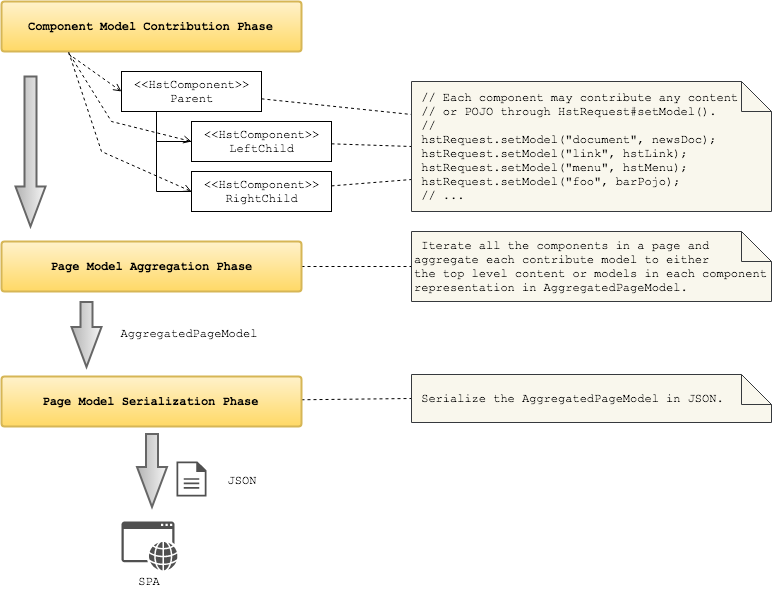
Diagram: The diagram illustrates the three-step Delivery API process: Component Model Contribution Phase, Page Model Aggregation Phase, and Page Model Serialization Phase. In the first phase, three
HstComponentinstances (Parent, LeftChild, RightChild) contribute models usingHstRequest.setModel. Example keys include document, link, menu, and foo. In the second phase, all contributions are combined into anAggregatedPageModel, either as top-level content or within each component. In the final phase, theAggregatedPageModelis serialized to JSON for consumption by an SPA.
During the Component Model Contribution Phase, the HST Container calls prepareBeforeRender(HstRequest, HstResponse) and doBeforeRender(HstRequest, HstResponse) on each HstComponent. If a component calls HstRequest#setModel(String, Object), the model object is stored at the HstRequest level and also set as a request attribute. You do not need to call setAttribute separately for the contributed model object.
In the Page Model Aggregation Phase, the HST Container iterates over all HstComponents in the page, collects the contributed model objects, and aggregates them into an AggregatedPageModel.
In the Page Model Serialization Phase, the HST Container serializes the AggregatedPageModel to JSON for use by SPAs.
Summary
The HstRequest API enables HstComponent implementations to contribute model objects to the Delivery API. The Delivery API processes these models in three phases: (1) Component Model Contribution, (2) Page Model Aggregation, and (3) Page Model Serialization. During the first phase, components contribute models using HstRequest#setModel(String, Object). These models are accumulated and then aggregated into an AggregatedPageModel, which is serialized to JSON for SPA consumption.