Swagger API Documentation Support
Info: Swagger support is available only in brXM v14 for Delivery API v0.9.
Both Delivery API v0.9 and Swagger integration are deprecated and unsupported as of brXM v15.
API Documentation in Swagger Format
Delivery API (formerly Page Model API) v0.9 exposes a Swagger API documentation endpoint at /swagger.json by default. For example, if your Delivery API endpoint is http://localhost:8080/site/resourceapi/, access the Swagger documentation at http://localhost:8080/site/resourceapi/swagger.json.
You can use a Swagger UI web application to view and interact with the API documentation in a browser.
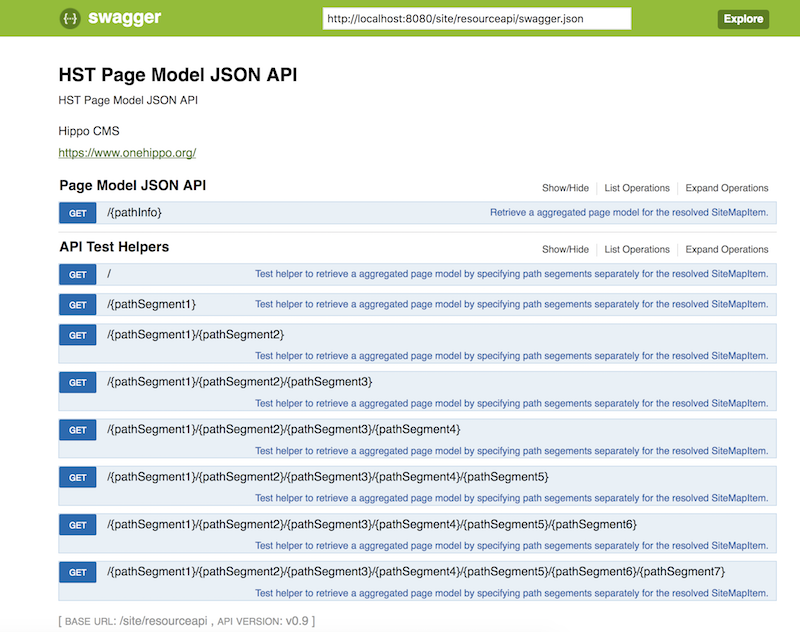
To install Swagger UI locally, refer to the example at /api-docs and review the configuration in the root pom.xml under the cargo.run profile in the TestSuite project.
The Delivery API always generates Swagger documentation in JSON format. The output format does not change based on file extensions (such as .yaml) because the API uses the default Jackson ObjectMapper for serialization.
Customizing the Swagger Endpoint Path
To change the Swagger API documentation endpoint from /swagger.json to a different path, set the pagemodelapi.v09.apiDocPath property in /WEB-INF/hst-config.properties:
# Change Swagger Path Info to /my-swagger.json in this example
pagemodelapi.v09.apiDocPath = /my-swagger.json