Dynamic Resource Bundle Node Structure
Resource Bundle Documents in the Content Repository
Note: You can create and manage resource bundle documents in the CMS using the Resource Bundle Editor plugin. This plugin is included by default when you create a project using the Maven archetype.
Resource bundle documents use the following content type definition:
[resourcebundle:resourcebundle] > hippo:document, hippostd:publishableSummary, hippostdpubwf:document orderable - resourcebundle:id (string) mandatory - resourcebundle:keys (string) multiple - resourcebundle:messages (string) multiple - * (string) - * (string) multiple
Property Reference
| Property Definition | Type | Description | Example values |
|---|---|---|---|
resourcebundle:id | string | The basename of the resource bundle defined by this document. This value is used to identify the resource bundle by its basename configuration. The value must be unique across all resource bundle documents in the repository. | org.example.app.Messages |
resourcebundle:keys | string, multiple | List of resource bundle keys. These correspond to property key names in a standard properties file. Note: Each entry must align with the corresponding entry in the resourcebundle:messages property. | { "greeting.one", "greeting.two" } |
resourcebundle:messages | string, multiple | List of resource bundle messages for the default locale. These correspond to property values in a standard properties file. Note: Each entry must align with the corresponding entry in the resourcebundle:keys property. | { "Hello!", "Hippo!" } |
* (string) | string | Allows for custom single-value properties as needed for extensions. | - "myproject:specialkey" = "special" |
* (string) multiple | string, multiple | Used to store localized resource bundle messages. To support specific locales (e.g., en_US, fr, nl_NL), add properties such as:- resourcebundle:messages_en_US- resourcebundle:messages_fr- resourcebundle:messages_nl_NLEach property holds localized messages. Note: Each entry must align with the corresponding entry in the resourcebundle:keys property.Note: Avoid using property names starting with resourcebundle:messages_ for custom properties unrelated to localization. |
|
You can create resource bundle documents at any location using the resourcebundle:resourcebundle node type. However, the value of the resourcebundle:id property must be unique throughout the repository. The system uses this property to look up resource bundles by basename.
Set message keys and default locale messages using the resourcebundle:keys and resourcebundle:messages properties. To add localized messages, use properties named with the pattern resourcebundle:messages_${locale.name}, replacing ${locale.name} with the appropriate locale (for example, en_US, fr, nl_NL).
Each entry in the resourcebundle:keys property must have a corresponding entry in both the resourcebundle:messages and any resourcebundle:messages_* properties. If the counts do not match, the system logs an error and does not process the bundle.
Example Resource Bundle Document
The following example shows a resource bundle document with live and preview variants under a document handle node. This example is based on content from the Bloomreach Content testsuite:
/content/documents/productresources: jcr:primaryType: hippo:handle jcr:mixinTypes: ['hippo:hardhandle'] /productresources[1]: jcr:primaryType: resourcebundle:resourcebundle jcr:mixinTypes: ['hippo:harddocument'] hippo:availability: [live] hippostd:state: published resourcebundle:id: org.onehippo.hst.demo.resources.ProductResources resourcebundle:keys: [brand, product, type, color, price, tags, image] resourcebundle:messages: [Brand, Product, Type, Color, Price, Tags, Image] resourcebundle:messages_en: [Brand, Product, Type, Color, Price, Tags, Image] resourcebundle:messages_fr: [Marque, Produit, Type, Couleur, Prix, Balises, Image] /productresources[2]: jcr:primaryType: resourcebundle:resourcebundle jcr:mixinTypes: ['hippo:harddocument'] hippo:availability: [preview] hippostd:state: unpublished resourcebundle:id: org.onehippo.hst.demo.resources.ProductResources resourcebundle:keys: [brand, product, type, color, price, tags, image] resourcebundle:messages: [Brand, Product, Type, Color, Price, Tags, Image] resourcebundle:messages_en: [Brand, Product, Type, Color, Price, Tags, Image] resourcebundle:messages_fr: [Marque, Produit, Type, Couleur, Prix, Balises, Image]
The HST Resource Bundle feature is context-aware for live and preview modes. When you visit a preview-mode site, only preview variants of resource bundle documents are used. When you visit a live-mode site, only live variants are used.
Auto Export of Resource Bundles
Resource bundles are exported to the repository-data/application submodule of your project. Starting with brXM version 14, when you create a new resource bundle document, it is exported to a separate YAML file instead of being added to an existing file (see Figure 1). In earlier versions, new bundles were appended to an existing YAML file.
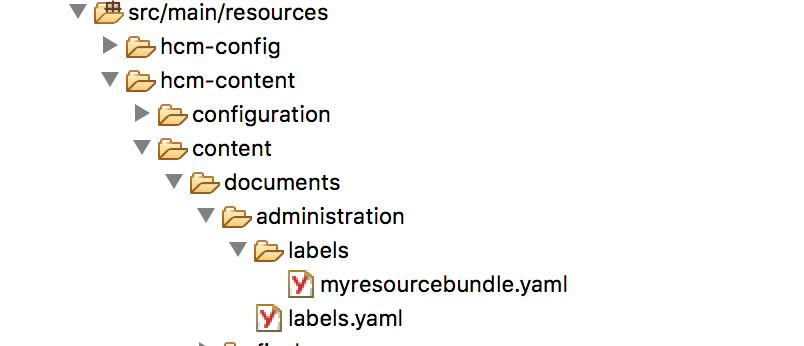
Figure 1. Folder structure for exporting a new resource bundle
This approach enables bootstrapping of new resource bundles during the next deployment. Content definitions are bootstrapped only if specific conditions are met. For details, see Manage Content.
Exporting resource bundles into separate files is supported only when the resource bundle is created in the /content/documents/administration folder or a subfolder within it (up to two levels deep). Create new bundles in the administration folder or its subfolders to enable this feature.