Manage Configuration
In Bloomreach Content, implementation-specific configuration and, optionally, content can be bootstrapped into the repository. To achieve this, you must define:
- When your configuration is added during bootstrapping.
- Where your configuration is added, removed, or changed.
YAML resources separate these two concerns. The following sections describe each aspect in detail.
Expressing Dependencies
Dependency Model
To control when a configuration set is merged into the Configuration Model, you must declare its dependencies. Dependencies specify which other configuration must be present before your configuration is applied. Bloomreach Content uses a three-level dependency model: Groups (top), Projects (middle), and Modules (bottom).1
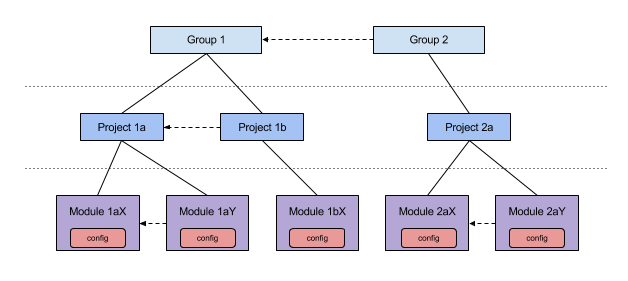
Diagram: This diagram illustrates the hierarchical dependency model. Groups contain Projects, and Projects contain Modules. Dashed arrows indicate the order in which sibling items are processed. Dependencies are only declared between siblings at each level.
Each configuration item must belong to exactly one Module. Each Module belongs to one Project, and each Project belongs to one Group. At every level, you specify which sibling(s) your configuration must follow. For example, Module 1aY can depend on Module 1aX, but not on Module 1bX, since they are not siblings. Instead, Project 1b would depend on Project 1a. All Groups are considered siblings.
Best Practice: Align the granularity of Modules and Projects with Maven terminology. Typically, a Module corresponds to a Maven module (and is represented by a JAR file at runtime), while a Project matches a Maven project. Use the Group level to separate Bloomreach Content configuration from custom implementation configuration.
hcm-module.yaml
Each Module declares its dependencies in an hcm-module.yaml2 file. This file must be located at the root of the module’s JAR and is typically placed at /src/main/resources/hcm-module.yaml in your Maven module.
Example hcm-module.yaml:
group: name: custom after: hippo-cms project: mywebsite module: name: extra after: [base, config]
This example configures a Module named extra. It is added after its sibling Modules base and config. The Module is part of the Project mywebsite. In this example, the Project does not declare dependencies on other Projects within the custom Group. However, the custom Group is configured to depend on the hippo-cms Group, indicating that configuration from Bloomreach Content must be present first.
This structure defines when your Module’s configuration is merged into the Configuration Model.
Contributing Configuration
Configuration Structure
All configuration is contributed by a Module. For maintainability, a Module’s configuration can be organized into multiple YAML Sources, which may reference additional non-YAML resources. Group Sources semantically, based on configuration purpose.
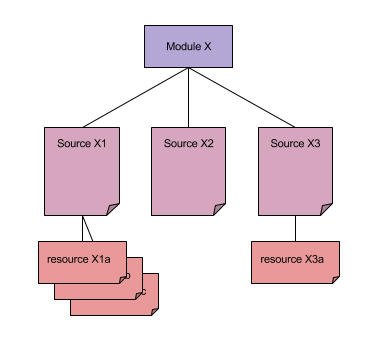
Diagram: The diagram shows that a Module contains multiple Sources, and Sources can reference one or more resources. Resources may include files such as CND, JSON, or binaries.
Each Source is a YAML file. Sources are associated with a Module by placing them in the hcm-config folder within the Module. When Bloomreach Content detects an hcm-module.yaml file, it checks for a sibling hcm-config directory and scans for files with a .yaml extension. All such files are treated as Sources for that Module.
There is no explicit reference from hcm-module.yaml to its Source YAML files, nor is there any ordering between Source files. You can freely add, remove, or rearrange Sources within the hcm-config folder.
Resources allow you to contribute content that is not suited for YAML format, such as CND files, JSON, or binaries. Keeping these resources separate from YAML Sources improves maintainability and allows you to use appropriate tooling for each file type.
Source Structure
Each configuration Source is a YAML file. The filename does not matter, as long as it uses the .yaml extension.
A configuration Source can define up to three types of definitions:
-
namespace
Defines namespaces (prefix-to-URI mappings) for the repository. Namespace definitions are processed first, across all modules, in module dependency order and in the order they appear in the Source. All namespace definitions for a Module must be in a single Source, typically namedmain.yaml.
A namespace definition can also specify a CND resource, which defines node types for configuration and content storage. CND resources are processed after their corresponding namespace definitions. -
config
After namespaces and node types are registered, useconfigdefinitions to contribute configuration as nodes and properties. The structure and capabilities ofconfigdefinitions are described in detail elsewhere. -
webfilebundle
Use awebfilebundledefinition to store static web resources (such as CSS, JavaScript, images, or templates) in the repository. This enables you to update these resources without redeploying the web application.
Example YAML Source file:
definitions: namespace: foo: uri: http://www.example.com/foo/nt/1.0 cnd: cnd/foo.cnd bar: uri: http://www.example.com/bar/nt/2.4 cnd: cnd/bar.cnd config: /hippo:configuration/hippo:modules/foo: bar: test webfilebundle: site
This example defines two namespaces, foo and bar, along with their node type definitions (CNDs). The CND files are external resources located in the cnd subfolder of the Source’s directory. The example also includes a minimal config definition and a webfilebundle definition.
Footnotes
-
Before brXM 12, dependencies were expressed implicitly using sequence number ranges for initialize items. In version 12 and later, dependencies are explicit, which improves clarity and maintainability.
-
Prior to brXM 12, the
hippoecm-extension.xmlfile was used to bootstrap configuration from a JAR. Starting with version 12,hcm-module.yamlserves as the entry point for contributing configuration.