Repository Session Security Delegation
For background information, review Repository Authorization and Permissions.
Security delegation allows you to combine the access control rules of two JCR sessions. You can also apply additional custom restrictions when combining these sessions.
Example Use Cases
Security delegation is useful when you need to combine access rights from different users or roles. For example, when a CMS editor previews a document in the Experience manager, the preview is rendered using the HST (site) previewuser. The previewuser may not have read access to the document the editor is working on. To support this scenario, the preview should be rendered using the combined readable documents of both users, with some exclusions:
[Documents readable by the HST site previewuser] +
[Documents readable by the CMS editor, excluding
     live and draft documents]
See Experience Manager Preview with Security Delegation for implementation details.
Another scenario involves authenticated visitors on the live site. After login, a visitor should see all live documents accessible to the site liveuser, plus any additional live documents the authenticated visitor is authorized to read. If the authenticated user's JCR session can also read preview documents, those must be excluded for the live site:
[Documents readable by the HST site liveuser] +
[Documents readable by the CMS editor, excluding
     preview and draft documents]
JCR Session Authorization and Permissions Overview
To understand security delegation, review how security domains, domain rules, and facet rules determine repository access. This overview focuses on read permissions for JCR nodes. Write access is controlled by assigning appropriate roles to domain rules.
Security Domains
A security domain is a set of documents for which you can configure permissions (such as read or write) for a user or group. Each JCR session is associated with one or more security domains, and each domain can grant different permissions. In the diagram below, a session with three security domains can read the green nodes.
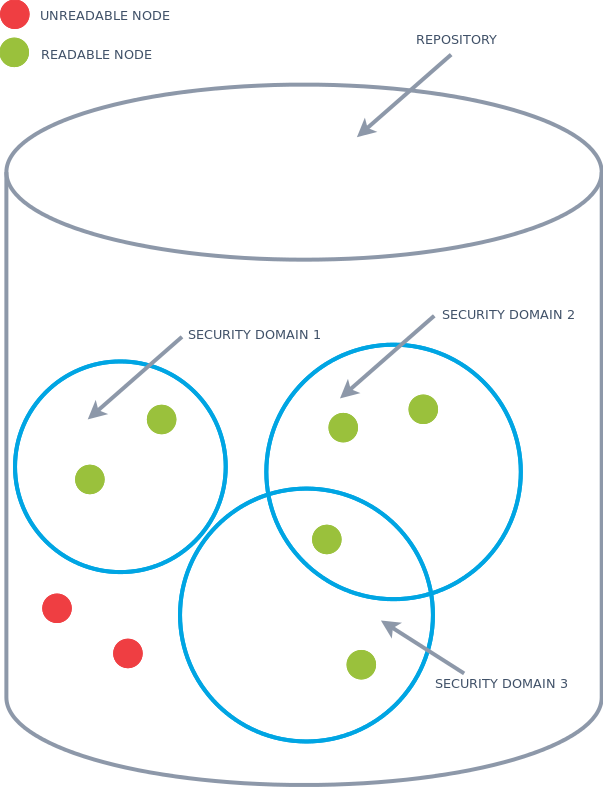
Diagram: The diagram shows a repository as a large cylinder containing three overlapping blue circles labeled Security Domain 1, Security Domain 2, and Security Domain 3. Green dots represent readable nodes, and red dots represent unreadable nodes. Green nodes are inside the security domain circles, including one in the overlap between Security Domain 2 and Security Domain 3. Red nodes are outside all security domains. A session with these three security domains can read all nodes within any of the domains.
Domain Rules
A security domain contains one or more domain rules. Each domain rule is made up of one or more facet rules. A document is part of a security domain if it matches at least one domain rule, and it matches a domain rule only if it matches all the facet rules within that rule.
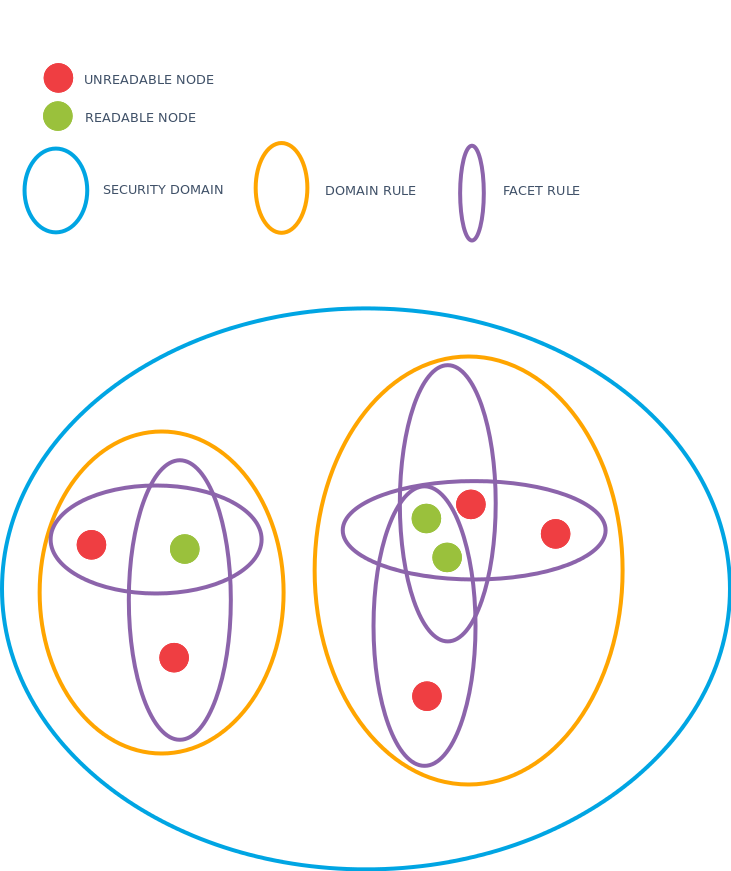
Diagram: This diagram shows the structure of repository security using colored shapes. A blue oval represents a security domain, containing two orange ovals for domain rules. Inside each domain rule, purple ovals represent facet rules. Green dots are readable nodes, and red dots are unreadable nodes. The arrangement shows that only nodes within the overlapping facet-rule areas are included in the domain, based on rule and facet matching.
Security Delegation in Repository Authorization
Security delegation requires the ability to combine the sets of security domains from two sessions. The green circles in the diagram below represent the sets of readable nodes for each session. A security-delegated JCR session can combine the read access of both sessions.
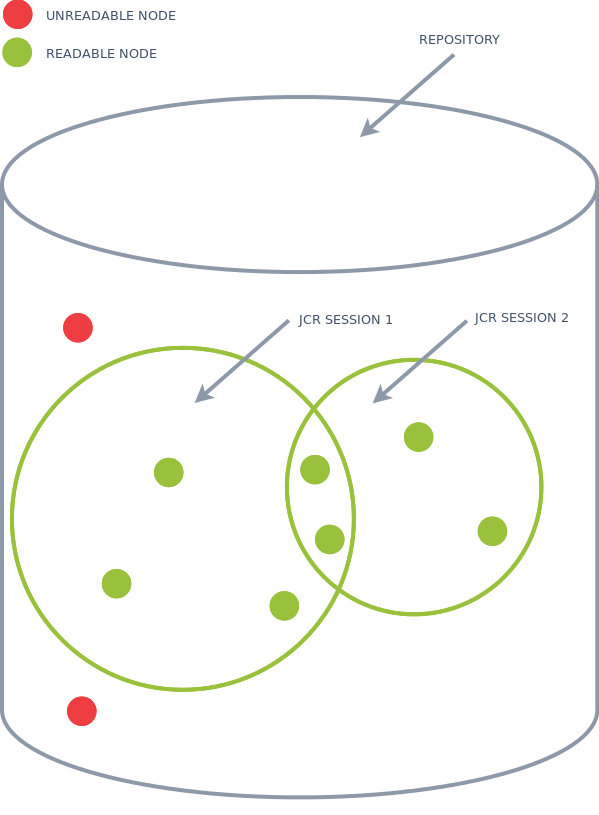
Diagram: The diagram shows a repository container with two overlapping green circles labeled JCR Session 1 and JCR Session 2. Green dots are readable nodes, and red dots are unreadable nodes. Each session circle encloses a set of readable nodes, with some overlap. The combined readable area of both sessions represents the union of their access rights.
Creating a Security-Delegated Session
To create a security-delegated session, use HippoSession#createSecurityDelegate:
/** * Create a new Session that contains the union of access control rules * of this Session and the provided session, with the optional addition * of custom domain rules. Those rules will be added to existing domain * rules, imposing additional restrictions on the session. */ Session createSecurityDelegate(Session session, DomainRuleExtension... domainRuleExtensions) throws RepositoryException;
To combine two sessions without any additional restrictions:
public Session createSecurityDelegate(Session s1, Session s2) throws RepositoryException { Session securityDelegate = ((HippoSession)s1).createSecurityDelegate(s2); return securityDelegate; }
The resulting Session has read (and write) access to all nodes accessible to either session1 or session2. The following calls are equivalent:
(HippoSession)s1).createSecurityDelegate(s2);
and
(HippoSession)s2).createSecurityDelegate(s1);
Creating a Security-Delegated Session with Additional Restrictions
In some cases, you need to apply extra restrictions to the combined session. For example, you may want to exclude preview and draft documents from the combined access.
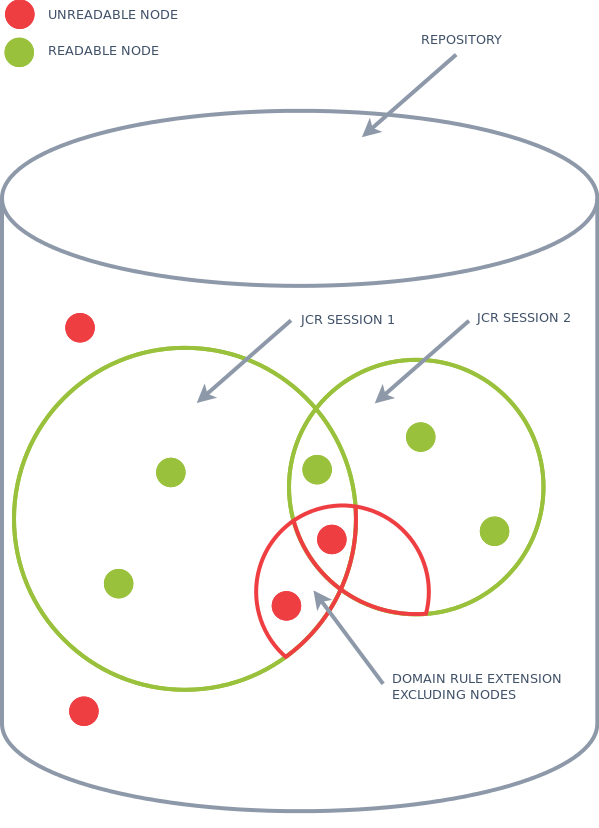
Diagram: This diagram shows a repository with two overlapping JCR session areas labeled JCR Session 1 and JCR Session 2. Green circles indicate readable nodes, and red circles indicate unreadable nodes. A red outlined overlap area marks a domain rule extension that excludes certain nodes, demonstrating how additional restrictions can be applied to the combined session.
You can add one or more domain rule extensions when creating the security delegate. A domain rule extension adds a Facet Rule to a specific domain rule (or to all domain rules using a wildcard). Since a document matches a domain rule only if all Facet Rules match, you can use this mechanism to narrow the set of readable nodes.
To create a security-delegated session that excludes nodes of type myproject:internaldocument from the hippo-document domain rule in the hippodocuments domain:
public Session createExcludeInternalDocs(Session session1, Session session2) throws RepositoryException { // The 'false' value means the nodetype must not be 'myproject:internaldocument'. // The second 'true' value indicates the FacetRule is optional, which does not affect 'nodetype' facet rules. FacetRule internalDocsRule = new FacetRule("nodetype", "myproject:internaldocument", false, true, PropertyType.NAME); // Apply the internalDocsRule to the domain '/hippo:configuration/hippo:domains/hippodocuments' // and the domain rule 'hippo-document'. DomainRuleExtension dre = new DomainRuleExtension("hippodocuments", "hippo-document", Arrays.asList(internalDocsRule)); return ((HippoSession)session1).createSecurityDelegate(session2, dre); }
This approach requires you to know the exact domain and domain rule names. If you need to apply a FacetRule to all domain rules, use wildcards. For example, to restrict access to documents in the preview state for any domain and domain rule:
public Session createOnlyPreviewDocs(Session previewUser, Session cmsUser) throws RepositoryException { // The first 'true' means the property 'hippo:availability' must be 'preview'. // The second 'true' means the FacetRule only applies to documents that have the property 'hippo:availability'. FacetRule previewDocsRule = new FacetRule("hippo:availability", "preview", true, true, PropertyType.STRING); // Apply the domain rule extension to any domain (*) and any domain rule (*). DomainRuleExtension dre = new DomainRuleExtension("*", "*", Arrays.asList(previewDocsRule)); return ((HippoSession)previewUser).createSecurityDelegate(cmsUser, dre); }
The #createSecurityDelegate method accepts a variable number of DomainRuleExtension arguments. To combine multiple restrictions, pass multiple dre instances to the method.