SalesForce Commerce Cloud: B2B Configurations
Info: This feature requires a standard or premium Bloomreach Content license. Contact Bloomreach for licensing details.
Overview
You can integrate Bloomreach Content with SalesForce Commerce Cloud: B2B (formerly CloudCraze B2B) using the Bloomreach Commerce Accelerator. The B2B application provides the necessary configurations to connect and interact with your SalesForce Commerce Cloud: B2B instance.
This page covers:
- How to connect Bloomreach Content to your SalesForce Commerce Cloud: B2B instance
- Key configuration options for the SalesForce Commerce Cloud: B2B connector
Details about Federation Integration Authentication are also included.
Connecting to a SalesForce B2B Instance
Salesforce B2B Commerce (formerly CloudCraze) is a cloud-based B2B e-commerce platform. The Bloomreach Commerce Accelerator B2B application includes a CRISP API resource space for connecting to your SalesForce B2B instance. The configuration for this resource space is located at:
/hippo:configuration/hippo:modules/crispregistry/hippo:moduleconfig/crisp:resourceresolvercontainer/salesforcecc
You must configure the following connection properties:
| Property name | Description |
|---|---|
salesforcecc.baseUrl | Base URL of your SalesForce B2B instance. Use your StoreFront base URL. |
salesforcecc.username | SalesForce B2B merchant username. |
salesforcecc.password | SalesForce B2B merchant password. |
salesforcecc.securityToken | SalesForce B2B merchant security token, if required. |
salesforcecc.accessTokenUri | SalesForce access token URL. Typically matches the hostname where SalesForce B2B is configured. |
salesforcecc.clientId | SalesForce OAuth connected app consumer key. |
salesforcecc.clientSecret | SalesForce OAuth connected app consumer secret. |
salesforcecc.storefront.user.signin.url | Salesforce B2B VisualForce page sign-in URL. |
salesforcecc.storefront.user.signout.url | Salesforce B2B VisualForce page sign-out URL. |
salesforcecc.storefront.user.changePassword.url | Salesforce B2B VisualForce page password change URL. |
salesforcecc.storefront.locale.language.code | Language code in language_territory format. |
salesforcecc.storefront.locale.currency.ISO3code | Currency code in ISO3 format. |
Define these properties in your Bloomreach Accelerator Configuration File. Replace placeholder values with your project-specific details:
..
# StarterStore parameters for SalesForce CloudCraze backend service.
salesforcecc.cache.enabled = (e.g. true or false)
salesforcecc.clientId = (e.g. your Connected App consumer key)
salesforcecc.clientSecret = (e.g. your Connected App consumer secret)
salesforcecc.username = (e.g. SalesForce B2B merchant username)
salesforcecc.password =
salesforcecc.securityToken =
salesforcecc.baseUrl = (e.g. https://<your_instance>.force.com/DefaultStore)
salesforcecc.accessTokenUri = (e.g. https://<your_region>.salesforce.com)
salesforcecc.storefront.user.signin.url = (e.g. https://<your_instance>.force.com/DefaultStore/SiteLogin?startURL=/CustomSiteLogin)
salesforcecc.storefront.user.signout.url = (e.g. https://<your_instance>.force.com/DefaultStore/secur/logout.jsp)
salesforcecc.storefront.user.register.url = (e.g. https://<your_instance>.force.com/DefaultStore/UserRegister)
salesforcecc.storefront.user.changePassword.url = (e.g. https://<your_instance>.force.com/DefaultStore/ChangePassword)
salesforcecc.storefront.locale.language.code = (e.g. en_US)
salesforcecc.storefront.locale.currency.ISO3code = (e.g. USD)
..
The connector currently supports SalesForce B2B Commerce Cloud version 4.9. Refer to the SalesForce B2B documentation for version-specific details.
Connector Configuration Details
The Bloomreach Commerce Accelerator B2B application includes a default commerce connector definition for SalesForce B2B. The Commerce Connector document is located in the commerce-connectors folder and is named Salesforce B2B.
- Module name:
com.bloomreach.commercedxp.b2b.container.connector.salesforcecc
This matches the HST module addon name in the connector implementation. - Resource space: Matches the SalesForce B2B CRISP API resource space name for the SalesForce backend.
For more information on installation, see Install B2B Commerce. The B2B Commerce Accelerator can work with SalesForce B2B VisualForce pages. For example, user sign-in and sign-up are delegated to SalesForce in the current B2B project version.
All customer-specific requests include ccrz-context data, as described in the REST API context handling section.
The following table lists the connector components for the SalesForce B2B connector:
| Component ID | Description |
|---|---|
federationToken | Delegates B2B customer (contact) sign-in to SalesForce. This component checks the temporary token issued by the SiteLogin controller. See the Federated Login section below. |
productSearch | Find products by keyword. Product REST API: find |
productSearchById | Fetch products by ID. Product REST API: fetch |
productFindFilters | Retrieve product filters (similar to product facets). Product REST API: findfilters |
categorySearch | Fetch categories by ID. Category REST API: fetch |
categorySearchBySOQL | Search categories using the SalesForce Objects REST API. |
cartCreate | Cart REST API: create |
cartRetrieve | Fetch a cart by ID. Cart REST API: fetch |
getActiveCart | Retrieve the cart currently used by the store user. Cart REST API: getactive |
cartProductAdd | Cart REST API: addto |
cartProductRemove | Cart REST API: removefrom |
cartDelete | Cart REST API: delete |
cartReprice | Recalculate cart total amount. Cart REST API: price |
getAccountProfile | Fetch account details. Account REST API: fetch |
searchAllAccounts | Retrieve B2B accounts using the SalesForce Data REST API. |
searchAccountsNameLike | Retrieve B2B accounts matching a specified name using the SalesForce Data REST API. |
getAccountAddressBooks | Fetch address books associated with the store user. Address Book REST API: fetch |
createAccountAddressBooks | Create address books for a store user. Address Book REST API: create |
updateAccountAddressBooks | Update address books for a store user. Address Book REST API: revise |
deleteAccountAddressBooks | Delete address books for a store user. Address Book REST API: delete |
getAddresses | Fetch an address by ID. Address REST API: fetch |
createAddresses | Address REST API: create |
updateAddresses | Address REST API: revise |
getCustomerProfile | Get user profile data. User REST API: getprofiledata |
updateCustomerProfile | Update user profile data. User REST API: updateprofiledata |
orderSearch | Fetch orders placed by store users. Order REST API: fetch |
orderRevise | Revise a pending order (order draft). Cart REST API: revise |
orderPlacement | Place an order. Cart REST API: place |
reorder | Create a new order draft from an existing order. Order REST API: reorder |
invoiceSearch | Fetch invoices related to the store user. Invoice REST API: fetch |
storedPaymentSearch | Fetch a stored payment method. Stored Payment REST API: fetch |
storedPaymentCreate | Create a new stored payment (e.g., Purchase Order). Stored Payment REST API: create |
storedPaymentUpdate | Update an existing stored payment. Stored Payment REST API: revise |
storedPaymentDelete | Delete an existing stored payment. Stored Payment REST API: delete |
opportunityCreate | Create a new sales opportunity in Salesforce. Typically triggered by a request for quote from existing customers. Uses the SalesForce Data API. |
leadCreate | Create a new sales lead in Salesforce. Typically triggered by a request for quote from anonymous customers. Uses the SalesForce Data API. |
wishListSearch | Wish List REST API: fetch |
wishListCreate | Wish List REST API: create |
wishListAddTo | Add a product to the wishlist. Wish List REST API: addto |
wishListUpdate | Wish List REST API: revise |
wishListDelete | Wish List REST API: remove |
Federated Login
SalesForce B2B Commerce v4.9 does not provide a public REST API for user (contact) registration. To address this, the Accelerator uses federated authentication, which relies on custom VisualForce pages and controllers installed on your SalesForce B2B instance.
The authentication process is shown in the diagram below. Before configuring federated login, set up the SalesForce storefront and ensure that VisualForce pages (such as user sign-in) are accessible. The Accelerator instance must accept only HTTPS requests.
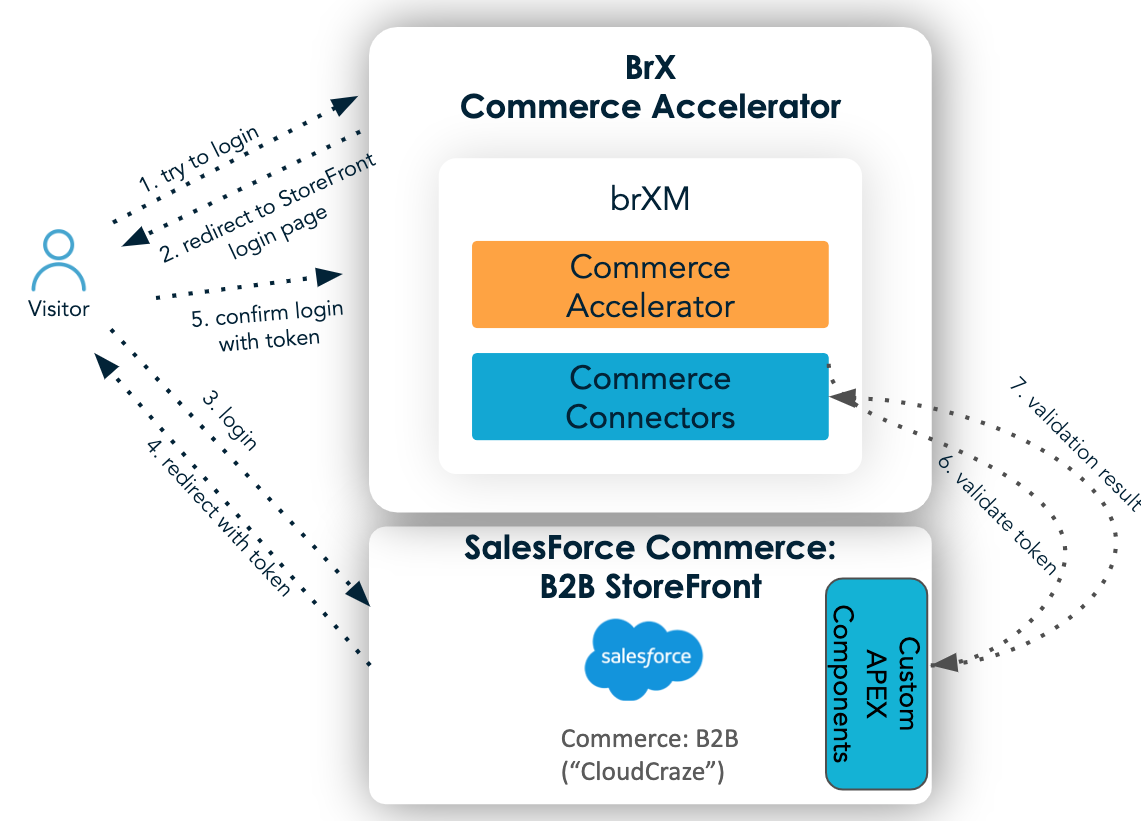
Diagram: The diagram illustrates a federated login sequence between a Visitor, the BrX Commerce Accelerator, and Salesforce Commerce B2B StoreFront. The BrX Commerce Accelerator container includes Commerce Accelerator and Commerce Connectors. The Salesforce side includes Commerce: B2B ("CloudCraze") and Custom APEX Components. The sequence shows the visitor initiating login, being redirected to the storefront login page, authenticating, receiving a token, and returning to the Accelerator. The Commerce Connectors validate the token with the Custom APEX Components.
Federated login flow:
- The visitor accesses the B2B Commerce Accelerator and initiates login.
- The Accelerator redirects the visitor to the Salesforce storefront login page (VisualForce "SiteLogin").
- The visitor submits credentials on the login form.
- If authentication succeeds, the visitor is redirected to "SitePostLogin," which generates a temporary token and stores it in the Salesforce platform cache. The visitor is then redirected back to the Accelerator with the token as a URL parameter.
- The HST component for federated login receives the token and requests validation.
- The SitePostLogin controller validates the token.
- If validation succeeds, the response includes authenticated user details.
After login, the Accelerator temporarily stores the authenticated user data. This data is included in every user-specific request by sending the ccrz-context parameter in the request header.