On-Premise Kubernetes Setup
Overview
This page describes how to deploy Bloomreach Experience Manager (brXM) in an on-premise Kubernetes environment. It covers system architecture, clustering, Lucene index management, session affinity, deployment models, and repository maintenance. The guidance assumes familiarity with Kubernetes, containerization, and standard deployment practices.
System Architecture
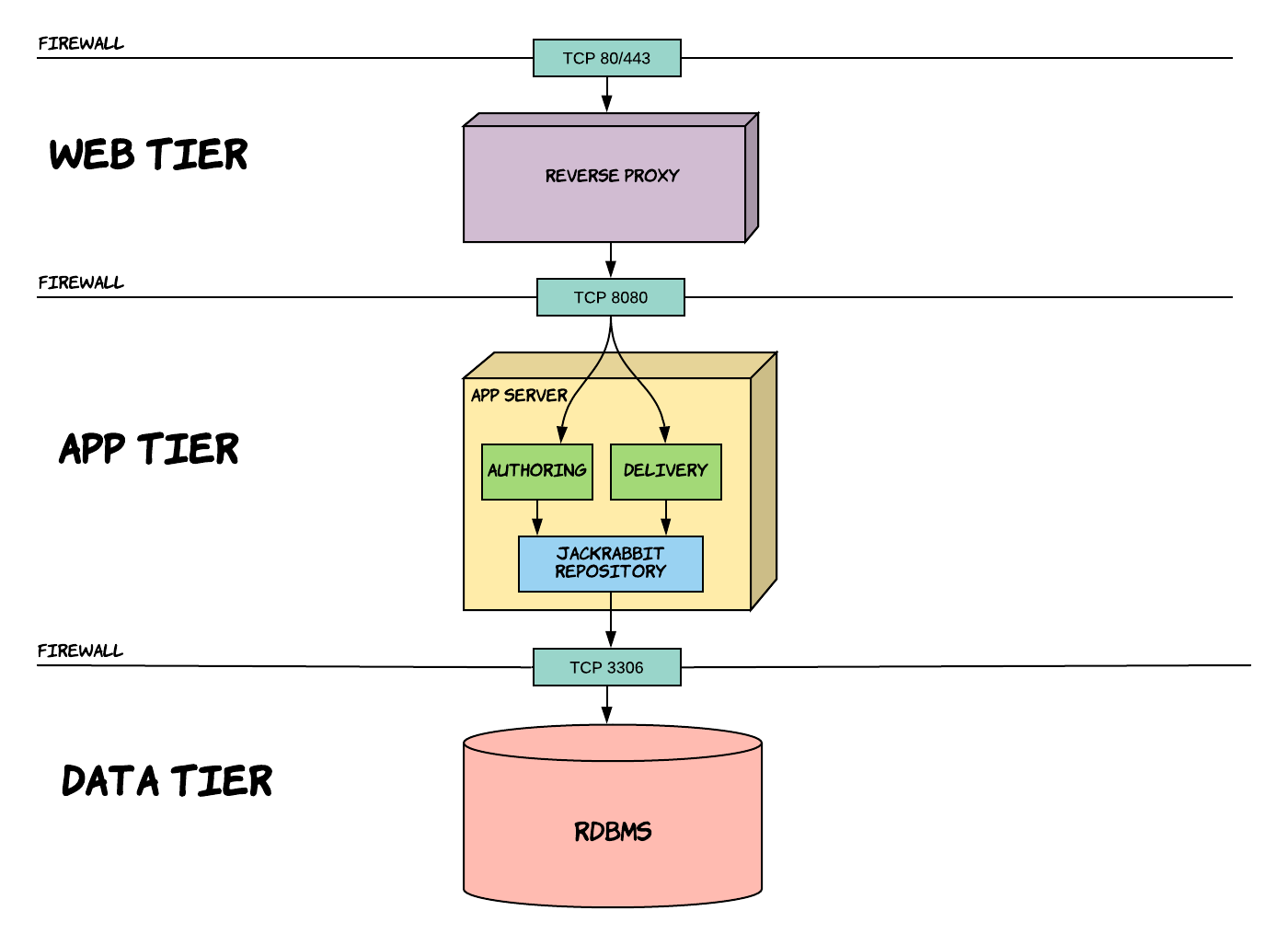
The recommended architecture for brXM in Kubernetes uses a three-tier model:
- Web Tier: Handles incoming traffic on TCP 80/443 via a reverse proxy, which forwards requests to the application tier.
- App Tier: Runs application servers (such as Tomcat) hosting two WAR files:
cms.war(Authoring) andsite.war(Delivery). Both connect to a Jackrabbit Repository. - Data Tier: Stores persistent data in a relational database (RDBMS) accessed by the repository.
Jackrabbit acts as the abstraction layer between the application and the database, implementing the JCR (Java Content Repository) specification. All data access occurs through this repository layer.
Clustering and Lucene Index Management
brXM supports horizontal scaling by running multiple application nodes in a cluster.
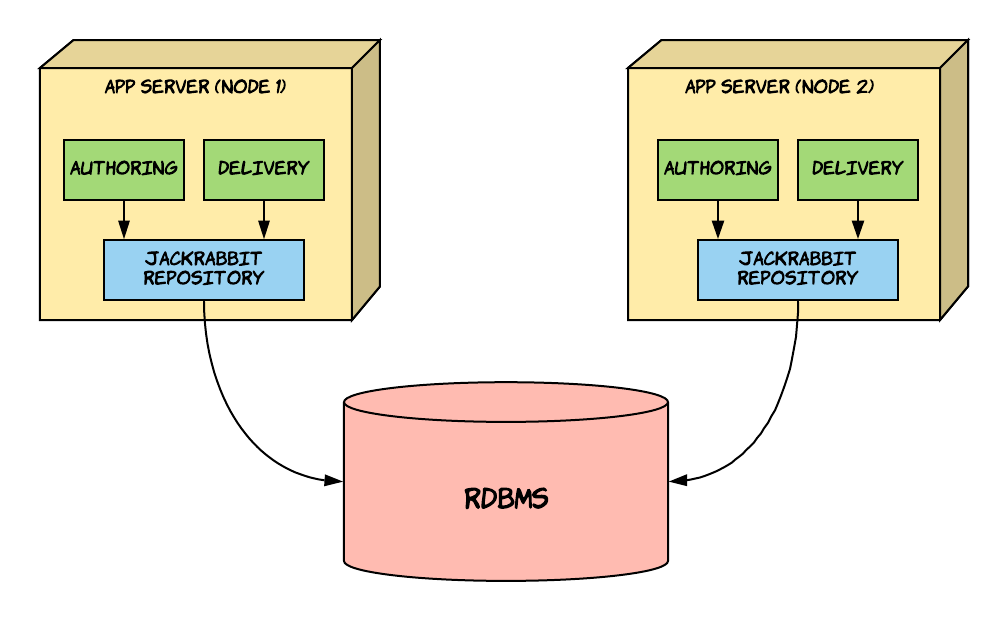
- Each application node connects to the same relational database.
- Every node is assigned a unique JCR cluster node ID (Journal ID), which Jackrabbit uses to maintain cluster consistency.
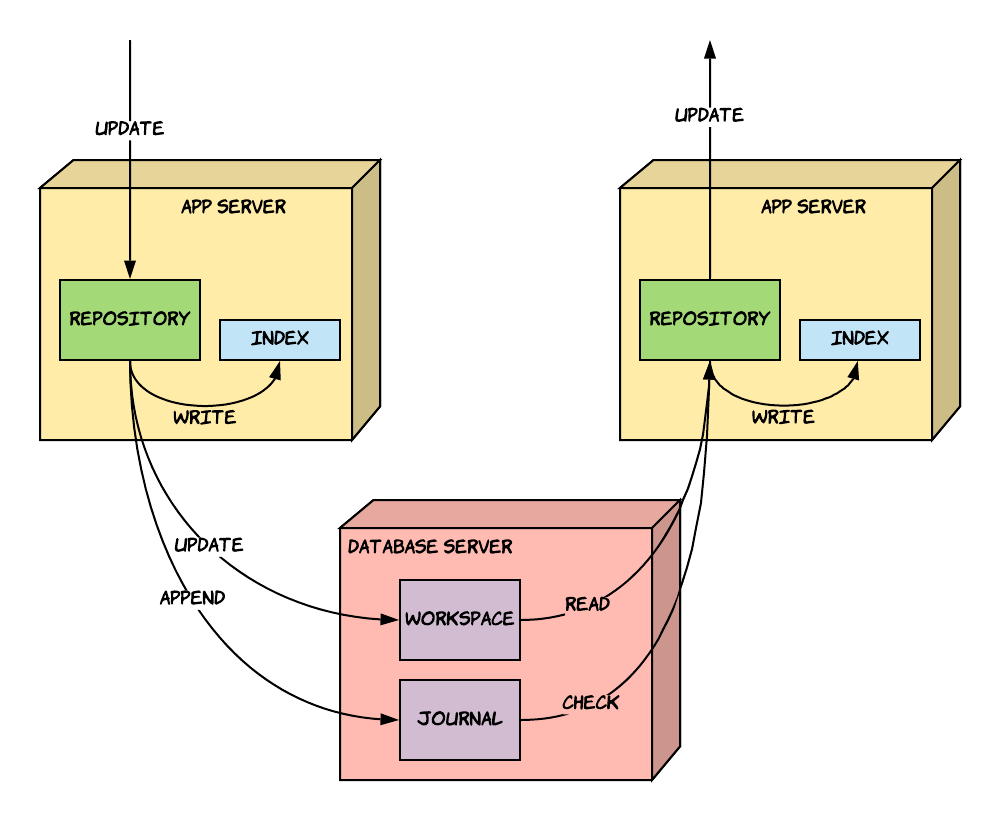
- Each cluster node maintains its own Lucene index stored on the local filesystem.
- When a node processes changes, it updates its local index and writes to the shared database.
- Other nodes synchronize by reading the shared workspace and journal, then updating their own indexes.
Lucene Index Challenges in Containerized Environments
In Kubernetes, when a pod is terminated, its local Lucene index is lost. On redeployment, the application must rebuild the index from scratch. As the repository grows, this process becomes slower, impacting deployment times.
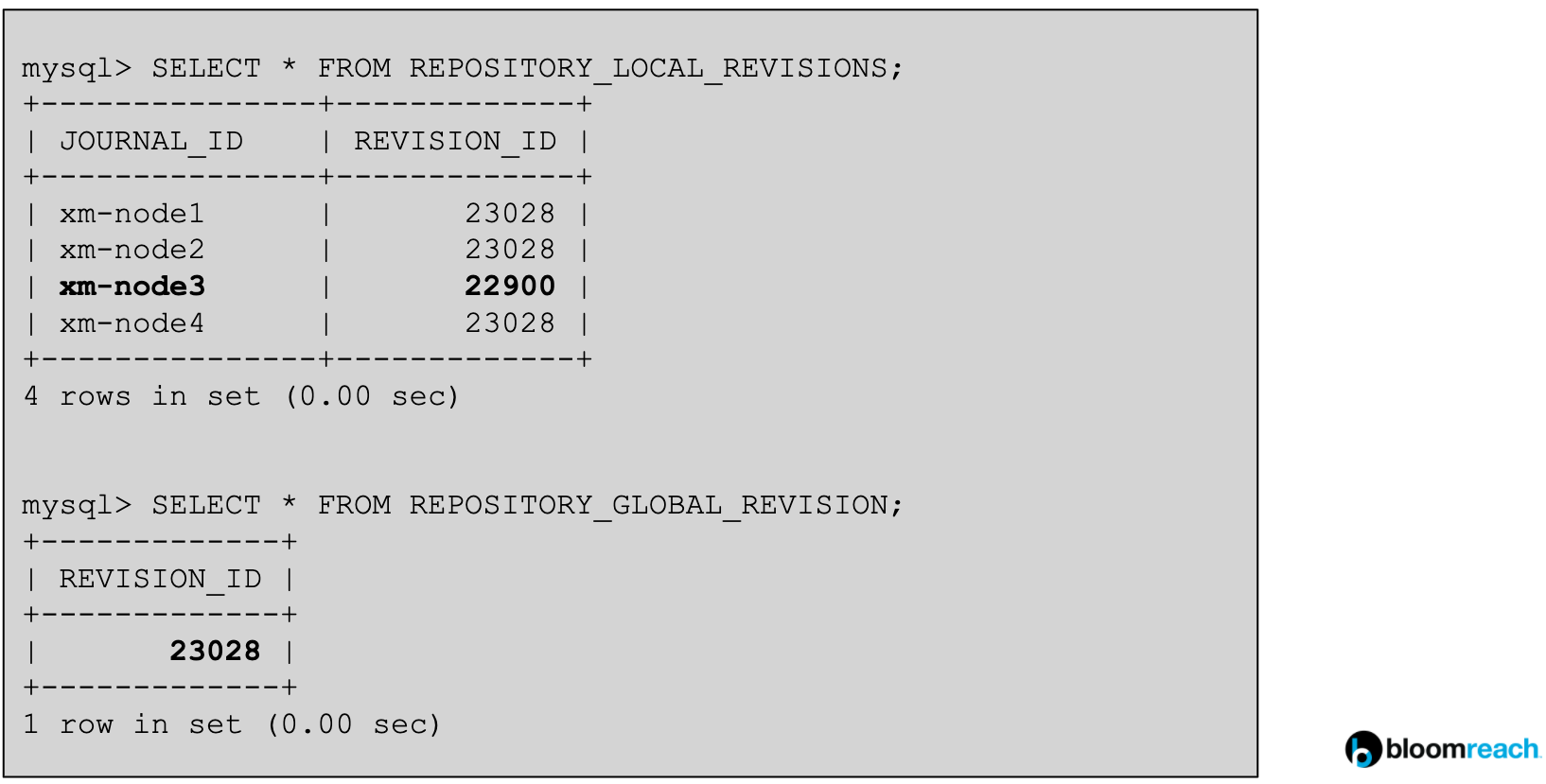
- Jackrabbit tracks cluster node revisions in the
REPOSITORY_LOCAL_REVISIONStable. - Each node’s Journal ID and current revision are recorded.
- The
REPOSITORY_GLOBAL_REVISIONtable holds the highest revision in the cluster.
By default, Journal IDs are assigned using the pod hostname ($(hostname -f)), but must remain unique.

- When a pod is killed, its Journal ID remains in the database.
- New pods receive new, random Journal IDs and must rebuild their Lucene index from the beginning.
- Over time, as the revision number increases, new pods take longer to catch up.
Accelerating Index Rebuilds
Use the Lucene Index Export Plugin to export an index from a running instance. On redeployment, unzip the exported index in the new pod before startup. This allows the application to resume indexing from the export’s revision, reducing catch-up time.
- Always use the most recent index export for faster deployments.
- If you restore an older database backup, do not use index exports created after the backup. Maintain index exports alongside database backups.
Session Affinity
The brXM CMS (Authoring) application is stateful and requires session affinity. Users must consistently connect to the same pod for the duration of their session.
- Without session affinity, horizontal scaling of CMS pods is not supported.
- Configure cookie-based session affinity at the load balancer or ingress level. For Kubernetes, use an ingress annotation as described in the NGINX ingress documentation.
Session data cannot be externalized (e.g., via Redis) because it contains unserializable objects and significant GUI state. Infrastructure-level session affinity is required.
Impact on Downscaling
When scaling down CMS pods, active user sessions are lost if their pod is terminated. This disrupts logged-in users.
- Downscaling should be coordinated during maintenance windows or upgrades.
- Bloomreach Cloud implements session draining to minimize disruption by gradually redirecting users to new pods.
Deployment Models
Backward Compatibility
A Docker image is considered backward-compatible if it meets the criteria described in the backward compatibility documentation. Most images, especially early in a project, are not backward-compatible due to frequent content model changes.
- Deploying a backward-incompatible image requires restoring the database to a compatible state before rollback.
- The deployment model should be chosen based on the compatibility of the application and database.
Rolling Updates
Kubernetes defaults to rolling deployments, where old and new versions run concurrently for a short period.
- Rolling updates are not supported for backward-incompatible images or major version upgrades.
- During a rolling update, incompatible application versions may interact with the same database, leading to unpredictable failures and potential repository inconsistencies.
- If using rolling updates, ensure you can restore the database and redeploy a stable image if issues occur.
Start-Stop (Recreate)
The start-stop (Recreate) strategy stops all pods before starting new ones.
- Prevents issues from backward-incompatible changes.
- Causes downtime during deployment.
- Suitable for development, testing, or internal environments where downtime is acceptable.
- For rollback, restore a compatible database backup before redeployment.
Blue-Green Deployment
Blue-green deployments maintain two parallel environments (blue and green), each with its own database.
- Only one environment is active at a time.
- To deploy, freeze content creation, back up the active database, restore it to the inactive environment, deploy the new version, validate, and switch traffic.
- Use the Synchronization addon to synchronize document management operations and minimize content freeze duration.
- The protect environment mechanism can restrict access during content freeze.
- Blue-green deployments avoid downtime and compatibility issues but increase infrastructure complexity and require careful coordination.
Repository Maintenance
Over time, the Jackrabbit repository database accumulates obsolete data. Regular maintenance is required to remove redundant entries and maintain performance. See the repository maintenance documentation for details.
- Clean up old revision entries using static SQL queries.
- The
REPOSITORY_LOCAL_REVISIONStable tracks each cluster node’s progress. - Remove entries from
REPOSITORY_JOURNALthat are older than the lowest revision inREPOSITORY_LOCAL_REVISIONS.
To remove records for inactive cluster nodes, use the following query:
DELETE FROM REPOSITORY_LOCAL_REVISIONS WHERE JOURNAL_ID NOT IN (%s) AND JOURNAL_ID NOT LIKE '_HIPPO_EXTERNAL%%'
Replace %s with the list of active pod IDs.
Identifying Inactive Journal IDs
- The preferred method is to query the Kubernetes API server for active pod names, which correspond to the Journal IDs (by default, set to the pod hostname).
- Use the brxm-repo-maintainer tool for automated maintenance in Kubernetes.
- If API access is restricted, apply a heuristic: treat nodes with revision numbers significantly behind the global revision as inactive.
Caution: Jackrabbit Janitor
Do not rely on the native Jackrabbit janitor process in cloud or containerized environments. The janitor does not remove entries for permanently inactive nodes and can complicate cluster scaling. Use external processes for repository maintenance.
In non-containerized, on-premise deployments, janitorEnabled=true may remain in repository.xml for legacy reasons.
Recommended Architecture
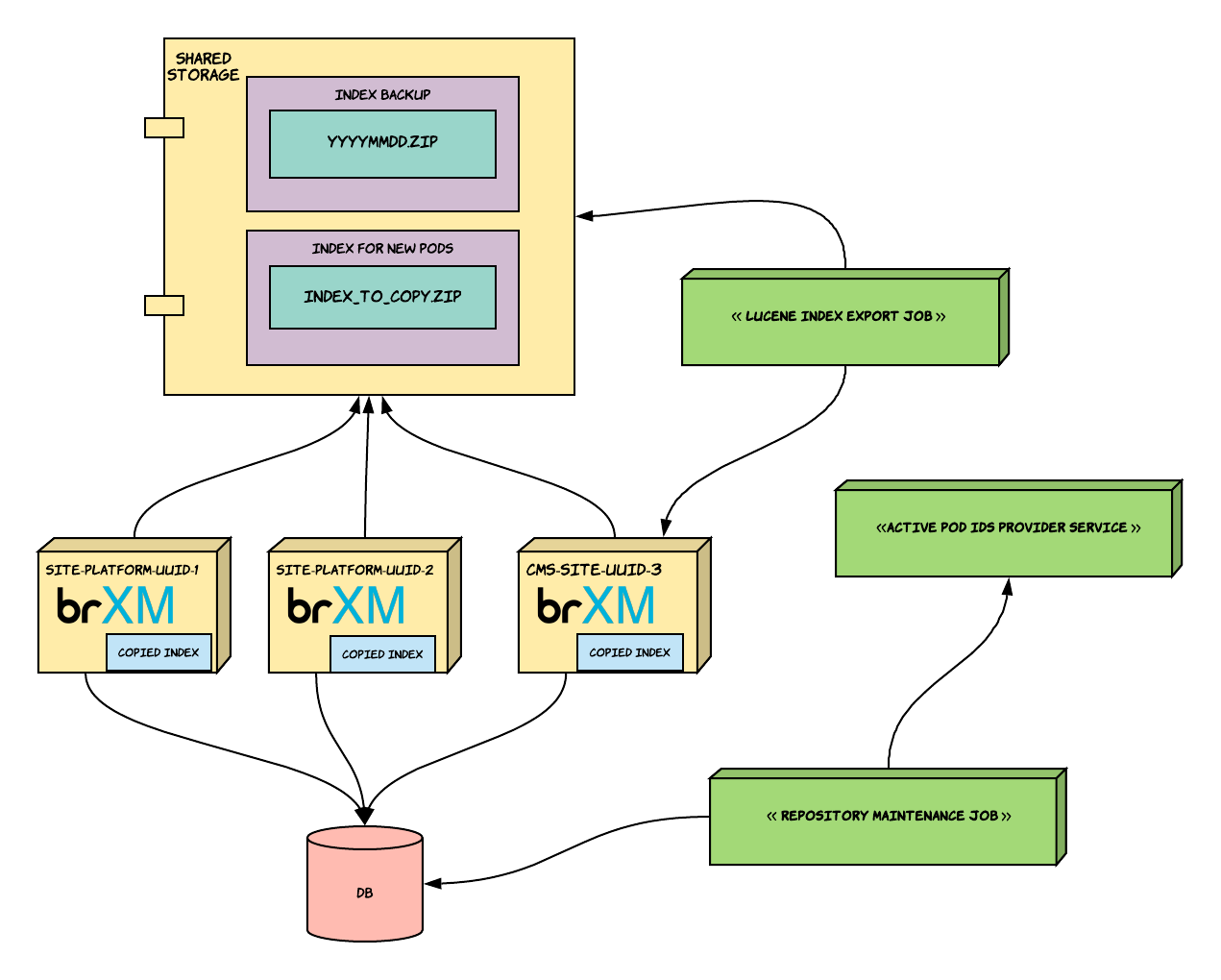
This diagram illustrates a recommended Kubernetes deployment for brXM:
- Multiple brXM pods, each with access to a shared database and persistent storage for Lucene indexes.
- Maintenance jobs run periodically to clean up repository tables and manage Lucene index exports.
- Session affinity is enforced at the ingress or load balancer level.
- Use persistent volumes for Lucene index storage to reduce index rebuild times.
Additional Resources
- How to build a Docker image
- Set environment-specific configuration with Docker
- Health check endpoints
- Lucene Index Export Plugin
- Synchronization addon
- Repository maintenance documentation
- brxm-repo-maintainer tool
- Session draining in Bloomreach Cloud
- Protect environment during content freeze
- Kubernetes Ingress session affinity
Troubleshooting
- Slow deployments due to index rebuilds: Use the Lucene Index Export Plugin and persistent storage for indexes.
- Session loss during downscaling: Implement session draining or coordinate pod termination during maintenance windows.
- Repository maintenance issues: Ensure inactive Journal IDs are removed from the database to enable effective cleanup.