Spring MVC Bridge
Overview
The Spring MVC Bridge enables integration between Bloomreach Content's delivery tier (HST) and Spring Web MVC applications.
When to Use
Use the Spring MVC Bridge when you need to incorporate an existing Spring Web MVC application into your Bloomreach Content (formerly Hippo) project. This approach allows you to leverage Spring MVC features within the HST delivery tier.
For other integration options, see HST Container Integration with Other Web Application Frameworks.
How the Spring MVC Bridge Works
The HST Spring MVC Bridge integrates an existing Spring MVC application by dispatching requests from HST components to Spring MVC controllers.
To see the integration in action, build and run the Hippo Test Suite demo project. The source code is available at Hippo Test Suite on GitHub.
After starting the demo, select the Contact-SpringMVC link in the left menu (http://localhost:8080/site/contact-springmvc). The page displays a form. If you submit invalid data (for example, entering wicky as an email address), validation errors appear. These errors are generated by the Spring Web MVC Framework. Submitting valid data displays a success view, as defined in the Spring Web MVC configuration.
To implement this integration, you must:
- Use
org.hippoecm.hst.component.support.SimpleDispatcherHstComponentas the HST component class with appropriate dispatching URI parameters. - Configure your Spring MVC application to handle requests dispatched by the HST component.
- Replace the default
org.springframework.web.servlet.DispatcherServletwithorg.hippoecm.hst.component.support.spring.mvc.HstDispatcherServlet. - Utilize all standard Spring Web MVC features, such as validation and form controllers.
Implementation
Configure HstDispatcherServlet
Replace the standard Spring MVC DispatcherServlet with HstDispatcherServlet in your web application configuration. HstDispatcherServlet extends the default dispatcher to support the HST request lifecycle.
Example configuration:
<!-- SNIP --> <!-- Use HstDispatcherServlet instead of the default DispatcherServlet --> <servlet> <servlet-name>HstDispatcherServlet</servlet-name> <servlet-class>org.hippoecm.hst.component.support.spring.mvc.HstDispatcherServlet</servlet-class> <init-param> <param-name>contextConfigLocation</param-name> <param-value>/WEB-INF/applicationContext.xml</param-value> </init-param> </servlet> <!-- SNIP --> <servlet-mapping> <servlet-name>HstDispatcherServlet</servlet-name> <url-pattern>*.do</url-pattern> </servlet-mapping> <!-- SNIP -->
The HST Container follows the Post/Redirect/Get (PRG) pattern after processing an action phase. HstDispatcherServlet extends the default dispatcher to:
- Store the
ModelAndViewobject in theHttpSessionafter the action phase. - Restore the
ModelAndViewfrom theHttpSessionbefore the render phase, if available.
See the HstDispatcherServlet implementation for details. The servlet overrides the render(ModelAndView mv, HttpServletRequest request, HttpServletResponse response) method to manage this behavior.
Configure SimpleDispatcherHstComponent
Configure the HST component to dispatch requests to your Spring MVC application. The following example is based on the Contact-SpringMVC example from the Hippo Test Suite.
Component configuration: /hst:hst/hst:configurations/democommon/hst:components/bodycontactspringmvcformpage/content
/hst:hst/hst:configurations/democommon/hst:components/bodycontactspringmvcformpage: /content: jcr:primaryType: hst:component hst:componentclassname: org.hippoecm.hst.component.support.SimpleDispatcherHstComponent hst:parameternames: [action-path] hst:parametervalues: [/spring/contactspringmvc.do] hst:template: contactspringmvc
Template configuration: /hst:hst/hst:configurations/democommon/hst:templates/contactspringmvc
/hst:hst/hst:configurations/democommon/hst:templates: /contactspringmvc: jcr:primaryType: hst:template hst:renderpath: /spring/contactspringmvc.do
In this configuration:
- During the RENDER phase, the bridge component uses the
contactspringmvctemplate to render the page. - During the ACTION phase (such as when submitting a form), the bridge component dispatches the request to
/spring/contactspringmvc.do(as specified by theaction-pathparameter) for action processing.
After the ACTION phase, HstDispatcherServlet stores the ModelAndView returned by the Spring controller. The HST Container then redirects to the original page and uses the contactspringmvc template for rendering.
The SimpleDispatcherHstComponent supports additional parameters:
| Name | Description |
|---|---|
| dispatch-path | Default dispatch path used for each invocation. |
| action-path | Dispatch path for doAction() invocation. If not set, dispatch-path is used. |
| before-render-path | Dispatch path for doBeforeRender() invocation. If not set, dispatch-path is used. |
| render-path | Dispatch path for rendering phase. If not set, dispatch-path is used. |
| before-resource-path | Dispatch path for doBeforeServeResource() invocation. If not set, dispatch-path is used. |
| resource-path | Dispatch path for resource serving phase. If not set, dispatch-path is used. |
Internal Request Flow
The following diagram illustrates the internal request flow between the SimpleDispatcherHstComponent and the Spring MVC application:
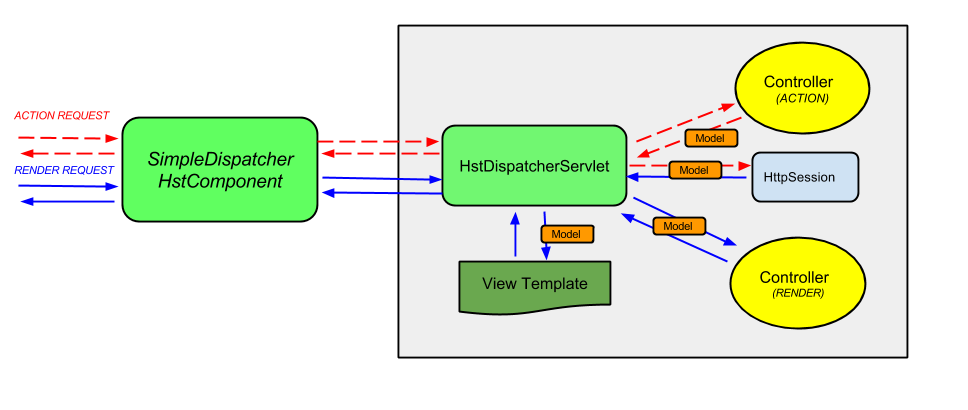
Diagram: This diagram shows the architecture of the Spring MVC Bridge. The
SimpleDispatcherHstComponent(left) interacts with theHstDispatcherServlet(right, within the application area). Red dashed arrows indicate action requests, and blue arrows indicate render requests. The servlet coordinates with separate controllers for action and render phases, manages model data via theHttpSession, and renders the view template.
Request Processing Steps
The following sequence describes how the bridge handles ACTION and RENDER phase requests:
- The HST Container processes a form POST request and invokes the page containing the bridge component in the ACTION phase.
SimpleDispatcherHstComponentdispatches the request to the Spring MVC application using the configured URI (for example, theaction-pathparameter), which maps to a controller in the Spring MVC context.HstDispatcherServletinvokes the appropriate controller.- If the controller returns a
ModelAndViewduring the ACTION phase,HstDispatcherServletstores it in theHttpSessionfor the specific HST component window (using the window reference name as the session attribute key). SimpleDispatcherHstComponentcompletes ACTION phase processing.- The HST Container redirects to a RENDER URL after processing the form POST request.
- The HST Container processes a GET RENDER request and invokes the page containing the bridge component in the RENDER phase.
SimpleDispatcherHstComponentdispatches the request to the Spring MVC application using the configured URI (from the HST template configuration,render-path, ordispatch-pathparameter), which maps to a controller.HstDispatcherServletchecks for a storedModelAndViewin theHttpSessionfor the component window. If found, it retrieves and removes the attribute, then invokes the controller for the RENDER phase.- The controller may return a new
ModelAndView.HstDispatcherServletthen renders the view template with the model data.