Container and Page Locking
Container Locking
When a webmaster edits a page region (container) using the Channel Editor, the system locks that region for the user. Although only the items within the container are modified, the lock applies at the container level.
If a webmaster moves a container item from one container to another, both containers are locked.
Locks apply only to the regions that are modified. Multiple webmasters can lock different regions of the same page at the same time. Each webmaster can publish or discard only the regions they have modified, while other regions remain locked by other users. Locking occurs at the container level; the system does not track locks for individual container items within a container.
Page Locking
When a webmaster adds, removes, or assigns a new template to a page under hst:workspace (see Page Management), the system locks the entire page. "Entire page" refers to:
- All explicit containers configured for the page
- The root component of the page under
hst:workspace/hst:pages - The associated sitemap item(s)
Locking for containers on a page is straightforward, except for the distinction between explicit and inherited containers. Explicit containers are those defined directly under the page in the repository hierarchy, not those included via inheritance or referencing.
Renaming or moving an existing sitemap item does not lock the associated page. If a sitemap item points to a page with containers locked by another user, both users can hold separate locks: one on the sitemap item, one on the page. Each user can publish or discard their changes independently.
Locking behavior for the root component and sitemap items varies by use case:
- Adding a page
- Removing a page
- Updating a page
- Renaming or moving a page
- Re-applying a prototype to a page
Locking for pages and sitemap items can become complex, especially when multiple webmasters perform add, move, or delete operations. For comprehensive locking behavior, refer to the unit tests in the sitemapresource package.
Adding a Page
When you add a new page, the system creates a new sitemap item under hst:workspace/hst:sitemap and copies a prototype page to hst:workspace/hst:pages. Both the new sitemap item and the new page are locked. No other webmaster can modify the new page or its containers. The sitemap item is also locked. For example, if user john adds a new page christmas.html, the relevant structure in hst:workspace appears as follows:
/hst:hst: /hst:configurations: /example: /hst:workspace: /hst:sitemap: /hst:pages: /example-preview: /hst:workspace: /hst:sitemap: /christmas.html: hst:lockedby: john /hst:pages: /christmas-one-column: hst:lockedby: john /main: /content: /container: hst:lockedby: john
In this example, the new sitemap item christmas.html is locked, as is the christmas-one-column page and its container. When a sitemap item is locked, all its descendant sitemap items are also implicitly locked. Publishing removes the locks and copies the relevant nodes to the live configuration under hst:workspace/example.
Adding a Page Below an Existing Page: Partial Locking
When you add a new page under an existing page (see page management), all ancestor sitemap items become partially locked. A partially locked sitemap item cannot be renamed, updated, or deleted by other webmasters. However, other webmasters can still add, remove, update, or re-apply a prototype to sibling sitemap items of the explicitly locked item.
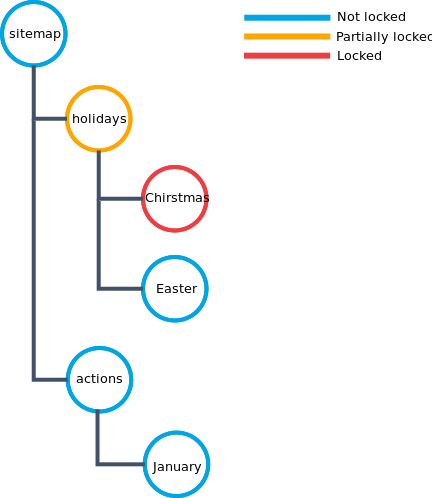
Diagram: The diagram displays a sitemap hierarchy with colored nodes: blue (unlocked), orange (partially locked), and red (locked). The root "sitemap" branches to "holidays" and "actions." "Holidays" is partially locked, with children "Christmas" (locked) and "Easter" (unlocked). "Actions" and its child "January" are unlocked. This illustrates that a locked descendant causes the parent ("holidays") to be partially locked, even if only "Christmas" is fully locked.
If two descendant items (for example, Christmas and Easter) are locked by different webmasters, no webmaster can rename or update the parent sitemap item (holidays). The holidays item remains partially locked, but a third webmaster can still add a new sitemap item (such as Pentecost) under it.
Hint: If a sitemap item is partially locked because multiple webmasters hold explicit locks on different descendants, no webmaster can rename or update the partially locked item. If only one webmaster holds a lock on a descendant, that webmaster can still manage the partially locked item as the sole lock owner.
Removing a Page
Removal logic depends on whether the page has been published:
- If the page has not been published, deleting it removes the sitemap item and page from
hst:workspace. The webmaster will have no outstanding changes unless other modifications exist. - If the page has been published, deleting it does not remove the sitemap item and page. Instead, both are marked as deleted and locked. This approach allows:
- Tracking deletions for publishing
- Maintaining locks on deleted items
If multiple sitemap items in hst:workspace reference the same page under hst:workspace/hst:pages, the page is deleted only when the last referencing sitemap item is deleted. This situation occurs only through developer actions, not via the Experience manager UI.
Updating a Page
When you update a page (for example, by changing the page title), the system locks the associated sitemap item.
Renaming or Moving a Page
Renaming or moving a page behaves differently depending on whether a live version exists:
- No live version: The page must have been created and locked by the current webmaster. Renaming or moving the sitemap item changes its name or parent. The page node itself is not renamed or locked. Renaming the sitemap item (URL) is possible even if another user has locked a container on that page.
- Live version exists: Renaming or moving results in:
- The renamed or moved sitemap item node is locked.
- The original sitemap item location contains a sitemap item marked as deleted and locked by the webmaster.
A deleted marker is added to prevent other webmasters from creating a sitemap item at the deleted location until the rename or move is published.
Re-applying a Prototype to a Page
When you re-apply a prototype to a page, the system locks the sitemap item as during a rename. In addition, the entire page under hst:workspace/hst:pages is locked. When a page is fully locked, all its explicit containers are also locked.