Experience Manager Troubleshooting
Contents
This page lists common issues with the Experience Manager and provides resolutions for each:
- Experience Manager is not visible
- Channel Overview does not show any channels
- Wrong channels are shown in Channel Overview
- Not all channels are listed in Channel Overview
- Channel does not load and network shows a 409 (conflict)
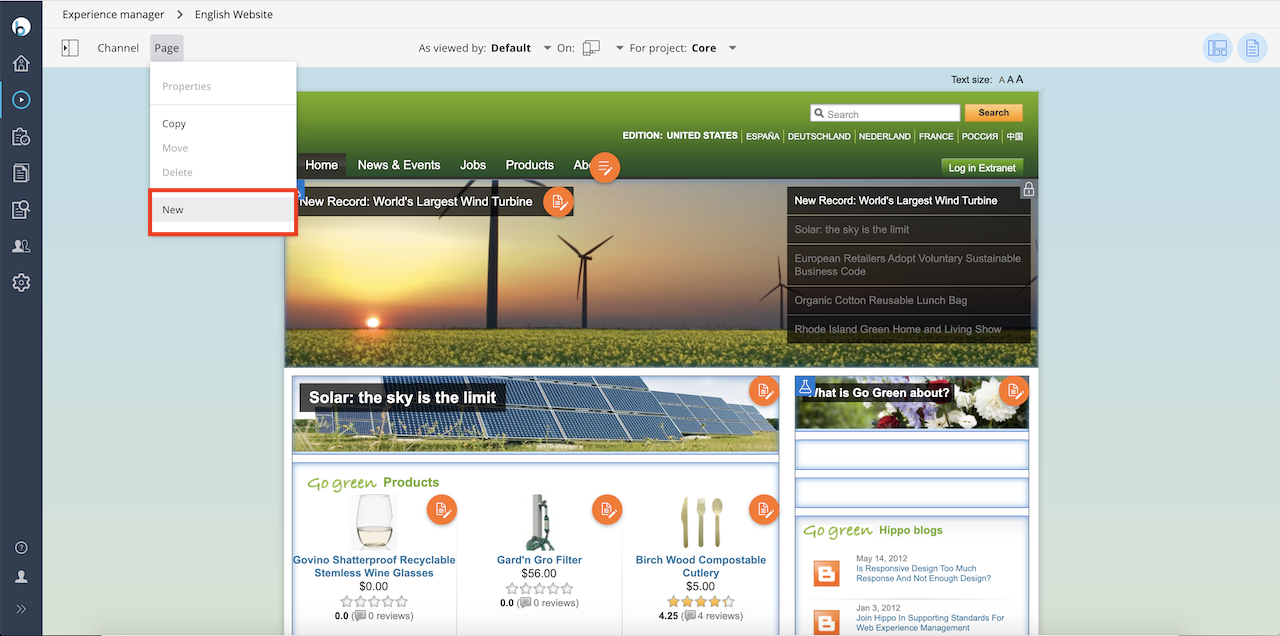
- 'New' option is not available in Page menu
- Preview of channels in the CMS and in a separate window does not work behind Apache Web Server
- Opening a channel shows a blank page
- Wrong or empty channel opens in Experience Manager
- Unable to find package resource nl.png
- Channels are showing a blank page with message to reload page
- Stacktraces MissingResourceException when clicking 'Channel Settings' in Experience Manager
- Changes in Blueprints through the Console are not visible in the Experience Manager at 'Add Channel'
- Blueprint 'reusing existing content' does not work
- No borders visible for containers and components
- Channel Settings not editable
- Projects feature does not work
- Component configuration not persisted when user publishes changes in the Experience Manager
Common Problems
Experience Manager is not visible
Verify that the logged-in CMS user has the required user role:
xm.channel.user
Users without this role cannot access the Experience Manager application.
Channel Overview does not show any channels
If the Channel Overview is empty but channels exist, check for the following causes:
- The CMS host you use to access the CMS is not configured under
/hst:platform. - The CMS host is configured under
/hst:platform, but its hostGroup does not match the hostGroup of the HST webapp configuration. - You accessed the CMS with the query string
?HstMode=false. - The HST site webapp does not have the
hst.configuration.rootPathproperty set inhst-config.propertiesto the correct HST root node. - The
hst-api.jarfile is present in the CMS webapp as an explicit dependency. Remove it; it should be part of the shared library. - The CMS webapp
web.xmlis missing required HST context parameters and filters. - The current CMS user does not have permission to view any channel. See Access Channels.
To resolve issues 1, 2, and 3, review Hosts Configuration. For issue 4, see HST Configuration Model Introduction. To fix issue 5, remove hst-api.jar from the CMS dependencies. For issue 6, compare your CMS web.xml with the archetype project’s web.xml.
Wrong channels are shown in Channel Overview
If Channel Overview displays incorrect channels or URLs, the CMS host likely has an incorrect hostGroup assignment. For example, the CMS host is under the hostGroup 'acct-ent' instead of 'prod-env', which is required to display production URLs. Refer to Hosts Configuration to correct the hostGroup.
Not all channels are listed in Channel Overview
If some channels are missing from Channel Overview and you have multiple HST site webapps, check the following:
- An HST site webapp may have its channels under a different hostGroup than the CMS host (under
/hst:platform). - An HST site webapp may not have the correct HST rootPath configured in its
hst-config.properties. - The current CMS user may lack privileges for all channels. See Access Channels and Channel Filtering.
To resolve issues 1 and 2, review Hosts Configuration and HST Configuration Model Introduction.
Channel does not load and network shows a 409 (conflict)
A 409 (conflict) error in a clustered environment usually indicates an incorrect load balancer configuration. Follow the instructions in Bloomreach Content Loadbalancing Requirements to configure your load balancer correctly.
'New' option is not available in Page menu
If the 'New' option does not appear in the Experience Manager's 'Page' menu, your project configuration does not define any prototype pages. The 'New' option is only available when prototype pages are present. Add prototype pages to enable this option.
Preview of channels in the CMS and in a separate window does not work behind Apache Web Server
Ensure that the VirtualHost configuration for the CMS includes an additional ProxyPass rule for /site/:
<VirtualHost *:80> ServerName cms.example.com ProxyPreserveHost Off # Add the extra ProxyPass rule for /site here ProxyPass /site/ http://127.0.0.1:8080/site/ ProxyPass / http://127.0.0.1:8080/cms/ ProxyPassReverse / http://127.0.0.1:8080/cms/ ProxyPassReverseCookiePath /cms / </VirtualHost>
Opening a channel shows a blank page
This issue can occur if HTTP HEAD requests are blocked by your network infrastructure, such as in some Citrix virtualization environments. Contact your system administrator to ensure that HEAD requests are allowed.
Another possible cause is integration with a web application security framework (for example, Spring Security) that sets the X-Frame-Options response header to DENY. Bloomreach Content requires X-Frame-Options: SAMEORIGIN. Spring Security Framework sets this header to DENY by default since version 4.0. If you use Spring Security 4.0 or later, update the configuration to set X-Frame-Options to SAMEORIGIN.
Wrong or empty channel opens in Experience Manager
Note: This issue and its resolution apply to CMS 12.0.0 or higher.
If your log contains messages similar to:
WARN http-nio-8080-exec-3 [VirtualHostsService.warnDuplicateChannel:450] Skip channel with id '${project-channel}' because already present for host group '${project-specific-hostgroup}'. Most likely there is a parent channel that already is a channel mngr channel. Set 'hst:nochannelinfo = true' on mount 'MountService [jcrPath=${project-specific-path}, hostName=${project-specific-host}]' to avoid this problem.
This occurs due to a specific configuration that behaves differently in CMS 12.0.0 and later. For details on the cause and resolution, see Explicitly hide a Mount in the Experience Manager.
Unable to find package resource nl.png
If you see a warning like the following in your logs:
WARN [org.apache.wicket.markup.html.PackageResource.getResourceStream():594]
 Unable to find package resource [path = org/onehippo/cms7/channelmanager/channels/nl.png, style = null, locale = null]
Check that the hst:locale property in the accessed mount is set to a valid Java locale, such as nl_NL.
Channels are showing a blank page with message to reload page
- Reload the CMS interface after clearing your browser cache.
- Verify that the response header does not include
X-Frame-Options: DENY.
Stacktraces MissingResourceException when clicking 'Channel Settings' in Experience Manager
If you see stack traces similar to:
17.12.2013 15:05:55 ERROR [org.apache.cxf.interceptor.AbstractFaultChainInitiatorObserver.onMessage():116] Error occurred during error handling, give up!
 org.apache.cxf.interceptor.Fault: Can't find bundle for base name org.onehippo.forge.channels.WebsiteInfo, locale en
 at org.apache.cxf.service.invoker.AbstractInvoker.createFault(AbstractInvoker.java:162)
 at org.apache.cxf.service.invoker.AbstractInvoker.invoke(AbstractInvoker.java:128)
 at org.apache.cxf.jaxrs.JAXRSInvoker.invoke(JAXRSInvoker.java:167)
...
...
...
Caused by: java.util.MissingResourceException: Can't find bundle for base name org.example.channels.WebsiteInfo, locale en
 at java.util.ResourceBundle.throwMissingResourceException(ResourceBundle.java:1499)
 at java.util.ResourceBundle.getBundleImpl(ResourceBundle.java:1322)
 at java.util.ResourceBundle.getBundle(ResourceBundle.java:795)
...
...
Either the required i18n resource bundles (for example, WebsiteInfo.properties, WebsiteInfo_de.properties) are missing next to the WebsiteInfo class, or the site/components/pom.xml file does not include the following configuration in the <build> section:
<build> ... <resources> <resource> <directory>src/main/java</directory> <filtering>false</filtering> <includes> <include>**/*.properties</include> </includes> </resource> <resource> <directory>src/main/resources</directory> <filtering>true</filtering> </resource> </resources> </build>
Changes in Blueprints through the Console are not visible in the Experience Manager at 'Add Channel'
Blueprint changes made in the /console are cached. To see updates in the Experience Manager, log out of the CMS and log in again.
Blueprint 'reusing existing content' does not work
If you have added an hst:site node with an hst:content property to your blueprint but do not see a picker to select existing content for a new channel, check if a bootstrap content node (with the same name as the blueprint node) exists under /hippo:configuration/hippo:queries/hippo:templates/new-subsite/hippostd:templates. This node takes precedence over the hst:site/hst:content property.
No borders visible for containers and components
The Experience Manager uses HTML comments in the markup to render containers and components. For example, the HST inserts comments like:
<!-- { "HST-Label":"bannercarousel", "HST-LastModified":"1490608164816", "HST-XType":"HST.Item", "uuid":"8d3699eb-fb88-41c9-8d10-590c2b7f9335", "HST-Type":"CONTAINER_ITEM_COMPONENT", "refNS":"r33_r1_r1_r1", "url":"/site/_cmsinternal/uk?_hn:type=component-rendering&_hn:ref=r33_r1_r1_r1"} -->
with a matching end comment:
<!-- { "uuid":"8d3699eb-fb88-41c9-8d10-590c2b7f9335", "HST-End":"true"} -->
If container and component borders are not visible, your web application or server may be configured to strip HTML comments. For example, Tomcat may have a filter that removes comments, and web servers like Apache httpd or Nginx can also perform this optimization.
To resolve this, configure your environment to retain HTML comments for CMS requests.
Channel settings not editable
Channel settings may be read-only for several reasons:
- Another user has modified the channel settings but has not published the changes. In this case, the settings are locked.
- The
hst:configurationnode hashst:locked = true, which locks all settings. - The
hst:channelnode is located directly under thehst:configurationnode instead of underhst:workspace. For example, if your channel ismyprojectand the node structure is:
/hst:hst: /hst:configurations: /myproject: /hst:channel: /hst:channelinfo:
the channel settings will be read-only. To make them editable, move the node under hst:workspace:
/hst:hst: /hst:configurations: /myproject: /hst:workspace: /hst:channel: /hst:channelinfo:
- The
hst:channelnode is inherited from another channel and not configured under the current channel’shst:configurationnode. Inherited channel settings are also read-only.
Projects feature does not work
This resolution applies to brXM 13.0 and 13.1. In version 13.2 and later, the hst:defaulthostname property no longer causes this issue.
If the Projects feature does not work (typically on hosts other than localhost), check if the hst:defaulthostname property is set on a hst:hosts node. If present, remove the hst:defaulthostname property.
Component configuration not persisted when user publishes changes in the Experience Manager
When publishing changes in the Experience Manager, a PUT request is sent. Deleting a component sends a DELETE request. Use a network monitor (such as your browser’s developer tools) to check if PUT or DELETE requests are failing. If they are, your server environment may be blocking these HTTP methods. Update your server configuration to allow PUT and DELETE requests.