Document Model
Documents and Folders
In the Bloomreach Content repository, folders typically use the hippostd:folder type. This type defines which document and folder types can be created within it using the FolderWorkflow.
Documents are stored as hippo:handle nodes. Each handle can have multiple child nodes of a hippo:document subtype, referred to as "variants." Documents with simple workflows, such as images and assets, usually have a single variant. Documents managed by the more complex "document workflow" can have up to three variants. Details on these variants are provided below.
Each folder node includes the mix:referenceable mixin. Document variants also receive the mix:referenceable mixin by default. If version history is required, the mix:versionable mixin is used instead. Handles also include the mix:referenceable mixin so their UUIDs can be used to reference documents.
A typical node structure in the repository, represented in YAML format, is shown below:
/myproject: jcr:primaryType: hippostd:folder jcr:mixinTypes: ['hippo:named', 'hippotranslation:translated', 'mix:referenceable'] jcr:uuid: 92f48970-7b13-4c68-8a2e-491c84588b9c hippo:name: My Hippo Project hippostd:foldertype: [new-translated-folder, new-document] hippotranslation:id: 996bcac5-86cf-49b5-a7a3-16a74863e814 hippotranslation:locale: en /content: jcr:primaryType: hippostd:folder jcr:mixinTypes: ['hippotranslation:translated', 'mix:referenceable'] jcr:uuid: fbbfb1ab-2b57-4ae3-b1f0-a3597c3df94d hippostd:foldertype: [new-content-document, new-content-folder] hippotranslation:id: 6297cf67-37d8-428e-aaf1-d64a5289af8a hippotranslation:locale: en /sample-document: jcr:primaryType: hippo:handle jcr:mixinTypes: ['hippo:named', 'mix:referenceable'] jcr:uuid: 64ab4648-0c20-40d2-9f18-d7a394f0334b hippo:name: Sample document /sample-document[1]: jcr:primaryType: myproject:contentdocument jcr:mixinTypes: ['mix:referenceable'] jcr:uuid: 570182a8-2b85-48c9-ad66-8c0ee529c6bd hippo:availability: [live] hippostd:holder: admin hippostd:state: published hippostdpubwf:createdBy: admin hippostdpubwf:creationDate: 2014-03-25T16:52:00+01:00 hippostdpubwf:lastModificationDate: 2014-03-25T16:52:00+01:00 hippostdpubwf:lastModifiedBy: admin hippostdpubwf:publicationDate: 2014-03-25T16:52:00+01:00 hippotranslation:id: ce342189-ee92-494e-8589-33d219e7cefb hippotranslation:locale: en myproject:introduction: Lorem Ipsum is simply dummy text of the printing and typesetting industry. myproject:publicationdate: 2014-03-25T16:52:00+01:00 myproject:title: Lorem /sample-document[2]: jcr:primaryType: myproject:contentdocument jcr:mixinTypes: ['mix:referenceable', 'mix:versionable'] jcr:uuid: 6ac38741-5b11-4171-b7d6-736a200cf69f hippo:availability: [preview] hippostd:state: unpublished hippostdpubwf:createdBy: admin hippostdpubwf:creationDate: 2014-03-25T16:52:00+01:00 hippostdpubwf:lastModificationDate: 2017-12-11T10:17:08.907-08:00 hippostdpubwf:lastModifiedBy: admin hippotranslation:id: ce342189-ee92-494e-8589-33d219e7cefb hippotranslation:locale: en myproject:introduction: Lorem Ipsum is simply dummy text of the printing and typesetting industry. myproject:publicationdate: 2014-03-25T16:52:00+01:00 myproject:title: Lorem Ipsum /sample-document[3]: jcr:primaryType: myproject:contentdocument jcr:mixinTypes: ['mix:referenceable'] jcr:uuid: 887f4761-56f7-41e7-a259-c3f58e8b2995 hippo:availability: [] hippostd:state: draft hippostdpubwf:createdBy: admin hippostdpubwf:creationDate: 2014-03-25T16:52:00+01:00 hippostdpubwf:lastModificationDate: 2017-12-11T10:17:04.754-08:00 hippostdpubwf:lastModifiedBy: admin hippotranslation:id: ce342189-ee92-494e-8589-33d219e7cefb hippotranslation:locale: en myproject:introduction: Lorem Ipsum is simply dummy text of the printing and typesetting industry. myproject:publicationdate: 2014-03-25T16:52:00+01:00 myproject:title: Lorem Ipsum
This example shows two folders (myproject and content) and one document (sample-document). All nodes use the mix:referenceable mixin. The unpublished variant also uses mix:versionable.
Document Workflow
The default workflow for publishable documents is called the "document workflow." In addition to basic operations such as copy, move, rename, and delete, this workflow manages editing, publication, workflow requests, scheduling, versioning, and unlocking. All these operations are associated with the hippo:handle (parent) node of publishable documents.
Editing Workflow Operations
When a user selects "edit" in the CMS or retrieves an editable instance via the workflow API, the system locks the document. The hippostd:holder property on the draft variant records the user ID of the person editing the document. If this property is not set, the document is not being edited. When editing begins, the system copies content from the unpublished variant to the draft variant. When changes are committed, content is copied back from the draft to the unpublished variant.
Administrators can use a separate workflow operation, "unlock," to remove the lock from a document.
Publication Workflow Operations
Publication workflow operations use three primary document states:
- new
The document is available for preview but not published. This state applies when a document is first created or taken offline. - live
The document is published and has not been modified since publication. - changed
The document is published but has been modified since publication.
The current state is stored in the hippostd:stateSummary property. Actions such as publish, take offline, edit, and commit move the document between these states.
Requested and Scheduled Publication Workflow Operations
In addition to the main states (new, live, changed), the workflow supports states for publication and depublication requests. These requests fall into two categories:
- author request
An author requests publication or depublication. This action requires review by an editor. - scheduled job
A job is scheduled to publish or depublish a document at a specified time.
Requests are stored as separate nodes under the handle. Pending requests can block certain actions. For example, you cannot edit a document if a publication request is pending. Similarly, you cannot request or schedule a new action if another request already exists.
Variants
The workflow supports three document variants:
- published
This variant hashippo:availability='live'when the document is published. - unpublished
This versionable variant is the central point for all content changes. - draft
This variant contains intermediate changes made by editors.
When editing starts, content is copied from the unpublished variant to the draft variant. When committing changes, content is copied from the draft back to the unpublished variant. Each time a document is published, the system creates a version from the unpublished variant to track changes over time.
Versions
The unpublished variant is versionable. The system creates a new version when the document is published or taken offline. Version history is linear and follows standard JCR versioning.
Availability
The hippo:availability property determines which variant is exposed in different contexts on the delivery tier (HST). Authorization rules use this property to control access. The published variant is shown on the live site when hippo:availability is set to live. The unpublished variant is shown on the preview site when hippo:availability is set to preview.
Roles
The document workflow defines three roles:
- author: Can edit documents and request publication or depublication.
- editor: Can publish or depublish changes, schedule actions, and approve or deny author requests.
- administrator: Can unlock documents, making them available for editing if previously locked.
Visual Representation of the Document Workflow
The diagram below illustrates the document workflow as a state machine. It shows states and allowed transitions, including how requests and scheduled jobs affect the workflow.
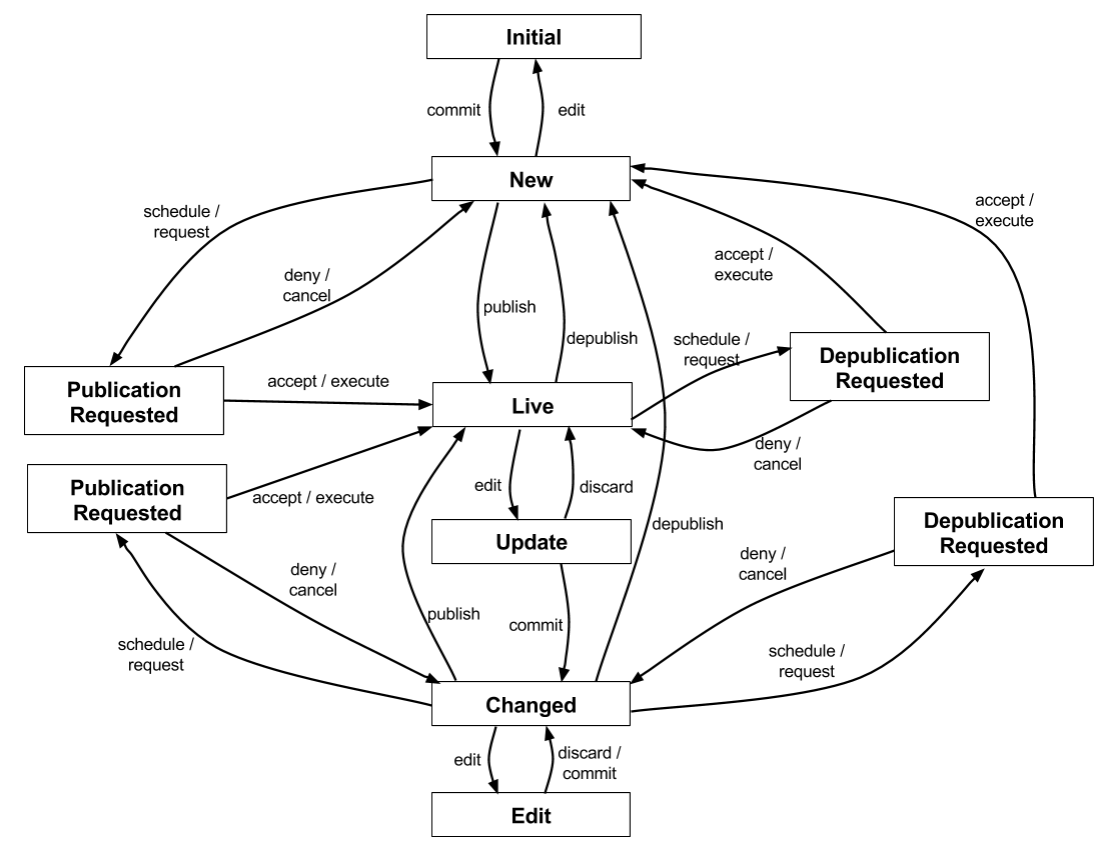
Diagram: The diagram represents the document workflow as a state machine. States include Initial, New, Live, Update, Changed, Edit, Publication Requested, and Depublication Requested. Transitions between states are labeled with actions such as edit, commit, publish, depublish, discard, schedule/request, accept/execute, and deny/cancel. The main flow connects authoring states (New, Changed, Edit, Update) with the published Live state. Side branches represent publication and depublication requests that can be scheduled, accepted, executed, denied, or canceled. The diagram overlays requests and execution outcomes on the workflow, showing how documents move between draft, changed, live, and request-related states.
Version History
The system extends the version history of the unpublished variant each time a document is published or taken offline. This approach allows you to restore changes made since the last publication.
The following example shows the version history for a document that has been published twice:
/6ac38741-5b11-4171-b7d6-736a200cf69f: jcr:primaryType: nt:versionHistory jcr:uuid: 3a424913-0e79-4594-85a8-d75562c0f1dd /jcr:versionLabels: jcr:primaryType: nt:versionLabels /jcr:rootVersion: jcr:primaryType: nt:version jcr:uuid: 6b951a93-dd0b-4541-8f1b-e56a51d6d473 /jcr:frozenNode: jcr:primaryType: nt:frozenNode jcr:uuid: a3da280c-0b11-42c0-9e0d-82582ed7fab8 /1.0: jcr:primaryType: nt:version jcr:uuid: 9a60062c-352c-493c-bb80-5b71b553c73d /jcr:frozenNode: jcr:primaryType: nt:frozenNode jcr:uuid: 1c6b616c-faf5-4ceb-85c8-3d2278202132 jcr:frozenPrimaryType: myproject:contentdocument jcr:frozenMixinTypes: ['mix:referenceable'] jcr:frozenUuid: 570182a8-2b85-48c9-ad66-8c0ee529c6bd hippostd:state: published hippostdpubwf:createdBy: admin hippostdpubwf:creationDate: 2014-03-25T16:52:00+01:00 hippostdpubwf:lastModificationDate: 2014-03-25T16:52:00+01:00 hippostdpubwf:lastModifiedBy: admin hippostdpubwf:publicationDate: 2014-03-25T16:52:00+01:00 hippotranslation:id: ce342189-ee92-494e-8589-33d219e7cefb hippotranslation:locale: en myproject:introduction: Lorem Ipsum is simply dummy text of the printing and typesetting industry. myproject:publicationdate: 2014-03-25T16:52:00+01:00 myproject:title: Lorem /1.1: jcr:primaryType: nt:version jcr:uuid: 7fdfdb79-1a3e-4a93-9ac3-3efe86f556a8 /jcr:frozenNode: jcr:primaryType: nt:frozenNode jcr:uuid: ad3d2bd8-f519-411c-9aae-8ba8a80c6981 jcr:frozenPrimaryType: myproject:contentdocument jcr:frozenMixinTypes: ['mix:referenceable', 'mix:versionable'] jcr:frozenUuid: 6ac38741-5b11-4171-b7d6-736a200cf69f hippostd:state: unpublished hippostdpubwf:createdBy: admin hippostdpubwf:creationDate: 2014-03-25T16:52:00+01:00 hippostdpubwf:lastModificationDate: 2017-12-11T10:17:08.907-08:00 hippostdpubwf:lastModifiedBy: admin hippotranslation:id: ce342189-ee92-494e-8589-33d219e7cefb hippotranslation:locale: en myproject:introduction: Lorem Ipsum is simply dummy text of the printing and typesetting industry. myproject:publicationdate: 2014-03-25T16:52:00+01:00 myproject:title: Lorem Ipsum
You can access this version history by dereferencing the jcr:versionHistory property of the unpublished variant.
The version history grows with each publication action and can become large over time. To manage version history size, use an updater script to trim old versions.