Bloomreach Content Application Release Process
Release Process Overview
A Bloomreach Content release involves a defined sequence of activities that must occur in a specific order and at the correct times. The release process is divided into three main phases: preparation, execution, and finalization. Multiple stakeholders participate in these phases, and the release manager is responsible for coordinating all activities across stakeholder groups.
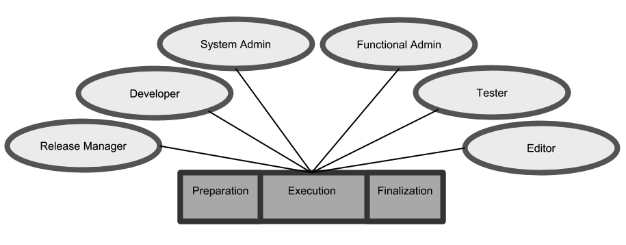
Diagram: This diagram displays six stakeholder roles—Release Manager, Developer, System Admin, Functional Admin, Tester, and Editor—arranged around a central bar representing the Preparation, Execution, and Finalization phases. Lines connect each role to the central phases, indicating involvement throughout the release process.
Preparation Phase
During preparation, the development team creates deployment notes. These notes provide detailed instructions for all steps required before, during, and after deployment. The release manager schedules review meetings with developers, system administrators, and/or functional administrators to ensure all parties understand the deployment notes. The team also estimates the time required for deployment and related activities, including any long-running configuration or content migrations. The release manager plans and allocates resources for the deployment.
Stakeholders involved:
- Developer
- Release Manager
- System Administrator
- Functional Administrator
Execution Phase
During execution, the team performs deployment, applies manual configuration changes, runs upgrade scripts, conducts intake testing, and, if necessary, executes a rollback. All roles participate in this phase. The deployment plan developed during preparation ensures coordination of all activities.
Deployment Procedure
The deployment procedure consists of several steps, some of which may not be required for every release. In the simplest case, only the CMS and site applications are deployed. The release manager documents all necessary steps and assigns responsibilities in the deployment plan.
Info: This procedure provides a general overview of the Bloomreach Content release process. It does not include detailed instructions for clustered deployments or zero-downtime deployments.
Content and Channel Freeze
Before deployment begins, the release manager announces a content and channel freeze in the production environment.
Content freeze
During a content freeze, editors cannot add or modify content. You can enforce a content freeze by temporarily deactivating CMS users, disabling access to the CMS server, making an agreement with users not to access the CMS, or taking the CMS offline.
Channel freeze
A channel freeze prevents users from making changes in the Channel Manager and Template Editor during deployment.
Database Backup
After the content and channel freeze starts, the system administrator creates a backup of the database. Estimate the required time in advance, as backing up large databases can be time-consuming.
Copy Database to Acceptance Environment
When deploying to the acceptance environment, align it with the current production environment before deploying the release. Ensure the acceptance environment runs the same application version as production and copy the production database to acceptance. Additional configuration in the console may be required to adjust host settings for the acceptance domain. The database copy also replaces users and groups in acceptance; back up and restore these as needed.
CMS Deployment in Acceptance Environment
System administrators take the CMS and site applications offline at the start of deployment, then deploy the new CMS release.
Upgrade and Update on Acceptance
After the CMS is running, execute scripts to upgrade or update content and configuration.
- Upgrade: Introduces a new version of Bloomreach Content or a plugin. Existing configuration may require updates for compatibility.
- Update: Applies changes to the content model or delivery tier configuration. Existing content and configuration may need to be updated to match the new model or settings.
Scripts are provided in two formats: Groovy scripts and JCR runner scripts.
References:
Groovy scripts
The development team provides Groovy scripts for configuration changes or content migration. Developers typically run these scripts, but you can also bootstrap them automatically after deployment using Bloomreach Content's bootstrap mechanism.
JCR runners
JCR runners are standalone batch Java applications used to update configuration after deployment. System administrators run the JCR runner on the server, and the development team supplies it as a separate package. Instructions are included in the deployment notes. Since Groovy updaters were introduced in version 7.8, JCR runners are now rarely used.
Configuration
Most deployments require manual configuration steps after deployment. These steps are documented in the deployment notes, including when to perform them. Manual configuration typically occurs during site downtime or shortly after the site is back online.
Responsibility for manual configuration varies by organization. Developers often perform these steps, especially for HST configuration, due to their familiarity with the options and console. In other cases, system administrators or functional administrators follow the deployment notes to complete configuration.
CMS Intake
During intake, testers verify that the CMS was deployed successfully. A standard smoke test script is used to check core CMS functionality. System administrators also review log files for errors and warnings. Developers remain available to resolve any unexpected issues during intake.
Rollback
If deployment fails or intake reveals critical issues that cannot be resolved, the release manager announces a rollback. The system administrator executes the rollback. After rollback, repeat the intake process for the CMS and site. The optimal time to decide on a rollback is immediately after CMS intake.
Site Deployment
After successful CMS intake, system administrators deploy the site application.
Site Intake
During site intake, testers verify successful deployment of the site. A standard smoke test script is used, and system administrators check log files for errors and warnings. Developers remain available to address any issues.
End of Content and Channel Freeze
Once the release intake is successful, the release manager announces the end of the content and channel freeze.
Update Deployment Table
After the release, the system administrator updates the deployment table. This table provides an overview of all releases and their versions across environments.
Process Overview Table
| Action | Role(s) | Compulsory |
|---|---|---|
| Content and channel freeze | Release Manager | Yes |
| Database backup | System Administrator | Yes |
| Copy database to (acceptance) environment | System Administrator | No |
| CMS deploy | System Administrator, Developer (stand by) | Yes |
| Groovy updaters | System Administrator, Functional Administrator or Developer | No |
| JCR runner | System Administrator or Developer | No |
| Configuration | System Administrator, Functional Administrator or Developer | No |
| CMS intake | System Administrator, Tester, Developer (stand by) | Yes |
| Rollback | System Administrator | No |
| Site deploy | System Administrator | Yes |
| Site intake | System Administrator, Tester, Developer (stand by) | Yes |
| End of content and channel freeze | Release Manager | Yes |
| Update Deployment Table | System Administrator | Yes |