Bloomreach Content Application Release Management Tasks and Roles
Application Release Management and Content Management
Content management operates independently from the release of a new version of a Bloomreach Content application. Document workflows—such as preview, live, and scheduled states—are not tied to application release management. However, content management depends on available functionality. For example, introducing a new document type for a website section requires both code changes and CMS configuration updates. You must release a new version of the Bloomreach Content application before editors can create and publish content that uses the new document type.
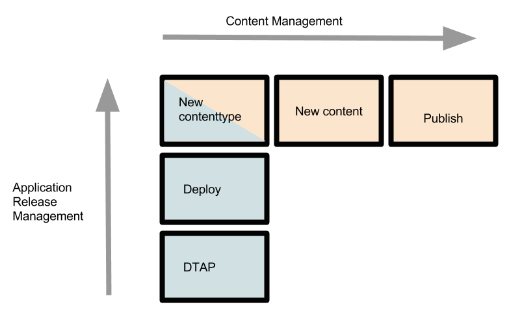
Diagram: This diagram compares application release management and content management using two axes. The vertical axis on the left, labeled "application release management," aligns with three stacked blue boxes: DTAP, Deploy, and New contenttype. The horizontal axis at the top, labeled "content management," aligns with three boxes: New contenttype, New content, and Publish. The shared "New contenttype" box connects the application release process to the content process, indicating that a new content type must be released before editors can create and publish new content.
Each new release of a Bloomreach Content application can introduce new content types and website components. After deployment, content editors can create and manage content for new website sections or channels.
Release Management in Acceptance and Production Environments
Why focus on acceptance and production environments?
Development teams typically manage deployments in development or test environments, and each organization handles these environments differently. These processes are not standardized. In contrast, deployments to acceptance and production environments follow a more formalized process and involve additional roles beyond developers.
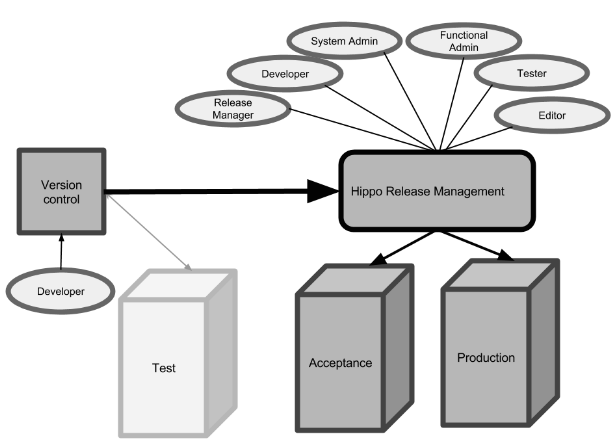
Diagram: This diagram shows a central box labeled "Hippo Release Management" connected to stakeholder roles: Release Manager, Developer, System Admin, Function Admin, Tester, and Editor. On the left, a "Version control" box links to a developer and points toward the release management process and the Test environment. Arrows from the central release management box lead to Test, Acceptance, and Production environment blocks, illustrating the deployment flow.
Stakeholders
The following roles participate in the release management process for Bloomreach Content:
- Release Manager
- Developer
- System Administrator
- Functional Administrator
- Tester
- Editor
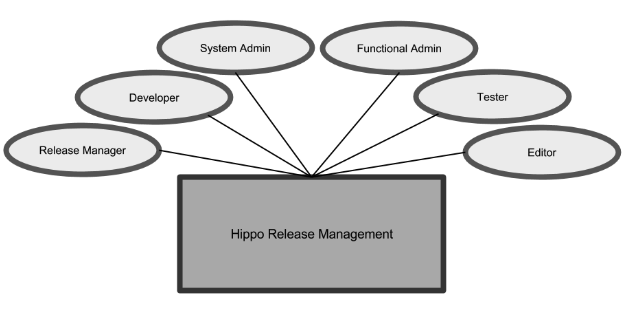
Diagram: The diagram displays a central box labeled "Hippo Release Management" surrounded by six roles: Release Manager, Developer, System Admin, Functional Admin, Tester, and Editor. Each role connects to the central process, indicating shared involvement in release management.
Release Manager
The release manager coordinates release preparation and oversees cross-functional activities during a release. The development team provides deployment notes with detailed steps and instructions. The release manager organizes reviews of these notes, schedules resources, and ensures development support during complex deployments. The release manager may also coordinate content backups for testing and manage post-release activities such as configuration updates and user imports. In larger organizations, these tasks may involve multiple departments. The release manager creates a high-level release plan to coordinate these activities, which is especially important for complex deployments.
Tasks
- Create release plans
- Preserve test data
- Organize deployment note reviews
- Schedule resources
- Coordinate deployments
- Coordinate post-deployment activities
Developer
Developers prepare deployment notes and write Groovy updater scripts. After deployment, they perform manual configuration steps in the CMS console. Developers remain available to assist if any issues arise during deployment.
Tasks
- Write deployment notes
- Develop Groovy scripts and JCR runners
- Perform manual configuration in the console
- Provide support during deployments
System Administrator
The system administrator deploys releases and manages server settings and configuration. In some organizations, system administrators have access to the CMS console to perform manual configuration and execute Groovy scripts or JCR runners. In other cases, their responsibilities are limited to server-side deployment and infrastructure maintenance. System administrators may be internal or external (for example, working for a hosting provider).
Tasks
- Review deployment notes
- Copy databases to acceptance environments
- Back up databases
- Deploy releases
- Maintain technical infrastructure
- Perform manual configuration in the console
- Execute Groovy scripts and JCR runners
Functional Administrator
Functional administrators configure content, create sites, and manage channels. They maintain users and groups in the CMS, handle translations, and update configuration documents such as key-value lists. Functional administrators may also access the CMS console to perform post-deployment activities.
Tasks
- Review deployment notes
- Configure value lists, properties, and translations
- Set up new sites using the channel manager
- Perform manual configuration in the console
Tester
Testers may be part of the development team or operate independently to perform acceptance testing. Testers in the development team usually focus on technical testing in the test environment, while separate testing teams conduct functional or business-oriented testing in the acceptance environment. Testers may collaborate with editors for acceptance testing. They participate in reviewing deployment notes and perform release intake, typically through smoke tests to verify deployment success. Testers report on release quality and retest resolved issues.
Tasks
- Review deployment notes
- Perform deployment intake
- Execute technical or acceptance tests
- Report test results
- Retest resolved issues
Editor
Editors work in the production environment, using the CMS to create, edit, and publish content. They use the channel manager to create new pages or publish channels. Editors may also assist testers in setting up test scenarios and participate in acceptance testing.
Tasks
- Assist testers with test scenarios
- Participate in intake and acceptance testing
For details on the release process, see: