Approaches to Test Content
Overview
Testing Bloomreach Content releases requires reliable test content. This page outlines methods for creating and managing test content in test environments.
Bootstrap Test Content
One approach is to use a dedicated bootstrap Maven module to manage test content. With this method:
- Test content is included as part of the project's source code.
- A specific Maven profile builds and deploys the bootstrap content into the development or test environment.
- This method is suitable when the test environment does not already contain content or configuration.
Teams commonly use this approach during the early development phases of new projects. It enables rapid deployments without the need for complex updates. When testers add new test content, they export it from the CMS console and merge it back into the bootstrap module. This ensures that test content is versioned and released alongside application code.
Test Database
Another method is to maintain a dedicated test database with comprehensive coverage of document types and content. This approach provides:
- Full control over test scenarios
- Consistent and reliable test results
Testers update the test database after each new release deployment. This method is particularly useful for ongoing maintenance of existing projects, as it allows teams to verify updates and upgrades of Bloomreach Content.
Using a Backup
To maintain consistency during testing cycles, use database backups:
- At the start of each sprint or test cycle, create a backup of the test database.
- For each deployment during the sprint, restore from this backup to ensure a consistent starting point.
- After the sprint, create a new backup reflecting any changes.
This process is important for testing update and upgrade scenarios. It reduces risks associated with incremental releases by ensuring that each deployment starts from a known state.
Incremental Releases
During development, teams often use incremental releases:
- Developers work with local test data in their development environments.
- At the end of a development cycle, the team creates a release and deploys it to the test server.
- The release is verified and tested. Additional fix releases may follow.
- After approval, the release is deployed to the acceptance environment for further testing, often by business users or customers.
- The process of bug fixing and releasing may repeat in both test and acceptance environments.
- After final approval, the release is deployed to production.
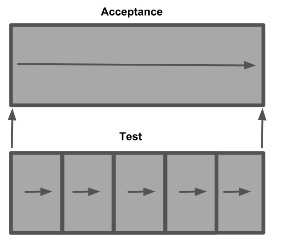
Diagram: The diagram illustrates a sprint containing multiple incremental releases, each represented as a sequence within the sprint timeline.
Incremental releases support rapid iteration. However, tracking configuration changes across multiple releases can be challenging, especially if several sprints occur before deploying to the acceptance environment. Dependencies between releases may not be obvious, increasing the risk of unexpected behavior when deploying a cumulative release to acceptance.
To address this, create a database snapshot for each new version in the acceptance environment. Use this snapshot as the starting point for each incremental release in the test environment. This ensures that deployments are tested under the same conditions as the acceptance environment.
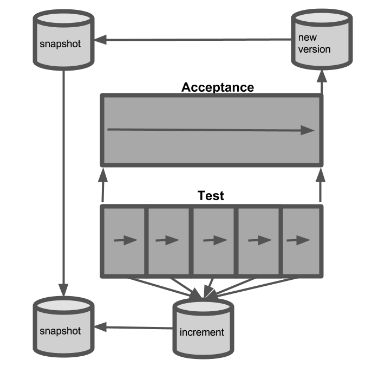
Diagram: The diagram shows how database snapshots and incremental updates are used to align test and acceptance environments during release management.
Handling Valuable Data in Test Environments
The methods described above overwrite existing content in test environments during deployment. This includes content created by testers or users.
Scenarios where this may be a concern:
- Test content that must be preserved
- Training or demonstration activities in acceptance environments
- Environments used for security or compliance audits
- Environments used for content migration
Recommendations
- Use test and acceptance environments exclusively for deployment testing.
- For training, demonstrations, or other purposes, create separate stable environments.
- If testers create valuable content, export it from the CMS console and add it to the test database or bootstrap module to preserve it for future use.