Installing CRISP Addon
Overview
You can install the CRISP Addon module using Bloomreach Essentials or by performing a manual installation. This page describes both approaches.
Installing with Essentials
To install the CRISP Addon module using Essentials:
- Open Essentials at
http://localhost:8080/essentials/. - Click the Install feature button for the CRISP Add-on module.
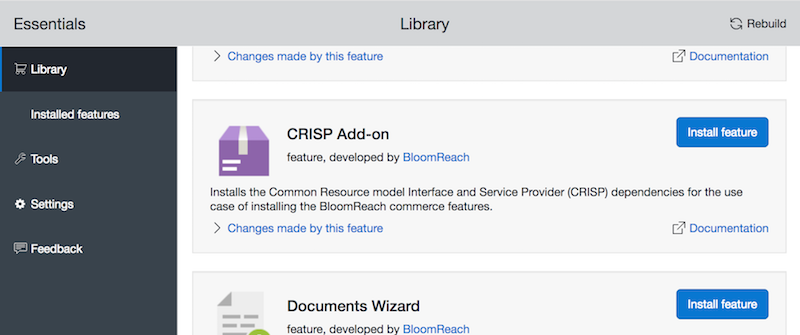
Essentials will automatically install the required CRISP Addon modules and configurations. If you use this method, you do not need to complete the manual installation steps below.
Manual Installation
This section describes how to install the CRISP Addon using the standard deployment model. In this model, each web application loads its own CRISP Addon modules and configuration.
If you require a shared deployment, see Shared Module Deployment.
Add Dependencies to the Delivery Web Application
Add the following dependencies to your site/components/pom.xml file:
<dependency> <groupId>org.onehippo.cms7</groupId> <artifactId>hippo-addon-crisp-api</artifactId> <version>${hippo.addon-crisp.version}</version> </dependency> <dependency> <groupId>org.onehippo.cms7</groupId> <artifactId>hippo-addon-crisp-core</artifactId> <version>${hippo.addon-crisp.version}</version> </dependency> <dependency> <groupId>org.onehippo.cms7</groupId> <artifactId>hippo-addon-crisp-hst</artifactId> <version>${hippo.addon-crisp.version}</version> </dependency>
Add Dependencies to the Authoring Web Application
Add the following dependencies to your cms-dependencies/pom.xml file:
<dependency> <groupId>org.onehippo.cms7</groupId> <artifactId>hippo-addon-crisp-api</artifactId> <version>${hippo.addon-crisp.version}</version> </dependency> <dependency> <groupId>org.onehippo.cms7</groupId> <artifactId>hippo-addon-crisp-core</artifactId> <version>${hippo.addon-crisp.version}</version> </dependency> <dependency> <groupId>org.onehippo.cms7</groupId> <artifactId>hippo-addon-crisp-hst</artifactId> <version>${hippo.addon-crisp.version}</version> </dependency> <dependency> <groupId>org.onehippo.cms7</groupId> <artifactId>hippo-addon-crisp-repository</artifactId> <version>${hippo.addon-crisp.version}</version> </dependency>
After you add these dependencies, the CRISP Addon is available for use in your project.